What Is CRDOWNLOAD File Extension In Google Chrome?
CRDOWNLOAD files are temporary files created by browsers like Google Chrome, Microsoft Edge, and Opera during a download. They act as placeholders for incomplete files, showing up in your download folder until the file is fully downloaded. Once the download finishes, the browser removes the “.crdownload” extension, making the file ready to use.
With faster internet and larger files, understanding CRDOWNLOAD files helps you troubleshoot stalled downloads, recover partial files, and stay safe from potential malware risks. Here’s what you need to know about these files and how to handle them.
The extension name is removed once the download has been completed, which indicates that the file is prepared to be opened. If the Chrome download was interrupted before the download was completed, it’s doable that you just is also ready to recover some of the files by removing the “.crdownload” extension and attempting to open the file. Let’s say, if some of an audio or video file was being downloaded, it should still play some of the files, even supposing the files aren’t however absolutely downloaded.
Also read: What is FileZilla
Some users who would like to start immediate playback of a file being downloaded, either rename the file by removing the .CRDOWNLOAD extension, or can really alter the code of Chrome, so the browser does not rename the file being downloaded. There are elaborated directions on the web describing the steps necessary to eliminate the .CRDOWNLOAD file extension for the particular version of Chrome being employed.
CRDOWNLOAD file
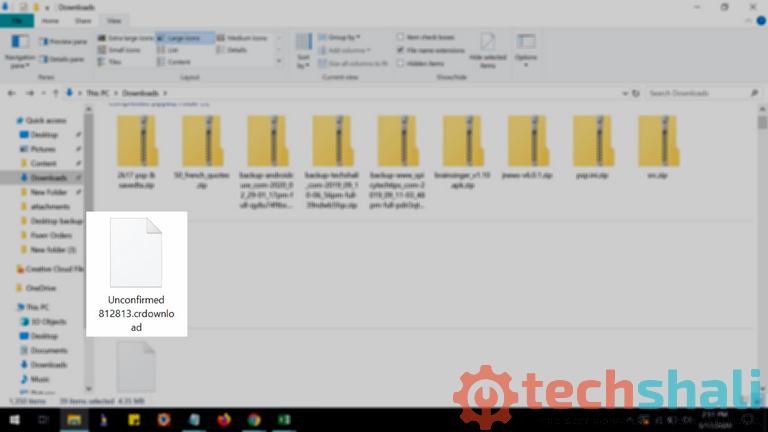
CRDOWNLOAD files, short for “Chrome Download,” are temporary files created by Google Chrome, Microsoft Edge, or Opera when you download a file. They appear in your download folder (e.g., as “filename.mp4.crdownload” or “Unconfirmed 123456.crdownload”) while the browser saves data from the server. The browser writes data chunks to the CRDOWNLOAD file, updating the download progress in real-time.
Once the download completes, the browser checks the file’s integrity and renames it to its final extension (e.g., .mp4 or .pdf). If a download is interrupted—due to a lost connection, browser crash, or cancellation—the file may stay as CRDOWNLOAD, indicating it’s incomplete. In 2025, issues like slow connections or browser bugs can cause files to get “stuck” as CRDOWNLOAD, even after the download appears complete.
If your laptop opens the CRDOWNLOAD file, however, it is the wrong application, you will need to alter your Windows written record file association settings. In alternative words, Windows is associating CRDOWNLOAD file extensions with the incorrect computer code program. We extremely advocate scanning your Windows written record for invalid file associations and alternative connected written record problems.
Unsure concerning which kind of CRDOWNLOAD file you have? Does one need to understand precisely what it’s, who created it, and the way to open it? Finally, you’ll currently discover everything you wish to understand concerning your CRDOWNLOAD file… instantly!
The revolutionary CRDOWNLOAD File Analysis Tool™ scans analyze, and reports back each detail concerning your CRDOWNLOAD file. Our patent-pending rule quickly analyzes your file, and at intervals moments, presents this info to you in a sublime, easy-to-read format.
In seconds, you may learn precisely what sort of CRDOWNLOAD file you’ve got, the computer code program related to your file, the publisher who created it, its security safety standing, and a range of alternative helpful info. To begin your free file analysis, merely drag-and-drop your CRDOWNLOAD file within the dotted lines below, or click “Browse My Computer” and choose your file. Your CRDOWNLOAD file analysis report can then be displayed directly below during this browser window.
How To Open a CRDOWNLOAD File
CRDOWNLOAD files are not meant to be opened directly since they’re incomplete. However, in some cases, you can access parts of a file or resume the download. Here’s how to handle them:
- Wait for the Download to Complete: If the file is still downloading, let it finish. The browser will automatically remove the “.crdownload” extension, making the file usable (e.g., “video.mp4.crdownload” becomes “video.mp4”). Check the download progress in Chrome’s Downloads page (type chrome://downloads in the address bar) or Edge’s Downloads page (edge://downloads/all).
- Try Partial Media Playback: For incomplete audio or video files (e.g., .mp4 or .mp3), you can sometimes play the downloaded portion. Use a media player like VLC Media Player: drag the CRDOWNLOAD file into VLC or rename it to its expected extension (e.g., change “video.mp4.crdownload” to “video.mp4”). This works best for files with a clear start-to-end structure, like videos, but not for documents or images.
- Resume a Stalled Download: If the download stopped, go to your browser’s Downloads page and click “Resume” if available. If resuming fails, try restarting the download from the original source. The browser may use the existing CRDOWNLOAD file to pick up where it left off.
- Avoid Double-Clicking: Double-clicking a CRDOWNLOAD file often fails because it’s not a complete file. If it opens in the wrong program, check your file associations in Windows Settings > Apps > Default Apps.
Note: Documents, images, or archives (e.g., .pdf, .jpg, .zip) usually can’t be used as CRDOWNLOAD files, as they need to be fully downloaded to work. Always ensure the file is from a trusted source to avoid malware risks.
Also read: 10 Best Totally Free Tools to Email Large Files
How To Convert a CRDOWNLOAD File
CRDOWNLOAD files aren’t files that are in their final type, they can’t be born-again to a different format. It does not matter if you are downloading a PDF, MP3, AVI, MP4, or the other file kind – if the total file is not there, and so the CRDOWNLOAD extension is appended to the top, there is no use in attempting to convert the unfinished file.
However, detain mind what we’ve discussed on top of concerning dynamic the file extension to it of the file you are downloading. Once you’ve got the file saved with the right file extension, you may be ready to use a free file converter to convert it to a unique format.
Troubleshooting CRDOWNLOAD File Issues
Sometimes, CRDOWNLOAD files don’t work as expected. Here are common issues and fixes:
- File Stuck as CRDOWNLOAD: If a download finishes but the file remains as “.crdownload,” it may be a browser bug. In Microsoft Edge, this can happen in non-English languages due to character encoding issues. Try switching your browser language to English (Edge Settings > Languages) or updating your browser to the latest version. For Chrome, clear the browser cache (Settings > Privacy and Security > Clear Browsing Data).
- Download Won’t Resume: If resuming fails, check your internet connection or ensure the original source is still available. Restarting the browser or computer can help. If the file is large (e.g., 68GB), ensure you have enough disk space, as low storage can halt downloads.
- Malware Concerns: CRDOWNLOAD files from untrusted sources can contain malware. Always scan files with antivirus software like Windows Defender or Malwarebytes before attempting to open or rename them. Avoid downloading from suspicious sites.
- Unconfirmed CRDOWNLOAD Files: Files named “Unconfirmed [numbers].crdownload” indicate an incomplete download. Check your browser’s Downloads page to resume or cancel them. If they persist, delete them to free up space, but ensure no active downloads are running.
Tip: To prevent CRDOWNLOAD issues, disable the “Ask where to save each file before downloading” option in Chrome or Edge settings (Chrome: Settings > Downloads; Edge: Settings > Downloads). This can reduce stuck files.
Safety and Best Practices for CRDOWNLOAD Files
CRDOWNLOAD files are generally safe as part of the download process, but they can pose risks if mishandled. Follow these tips:
- Download from Trusted Sources: Only download files from reputable websites to avoid malware hidden in CRDOWNLOAD files. Scan all downloads with antivirus software like Windows Defender or Malwarebytes.
- Monitor Disk Space: Large CRDOWNLOAD files can fill up your drive, causing downloads to fail. Regularly check your download folder and delete unneeded CRDOWNLOAD files to free up space.
- Use Browser Tools: Check download status in Chrome (chrome://downloads) or Edge (edge://downloads/all) to manage or cancel stuck downloads. Avoid third-party download managers unless they’re reputable, like JDownloader for large files.
- Secure Sensitive Downloads: If a CRDOWNLOAD file contains sensitive data (e.g., personal documents), delete it immediately if the download fails to prevent unauthorized access. Use a VPN for privacy when downloading from restricted sites.
More info on CRDOWNLOAD Files
When a traditional download takes place in Chrome, the browser attaches this.CRDOWNLOAD file extension to the computer file name then mechanically removes it once the download finishes. This implies you should not ever need to manually take away the extension unless, in fact, you are attempting to save lots of a part of the file as we represented on top of.
Trying to delete a CRDOWNLOAD file might prompt you with a message that says one thing like “The action cannot be completed as a result of this file is open in Google Chrome.” this implies the file is barred as a result of it’s still being downloaded by Chrome.
Fixing this is often as easy as canceling the download in Chrome (so long as you do not need to complete the download). If each file you download has the .CRDOWNLOAD file extension and none of them appear to be downloading fully, it may mean that there is a problem or bug together with your specific version of Chrome.
It is best to create certain the browser is totally updated by downloading the latest version from Google’s web site. You will even take into account reinstalling Chrome altogether.
Also read: 6 Best Free Software For Viewing DICOM Files
Conclusion
CRDOWNLOAD files are temporary files used by Chrome, Edge, and Opera to manage downloads. While they’re not meant to be opened directly, you can sometimes access partial media files or resume stalled downloads.
To avoid issues, keep your browser updated, monitor disk space, and download from trusted sources. Use tools like your browser’s Downloads page or VLC Media Player to manage CRDOWNLOAD files, and always scan for malware. By understanding and handling CRDOWNLOAD files properly in 2025, you can ensure smooth and safe downloads.