Google Solitaire —How to Play, Tips, and Features Explained
It's free, it's instant, and it's been sitting inside Google Search since 2016. Here's the full story — and everything you didn't know about it.
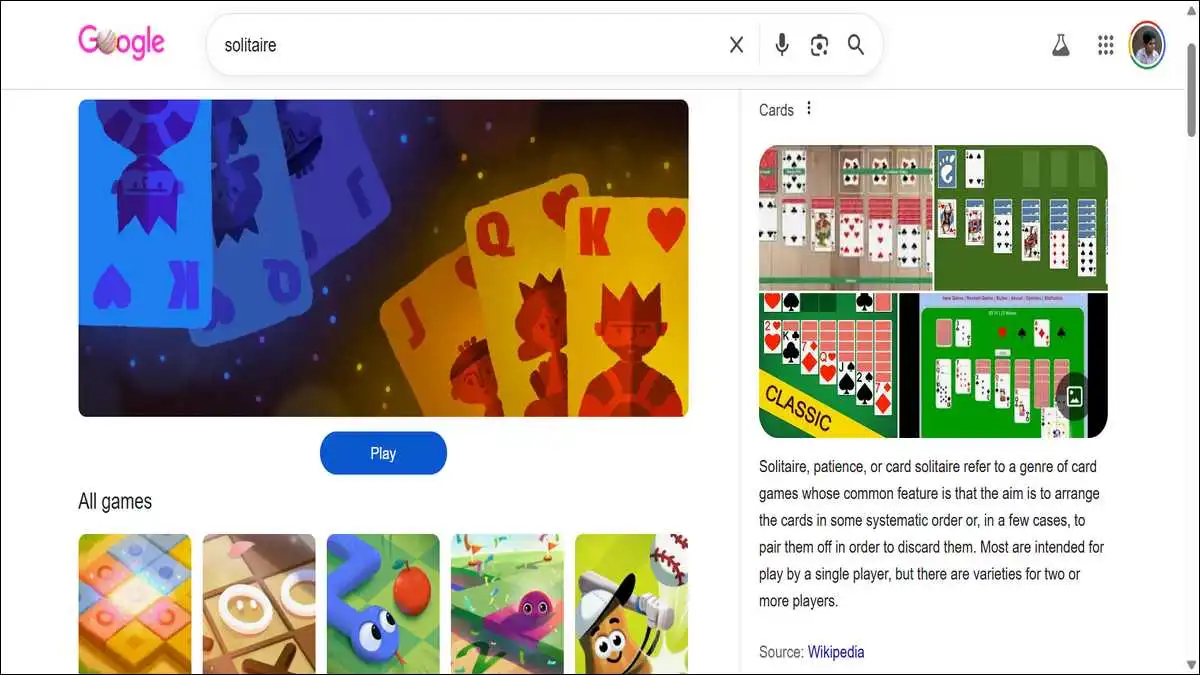
Most people find Google Solitaire by accident. You type “solitaire” into Google, expecting a list of websites — and instead, a fully playable card game appears right at the top of the page.
No download prompt, no sign-up screen, and no waiting. Just cards, ready to go.
That’s deliberate. Google built it to be instant — a mental break that loads before you’ve even fully decided you want one. And once you start a game, it’s surprisingly hard to stop. There’s something about that one-more-move feeling that Klondike Solitaire has always had. Google just made it easier to stumble into than ever before.
As per sources, in August 2016, Google quietly added Solitaire and Tic-Tac-Toe to Search results — no announcement, no fanfare. Most people discovered it the same way they do today: by accident.
This guide covers everything worth knowing — how to open this game, what the two difficulty modes actually mean, where the game originally came from, and why something this simple has held this many people’s attention for this long.
How to Open It Right Now
No tricks here. Open Google, type “solitaire,” hit enter.
A green Play button shows up at the top of the results page. Click it, and the game opens as an overlay right inside your browser — no new tab, no redirect, no permission pop-ups. You’re playing within seconds.
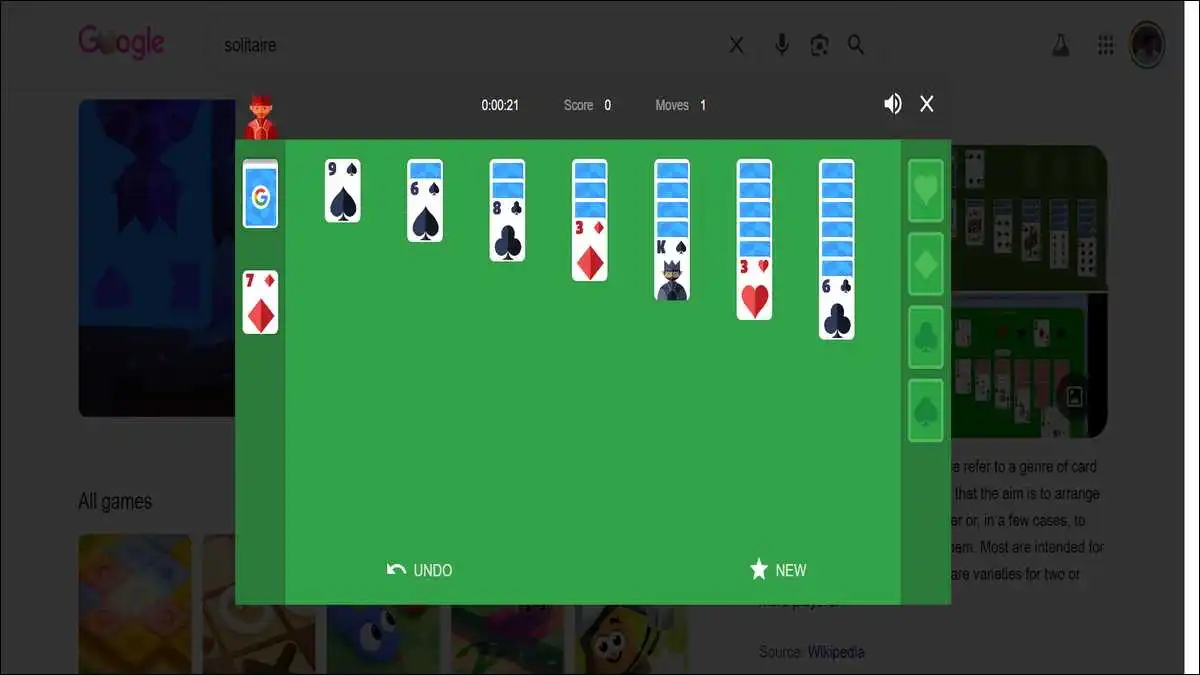
If you want more room, there’s a full-screen button inside the game window. Click that and the search results disappear, leaving just the card table. On mobile, it works the same way — search “solitaire” in your browser, tap Play, and the cards are fully touchscreen-responsive.
It runs on Chrome, Firefox, Safari, and Edge. Desktop, laptop, tablet, smartphone — doesn’t matter. All you need is a browser and an internet connection. That’s it.
What You’re Actually Playing
Google Solitaire is a digital version of Klondike Solitaire — the specific variant most people just call “Solitaire.” If you’ve ever played the one that came bundled with Windows, you already know the rules. This is the same game.
The setup is standard. A 52-card deck. Seven columns spread across the table — the first has one card, and each one after has one more than the last. Only the top card of each column is face-up. Everything below it is hidden, waiting to be uncovered.
Four empty spaces sit in the upper-right corner, one for each suit. Your goal is to fill them — Ace to King, suit by suit. To get there, you rearrange the columns: cards go in descending order, alternating between red and black. Red 7 on black 8. Black 4 on red 5. That kind of thing.
When you run out of moves in the columns, you draw from the stock pile in the top-left corner. Those extra cards either open something up — or they don’t.
The rules are genuinely simple. But the decisions you make in the first few moves quietly shape whether the whole game is winnable. That tension is what keeps people coming back.
Easy Mode vs Hard Mode — What’s the Actual Difference
When you start a game, Google gives you two options: Easy and Hard. The gap between them is bigger than the labels suggest.
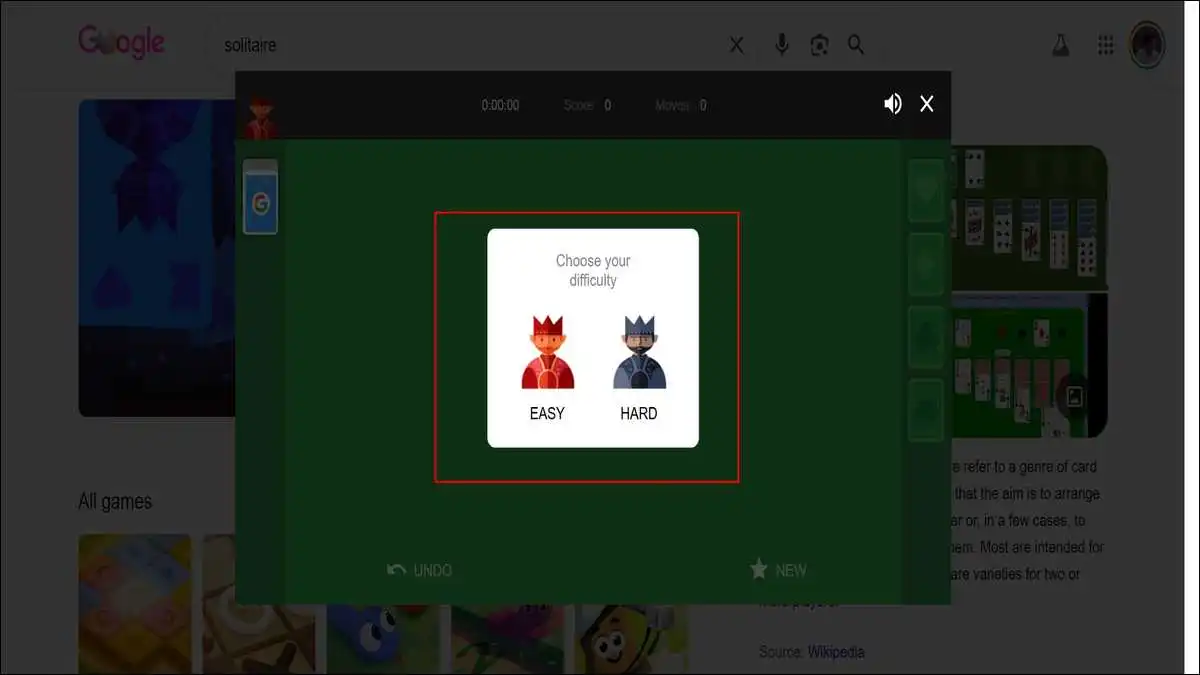
- Easy mode draws one card at a time from the stock pile. Every card eventually becomes accessible. You have more room to work with, more moves available at any moment, and a noticeably higher chance of actually winning. If you’re playing to relax — or playing for the first time — Easy is the right starting point.
- Hard mode draws three cards at once. Only the top card of those three is playable. The other two stay locked until you cycle through again. That single change cuts your options dramatically. You have to think further ahead, plan around cards you can’t reach yet, and accept that some deals simply cannot be won — no matter how well you play.
There’s also a small but noticeable interface difference. In Easy mode, clicking a card automatically moves it to the best valid destination. In Hard mode, you drag every card manually. It changes the rhythm of play more than you’d expect.
Here’s a side-by-side breakdown:
| Feature | Easy Mode | Hard Mode |
|---|---|---|
| Cards drawn from stock | 1 at a time | 3 at a time |
| Cards accessible per draw | All, eventually | Only the top card of three |
| Card movement | Click to auto-move | Manual drag required |
| Win probability | Higher | Lower |
| Best for | Casual play, beginners | Experienced players |
| Strategy required | Moderate | Considerably more |
Start on Easy. Once you’re winning regularly, switch to Hard. The difficulty jump is real — and worth experiencing.
The Buttons — What Each One Actually Does
The Google Solitaire interface is deliberately minimal. No settings menu, no hidden options, and no tutorials. What you see is what you get — and honestly, that’s a big part of why it feels so clean to use.
Undo reverses your last move. Use it as many times as you like. There’s no rule against it, though it will nudge your score down if you lean on it heavily.
New Game deals a fresh deck immediately. No confirmation prompt, no “are you sure?” — the current game just ends and a new one begins. Useful when you’ve clearly played yourself into a corner and want a clean slate rather than a slow death.
Sound toggles the in-game audio. The sound effects are subtle — soft card shuffles, light placement clicks. Nice with headphones. Easy to forget to turn off during a video call, so worth knowing it’s there.
Full Screen expands the game to fill your browser window. The search results disappear, the card table takes over, and it genuinely starts to feel like a standalone app rather than a search engine feature.
Beyond those buttons, the game tracks three things automatically — a timer, a move counter, and a score. Score goes up when you place cards on the foundation piles, and drops when you cycle through the entire stock pile without making a useful play.
One thing to know upfront: none of this saves. When the game ends, your stats appear briefly — then disappear. The next game starts at zero. Every time.
Why There’s No High Score to Chase
This is probably the most honest limitation worth mentioning. Google Solitaire doesn’t remember anything between sessions.
Your score from the last game? Gone the moment you close the tab. Win rate over time? Not tracked. Number of games played? No record kept. Everything resets — timer, score, move count — with every new deal.
If you’re the kind of player who tracks improvement — average completion time, win streaks, personal bests — Google Solitaire won’t give you that.

For that kind of depth, Microsoft Solitaire Collection is a better fit. It’s free, available on Windows, Android, and iOS, and tracks everything across sessions. It also includes six different solitaire variants, not just Klondike.
But if you want something that opens in three seconds with zero setup and zero commitment? Google Solitaire is still the best version of that experience available anywhere. The trade-off is obvious — and for most people, it’s entirely fine.
Where Klondike Solitaire Actually Came From
Google didn’t invent this game. The rules are centuries old. And understanding where Klondike came from makes the whole thing feel a lot more interesting than just “a card game on the internet.”
The earliest written record of patience-style card games appears in a German book published in 1788. The game spread through Scandinavia, France, and England across the 1800s, picking up different names as it travelled. In Britain it became “Patience.” In North America, “Solitaire.”
The Klondike variant specifically is believed to trace back to the Klondike region of Canada — named after the gold rush prospectors who played it to pass the time in the late 1800s. A card game born from boredom in the wilderness, eventually running on a billion computers. That’s a tidy arc.
The digital version changed everything in 1990. A Microsoft intern named Wes Cherry built Solitaire for Windows 3.0 — and the original purpose had nothing to do with entertainment.
As The New York Times reported in a retrospective on the game, Microsoft wanted new PC users to practice using a mouse. Dragging and dropping cards was the ideal way to teach that. The game was a training tool.
Cherry was never paid for it. No salary adjustment. No royalties. The game shipped with every version of Windows from 3.0 through Windows 8.1 — making it one of the most widely distributed pieces of software ever created.
In 2019, Microsoft Solitaire was inducted into the World Video Game Hall of Fame at The Strong Museum of Play in Rochester, New York — recognised for longevity, cultural impact, and geographical reach. Not many games can claim that.
The Numbers That Show How Big This Actually Is
It’s easy to underestimate just how enormous the solitaire category is. These numbers put it in context.
Microsoft Solitaire alone has 35 million unique players every month — a number Microsoft confirmed in a 30th anniversary blog post in 2020. That’s active monthly players, not total downloads. Three decades in.
According to Statista’s 2024 mobile gaming report, solitaire apps across Android and iOS were downloaded 2.09 billion times in 2024. In a single year. That’s not a niche hobby. That’s one of the most-played game categories on the planet.
Historically, Microsoft Solitaire was the third most-used program on Windows — behind only Windows itself and File Manager, and ahead of both Word and Excel. More people were moving cards than writing documents.
And an average solitaire game — played at a reasonable pace — takes about 11 minutes to complete. Long enough to feel satisfying. Short enough to fit into a spare moment. That balance is a big part of why it never really goes away.
| Metric | Detail |
|---|---|
| Google Solitaire launched | August 2016 |
| Access method | Search “solitaire” on Google |
| Cost | Permanently free |
| Account required | No |
| Internet required | Yes |
| Microsoft Solitaire monthly players | 35 million unique users |
| Solitaire app downloads in 2024 | 2.09 billion (Statista) |
| Average game length | ~11 minutes |
| World record (digital Klondike) | ~5 seconds |
| Hall of Fame induction | 2019, The Strong Museum of Play |
| Speedrun community | Active — Speedrun.com |
The Speedrunning Community Nobody Talks About
Google Solitaire has a competitive side that most casual players don’t know exists.
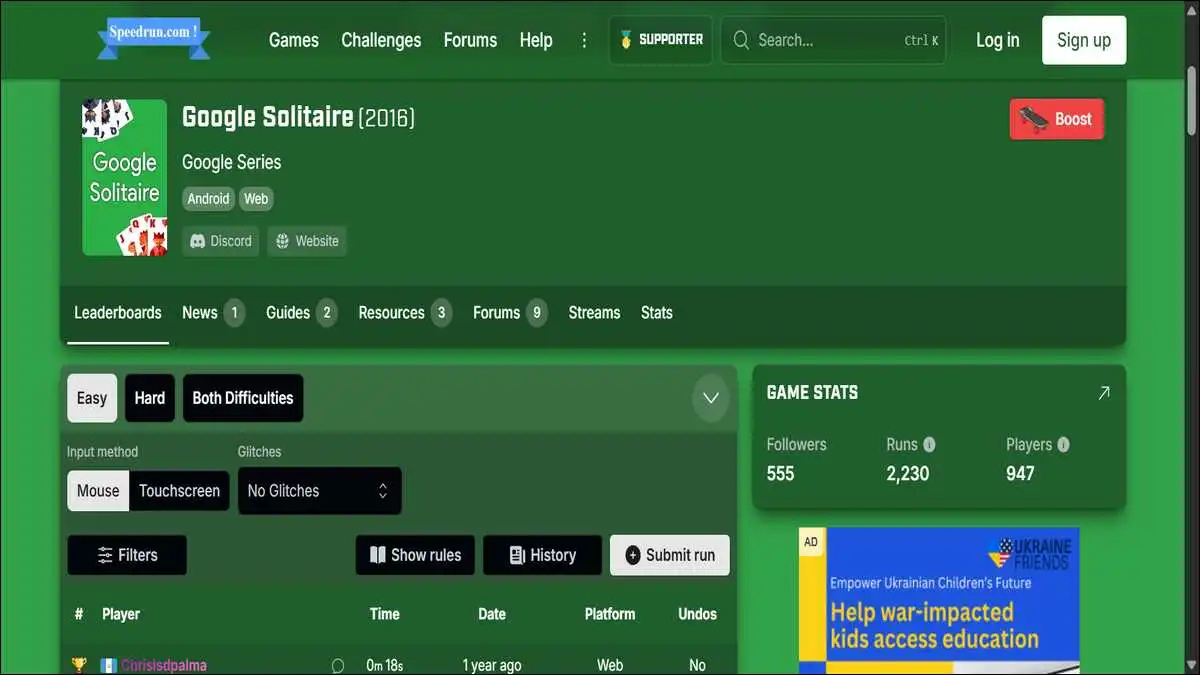
On Speedrun.com’s dedicated Google Solitaire leaderboard, players compete to finish the game in the shortest verified time. Categories include Any% Easy, Any% Hard, and Glitchless — each with its own leaderboard and submission rules. Glitched runs use a documented exploit involving the undo button at game start, and audio has to be enabled for the run to count.
The fastest verified digital Klondike completion sits at around 5 seconds. That requires a near-perfect opening card layout and instant, accurate decision-making from the very first move. Getting there consistently means thousands of practice games, not hundreds.
For context — a solid casual player finishes in 5 to 10 minutes. An experienced player who knows optimal strategy averages 3 to 5. Competitive speedrunners push that under two minutes regularly, and under 30 seconds on a favourable layout.
It’s a reminder that almost any game with genuine depth eventually attracts people trying to push its limits. Klondike Solitaire is somewhere around 235 years old by some estimates. People are still finding new ways to compete with it.
The Real Benefits of Playing — Beyond Killing Time
Playing solitaire isn’t just wasted time, though it’s completely fine if that’s all you want from it.
Researchers have documented consistent cognitive benefits from regular solitaire play. The game demands planning — you’re constantly evaluating which move opens the most future options, not just which move is immediately available. That kind of forward-thinking exercises the same mental muscles used in puzzle-solving and strategy games.
Memory plays a role too. Tracking which cards have been played, which suits are running short, and where specific cards are buried in the columns strengthens working memory over time. Regular players tend to develop faster pattern recognition — spotting valid moves well before a newer player would.
Then there’s the stress angle. The repetitive, low-stakes nature of solitaire creates a mild meditative state for a lot of people. You’re focused enough to stop thinking about whatever was on your mind, but not stressed enough to feel under pressure. That mental reset has real value — even if it’s hard to quantify.
A study developed in collaboration with UCLA’s CRESST group found that solitaire performance metrics could function as indicators of cognitive health — tracking how a player’s speed and accuracy shift over time as a measure of cognitive acuity.
That’s a long way from a Microsoft intern teaching people to use a mouse in 1990. But it makes sense when you think about what the game actually asks of you.
The Other Games Google Hid Inside Search
Solitaire isn’t the only game Google quietly built into Search. It’s one of several Easter eggs — all accessible the same way, all free, all instant.
Searching “snake game” launches a full version of classic Snake. “Pac-Man” opens a playable arcade version.
“Minesweeper” loads the grid-based logic puzzle with Easy, Medium, and Hard modes. “Tic-tac-toe” lets you play against Google’s AI or a second player on the same screen. Here’s our list of 10+ Google games that you could play, must check it if you like these games.
Of all of them, Solitaire and Minesweeper are the most engaging for extended solo sessions. Snake and Pac-Man are great for two minutes. Solitaire can quietly absorb an hour without you quite noticing it happening.
That’s not a design flaw. It’s the same quality Klondike Solitaire has always had — Google just made it easier to access than ever before.
One Honest Limitation Worth Knowing
Google Solitaire plays one variant: Klondike. That’s it.
No Spider Solitaire. No FreeCell. No Pyramid or TriPeaks. No hint system, no card customisation, no table themes, and no offline mode. You need an internet connection every single time.
For players who want those features, Microsoft Solitaire Collection is the most comprehensive free alternative. It covers Klondike, Spider, FreeCell, Pyramid, and TriPeaks — with daily challenges, full stat tracking, and cross-device progress through a Microsoft account.
But Google Solitaire never tried to be that. It tried to be the fastest, cleanest version of one thing — and it is. No setup, no friction, open in seconds. That’s the whole pitch.
The End Note
Google Solitaire earns its place by not asking anything of you.
You need no account, no download, and there’s no tutorial to click through. You search, you click, you play. The game is clean, the rules are timeless, and Easy and Hard modes give you enough range to stay appropriately challenged without the whole thing becoming a chore.
It won’t replace a dedicated solitaire app if stats and variety matter to you. But as a two-minute mental reset built into the browser you already have open? Nothing comes close.
Next time you need five minutes away from whatever you’re working on — you already know where to find it.