Workday HCM Implementation: Why 43% of Users Still Need Training After 12 Months (How to Avoid It)
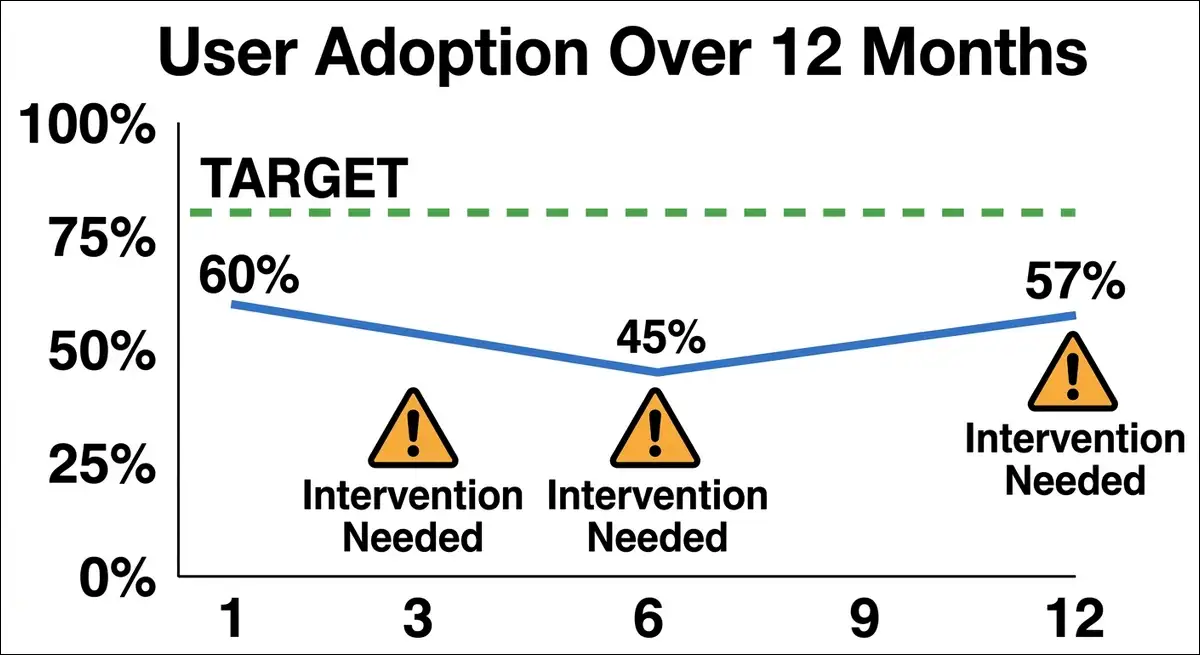
Workday’s a $9.5 billion platform used by more than 60% of the Fortune 500. But here’s the thing: a Denver City Government audit found that 43% of HCM users still needed additional training months after go-live. And that number jumps to 55% for Finance users (Apty, 2026).
I’ve spent weeks reviewing audit reports, reading 1,743+ verified user reviews on Capterra and G2, studying Reddit threads from actual Workday administrators, and analyzing Forrester TEI data.
The pattern I found is very consistent; the software works, but people usually don’t.
So what’s going on? In this article, I break down exactly where Workday implementations fail, why they fail, and what you can do to prevent it.
For readers, I’ve included real data, a 25-point readiness checklist, and a month-by-month post-go-live playbook. No marketing copy or generic best practices; here you get just what actually works.
Quick Stats You Should Know Before Reading Further
Before we get into the details, here are the numbers that frame everything in this article.
| Stat | Value | Source |
|---|---|---|
| Users needing training after 12 months (HCM) | 43% | Denver City Audit |
| Users needing training after 12 months (Finance) | 55% | Denver City Audit |
| Average implementation timeline | 8.2 months | Kandor Solutions 2025 |
| Implementation cost as % of subscription | 100 to 200% | Kandor Solutions 2025 |
| Number one cause of failure | Treating it as IT project | HCM Advisory 2026 |
| Workday gross renewal rate | Above 95% | MatrixBCG |
| Three-year ROI when properly adopted | 249 to 331% | Forrester TEI |
| Companies using shadow systems post-go-live | Majority | Reddit r/workday |
These numbers clearly tell the whole story. Workday has a retention problem that isn’t about the software. In reality, it’s about adoption. And that’s a problem you can solve if you know exactly where to look.
The “Technical Success, Business Failure” Paradox Explained
Here’s something that might surprise you.
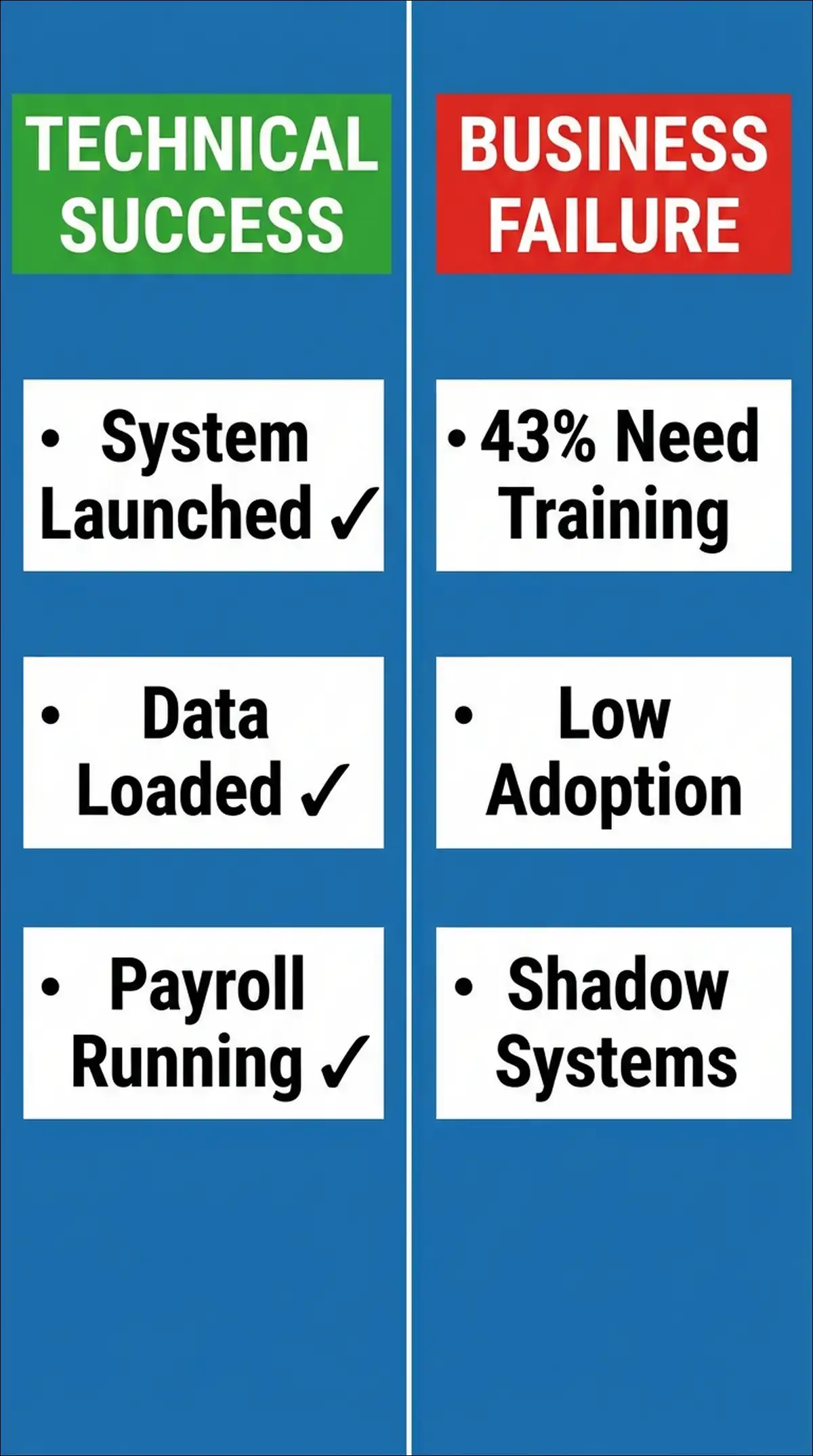
Workday implementations often succeed technically but fail in practice. The system goes live, data loads correctly, and payroll runs as usual. By every IT metric, the project delivered. But employees can’t complete basic tasks without help. Managers avoid the system, so shadow spreadsheets persist.
This is what I call the “Technical Success, Business Failure” paradox. And it’s far more common than most organizations admit.
What the Denver City Audit Actually Revealed
The Denver City Government audit is one of the few publicly available post-implementation assessments of Workday. And it paints a sobering picture.
The system functioned as expected. Data loaded correctly and nothing broke in production. But daily work never shifted smoothly into Workday (Apty, 2026).
Specifically, here’s what the audit found.
- 43% of HCM users still needed additional training 12 months after go-live
- 55% of Financial users still needed additional training at the same mark
- Most users found help resources unhelpful and rated support channels poorly
- Workday terminology didn’t match legacy system language, which slowed routine tasks for months
- The system functioned technically, but real business outcomes suffered
I find that last point quite critical. The audit didn’t say Workday was broken. It said the organization never fully moved into it. That’s a fundamentally different problem with a fundamentally different solution.
Why “Nothing Broke” Doesn’t Mean It Worked
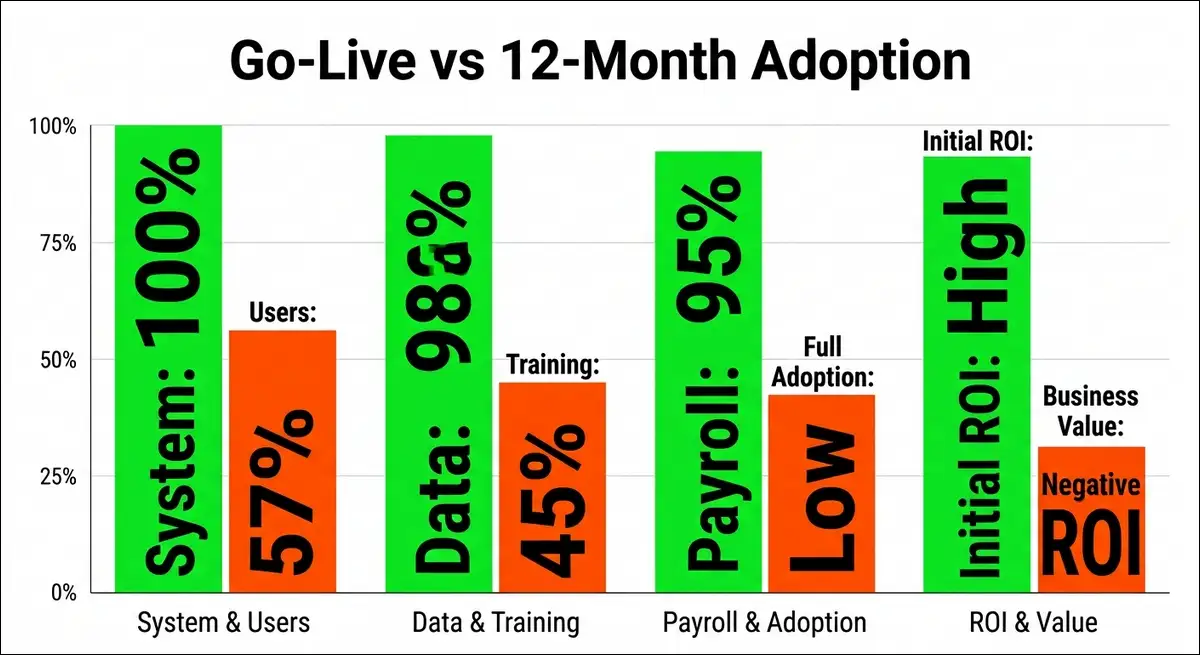
Most Workday project teams define success as go-live. Did the system launch? Did payroll process? Can employees log in? Those are the minimum viable outcomes, not success.
The real test starts at month 3, month 6, and month 12. That’s when project support structures start to fade. That’s when you find out whether people actually adopted the system or just tolerated it.
Dickinson College provides a real-world example. They implemented Workday in January 2025 for HCM, Finance, Payroll, and Student. But students couldn’t correct their own timesheet errors.
Faculty reported “a lot of bumps” even with experienced implementation support (The Dickinsonian, April 2026).
One staff member mentions that time tracking for student workers became the largest ongoing challenge. Students getting used to logging in and out of Workday couldn’t fix their own mistakes.
This isn’t a software bug. This is just an adoption gap.
The 12-Month Reality Check
If nearly half your users can’t work independently after a full year, you haven’t implemented Workday. You’ve installed it. There’s a meaningful difference.
Installation means the software is running. Implementation means your people are using it effectively, confidently, and accurately every day.
The cost of that gap is substantial. You’re paying for extended help desk support, and re-training programs at consultant rates. You’re losing productivity during the extended learning period. And you may be facing compliance gaps because people work around the system instead of in it.
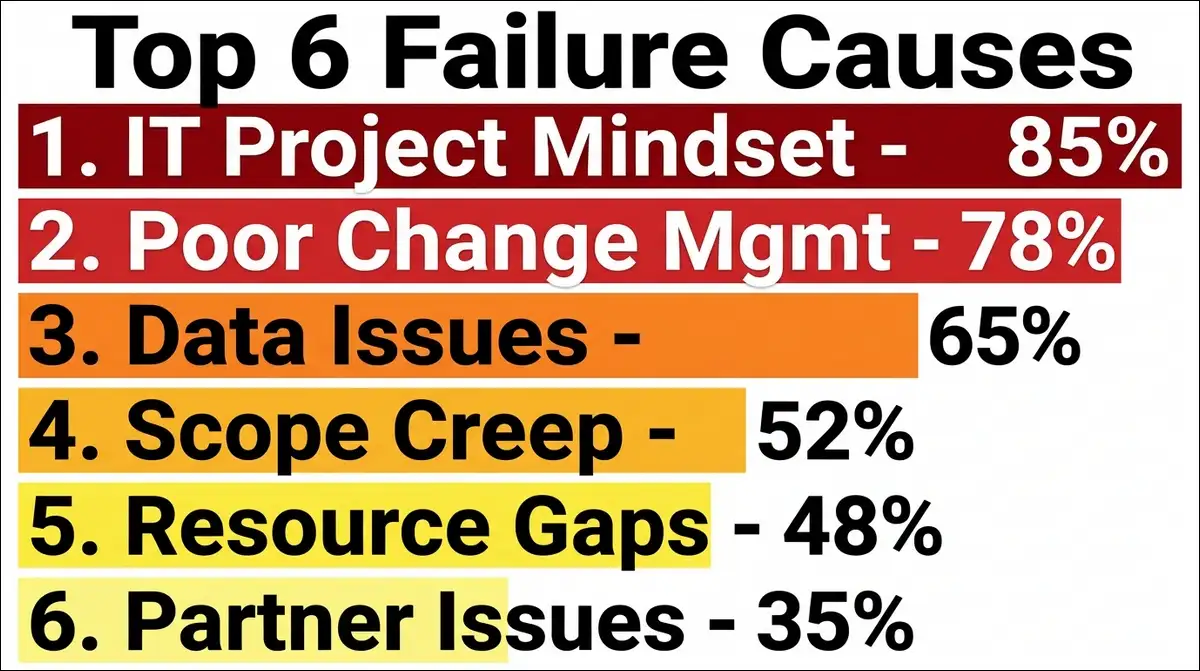
The 6 Root Causes of Workday Implementation Failure, Ranked
I’ve reviewed implementation post-mortems, audit reports, and community discussions. Six causes appear repeatedly. Here they are ranked by how often they predict failure.
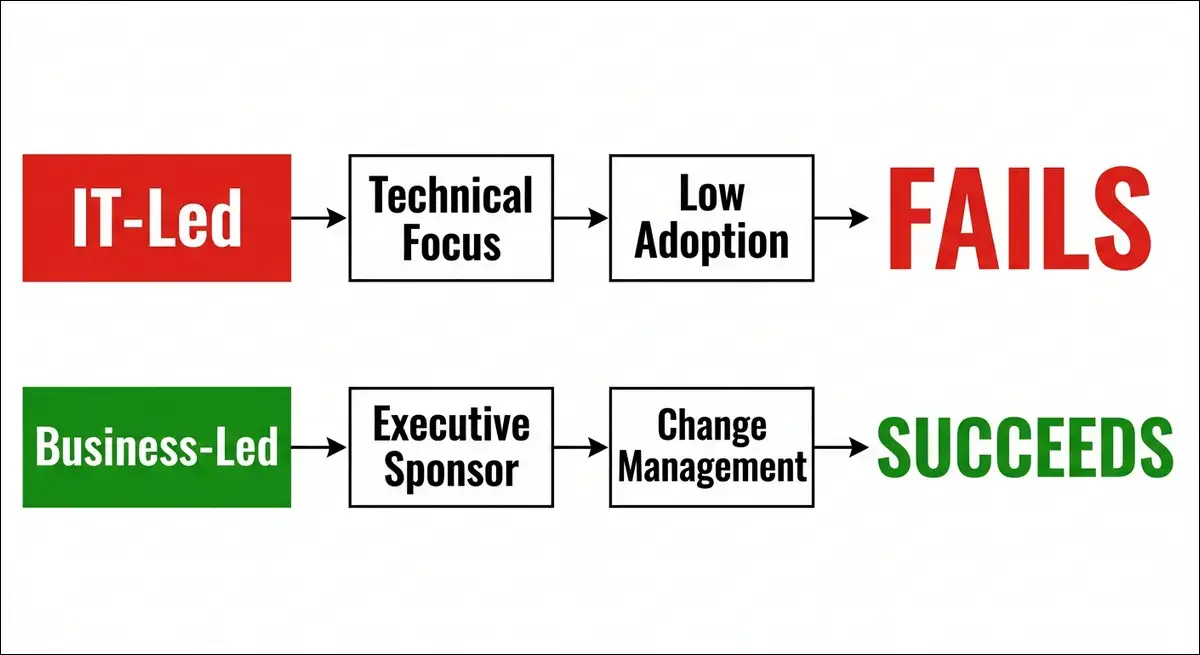
Cause Number 1: Treating It as an IT Project, Not a Transformation
This is the single most common predictor of Workday implementation failure.
HCM Advisory puts it directly: “Failure typically occurs when the deployment is treated as an IT task rather than a fundamental organisational transformation” (HCM Advisory, 2026).
Without active C-suite sponsorship, scope creep and a lack of cross-functional commitment drive costs upward. IT departments own the project. Business leaders attend steering committee meetings but don’t drive decisions. The result is a technically sound system that doesn’t match how people actually work.
What you can do:
- You have the option to appoint an executive sponsor who isn’t the IT director. A CHRO or CFO works well.
- Consider drafting a formal project charter with scope boundaries and getting C-suite sign-off before kickoff.
- You may want to frame the project internally as a business transformation, not a software installation.
Cause Number 2: Inadequate Change Management
Change management is not a communication plan. It’s a sustained cultural shift that requires dedicated leadership and authority.
Organizations that underestimate the human dimension consistently face low adoption rates and internal resistance after go-live (HCM Advisory, 2026).
A Reddit user who went through a full Workday ERP implementation shared this. “They originally thought they could absorb that internally but quickly realized the demands of a full platform implementation far exceeded the time and skills of the staff they had” (Reddit r/workday).
They also had to hire a project manager they didn’t think they needed. And they hired temps to augment internal departments to free up time for people to work on the project.
The user described this delay as “super wishful thinking.”
Common change management challenges include the following.
- Resistance to change from long-tenured employees
- Lack of executive sponsorship visible to front-line workers
- Unclear communication about why the change is happening
- Inadequate training resources that don’t match how adults learn
What you can do:
- You might consider using a four-phase OCM framework. Assess Readiness, Design and Develop, Implement and Manage Adoption, Sustain and Reinforce (OCM Solution, 2025).
- Building a change champion network with influencers across departments, not just managers, can help significantly.
- You have the option to budget 10 to 15% of the total project cost specifically for change management.
Cause Number 3: Data Conversion Treated as a Technical Exercise
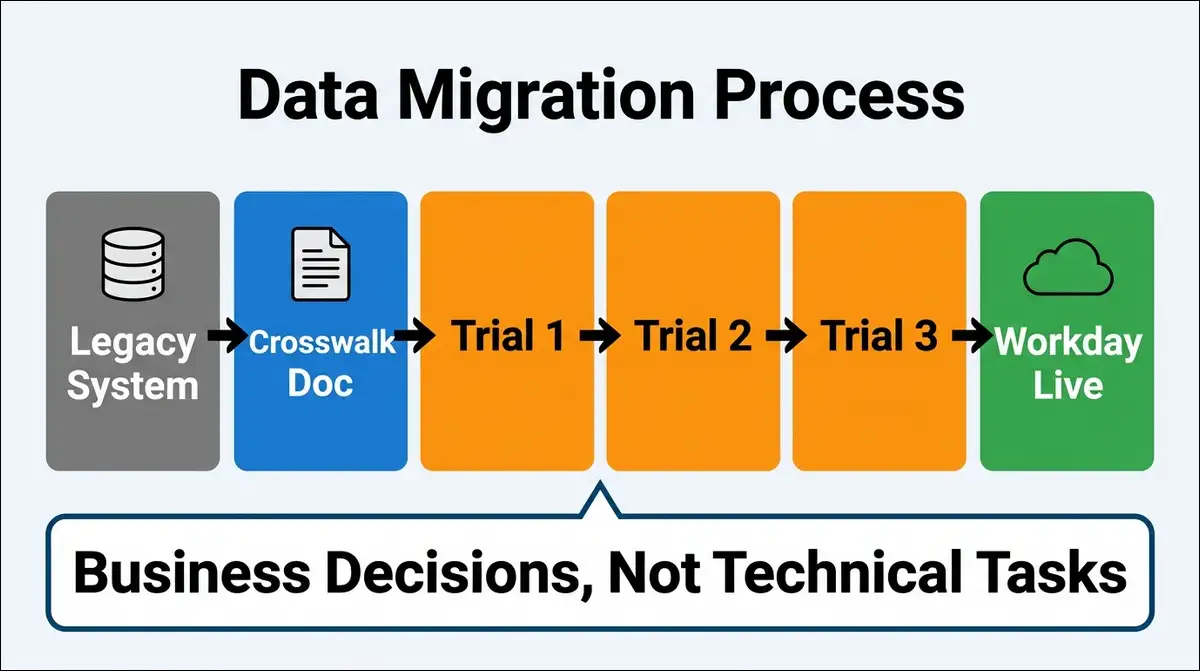
Data conversion should be approached as a business mapping exercise, not a technical script-and-migrate task (David Kent Consulting, 2026).
The primary challenge involves making decisions about legacy data mapping and field definitions. This requires active participation from functional HR and Finance teams who understand the qualitative context of the records.
Technical teams can move data. Only business teams can decide what that data should become in the new system.
Legacy systems carry years of accumulated inconsistencies. Duplicate records. Incomplete fields. Non-standard coding. In higher education, Banner environments are particularly prone to dirty data reaching production.
What you can do:
- You can assign data stewardship at the department level before the project starts.
- Consider building crosswalk documentation that maps every legacy field to its Workday equivalent.
- You may want to require functional sign-off at each mapping decision point.
- Running a minimum of 3 trial data loads before the first prototype can help catch issues early.
Cause Number 4: Scope Creep Without a Change Control Board
Workday implementations invite scope expansion. Stakeholders see the platform’s capabilities and request additions mid-project. Without a formal process, these requests extend timelines and inflate budgets.
A formal change control board must evaluate every modification request for its impact on timeline and budget. Only adjustments that are directly aligned with strategic corporate goals should be integrated into the build.
What you can do:
- You have the option to establish a change control board before the build phase begins.
- Using the project charter as the definitive reference for all scope decisions can keep things on track.
- You might require a written impact assessment for every change request.
Cause Number 5: Resource Gaps and SME Availability Conflicts
Subject matter experts must be identified and their availability secured before the project kickoff. Scheduling conflicts are a leading cause of timeline slippage.
The Reddit user I quoted earlier described this problem clearly. “They had to hire temps to augment some internal departments to free up time for people to work on the project. Again, they were slow to do that as they convinced themselves their current staff could do it.”
What you can do:
- Planning temporary backfilling of operational roles so SMEs can focus on the project can make a big difference.
- You may want to budget for external augmentation from day one instead of hoping internal capacity holds.
- Securing SME time commitments in writing before signing the implementation SOW can prevent conflicts later.
Cause Number 6: SI Partner Misalignment
Your implementation partner brings deep platform knowledge. But they can’t bring institutional knowledge. The most successful implementations happen when the institution staffs an empowered internal team as a true counterpart to the SI.
One Reddit user described an internal battle between IT and the business over who should own what. “That battle caused issues on the project as it wasn’t clear early on who should be learning what and who should be in meetings.”
And they eventually established a business-based HRIS team for system admin and reporting, while IT handled security and integrations.
What you can do:
- You can decide on a governance model early and make sure everyone knows their role.
- Clarifying who owns configuration, who owns integrations, and who owns reporting can prevent confusion.
- You might require your SI partner to document everything for internal knowledge transfer.
The Real Cost of Failed Adoption Nobody Budgets For
Most organizations budget for the Workday license. Many budget for implementation. But very few budget for what happens when adoption fails. Let’s break down what that actually looks like.
The Full First-Year Investment
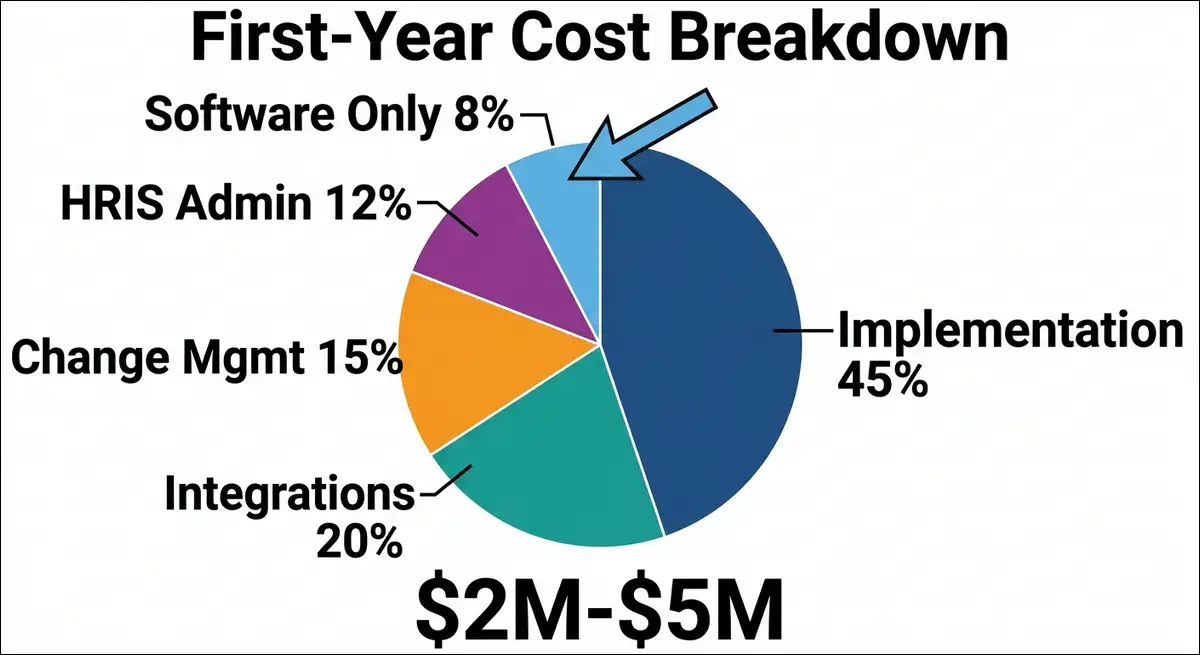
Here’s what a Workday implementation actually costs in year one. I’ve compiled these ranges from multiple verified sources.
| Cost Component | Range | Notes |
|---|---|---|
| Annual subscription | $100 to $504 per employee/year | Depends on scale and modules |
| Implementation services | 100% to 200% of subscription | Kandor Solutions 2025 |
| Change management | 10% to 15% of project budget | Often underfunded |
| Integration development | $20K to $80K per system | Per connected system |
| HRIS administrator | $80K to $120K per year | Most deployments need one |
| Data migration | Included in implementation | Often underestimated |
For a 5,000-employee organization, total first-year costs commonly range from $2 million to $5 million. That includes the license, implementation, training, integrations, and the dedicated administrator most deployments require.
The subscription fee is often the cheapest part of the equation.
The Compounding Cost of Low Adoption
When 43% of your users still need training after 12 months, you’re paying for the following.
- Extended help desk support with higher ticket volumes
- Re-training programs delivered at consultant day rates
- Productivity losses during the extended learning period
- Shadow systems that persist because people can’t use Workday effectively
- Employee frustration that increases turnover risk
- Data accuracy problems when users input information incorrectly
One Reddit user summarized it well. “Workday isn’t going to automatically transform your organization. It’s just a set of tools. If the organization clings to the past or refuses to modify old processes, you’ll go live with a suboptimal solution that’s expensive” (Reddit r/workday).
The Change Management Framework That Actually Works for Workday
Generic change management advice doesn’t work for Workday. The platform changes how every employee, manager, and HR professional completes daily tasks. That level of disruption requires a structured, Workday-specific approach.
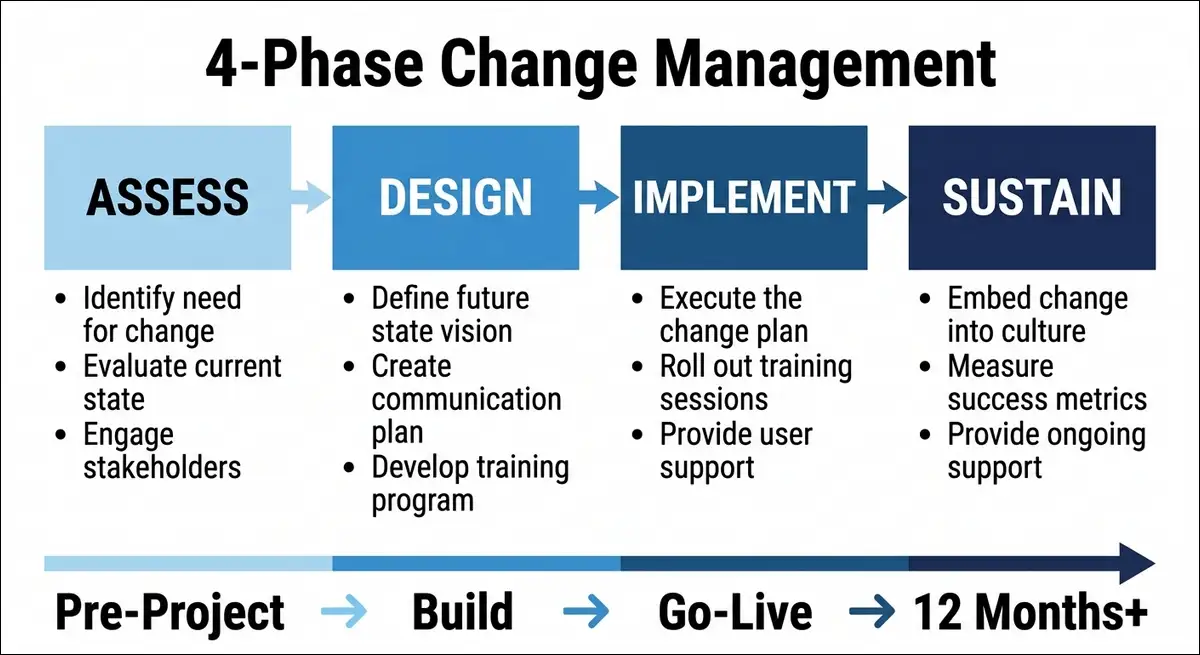
The Four-Phase OCM Model
I recommend the four-phase model from OCM Solution because it maps directly to how Workday implementations unfold (OCM Solution, 2025).
Phase 1: Assess Readiness. You can map all stakeholders and conduct impact analysis by role. Scoring organizational readiness on a defined scale helps identify pockets of resistance early.
Phase 2: Design and Develop. Creating tailored communications for each audience works well here. You might design role-based training paths, recruit and train a change champion network, and build feedback loops into the project plan.
Phase 3: Implement and Manage Adoption. Deploying go-live support structures and activating the champion network are key. You can monitor adoption KPIs daily in the first weeks and respond rapidly to emerging issues.
Phase 4: Sustain and Reinforce. Continuing reinforcement through regular office hours helps maintain momentum. You may want to maintain the champion network, share success stories, and embed Workday processes into business-as-usual operations.
Why Generic Training Fails (And What Works Instead)
The Denver audit found that users considered help resources unhelpful. A Capterra reviewer was even more direct. “Their expensive user training courses are absolutely appalling for adult learners. Four days in a classroom flicking through a 500-page bound workbook” (Capterra).
What works instead:
- Role-specific training paths can be much more effective. An HR admin needs different training than an employee or a manager or an executive.
- Just-in-time learning embedded in workflows instead of front-loaded classroom sessions may improve retention.
- Micro-learning modules under 10 minutes that people can access when they need them often work better than long sessions.
- Sandbox environments where people can practice without affecting production data give users confidence.
- Short video libraries for common tasks that are accessible on demand can reduce help desk tickets.
The Terminology Translation Problem
The Denver audit identified a specific issue that I see repeated across implementations. Workday terminology doesn’t match legacy system language, which slows routine tasks for months.
If your employees used to “submit a PAR” and now they need to “initiate a Job Change business process,” you’ve got a translation problem. People spend cognitive effort figuring out what Workday calls things instead of doing their jobs.
What you can do:
- You can create a Workday Dictionary that maps every legacy term to its Workday equivalent.
- Distributing it before training begins so people learn both vocabularies simultaneously can help.
- You might include it in new hire onboarding materials for everyone who joins after go-live.
- Posting it as a quick-reference card near workstations in high-use areas makes it accessible.
Data Migration: The Business Exercise Most Teams Get Wrong
I mentioned this in the failure causes section. But it deserves its own section because data migration errors create problems that persist for years after go-live.
Why “Script and Migrate” Fails
Legacy systems carry decades of accumulated data. In higher education, Banner environments often have duplicate records, incomplete fields, and non-standard coding that accumulated over many years.
A technical team can write a script to move that data into Workday. But they can’t decide whether a 15-year-old job code should map to a current Workday job profile. They can’t decide which of three duplicate employee records is the correct one. They can’t determine whether a custom compensation field should carry forward or be retired.
Those are business decisions. And they require functional HR and Finance teams who understand the context.
The Crosswalk Documentation Framework
A crosswalk document maps every legacy data field to its Workday equivalent. Here’s what it should include.
| Legacy Field | Workday Field | Rule | Owner | Date |
|---|---|---|---|---|
| Employee_ID | Worker_ID | Direct map | HR Data Steward | |
| Dept_Code | Cost_Center | Cross-ref table | Finance Lead | |
| Job_Code | Job_Profile | Mapping table | HR Director | |
| Hire_Date | Original_Hire_Date | Direct map | HR Data Steward | |
| Custom_Field_12 | TBD | Business decision | CHRO |
Every row needs a decision owner and a sign-off date. Without those, data conversion becomes a blame game when something goes wrong.
The Trial Load Strategy
Running multiple trial loads before the first prototype is essential to surface structural issues early.
I recommend a minimum of three trial loads.
- Trial Load 1: Small sample (500 records). This tests basic field mapping and identifies obvious errors.
- Trial Load 2: Larger sample (5,000 records). This tests edge cases, duplicate handling, and transformation rules.
- Trial Load 3: Full data set. This mirrors production as closely as possible and includes cross-functional validation from HR, Finance, IT, and end-user representatives.
Each trial load should produce a defect log that the business team reviews before the next load.
Special Considerations for Banner to Workday Migrations
Higher education institutions migrating from Banner face unique challenges. Banner environments carry years of accumulated inconsistencies. Shared governance adds complexity to data ownership decisions. Departments may resist standardizing data that they’ve managed independently for decades.
Working with consultants who have deep experience in both Banner and Workday reduces the risk of dirty data reaching production.
Implementation Timelines: What to Actually Expect by Organization Size
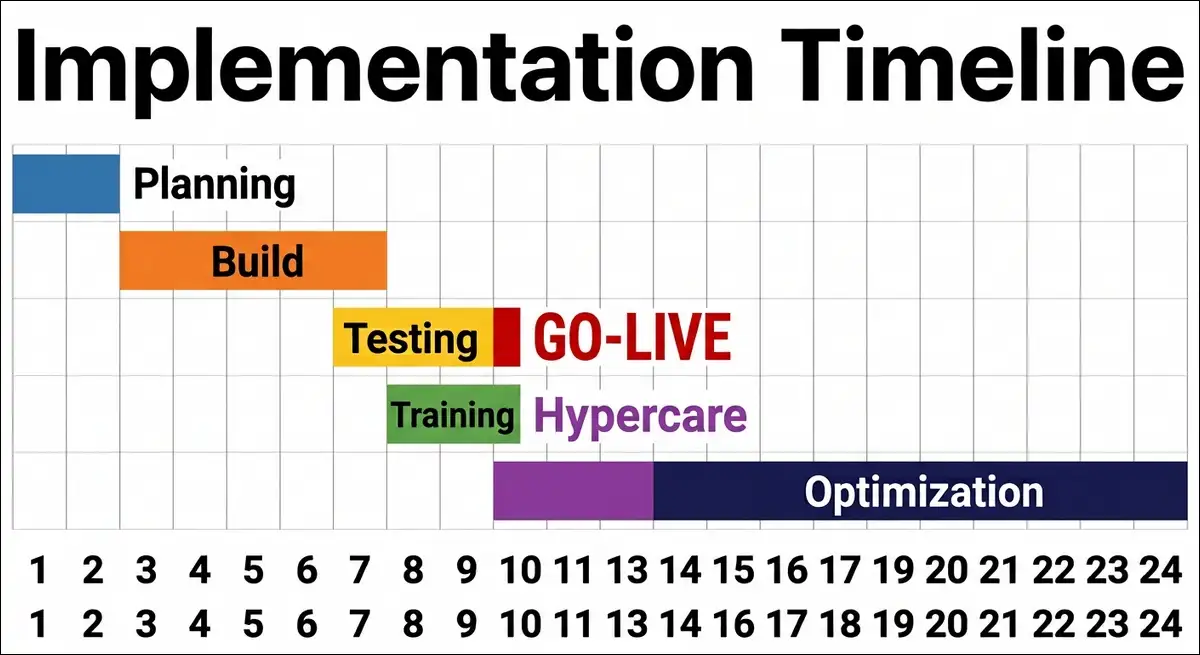
Workday publishes an 8-week deployment option called Workday GO. Some consultants quote 3-month accelerated timelines. But the reality for most organizations is significantly longer.
Timeline Benchmarks
| Scenario | Timeline | Key Variables |
|---|---|---|
| Workday GO (small orgs) | 8 weeks | Limited customization |
| Mid-market accelerated | 3 months | Fewer integrations |
| Standard mid-market | 8 to 12 months | Custom configuration |
| Large enterprise | 12 to 18 months | Multi-country, complex |
| Very large (phased) | 18 to 24 months | Global rollout |
| Higher ed with Student | 18 to 24+ months | Shared governance |
The average Workday implementation takes 8.2 months according to Kandor Solutions (Pin, 2026).
Why Timelines Almost Always Slip
I’ve identified five common reasons implementations take longer than planned.
- Data readiness gaps discovered mid-project that require cleanup before migration
- Scope changes from stakeholder requests that weren’t in the original charter
- Resource constraints when subject matter experts can’t be freed from daily work
- Consensus building across decentralized departments, especially in higher education
- SI partner availability changes due to staffing or competing client commitments
How to Protect Your Timeline
- You can build a 15 to 20% buffer into every phase estimate.
- A formal change control board prevents scope creep from extending deadlines.
- Backfilling operational roles so your best people can focus on implementation work helps maintain momentum.
- Starting data readiness work at project kickoff, not during the build phase, can prevent delays.
- You might lock in SI partner resource commitments in the statement of work before signing.
The Post-Go-Live Playbook: What to Do in Months 1 Through 12
This is the section no competitor covers in detail. Most articles end at go-live. But go-live is where the real work begins.
Months 1 to 3: Hypercare Phase
This is your highest-support period. The goal is rapid issue resolution and adoption monitoring.
What you can do:
- Staffing a dedicated support team available for real-time issue resolution during business hours can help.
- You might hold daily standups to triage critical issues and escalate patterns.
- Activating your change champion network in every department for peer support works well.
- You can track daily metrics like login frequency, task completion rates, and help desk ticket volume and categories.
What to watch for:
- Users creating workarounds instead of using the system
- Repeated questions about the same processes indicating training gaps
- Managers delegating Workday tasks to assistants instead of using self-service
Months 3 to 6: Stabilization Phase
You’re transitioning from project mode to operational support. The goal is building internal capability.
What you can do:
- Transitioning from the project team to an operational support model with defined SLAs helps establish stability.
- You may want to begin role-specific advanced training for power users and administrators.
- Identifying candidates for your Centre of Excellence from early adopters can build long-term capability.
- You can track monthly metrics including process cycle times, data accuracy rates, and user satisfaction survey results.
What to watch for:
- Help desk ticket volume should be declining. If it isn’t, you’ve got a training gap.
- Process cycle times should be improving. If they’re not, you’ve got a configuration problem.
- Shadow systems should be disappearing. If they persist, investigate why.
Months 6 to 12: Optimization Phase
You’re now optimizing what you’ve built. The goal is expanding value and preparing for the first release.
What you can do:
- Preparing for Workday’s bi-annual release by testing new features in your sandbox and adopting selectively based on business value works well.
- You might conduct your first formal adoption assessment using the KPIs below.
- Identifying underutilized modules and creating activation plans for them can expand value.
- You can track quarterly metrics including feature adoption rates, process automation levels, and HR-to-employee ratio changes.
The 12-Month Adoption Assessment
At the 12-month mark, you should conduct a formal review. Here are the KPIs I recommend measuring.
| KPI | Target | What It Tells You |
|---|---|---|
| Daily active users | Above 80% | Regular system use |
| Training completion | Above 90% | Training reach |
| Help desk tickets | Declining | Self-sufficiency |
| Process cycle times | 20% faster | Efficiency gains |
| Data accuracy | Above 95% | Input quality |
| Employee satisfaction | Above 3.5/5 | User experience |
| Manager self-service | Above 75% | Manager adoption |
If your metrics show below 80% independent usage at 12 months, you may want to deploy a targeted intervention.
That could mean additional role-specific training. It could mean reconfiguring business processes that are too complex. It could mean addressing resistance from specific departments.
Building a Centre of Excellence for Long-Term Workday Success
Workday releases bi-annual updates with new features, changed behaviors, and deprecated functionality. Without internal expertise, every release becomes a consulting engagement. That gets expensive fast.
Why You Need a CoE and Not Just an Admin
A single Workday administrator can keep the lights on. But they can’t evaluate new release features. They can’t redesign business processes. They can’t build complex integrations. They can’t train new users effectively.
A Centre of Excellence distributes these responsibilities across a team with complementary skills. It reduces dependency on external consultants and equips your organization to manage Workday independently.
Recommended CoE Structure
| Role | Responsibility | FTE Allocation |
|---|---|---|
| Platform Owner | Strategy, releases, vendor relations | 1 FTE |
| HCM Functional Lead | Config, processes, support | 1 to 2 FTE |
| Integration Specialist | Studio, Cloud Connect, APIs | 0.5 to 1 FTE |
| Reporting Lead | Reports, analytics, dashboards | 0.5 to 1 FTE |
| Security Admin | Access, compliance, security | 0.5 FTE |
| Change Champions | Peer support, adoption | Distributed |
For a 5,000-employee organization, this typically means 4 to 6 dedicated FTEs plus a distributed champion network.
Knowledge Transfer From SI Partner to Internal Team
Planning knowledge transfer as a formal project deliverable, not an afterthought, is crucial. Here’s what I recommend.
- You can require your SI partner to document all configurations, integrations, and customizations before go-live.
- Having internal team members shadow the SI partner during the build phase, not just receive a handoff at the end, builds capability.
- You might budget for Workday certification for 2 to 3 internal team members in key roles.
- Scheduling monthly knowledge transfer sessions during the first 6 months post-go-live can reinforce learning.
European and Global Considerations: Works Councils, GDPR, and Data Sovereignty
If you’re deploying Workday across European countries, you’ll face regulatory requirements that don’t exist in the United States. Most importantly, these aren’t optional; they can delay or block your implementation if not addressed early, and properly.
Engaging Works Councils in the DACH Region
Deploying Workday in Europe requires a proactive strategy regarding labour regulations and Works Councils, particularly in the DACH region.
Engaging these bodies during the planning phase to prevent legal roadblocks later is essential. Early and transparent communication about data processing is the most effective way to build trust with labour representatives.
Providing full auditability of how employee information is handled helps. Works Councils want to know what data’s collected, who can see it, how long it’s retained, and what decisions are made using it.
GDPR Compliance in Workday HCM
Workday has built-in GDPR features. These include data purging capabilities for the right to be forgotten, role-based access control, and audit logging (TechTarget).
However, a common compliance gap exists in non-production environments. Sandboxes and test instances often use real employee data, which violates GDPR restrictions on using personal data outside production.
Data masking is required for all lower environments. Custom fields, attachments, and integration endpoints need explicit protection (K2view, 2025).
Multi-Country Payroll and Localization
Workday offers native payroll for the US, UK, Canada, France, and Australia. Other countries require partner-managed payroll, which adds cost and complexity.
In total, Workday supports payroll in 50+ countries through native and partner-managed options. Workday builds localized payroll engines and regional data center compliance to meet sovereignty and GDPR requirements (MatrixBCG).
If your organization operates in countries outside the native payroll list, you may want to budget additional time and cost for partner payroll integration.
Lessons From the Trenches: What Real Users Actually Say
I spent significant time reading user reviews on G2, Capterra, and Reddit. Here are the patterns I found, organized by theme.
On Implementation and Training
From Reddit r/workday, an implementation veteran shared several observations.
“They exceeded budget because the client figured out they needed elevated change management and training support and test management support. They originally thought they could absorb that internally but quickly realized the demands of a full platform implementation far exceeded the time and skills of the staff they had.”
“They also had to hire a project manager which they didn’t think they needed and hired temps to augment some internal departments to free up time for people to work on the project.”
“Workday isn’t going to automatically transform your organization. It’s just a set of tools.”
On User Experience Frustrations
From G2 verified reviews (G2 Workday HCM Reviews):
“The web interface can sometimes be sluggish and heavy to load, especially during peak usage times like payroll cutoffs or performance review cycles. The loading spinner appears frequently when switching between modules.”
“It can be a bit overwhelming for those who are new to the system. With so many options available, it’s easy for new customers to miss the value that’s right at their fingertips.”
“The AI within Workday, known as Workday Assistant, leaves much to be desired. In our experience, it usually doesn’t understand what’s being asked.”
On Reporting Complexity
From Capterra verified reviews (Capterra):
“The reporting capabilities are incredibly robust once you know how to build them. But custom reporting has a very steep learning curve.”
“Workday gets overcomplicated very easily. I feel like there’s too much going on in one place.”
On Comparing Workday to SAP SuccessFactors
From a Reddit user who’s administered both systems (Reddit r/workday):
“Custom fields are needlessly laborious. You’ll have to create 6 or 7 different custom fields to replicate something that could be done in a few minutes with one custom field in SuccessFactors.”
“In Workday everything is process-based, rather than data-based. You look in the worker history and it’s a mess of cancelled, rescinded and completed processes.”
“From my perspective Workday is definitely not a significant improvement on SuccessFactors. It’s harder to maintain, update, retrieve, or restrict access to your data.”
These quotes aren’t meant to discourage you from implementing Workday. They’re meant to prepare you for what real users experience so you can plan accordingly.
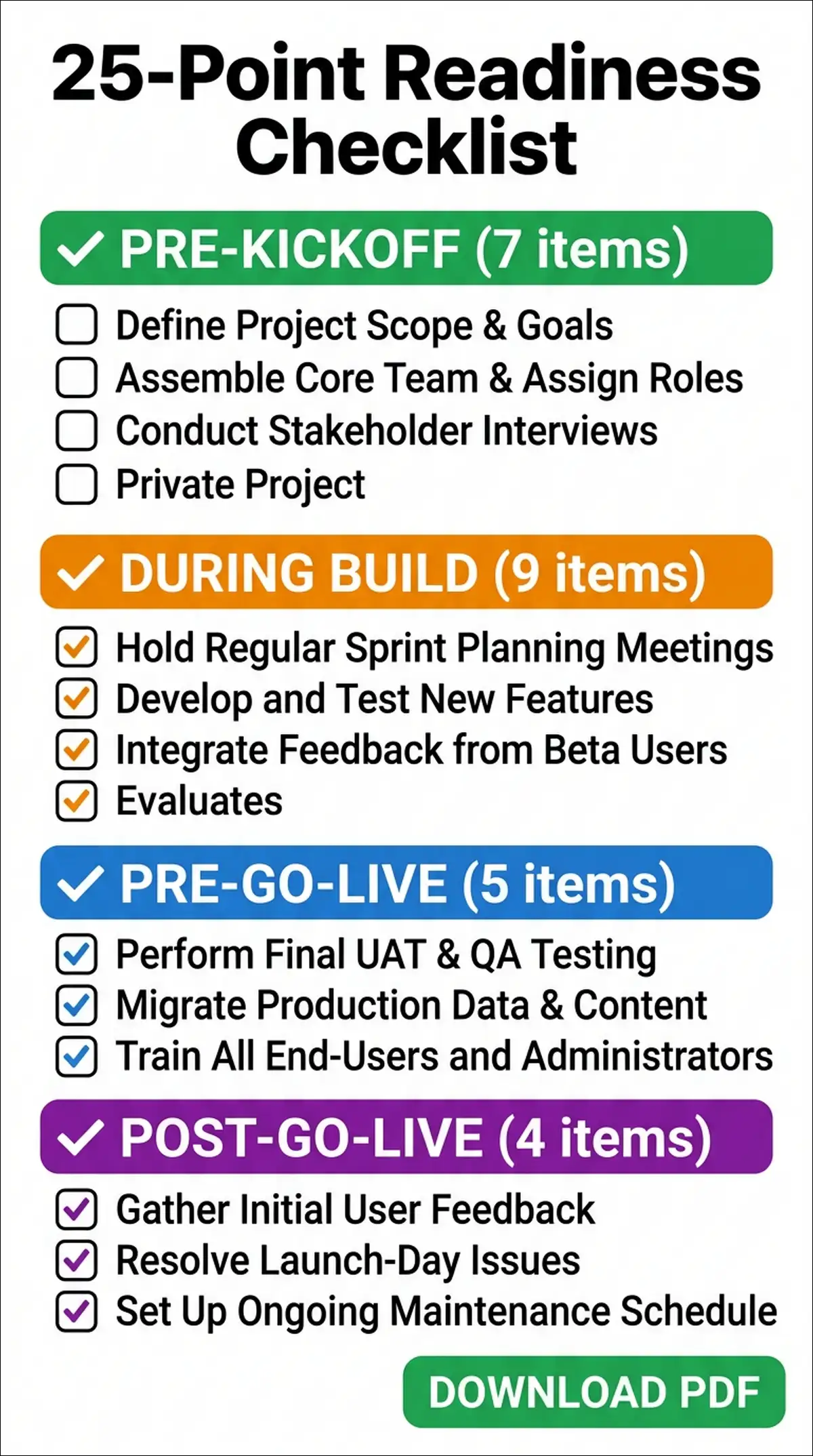
The 25-Point Implementation Readiness Checklist
Use this checklist before you sign the statement of work. If you can’t check most items in the Pre-Kickoff section, you’re not ready to start.
Pre-Kickoff (Before You Sign the SOW)
- Executive sponsor identified and committed (not the IT director)
- Formal project charter drafted with scope boundaries and success criteria
- Budget includes 100% to 200% of subscription for implementation services
- Budget includes a dedicated HRIS administrator ($80K to $120K per year)
- Change management budget allocated at 10% to 15% of total project cost
- SI partner selected with relevant industry experience and references checked
- Internal team identified and backfill planned for their operational roles
During Build Phase
- Data stewardship assigned at the department level for every data domain
- Crosswalk documentation built with functional sign-off on every field mapping
- Three or more trial data loads scheduled and completed before first prototype
- Change control board established with defined membership and approval process
- Role-based training paths designed for each audience (not generic training)
- Change champion network recruited and trained before go-live
- Workday terminology dictionary created mapping legacy terms to Workday terms
- Sandbox environment available for user practice without production consequences
- Integration architecture documented including Workday Studio, Cloud Connect, and APIs
- Security model designed with constrained roles (not unconstrained global access)
Pre-Go-Live
- Hypercare support team staffed and ready for the first 90 days
- Help desk procedures documented and tested with sample scenarios
- Communication plan executed covering awareness, readiness, and logistics
- Go and no-go criteria defined with measurable thresholds for each module
- Rollback plan documented in case critical issues are found during go-live
Post-Go-Live (Months 1 to 12)
- Adoption KPIs tracked monthly including login frequency, task completion, ticket volume
- First adoption assessment conducted at 90 days with formal reporting
- Bi-annual release management process established with sandbox testing protocol
- Centre of Excellence operational with certified internal staff in key roles
- Formal 12-month adoption review completed with executive reporting
Verdict: Stop Measuring Success at Go-Live
The Workday industry measures success at go-live. Did it launch? Did the data load? Did payroll run? Those are the minimum viable outcomes, not success.
Real success is measured at month 12. Can your people work independently, confidently, and accurately in the system? If 43% of them still need training, the answer’s no.
Three Non-Negotiables for Workday Implementation Success
- Change management is the project, not a workstream within the project. If your change management budget’s less than 10% of total project cost, you’re underfunding the most important part.
- Data migration is a business decision, not a technical task. Your HR and Finance teams must own the data mapping decisions. IT can move the data. Only business people can decide what it should become.
- Go-live is the beginning, not the finish line. Your post-go-live plan should be as detailed as your implementation plan. Months 1 through 12 require structured support, monitoring, and optimization.
The ROI Is Real When Adoption Succeeds
Workday delivers 249% to 331% three-year ROI when properly adopted (Forrester TEI). A Forrester TEI study documented a retail organization achieving $29.3 million in three-year benefits with proper workforce optimization. HP replaced 86 separate systems and achieved ROI in under 3 years across 300,000 employees in 100+ countries.
But none of those outcomes happen if 43% of your users still can’t navigate the system after 12 months.
The gap between Workday’s potential and Workday’s reality is almost entirely an adoption problem, not a software problem.
What to Do Next
If you’re planning a Workday implementation: You can use the 25-point readiness checklist above before signing the SOW. If you can’t check most items in the Pre-Kickoff section, you may want to delay the project until you can.
If you’re post-go-live and struggling: Conducting a formal adoption assessment using the KPIs in Section 7 can help. Identifying the specific areas where users need support and deploying targeted interventions makes a difference.
If you’re evaluating Workday versus alternatives: You might factor the full adoption cost into your total cost of ownership. Including change management, training, the Centre of Excellence, and the dedicated HRIS administrator gives you a complete picture. The license fee’s the cheapest part.
Frequently Asked Questions
Mid-market organizations typically take 8 to 12 months. Large enterprises take 12 to 18 months. Very large enterprises with phased approaches may take 18 to 24 months. Workday GO offers 8-week deployments for smaller organizations that accept pre-configured best practices. The average across all implementations is 8.2 months according to Kandor Solutions.
The primary causes are organizational, not technical. The most common failure causes are insufficient change management, data conversion treated as a technical exercise rather than a business mapping effort, and misalignment with the implementation partner. Failure occurs when the deployment’s treated as an IT task rather than an organizational transformation.
A Denver City Government audit found that 12 months after go-live, 43% of HCM users and 55% of Financial Management users still needed additional training. This highlights how ineffective training models fail to support long-term usage.
Implementation costs typically equal 100% to 200% of annual subscription fees. For a company paying $300,000 per year, you’d budget $300,000 to $600,000 for implementation. Mid-market companies with 500 to 2,500 employees face total year-one costs of $600,000 to $1.1 million. Large enterprises pay $1 million to $3 million or more in year one.
Yes. Change management’s the number one predictor of Workday implementation success. It’s not a communication plan. It’s a sustained cultural shift requiring dedicated leadership and authority. Organizations that underestimate the human dimension consistently face low adoption rates and internal resistance after go-live.
You can track KPIs including user login frequency, training completion rates, help desk ticket volume, process cycle times, data accuracy rates, employee satisfaction scores, and manager self-service adoption rates. Conducting formal assessments at 90 days, 6 months, and 12 months helps. Target above 80% independent usage at the 12-month mark.
Workday reports gross renewal rates above 95%, which suggests customers stay. However, independent audits show many organizations experience technical success with business failure. The system works but adoption lags. Organizations with strong executive sponsorship, dedicated change management, and proper resource allocation report dramatically better outcomes.
Basic employee self-service tasks can be learned in hours. HR administrators and functional leads typically require 3 to 6 months of hands-on experience to become proficient. Certification programs range from self-paced online courses to multi-week instructor-led training.