Akool AI Review: Hands-On Insights, Credit Costs, Full Features & Top Alternatives Compared
Akool AI combines face swap, talking avatars, video translation, and image tools in one platform. It’s a solid option if you’re looking to create personalized videos without a full production team.
As per our research, we found that most users get good results when they prepare clear source material and keep an eye on credit usage. The platform performs strongly in several areas, though it does ask you to manage costs and input quality as you go.
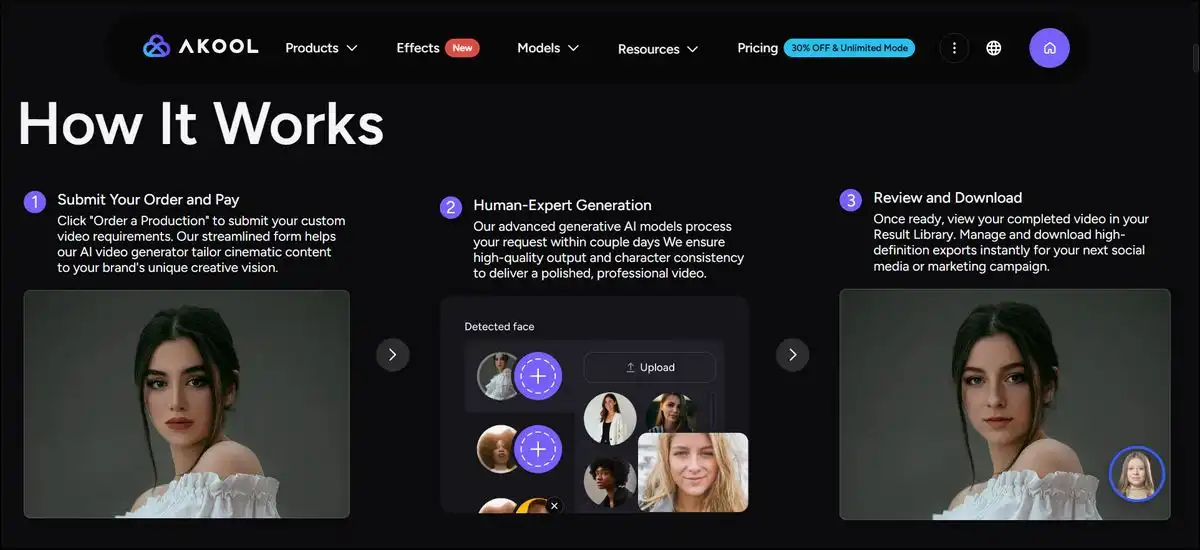
Suggested Image Placement: Right after the opening paragraph. Alt text: Akool AI platform overview showing examples of avatar videos and face swap results for content creators.
Key Findings:
Akool AI works well for people who already have a clear idea of the video they want to create. It handles face swaps and translations effectively in one workspace. The platform supports 155 languages for video translation, and you can remove watermarks plus access higher resolutions on paid plans.
Users often describe the interface as easy to navigate. Face swap tends to give natural blends with good source images. Image generation frequently produces clean results. The live real-time tools open up new possibilities for events and interactive content.
Credit use changes depending on the task and resolution. A typical 1080p avatar video uses about 5 credits per 10 seconds. That works out to roughly 30 credits per finished minute. The free plan includes watermarks and shorter limits, while paid plans unlock longer videos and faster processing.
Strengths come with practical limits. The single platform reduces the need to switch between different apps. At the same time, new users still spend some time learning how credits work and which prompts give the best outputs. Quality stays higher with good lighting and simpler scripts.
Here’s a scorecard based on user feedback and available testing patterns.
Our Akool AI 2026 Scorecard
- Ease of Use: 9/10 — The clean layout helps most people start quickly.
- Image Quality: 9/10 — Text-to-image and background tools deliver reliable results.
- Avatar Videos: 8/10 — Natural motion shows up in many tests, and more model options improve things on higher plans.
- Video Translation: 8/10 — Lip sync works well with clear audio, though technical content may need extra review.
- Face Swap: 7/10 — It stays stable on still images and short clips, but results can vary with motion or lower-quality sources.
- Live Real-Time Tools: 8.5/10 — These prove useful for events when your connection stays stable.
- Value and Cost Control: 7/10 — It’s flexible for moderate use, but higher volume needs closer credit tracking.
- Overall for Marketing Teams: 8/10 — You get a broad toolkit that rewards clear creative direction.
That gives you a quick sense of how it performs. Now let’s look at what Akool actually is and the kinds of people who tend to use it most.
What Akool AI Is and Who Uses It
Akool AI functions as a generative AI suite built for video and image creation. It brings multiple tools together so you can handle face swaps, avatars, translation, and image work without leaving the platform. The company highlights partnerships with brands such as Canon, Google Cloud, AWS, and Coca-Cola.
Official information mentions over 300 million assets created and adoption by tens of thousands of companies. Case studies show uses in real-time events and marketing campaigns. Security features include SOC 2 compliance along with references to GDPR alignment.
Different groups find value in different ways. Marketing teams often create localized ad variants and product explainers. E-commerce sellers generate visuals and talking product videos. Training teams produce multilingual onboarding content. Event organizers test live avatar experiences, while solo creators make quick social media clips.
Results tend to improve when your source files have good lighting and clear audio. Complex scenes or low-quality inputs usually require more editing afterward. The platform works best for people who are ready to test small projects first before scaling up.
Core Features in Detail
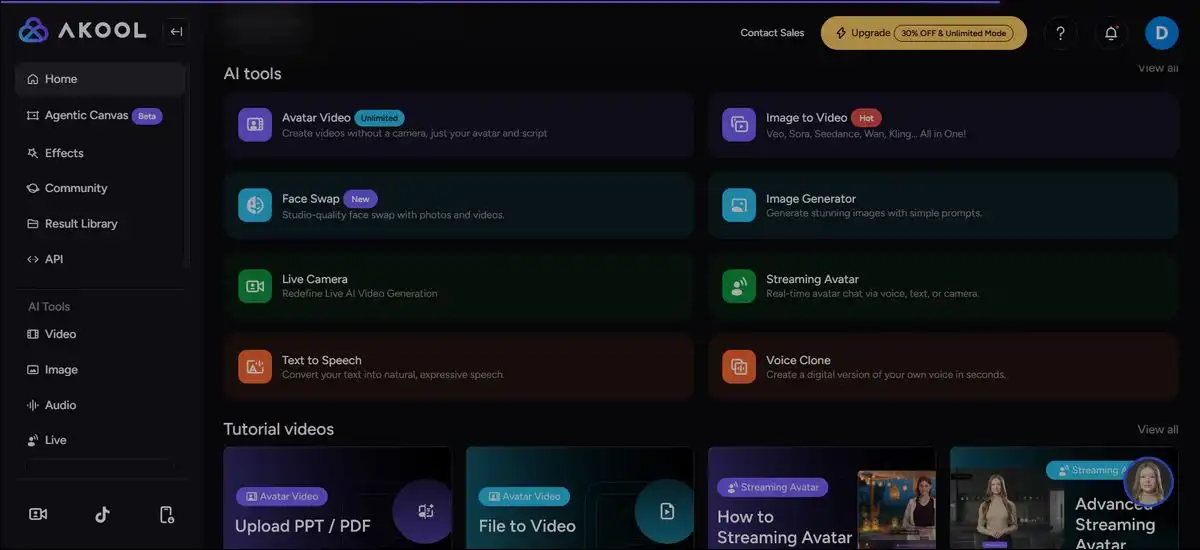
The platform includes several core tools that work together for video and image projects. Each one targets a specific need, and you can choose how deeply you want to use them.
Performance depends on your plan and how well you prepare the input material.
Face swap
This feature lets you replace faces in images or video clips. It aligns features and blends tones in many cases. Clear, well-lit source photos usually give the most natural results. You can get stable performance on still images and short clips.
Motion or unusual angles can create visible blending issues, so you may want to secure clear consent and keep records before using anyone’s likeness publicly.
You can also create AI avatars and talking photos.
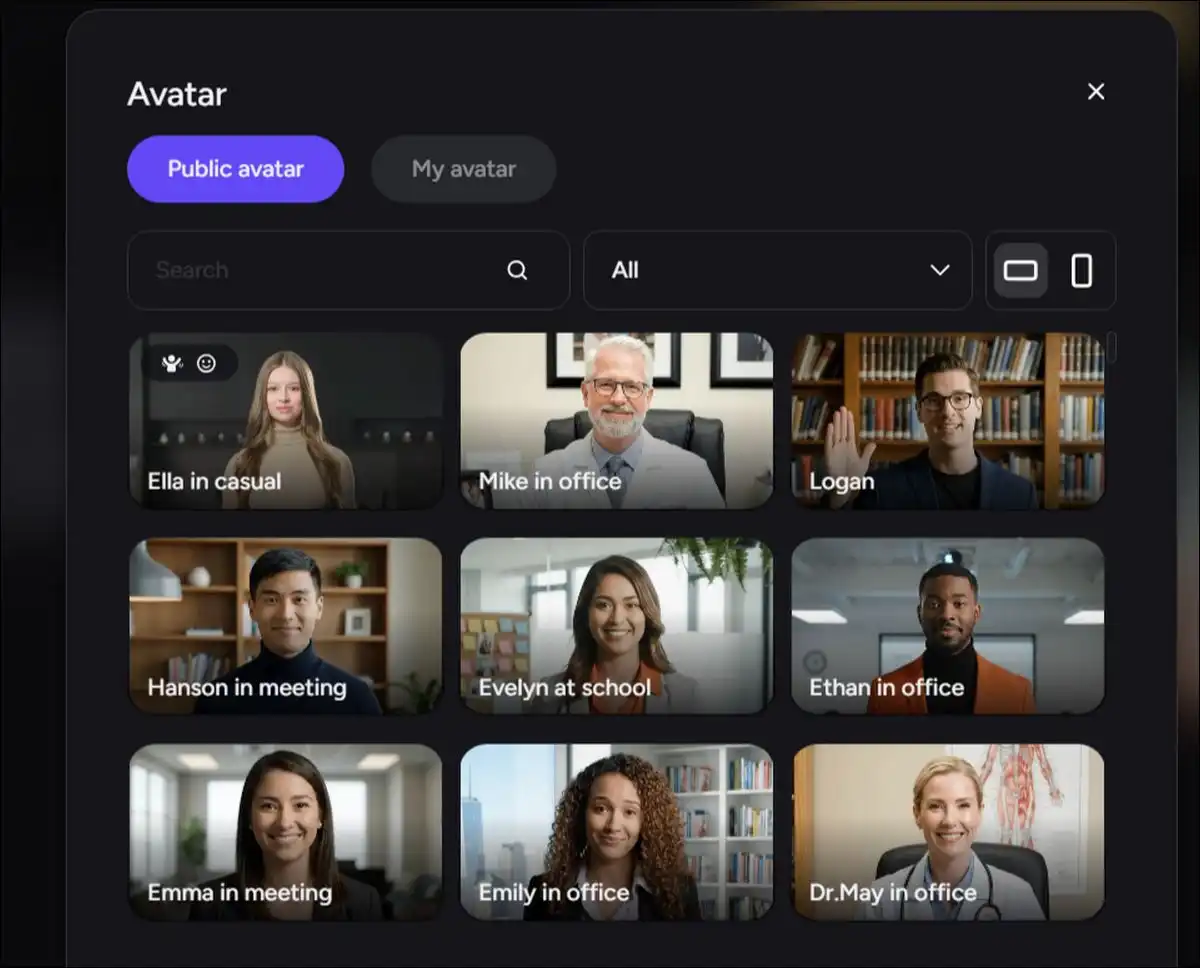
These turn photos or templates into speaking characters. You type a script, pick a voice, and the avatar moves in sync with the audio. Streaming avatars support real-time interactions through connected models.
This works well for support demos or interactive presentations. Gesture variety improves with access to more models, though longer scripts sometimes show repeated movements.
Video translation
This feature helps users convert spoken words while trying to match lip movements. It lists support for 155 languages. Lip sync stays reliable with clear, well-paced audio. Accented speech or technical terms may need manual checks on higher tiers.
You have the option to use background music removal and subtitle tools on Pro Max and above. Many teams use it to localize training videos for new markets.
Image generation and editing tools
This tool covers text-to-image, background change, and image-to-image work. Text prompts often create clean visuals for product mockups and graphics. Background replacement helps e-commerce users place items in new settings quickly.
These tools connect easily with video workflows, so you can generate, edit, and animate in one session.
Text-to-video, image-to-video, and reference-to-video
These let you animate still images or follow reference clips. Image-to-video often adds smooth camera moves. Some testing notes show frame rates near 15 fps, which can look slightly less smooth on fast action.
Reference-to-video helps keep characters consistent across scenes. Longer and higher-resolution outputs require higher plans.
The live real-time suite
This suit includes live camera face swap and streaming avatars. These tools suit virtual events and interactive support. Latency stays manageable with a stable connection. The feature set is newer, so fewer independent long-term tests exist compared with the core tools.
API and integrations
So, developers can connect Akool to custom systems. Higher plans unlock API access. Teams have built automated pipelines for larger content needs. Setup works best with some technical comfort or developer support.
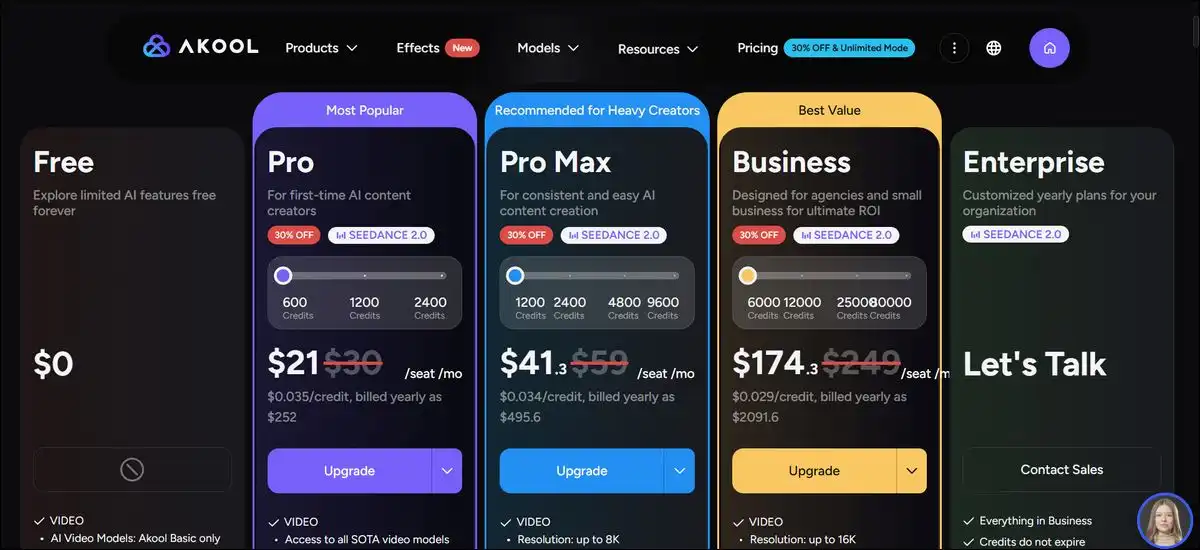
Akool Pricing and Credit System Explained
Akool uses a hybrid model with subscription tiers plus credit consumption for actual generations. Tiers unlock higher limits, resolution, storage, and features. Credits cover the generation work itself.
This gives you flexibility, but it also means tracking your output volume as you go.
Plan differences show up clearly in this comparison. Details can change, so it helps to check the official pricing page for the latest numbers.
Akool AI Plans Comparison 2026
| Plan | Starting Point (approx.) | Main Unlocks | Example Video Length | Storage | Best Suited For |
|---|---|---|---|---|---|
| Free / Basic | $0 | Basic models, watermarks present | 5–10 minutes | 5 GB | Testing and learning the interface |
| Pro | $21–30 per seat | No watermark, 4K, more models | ~30 minutes | 50 GB | Regular marketing and creator work |
| Pro Max | $41–59 per seat | API access, collaboration tools | ~45 minutes | 500 GB | Teams with moderate to high volume |
| Business | $174+ per seat | Business license, custom avatars | ~60 minutes | 1 TB | Agencies and scaling production |
| Enterprise | Custom | SSO, dedicated support, flexible credits | Custom | Custom | Large organizations with compliance needs |
Credit use varies by task. One 2026 breakdown notes that a 1080p avatar video uses about 5 credits per 10 seconds, or roughly 30 credits per finished minute. Face swap on images costs fewer credits. High-resolution translation or complex video jobs use more. Credits often reset monthly on lower tiers.
For instance, creating one 90-second avatar explainer, translating it into two languages, and adding one face swap variant might total 150–250 credits depending on resolution. Testing a small project first reveals the actual rate for your content style.
The free plan works for exploration. Watermarks and short limits make it less practical for client deliverables. Paid plans remove these barriers and add speed. Heavy users sometimes add credit packs or move to Business for better rates per credit.
You can watch your usage closely in the first month. Many people set reminders or start with smaller tests before scaling up.
Hands-On Testing Insights and Real Performance Notes
As per our hands-on reports and patterns, there are several consistent observations we found.
- The interface feels straightforward for most people. Sign-up takes only a few minutes with email verification.
- Text-to-image tests often produce accurate lighting and mood when prompts include specific details. Image-to-video adds natural motion in many cases. Frame rates near 15 fps appear in some outputs and can look slightly less smooth on fast movement.
- Face swap works reliably on clear, front-facing photos with even lighting. Likeness holds better with neutral expressions. Moving subjects or group shots raise the chance of blending issues. Users suggest starting with high-quality source files.
- Avatar videos show good lip sync on standard scripts. Gestures can feel repetitive on longer takes. Access to more models on higher plans adds variety. Real-time streaming avatars respond during live sessions, though connection quality affects any delay.
- Translation keeps speaker identity in clean recordings. Background noise or heavy accents can reduce accuracy. The proofread editor on paid plans helps catch problems before export.
Quality improves with input care and plan level. Simple, well-lit content succeeds more often. Complex or low-quality inputs need extra editing time. Credit tracking becomes easier after a few practice projects. These patterns match broader user feedback across review sites.
What Real Users Say About Akool in 2026
Review platforms show generally positive feedback with solid volume. G2 reports around 4.8 out of 5 from hundreds of reviews. Trustpilot shows a similar 4.8 out of 5 across more than 1,200 reviews. Capterra feedback often mentions time savings and tool quality.
Frequent criticisms include credit costs for high-volume work and occasional slower rendering during busy periods. Face swap consistency draws mixed notes. Some users want more control over avatar gestures.
Regional differences show up in parts of the Trustpilot data. Scores vary by country. This suggests support experience or output perception can differ by market.
Reddit discussions often highlight face swap stability for character content. Translation receives notes on usefulness for non-English audiences, with occasional fine-tuning needed for specialized topics.
The overall picture stays balanced. Most reviewers suggest testing with a real project before committing to larger scale. The platform improves with clear creative direction and good source files.
Practical Use Cases for Akool AI
Teams apply the tools across several common scenarios. Each case benefits from having multiple functions in one place.
- Marketing and ad variants work well when a base video exists. You can swap faces for different presenters, translate scripts, and create quick versions for testing. Credit costs stay reasonable for clips under 60 seconds. It helps to confirm likeness rights and disclosure rules first.
- E-commerce product videos start with image generation and background change. Sellers place products in new settings, then add a talking avatar to explain features. Image-to-video helps animate static shots. Resolution and length limits depend on the plan you choose.
- Multilingual training and onboarding relies on video translation. Teams record once and create versions in target languages. Lip sync and subtitle tools reduce later work. Technical content still benefits from human review for accuracy.
- Live virtual events and support use real-time avatar features. Hosts appear as consistent characters. Interactive elements through connected models allow basic audience flows. A stable internet connection helps delivery.
- Social media repurposing combines face swap and short avatar clips. Creators test different presenter styles or add talking photos to static images. Quick generation supports frequent posting.
Each use case gains speed from the integrated tools. Credit planning and input quality checks remain useful in every workflow.
Akool AI Compared to Other Tools in 2026
Several platforms offer similar capabilities. Akool stands out for combining face swap, avatars, and live features in one workspace. Other tools focus more narrowly on specific strengths.
1. HeyGen
This tool offers a large library of stock avatars and strong tools for marketing videos. It supports over 175 languages and full-body avatars in many cases. Users testing HeyGen often note fast generation and reliable lip sync on standard scripts. Gesture performance can feel slightly stiff in longer takes.
HeyGen suits teams that want ready-made avatars without heavy customization. It doesn’t include Akool’s native face swap strength or integrated image editing. Pricing follows a subscription model with credit elements. Many marketing teams choose it for scale and avatar variety. Akool may fit better when face transformation or live interaction matters more.
2. Synthesia
It targets enterprise training and structured communication. It provides solid avatar quality and mature learning management system integrations. Feedback often notes clean outputs for corporate videos and consistent branding controls. Price points tend to sit higher. Users who need heavy customization or real-time live avatars sometimes look at other options.
Synthesia works well for organizations that prioritize polished, policy-aligned training content. Akool offers more flexibility for mixed marketing and live use cases at potentially lower entry costs for moderate volumes.
3. D-ID
This tool focuses on conversational AI agents and expressive talking avatars. It provides a lower-cost entry for API-driven projects. Testing reports highlight good emotional range and solid performance for interactive applications. Language support reaches around 30 or more options.
The tool excels in agent-style conversations rather than long marketing videos. D-ID pairs well with custom development. Akool offers broader video transformation tools and stronger face swap alongside its avatar features. Teams needing heavy API customization at lower base cost often evaluate D-ID first.
Runway and similar creative video platforms emphasize generative video from text or image prompts. They deliver cinematic motion and advanced camera controls in many tests. Output quality reaches high visual standards for experimental work.
These tools require more prompt skill and post-editing for character consistency. They don’t focus on talking avatars or face swap as core features. Akool handles avatar-driven and translation workflows more directly. Creative teams sometimes combine platforms when they need both generative motion and avatar tools.
Akool AI vs HeyGen, Synthesia & D-ID (2026)
Side-by-side feature comparison for 2026 users
| Feature | Akool AI | HeyGen | Synthesia | D-ID |
|---|---|---|---|---|
| Face Swap | Strong | Limited | No | Limited |
| Avatar Quality | Good | Excellent | Excellent | Very Good |
| Real-time / Live Avatars | Yes (Strong) | Limited | No | Strong |
| Video Translation | 155+ languages | 175+ languages | Good | ~30+ languages |
| API & Integrations | Good (Higher plans) | Good | Strong | Excellent |
| Best For | All-in-one Marketing | Marketing & Avatars | Enterprise Training | Conversational Agents |
| Pricing Model | Credit + Subscription | Subscription | Higher | Lower Entry Cost |
Side-by-side feature comparison of Akool AI with HeyGen, Synthesia, and D-ID for 2026 users
Balanced Pros and Cons of Akool AI
Pros
- Multiple tools live in one interface, which reduces switching between apps.
- Face swap performs steadily on clear inputs, and many users achieve usable results quickly.
- Video translation supports a wide language range with lip sync options on higher plans.
- Live real-time features enable new interactive formats for events and support.
- API access on higher plans supports custom automation for larger teams.
- Image tools integrate smoothly with video workflows.
- Security certifications meet common enterprise requirements.
Cons
- The credit system requires active monitoring because costs can rise with volume or resolution.
- Face swap likeness can vary with motion or lighting conditions.
- Some outputs show frame rate considerations around 15 fps in testing notes.
- Longer or complex videos may render slower during peak hours.
- The free plan limits make production work impractical for most professional needs.
- New users need practice to optimize prompts and credit use effectively.
- Gesture variety in avatars improves mainly on paid tiers.
Every strength includes a practical boundary. Teams that plan projects and test small batches tend to see the best outcomes.
How to Get Started with Akool AI
You can begin with the free plan to explore the interface. Sign-up takes only an email and quick verification. The dashboard presents tools in clear categories.
Upload a test image or short clip first. Try face swap on a simple portrait. Then create a short avatar video from a script under 30 seconds. This shows credit usage and output style without high risk.
Review the credit counter after each generation. Note how resolution and length affect consumption. You can adjust future projects to stay efficient.
Move to a paid plan once you have a clear production need. Many people start with Pro for regular marketing and creator work. You can upgrade later if concurrency or storage becomes a limit.
Prepare source files carefully. Use well-lit photos and clear audio recordings. Simple scripts with natural pacing produce better translation and avatar results.
Export in the format needed for your platform. Add final polish in external editors if required. Many teams combine Akool outputs with tools like CapCut for captions and music.
Track results over the first few projects. Refine prompts and settings based on what works for your content style. Support resources and community examples can speed up learning.
Ethical and Legal Considerations for Face Swap and Avatars
Face swap tools raise consent and disclosure questions. You can obtain clear permission before using anyone’s likeness in commercial or public content. Keeping records of agreements protects everyone involved.
Platform policies often require labeling AI-generated material. Checking current rules on YouTube, Meta, TikTok, and other channels supports transparent use. Clear labeling builds audience trust over time.
You may want to avoid content that could mislead viewers about endorsements or events. False representation carries both legal and reputational considerations. Reviewing local advertising standards in target markets reduces risk.
Data privacy matters for custom avatars and uploaded footage. Higher plans include stronger security options. Enterprise users benefit from confirming compliance details with their legal team before scaling.
Responsible use protects both creators and subjects. Thoughtful planning prevents most issues before they arise.
Final Verdict on Akool AI in 2026
Akool AI delivers a capable all-in-one suite for teams focused on avatar videos, face transformation, and multilingual content. It reduces the need for multiple specialized apps. Credit management and input preparation determine real-world efficiency and results.
The platform fits marketing teams and creators who produce regular short-to-medium videos. Enterprise users gain from API options and compliance features on higher tiers. Solo users on tight budgets may find credit costs add up faster than expected for high volume.
Summary graphic of Akool AI strengths and key considerations for 2026 users
Testing with a real project on the free or Pro plan helps before committing to larger scale. Comparing outputs and total costs against your current workflow gives clear insight. Many teams find value once they optimize their process and prompts.
Akool continues to evolve with new model integrations and live capabilities. Its current strengths make it a practical choice for organizations ready to invest time in learning the credit system and best practices for their specific content.
Frequently Asked Questions About Akool AI
How much does a typical 60-second avatar video cost in credits?
A 1080p avatar video uses roughly 30 credits per minute. Total cost depends on the plan and any added translation or edits.
Can I use Akool outputs for commercial client work?
Higher plans include business or enterprise licenses. Reviewing the specific plan terms clarifies commercial rights.
Does Akool support Hindi or other Indic languages well?
The platform lists 155 languages. Performance varies by accent and content type. Testing a short sample first helps confirm suitability.
What happens if I run out of credits mid-project?
You can usually purchase additional credit packs. Planning ahead with smaller tests reduces the chance of interruptions.
Is the free plan useful for anything beyond testing?
It works for learning the interface and trying basic features. Watermarks and short limits make it less practical for finished client or public work.
How does face swap perform on group photos or moving subjects?
It handles simple stills and short clips reliably. Group shots or motion increase the chance of blending issues. Good source quality helps significantly.
Do I need technical skills to use the API?
Basic comfort with integrations helps. Many teams work with a developer for custom setups on higher plans.
Can I cancel or change plans easily?
Most platforms allow changes through the billing section. Checking current terms on the official site gives the latest details.
Are outputs from lower plans suitable for social media?
Lower resolutions and watermarks on the free plan often need extra editing. Paid plans produce cleaner results ready for most platforms.
Does Akool offer refunds?
Refund policies vary and usually appear in the terms of service. Contacting support directly clarifies options for your situation.
How do I get the best lip sync in translated videos?
Clear original audio and natural pacing help. Using the proofread editor on higher plans catches issues before final export.
What file formats can I export?
Common video and image formats are supported. Exact options appear in the export settings after generation.
Overall, this platform is good for users who start small, track credits, and refine their process over the first few projects. Many people find it becomes easier and more predictable with a little practice.