Nectar AI Image Prompt Pack: 50 Prompts That Fix Clothing & Body
This guide is best for: Anyone tired of sweaters, cropped legs, and missing tattoos on Nectar AI.
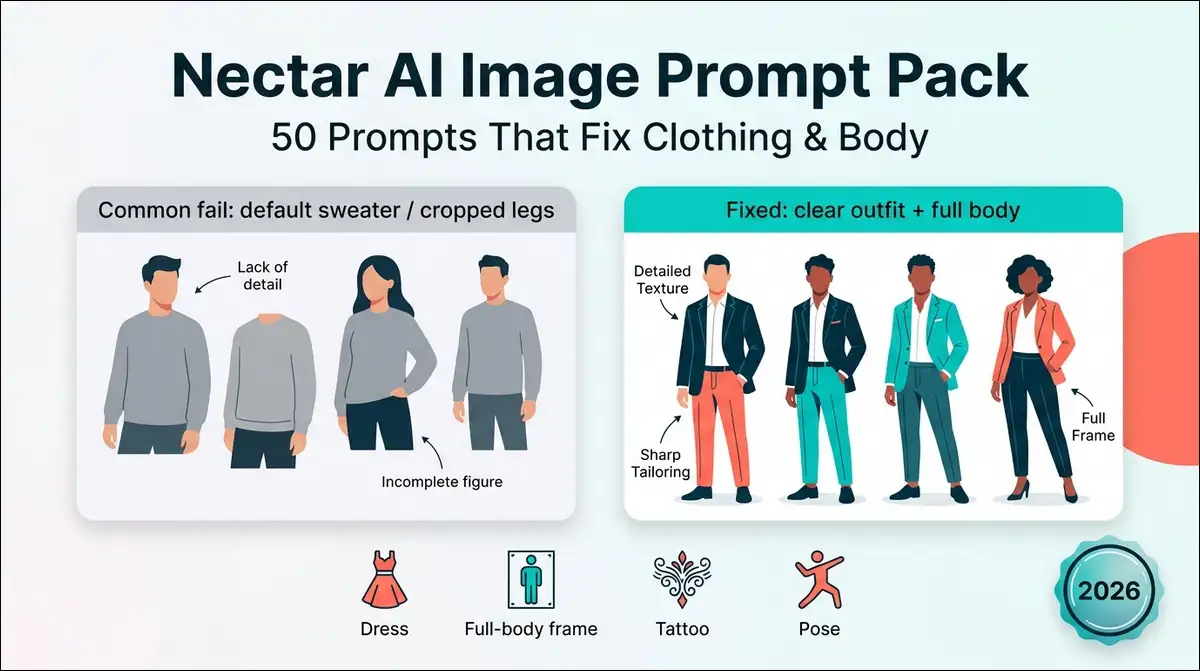
Bottom line first: Nectar AI can make strong companion images. It also ignores outfits a lot. If you type “red dress” and still get a sweater, you’re not alone. This guide gives you a fix system (CLOTH) plus 50 paste-ready prompts built around the fails 2026 reviews keep reporting: clothing ignore, weak full-body framing, tattoo flicker, and awkward poses.
So, I wrote this as a toolkit, not a vibes review. You can copy a prompt, generate once, save it, then change one detail at a time.
Key findings (what actually breaks Nectar images)
Before we get into the pack, here’s what matters most.
| Finding | What it means for your prompts |
|---|---|
| Clothing is the #1 fail | The model may default to sweaters or soft tops and skip your outfit text |
| Full-body is unreliable | Without shot language, you often get portraits with no legs or shoes |
| Tattoos flicker | Details can vanish on the next gen unless you lock placement hard |
| V1 vs V2 behave differently | V2 often helps scene and outfit accuracy. V1 may hold face likeness better |
| Single-slot queue | Gens often take about 10–13 seconds, one at a time |
| Save before you leave | Images can disappear if you navigate away too fast |
| Prompt wording matters more here | Nectar leans on text more than some apps with big outfit dropdowns |
| NSFW is toggle-based | Adult mode can change crops and default clothing reads. Keep SFW and mature prompts separate |
Verdict in one line: Better images on Nectar come from front-loaded clothing language + full-body framing, not longer poetic prompts.
Why Nectar AI ignores your clothing prompts (and how to fix it)
So why does a clear outfit still fail? In 2026 hands-on reviews, clothing ignores and full-body misses show up again and again. Image quality can look sharp while the wardrobe still drifts.
What testers keep reporting
And the pattern’s pretty consistent. Across review writeups, the same symptoms repeat:
- Outfit text gets soft-pedaled or swapped
- A sweater or plain top appears when you never asked for one
- Full-body requests still crop at the waist
- Tattoos show once, then vanish
- Hands and arms collapse in complex poses
- One image queue makes spam regeneration expensive in time
That’s annoying. It’s also fixable with structure.
The constraints you can work around
Still, you’re not fighting “bad AI” in the abstract. You’re working inside a few product limits:
- One image at a time in many tests
- Prompt-heavy outfit control vs pure sliders
- Likeness vs wardrobe tradeoff when V1/V2 options appear
- Character identity that can fight a brand-new outfit mid-chat
Once you accept those, prompts get calmer and shorter.
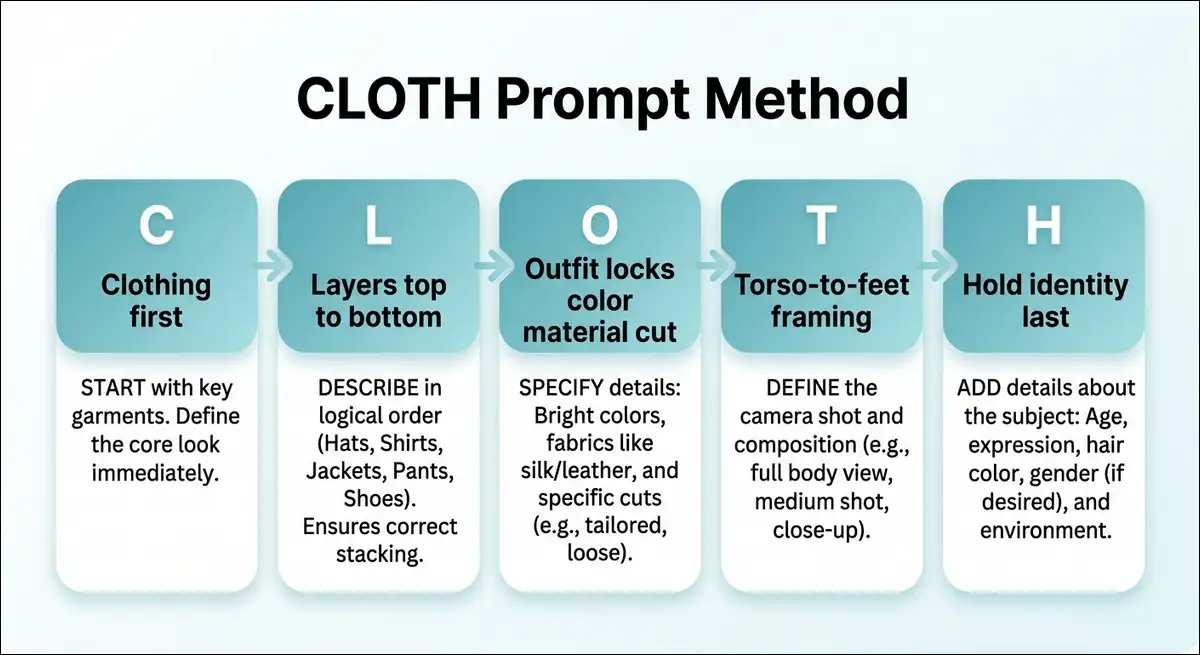
The CLOTH fix framework
That’s where a simple order helps. I use this sequence every time.
| Letter | Meaning | What you write first |
|---|---|---|
| C | Clothing first | Put the outfit in the first line, not the last |
| L | Layers | Top → mid layer → bottom → shoes → accessories |
| O | Outfit locks | Color + material + cut (“red satin slip dress, thin straps”) |
| T | Torso-to-feet framing | “full body, head to shoes, feet visible” |
| H | Hold identity last | Face, hair, eyes after clothes are locked |
Why this helps: Nectar seems to over-index early tokens for wardrobe. If the dress is buried under mood poetry, the sweater wins.
Nectar AI image settings that change prompt results
Prompt order isn’t the only lever, though. You don’t need every menu. You mainly need the toggles that can change clothes and body.
Realistic vs anime
Realistic can read fabric and body weight more literally.
Anime may exaggerate proportions, so fitted clothing language still helps, but body terms can stay simple.
If fabric accuracy is the goal, you can start realistic. If stylized line and hair matter more, you may prefer anime and keep the same CLOTH order.
V1 vs V2 (when you have the option)
From 2026 testing notes:
| Goal | Try first |
|---|---|
| Outfit + scene accuracy | V2 |
| Face / character likeness | V1 |
| Tattoo visibility in a scene | V2, then lock placement text |
| Same face, new wardrobe | Generate likeness on V1, then wardrobe passes on V2 if needed |
Results can vary by update. If one model ignores the dress, you can switch once before you rewrite the whole prompt.
In-chat image vs standalone generator
You may also have the option to request images in chat or use a more open generator path, depending on your plan and UI. The same wording may behave a bit differently in each.
Practical habit: Keep a short “hero prompt” for your character. Reuse it in both places so you’re testing one variable, not five.
NSFW toggle impact
There’s one more setting that can reshape the result. If adult content is off, the model may push modest crops and safer tops. If you turn it on, wardrobe and framing can shift.
For this pack:
- Default prompts are SFW-friendly
- A few optional mature notes stay clearly labeled 18+
- I’d avoid mixing “fix clothing” practice with heavy adult requests until the outfit sticks
Save and queue discipline
And once you generate, timing matters. Because the queue is often single-slot and gens take time, you can:
- Write the full prompt first
- Generate once
- Save immediately
- Change only one thing next
Ten near-identical regenerations rarely fix a sweater. A cleaner first line usually does.
The prompt formula that works better on Nectar
With settings out of the way, let’s put the wording in a reusable shape. Here’s the template I actually reuse.
Base structure (copy this)
[shot type], [clothing stack top to bottom], [body build], [pose],
[identity anchors: hair, eyes, skin, age vibe], [setting], [lighting],
[style: realistic or anime], [quality locks], [avoid list]
Clothing comes before identity. That’s the whole trick.
Clothing stack order
From there, you can write layers in this order:
- Main top or dress
- Outer layer (only if needed)
- Bottom (if not a dress)
- Shoes
- Accessories last
Example stack:
emerald satin midi dress with thin straps, no jacket, no cardigan,
bare shoulders, black strappy heels, small gold hoop earrings
Body consistency anchors
Body language works the same way. Pick one build line. Don’t stack conflicting adjectives.
Good enough:
- “slim athletic build”
- “soft curvy figure”
- “tall long legs”
- “broad shoulders, fit torso”
Then stop. Extra body poetry often creates weird proportions.
Avoid language that helps
You can also add a short avoid list at the end:
no sweater, no hoodie, no coat over the dress, no extra jacket,
no cropped portrait, no missing feet, no blurry hands
Keep it short. A novel-length negative block can dilute the outfit.
Identity lock vs outfit change
And if you want the same face in new clothes, keep the identity block stable:
- Keep hair, eye color, and one face cue stable
- Make the clothing block longer and earlier
- Avoid rewriting the whole person every time
full body, red leather moto jacket open over white crop top,
high-waist black jeans, white sneakers,
same woman with shoulder-length black hair and brown eyes...
50 Nectar AI image prompts (the pack)
Now for the part you can actually paste. Here’s how I’d use the pack:
- Copy one prompt
- Swap identity bits like hair or eyes if you want
- Generate once, save, then edit one clause
- Legend: 👕 clothing · 🧍 full-body · 🎨 tattoo · 💃 pose · 🎬 scene · 🎌 style
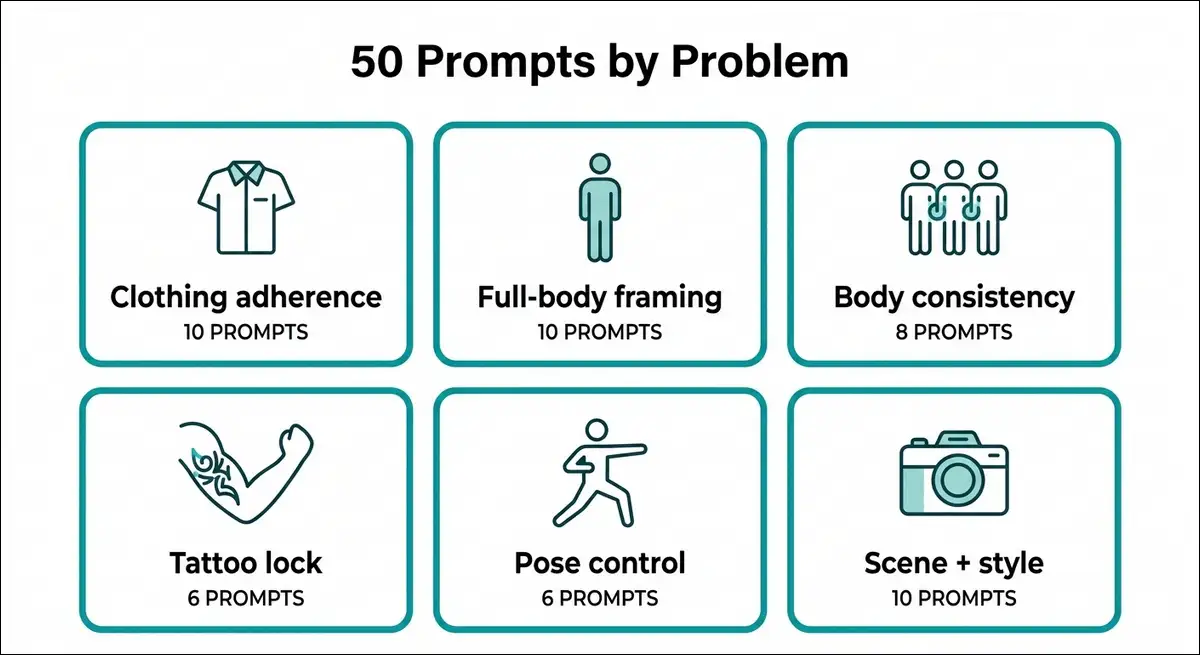
Prompts 1–10 — Clothing adherence (kill the default sweater) 👕
1. medium shot, bright red satin slip dress with thin straps, clean neckline, no sweater, no cardigan, no jacket, fabric clearly visible, soft studio light, realistic photo
2. upper body, open black blazer over white ribbed tank top, blazer worn open, tank fully visible, no closed coat, no turtleneck, sharp fabric detail, realistic
3. portrait to waist, cobalt blue off-shoulder top, bare shoulders, no sweater covering shoulders, smooth fabric folds, natural window light, realistic
4. full outfit focus, yellow rain jacket zipped only halfway over gray t-shirt, t-shirt visible at chest, no hidden layers, street daylight, realistic
5. medium shot, green plaid flannel shirt fully unbuttoned over black sports bra, flannel open, no closed shirt, gym mirror light, realistic
6. waist-up, white button-up shirt tucked into high-waist beige trousers, shirt tucked tight, no loose sweater, office soft light, realistic
7. medium shot, black leather corset top with visible seams, no jacket, no cardigan, no hoodie, strong rim light, realistic
8. cafe table shot, soft pink knit camisole only, thin straps, no sweater, no shawl, warm indoor light, realistic
9. upper body, navy school-style sweater vest over white collared shirt, vest and collar both visible, no heavy coat, clean daylight, realistic
10. medium shot, metallic silver crop top with high-waist black cargo pants, crop top fully shown, no long sweater covering midriff, night city bokeh, realistic
Prompts 11–20 — Full-body framing (head to shoes) 🧍
If the outfit sticks but the crop doesn’t, these help you pull the camera back.
11. full body standing, head to shoes visible, feet in frame, black midi dress, ankle strap heels, straight posture, plain studio backdrop, realistic
12. full body, head to toes, white sneakers visible, light blue jeans and tucked white tee, relaxed stance, outdoor park path, realistic
13. full body three-quarter view, boots fully visible, long camel coat open over black outfit, feet on ground, sidewalk, realistic
14. full body walking toward camera, shoes sharp and visible, red tracksuit set, athletic build, gym parking lot, realistic
15. full body sitting on a stool, legs and shoes visible, denim mini skirt and white blouse, hands on knees, studio, realistic
16. full body mirror selfie angle, entire outfit and shoes shown, olive green utility jumpsuit, bedroom mirror, realistic
17. full body from a slightly low angle, feet visible, long black evening gown with a thigh-high slit, glossy floor, realistic
18. full body, head-to-toe framing, yellow sundress and sandals visible, soft beach light, no crop at waist, realistic
19. full body standing side profile, shoes in frame, gray tailored suit and loafers, clean office hallway, realistic
20. full body, camera stepped back, entire figure visible including shoes, purple hoodie and black joggers, rooftop, realistic
Prompts 21–28 — Body shape consistency 🧍👕
Once framing’s under control, you can steady body shape with one clear build line.
21. full body, slim athletic build, fitted black tank and running shorts, long legs, natural proportions, track, realistic
22. full body, soft curvy figure, belted wrap dress showing waist, balanced hips and bust, no distortion, studio, realistic
23. full body, tall long-legged frame, high-waist jeans and crop sweater, torso-to-leg ratio natural, city street, realistic
24. medium-full shot, fit torso, broad shoulders, compression sports top and leggings, solid stance, gym, realistic
25. full body, petite frame, tailored blazer dress above the knee, proportional limbs, gallery light, realistic
26. full body, lean runner build, race tank and shorts, visible collarbones, no exaggerated anatomy, morning road, realistic
27. full body, hourglass silhouette in ribbed knit maxi dress, clear waistline, natural hands at sides, studio, realistic
28. full body, sturdy athletic legs, bike shorts and oversized tee knotted at waist, grounded pose, outdoor court, realistic
Prompts 29–34 — Tattoo and detail lock 🎨
Details are next, ‘cause tattoos are where regen variance gets annoying.
29. medium shot, bare right forearm with detailed black rose tattoo clearly visible, sleeveless black top, tattoo sharp every time, realistic
30. upper body, fine-line script tattoo along left collarbone, open shirt collar, tattoo placement locked on collarbone, soft light, realistic
31. full body, full sleeve geometric tattoo on left arm, tank top, sleeve tattoo continuous from shoulder to wrist, outdoor daylight, realistic
32. portrait to waist, small crescent moon tattoo behind right ear, hair tucked behind ear so tattoo shows, realistic
33. medium shot, watercolor-style peony tattoo on right shoulder blade, backless top, tattoo centered on shoulder blade, studio, realistic
34. upper body, matching tiny star tattoos on both wrists, short sleeves rolled up, both wrist tattoos visible, cafe light, realistic
Prompts 35–40 — Pose control without anatomy collapse 💃
After the body reads clean, you can push pose a little without breaking hands and arms.
35. full body, hands on hips, elbows out gently, red tea dress, clean standing pose, no twisted fingers, studio, realistic
36. medium shot, arms crossed loosely over chest, denim jacket, hands relaxed not clenched, neutral face, realistic
37. full body, leaning on railing with one forearm, other hand in pocket, black jeans and white tee, city overlook, realistic
38. three-quarter view looking back over shoulder, hair over one shoulder, green satin dress, simple spine twist, realistic
39. full body sitting, legs crossed at knee, hands resting on top knee, beige trousers and blouse, chair fully visible, realistic
40. full body, one hand adjusting bag strap, other arm relaxed, trench coat and ankle boots, crosswalk, realistic
Prompts 41–45 — Scene + outfit together 🎬👕
Then you can add a setting without letting the background steal the outfit.
41. full body cafe interior, outfit first: cream cable knit vest over blue shirt and black skirt, latte on table, warm light, realistic
42. full body rainy street night, outfit first: clear raincoat over black mini dress and boots, neon reflections, realistic
43. full body gym, outfit first: maroon sports bra and black high-waist leggings, dumbbell rack background, bright light, realistic
44. full body modern office, outfit first: gray pencil skirt suit and pointed heels, glass windows, daylight, realistic
45. full body golden hour beach path, outfit first: white linen shirt dress and sandals, wind soft, realistic
Prompts 46–50 — Style control (realistic main + anime switch) 🎌
These five finish the official 50. For each one, you have the option to swap the ending realistic for clean modern anime style, sharp lineart if you want a twin pass.
46. full body, cherry-red school-style cardigan over white blouse and plaid skirt, loafers, soft daylight, realistic
47. medium shot, oversized denim jacket on black turtleneck, silver hoop earrings, street photo realism
48. full body, pastel purple hoodie dress and chunky sneakers, park path, realistic
49. upper body, black turtleneck under long camel coat, city bokeh, realistic
50. full body, white gi-style wrap top and black wide pants, dojo wood floor, realistic
Anime twin tip: Keep the outfit block identical. Only change the style tag. That’s the cleanest way to test whether fabric reads survive the style shift.
Before/after prompt surgeries (5 worked examples)
If you want to see the method in action, these are the “show your work” fixes most reviews skip.
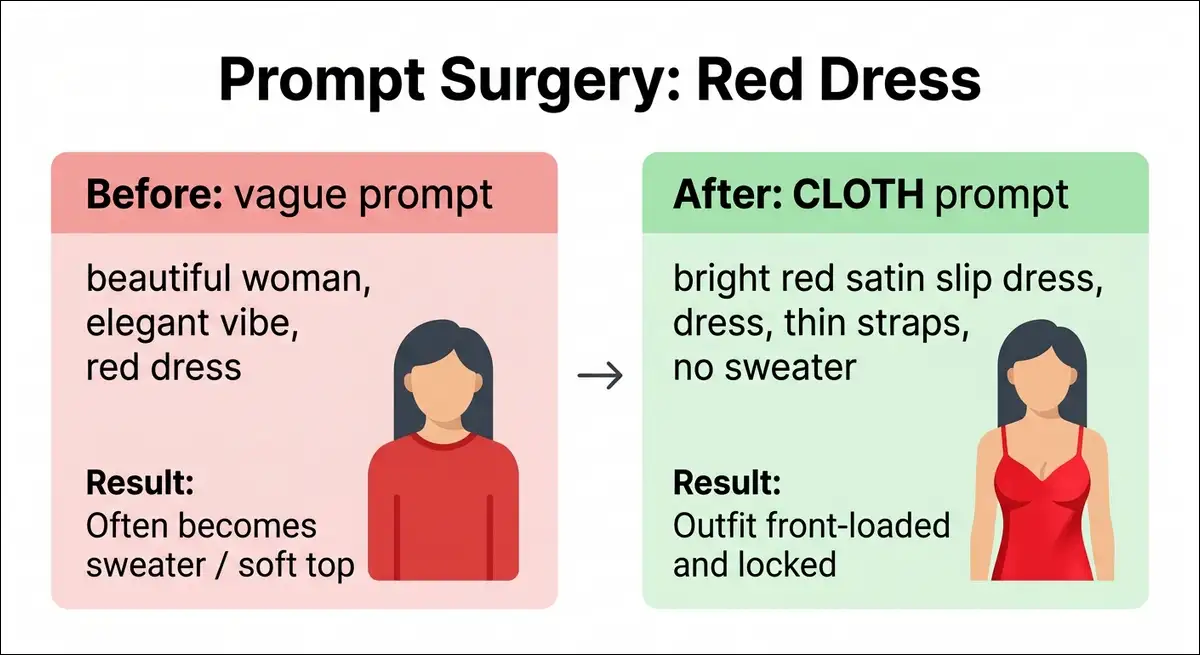
Example 1 — “Red dress” still becomes a sweater
Fail prompt:
beautiful woman smiling, elegant vibe, red dress, cinematic lighting
Why it fails: Clothing’s late and vague. “Elegant vibe” doesn’t do much useful work.
Fixed prompt:
medium shot, bright red satin slip dress with thin straps, bare shoulders, no sweater, no cardigan, no jacket, clear dress fabric, soft studio light, realistic
What changed: Clothing first, material + cut, explicit no-sweater locks.
Example 2 — You wanted full body, got a face crop
Fail prompt:
my AI girlfriend full body in jeans and sneakers
Why it fails: “Full body” alone’s weak against portrait bias.
Fixed prompt:
full body standing, head to shoes visible, feet in frame, light blue jeans, white sneakers clearly shown, tucked white tee, park path, realistic
What changed: Head-to-shoes + feet visible + shoe callout.
Example 3 — Tattoo vanishes on regen
Fail prompt:
cool girl with tattoos in a tank top
Why it fails: There’s no placement, no style, and no permanence language.
Fixed prompt:
medium shot, sleeveless black tank, detailed black rose tattoo on right forearm clearly visible, same tattoo every generation, sharp ink edges, realistic
What changed: Exact placement + “clearly visible” + stability phrase.
Example 4 — Jacket hides the outfit you wanted
Fail prompt:
leather jacket and crop top, stylish
Why it fails: The jacket often renders closed and eats the crop top.
Fixed prompt:
medium shot, black leather jacket worn open, white crop top fully visible underneath, jacket unzipped, midriff slightly shown, no closed coat, realistic
What changed: Open/unzipped language + “fully visible underneath.”
Example 5 — Gym body looks soft or wrong
Fail prompt:
super fit, sexy gym body, workout clothes
Why it fails: Vague body slang + vague clothes.
Fixed prompt:
full body, athletic build, maroon sports bra and black high-waist leggings, solid stance, natural muscle definition, gym mirrors, realistic
What changed: One build term + exact outfit + grounded pose.
Troubleshooting matrix (when it still ignores you)
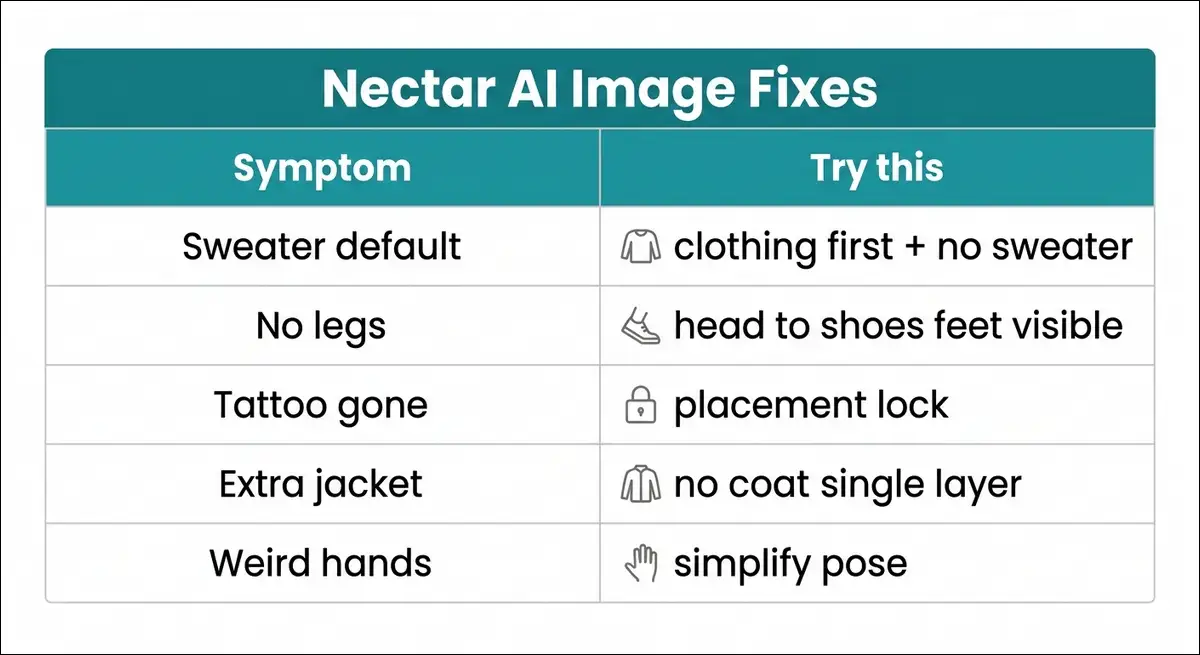
Even good prompts can miss. When that happens, use this matrix before you burn more gens.
| Symptom | Likely cause | What to try next |
|---|---|---|
| Sweater / default top | Clothing not front-loaded | Move outfit to first 15 words; add “no sweater” |
| No legs or shoes | Portrait bias | Add “head to shoes, feet visible” |
| Face drifts | Prompt too long / weak ID | Shorten scene; lock hair + eyes |
| Tattoos gone | Weak detail lock | Placement + style + “clearly visible” |
| Extra jackets | Over-layering | “single outer layer” or “no coat” |
| Weird hands | Pose too complex | Pockets, hips, or rest hands on a prop |
| Outfit right, body wrong | Conflicting body words | One build descriptor only |
| Good once, fails next | Regen variance | Change one clause only; save winners |
How many retries are worth it
With a single queue and ~10–13 seconds per image, I’d stop at 3–4 tries. Then rewrite with CLOTH instead of rolling the dice.
When to switch V1/V2 instead of rewriting
If rewriting still feels off, you can switch models first:
- Outfit wrong, face fine → try V2
- Face wrong, outfit fine → try V1
- Both wrong → rewrite clothing first, then model
Nectar vs other apps for outfit control (quick reality check)
Of course, Nectar isn’t the only image path in this category. You don’t need a full competitor essay here. You just need the practical split.
| Need | Nectar can work if… | Another app may feel easier if… |
|---|---|---|
| Companion-linked images | You want chat + image in one place | You only care about pure art tools |
| Outfit text control | You use CLOTH and locks | You want heavy visual sliders |
| Consistency across many gens | You reuse a short identity block | Candy-style consistency is your top priority |
| Full creative wardrobe tests | You budget gens and save winners | You need huge batch queues |
Hands-on take: Nectar’s image quality can look great. Outfit obedience is more of a prompt-skill issue than an “is the model pretty” issue.
Prompt ops: workflow that saves gens and time
One more practical layer: plan limits. Free tiers often top out at around 10 image generations/day, so process matters.
One-variable iteration
Here’s the order of operations I’d stick to:
- Clothing
- Framing (full body vs portrait)
- Pose
- Background
- Style model (V1/V2, realistic/anime)
If you change all five at once, you won’t know what fixed it.
Build a personal outfit bible
After a few wins, save 5 outfits that always work for your character:
- Everyday casual
- Smart casual
- Athletic
- Evening
- Seasonal outer layer
Reuse those blocks instead of inventing from scratch each night.
Save, rename, reuse
A simple naming pattern helps later:
char_redslip_fullbody_v2_01
If the platform doesn’t rename files for you, you can keep a simple note with the winning prompt text.
Free vs paid gen budgets
On tighter daily caps, I’d spend gens on clothing locks, not background fireworks. Backgrounds are cheap to change after the outfit’s stable.
Optional mature prompt notes (18+ only)
If you enable NSFW, clothing still needs CLOTH. Adult mode doesn’t magically follow bad outfit text.
You can keep these rules in mind:
- Lock the garment first, then intimacy framing
- Avoid dumping only body slang with no clothing stack
- Expect different crops; restate “full body / head to shoes” when you need it
- Don’t publish explicit prompts in SFW guides without labels
I’m keeping this section principle-based on purpose. The 50-pack above stays usable without adult content.
FAQ: Nectar AI image prompts
Still stuck on a specific fail? These come up the most.
Because clothing’s often under-weighted if it appears late or vague. Put the outfit first, name fabric and cut, and add “no sweater, no cardigan” when that default shows up.
Say full body and prove it. Use “head to shoes visible, frame feet,” and name the shoes. “Full body” alone’s usually too weak.
Try V2 first for outfit and scene accuracy. You can switch to V1 if the face drifts too much. Your account may label models differently after updates.
Yes, more often if identity stays short and stable. Lock hair, eyes, and one face cue. Make the clothing block longer than the identity block.
They still need clear garment stacks. Adult mode can change defaults and crops, so restate clothing and framing. Keep mature use 18+ only.
They’re treated like optional details unless you lock them. Use placement, style, and “clearly visible / same tattoo every generation.”
Often about 10–13 seconds per image in reviewer tests, with a single-slot queue. Plan fewer, better prompts.
No. The same CLOTH order can work for guys, anime characters, and original OCs. Swap identity lines and keep clothing first.
Wrapping Up!
So where does that leave you? Nectar AI can output sharp, usable companion images. The sweater problem isn’t mysterious once you see the pattern. Wardrobe fails when clothing’s vague, late, or fighting a portrait default.
If you only take one system from this page, take CLOTH:
- Clothing first
- Layers in order
- Outfit locks (color + material + cut)
- Torso-to-feet framing
- Hold identity last
Then use the 50 prompts as starting recipes, not scripture. Save what works for your character. Drop what doesn’t. And if a review only says “image quality is good,” it didn’t solve the outfit problem you actually have.
Next reads that pair well
- Nectar AI Real Cost 2026 (gens and plans still cost money)
- Companion vs Fantasy playbook
- Photo-reference companion pipeline
- Nectar vs Candy for image consistency
Note: Results vary with model updates. Prompts are educational starting points. Adult features are for users 18+ only. Verify current UI labels on nectar.ai or trynectar.ai.