UltraViewer Pricing: Free vs Lite vs Professional vs Premium In 2026
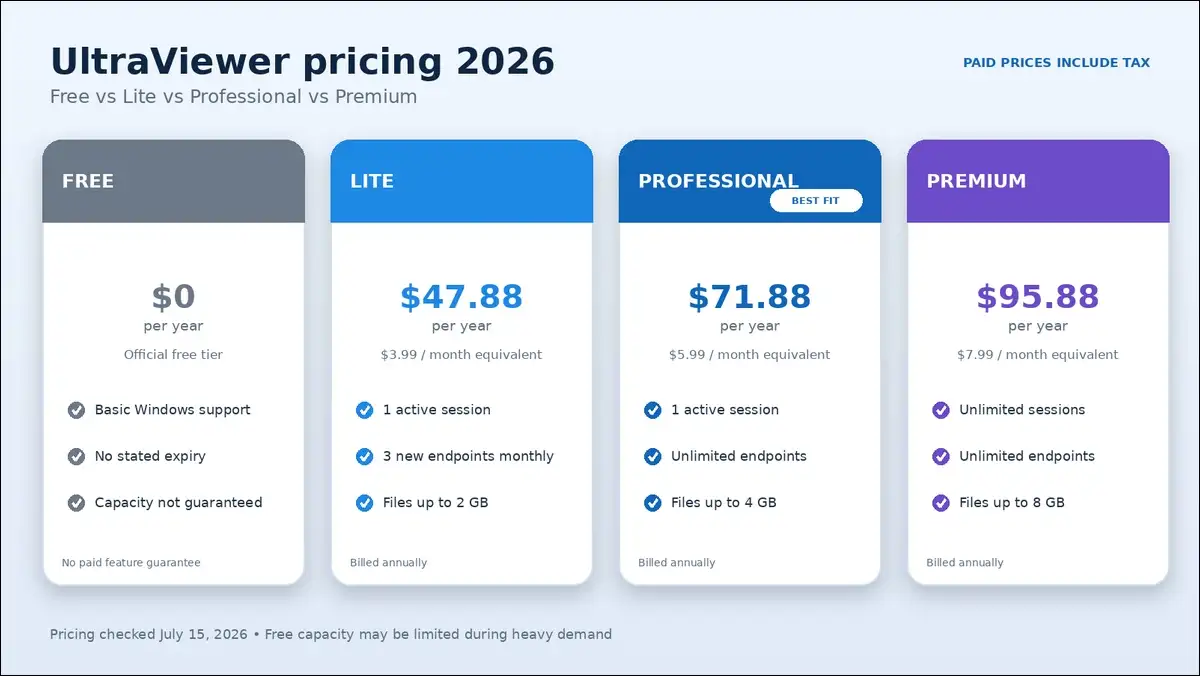
UltraViewer Professional offers the most practical value for solo technicians. It costs $71.88 yearly and removes Lite’s endpoint restriction.
Lite costs $47.88 yearly but permits only three new endpoints monthly. Meanwhile, Premium costs $95.88 yearly and adds unlimited concurrent sessions.
Free may handle occasional support, but its capacity isn’t guaranteed. That’s the key detail many competing pricing guides miss.
Key findings: Professional fits most frequent support work
- Free costs nothing, but UltraViewer doesn’t guarantee bandwidth or session capacity.
- Lite costs $47.88 yearly and supports three new endpoints monthly.
- Professional costs $71.88 yearly and can support unlimited remote endpoints.
- Premium costs $95.88 yearly and may run unlimited concurrent sessions.
- Every paid plan uses annual billing, despite showing monthly equivalents.
- UltraViewer includes tax within its displayed paid-plan prices.
- Paid purchases include a 15-day refund window through UltraViewer’s terms.
- Professional can add Address Book and PC sound for frequent support.
- Premium can add recording, branding, larger files, and faster route options.
- Premium still licenses one active user, not an unlimited technician team.
Our Verdict: Free for testing, and Professional plan for frequent support
- Free may suit occasional, noncritical Windows support work. You could encounter restrictions when UltraViewer experiences heavy demand.
- Lite may fit one person accessing three repeat computers. However, its endpoint limit can hinder new customer support.
- A professional may fit solo technicians supporting many Windows computers. You’ll pay only $24 more yearly than Lite.
- Premium may fit one technician managing several active sessions. You can also get recording, branding, and 8 GB transfers.
| Your situation | Most suitable plan | Main reason | Main caution |
|---|---|---|---|
| Occasional family help | Free | No subscription cost | Capacity isn’t guaranteed |
| Three repeat Windows PCs | Lite | Low annual cost | Three new endpoints monthly |
| Frequent one-session support | Professional | Unlimited endpoints | One concurrent session |
| Several simultaneous sessions | Premium | Unlimited sessions | One active licensed user |
| Several active technicians | Additional paid licenses | Separate user access | Confirm license count first |
| Mac or Linux support | Another product | Native platform coverage | UltraViewer remains Windows-focused |
UltraViewer plans cost between $0 and $95.88 yearly
UltraViewer’s paid prices become clearer once you understand annual billing. The displayed monthly amounts aren’t month-to-month subscription options.
I’ve carefully checked the official UltraViewer pricing page. Here’s the complete annual cost breakdown for 2026.
| Plan | Monthly equivalent | Annual charge | Concurrent sessions | Remote endpoints |
|---|---|---|---|---|
| Free | $0 | $0 | Official comparison says 1 | No guaranteed service level |
| Lite | $3.99 | $47.88 | 1 | 3 new IDs monthly |
| Professional | $5.99 | $71.88 | 1 | Unlimited |
| Premium | $7.99 | $95.88 | Unlimited | Unlimited |
Monthly prices are annual-billing equivalents
You’ll pay the full annual amount when purchasing a plan. That’s because UltraViewer labels every price as billed annually.
So, Lite charges $47.88 instead of $3.99 monthly. Professional charges $71.88, while Premium charges $95.88 yearly.
UltraViewer includes tax within the displayed paid prices
The official pricing page says listed prices include all taxes. That’s different from TeamViewer and AnyDesk’s current US pricing.
Your payment method may still add conversion or bank fees. Those charges come from your provider, not UltraViewer’s table.
Paid plans include a 15-day refund window
UltraViewer’s official terms provide a 15-day money-back period. You’ll need to submit your request through UltraViewer’s contact page.
I haven’t purchased or refunded a license during this review. Therefore, I can’t describe processing times from direct experience.
Version upgrades don’t require another purchase fee
The pricing page says you can upgrade without extra charges. That statement covers software versions during an active license.
However, it doesn’t mean your annual subscription avoids renewal. That’s why you should separate upgrades from license duration.
UltraViewer Free costs nothing, but capacity isn’t guaranteed
Free plan can handle basic Windows support without an annual payment. However, you’ll find different limits across the vendor’s pages.
That conflict deserves more attention than generic unlimited claims. You’ll want both official statements before relying on Free.
Free can provide the basic remote support workflow
UltraViewer’s public pages document these core capabilities:
- You can control another Windows computer using an ID and password.
- You can open chat using the default F1 shortcut.
- You can transfer files through the chat window.
- You may control several computers from separate windows.
- You can configure fixed-password access for unattended remote computers.
- You can review local connection logs after sessions.
- You have the option to limit clipboard sharing.
The paid pricing table doesn’t document Free’s exact file ceiling. Therefore, this guide doesn’t copy Lite’s 2 GB limit into Free.
The English page says Free plan can support commercial use
UltraViewer’s English comparison page says Free supports personal and commercial use. It also says sessions don’t carry a time limit.
Those statements may make Free attractive to small businesses. However, they don’t create a promised service level.
Another official page says Free has no capacity commitment
UltraViewer’s Vietnamese product disclosure adds important Free-plan limits. It says Free doesn’t include commitments for time or computer counts.
During peak demand, UltraViewer may restrict bandwidth or session duration. It may also restrict how many computers you control.
The clearest conclusion is simple:
Free plan has no stated expiry, but it isn’t guaranteed unlimited service.
Free works best for occasional, noncritical sessions
Free may suit these situations:
- You occasionally help a family member with Windows.
- You want to test UltraViewer before purchasing access.
- You can tolerate slower performance during busy periods.
- You don’t depend on guaranteed remote-support availability for urgent work.
Still, Free isn’t ideal for urgent or regulated support. Its unclear capacity can create unnecessary operational uncertainty.
UltraViewer Lite costs $47.88 yearly, but limits new endpoints
If Free feels uncertain, Lite may suit three repeat IDs. Anyone meeting more computers should compare Professional before purchasing.
The $23.99 yearly savings may look appealing initially. However, one additional customer computer could remove that advantage.
Lite licenses one user on one local device
Lite can cover one user and one licensed computer. You can also run one active remote session.
That local computer belongs to the person operating UltraViewer. It isn’t one of the remote endpoint computers.
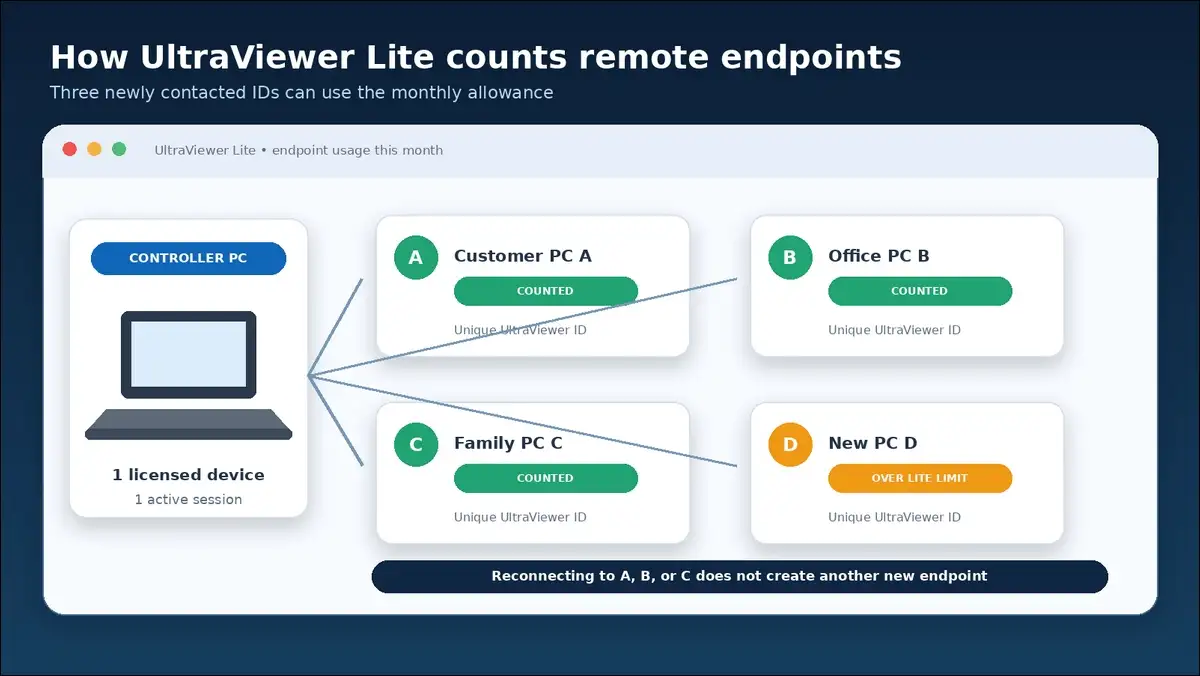
Three endpoints mean three newly contacted IDs monthly
UltraViewer counts a new endpoint using the remote computer’s ID. The counting window lasts roughly one month, or 30 days.
Consider this example:
- You connect to computers A, B, and C.
- Those three IDs use your monthly endpoint allowance.
- You may reconnect to A, B, and C.
- Connecting to computer D may exceed Lite’s limit.
Most competitor pages don’t explain that counting method. Once you understand it, you’ll avoid unexpected support limits.
Lite supports files up to 2 GB each
Lite can transfer individual files reaching 2 GB. It also includes several convenience features for daily support.
You can use:
- An ad-free interface
- Windows sleep prevention
- Remote computer wake-up
- One active remote session
Lite doesn’t include Address Book or remote PC sound. You’ll find those useful features starting with Professional.
Lite makes sense for a narrow, predictable setup
Lite may suit one person accessing three known computers. A home, office, and family PC provide a clear example.
It usually doesn’t fit repair shops or busy freelancers. Professional costs only $24 more yearly and removes endpoint limits.
UltraViewer Professional costs $71.88 and removes endpoint limits
If three endpoints aren’t enough, Professional may fit better. It combines unlimited endpoints with a manageable annual price.
I’ve compared its official limits with Lite and Premium. Its value comes from fewer restrictions, not marketing language.
One user can install Professional on six computers
Professional may be installed on six local computers. However, only one licensed user can operate it simultaneously.
Six installations don’t create six active technician seats. Instead, they let one user switch between approved computers.
Professional plan can connect to unlimited remote endpoints
A professional plan can remove Lite’s monthly endpoint restriction completely. That change may help freelancers, repair shops, and internal teams.
A technician may contact 30 different customer IDs monthly. Professional won’t apply Lite’s three-endpoint limit to your account.
Professional still permits one concurrent session
Unlimited endpoints don’t mean unlimited simultaneous technician connections. A professional can support one active remote session simultaneously.
That limit fits technicians handling customers sequentially throughout the day. Premium may fit workflows requiring several open sessions.
Professional raises file transfers to 4 GB each
A professional plan can raise Lite’s file ceiling to 4 GB. You can also use the Address Book and PC sound.
Its complete additions include:
- Unlimited remote endpoints
- Address Book access
- Remote PC sound
- Files reaching 4 GB each
- Ad removal
- Sleep prevention
- Remote wake-up
Professional adds considerable value for only $24 yearly
The jump from Lite costs exactly $24 yearly. In return, you’ll remove the main endpoint restriction.
You’ll also gain Address Book and remote PC sound. Together, those features may reduce repeated support setup.
UltraViewer Premium costs $95.88 and adds unlimited sessions
If one session isn’t enough, Premium may fit better. It can add UltraViewer’s advanced support and branding features.
The annual price remains exactly $24 above Professional. That difference may make Premium worthwhile for specific workflows.
One user can install Premium on twelve computers
Premium can be installed on twelve local computers. Only one licensed user may operate the license simultaneously.
That distinction matters for support teams with several technicians. Twelve installations don’t automatically provide twelve active technician accounts.
Premium lists concurrent remote sessions as unlimited
The official pricing page describes Premium sessions as unlimited. One active user may therefore open several remote connections.
However, licensing permission doesn’t guarantee unlimited technical performance. Network speed, computer resources, and relay load can affect capacity.
I haven’t run a controlled multi-session Premium benchmark. Therefore, I can’t state how many sessions remain responsive.
Premium raises file transfers to 8 GB each
Premium can raise Professional’s file ceiling to 8 GB. That capacity may help with backups, installers, or recordings.
The full file comparison is straightforward:
- Lite can transfer files reaching 2 GB each.
- Professional can transfer files reaching 4 GB each.
- Premium can transfer files reaching 8 GB each.
Premium adds recording, branding, and faster route options
Premium can provide every listed UltraViewer pricing feature. You have the option to use several advanced support tools.
Those options include:
- Local session video recording
- A custom client using your branding
- Higher FPS and speed settings
- Alternate connection-route selection
- Unlimited concurrent sessions
- Unlimited remote endpoints
- Address Book and PC sound
The vendor doesn’t publish neutral speed measurements for Premium. Treat higher-performance language as a product claim, not tested proof.
Premium doesn’t automatically license a support team
Unlimited sessions and unlimited users describe different concepts. Premium lists one active licensed user despite unlimited sessions.
A support company with three simultaneous technicians may need three licenses. Buyers should confirm exact licensing before team deployment.
The complete feature table shows each upgrade clearly
With every plan explained, the upgrade path becomes clearer. Professional removes Lite’s main restriction, while Premium adds advanced tools.
| Feature | Free | Lite | Professional | Premium |
|---|---|---|---|---|
| Annual price | $0 | $47.88 | $71.88 | $95.88 |
| Native platform | Windows | Windows | Windows | Windows |
| Licensed local installations | Not clearly specified | 1 | Up to 6 | Up to 12 |
| Active licensed users | Not clearly specified | 1 | 1 | 1 |
| Concurrent sessions | Official comparison says 1 | 1 | 1 | Unlimited |
| Remote endpoints | No guaranteed capacity | 3 monthly | Unlimited | Unlimited |
| Individual file ceiling | Not clearly documented | 2 GB | 4 GB | 8 GB |
| No ads | Not confirmed | Yes | Yes | Yes |
| Prevent Windows sleep | Not confirmed | Yes | Yes | Yes |
| Remote wake-up | Official comparison says no | Yes | Yes | Yes |
| Address Book | Not confirmed | No | Yes | Yes |
| PC sound | Not confirmed | No | Yes | Yes |
| Custom client | No | No | No | Yes |
| Higher FPS or alternate routes | No | No | No | Yes |
| Session recording | No | No | No | Yes |
Here, “not confirmed” doesn’t mean a feature is unavailable. It means I haven’t found clear official pricing documentation.
Four licensing terms determine your real UltraViewer cost
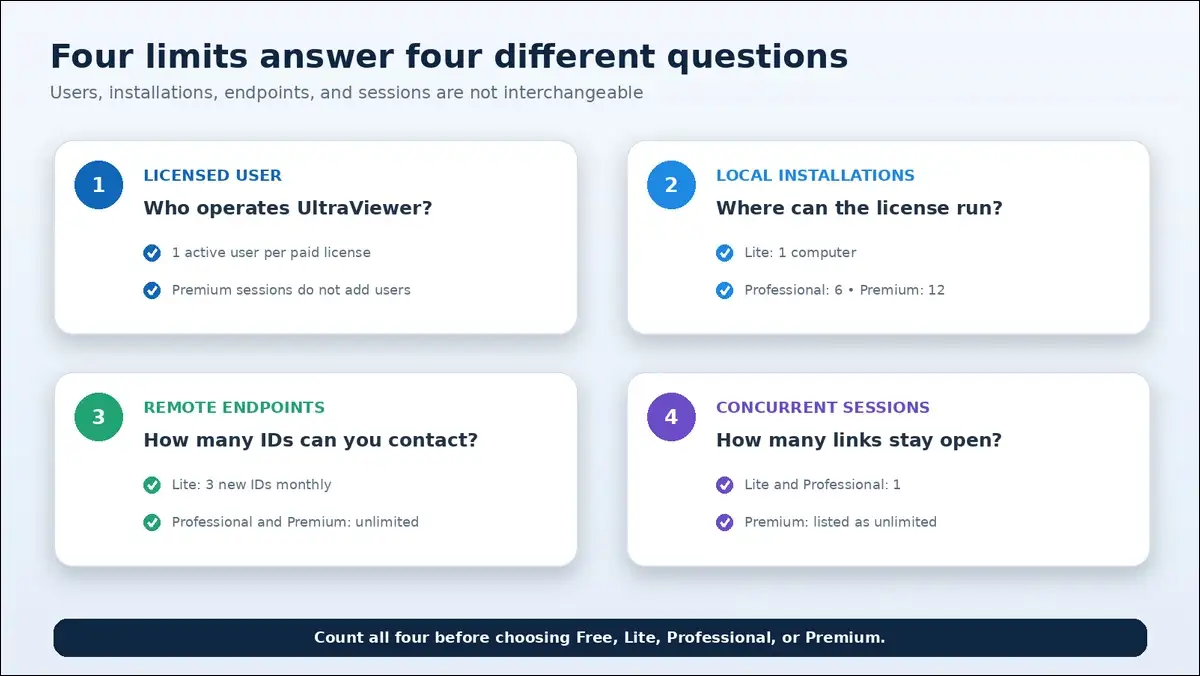
Those plan differences make more sense after defining four terms. Users, installations, endpoints, and sessions measure different things.
A licensed user is the person operating UltraViewer
One active user can operate each listed paid license. Premium’s unlimited sessions can’t remove that user restriction.
If three technicians work simultaneously, you may need three licenses. You have the option to confirm requirements with sales.
A licensed installation is the technician’s local computer
Local installation allowances apply to the controller’s computers. They don’t describe the remote systems receiving support.
The limits are:
- Lite can be installed on one local computer.
- Professional can be installed on six local computers.
- Premium can be installed on twelve local computers.
Only one licensed user may operate Professional or Premium simultaneously. That rule applies across every permitted local installation.
A remote endpoint is a unique controlled ID
Each remote computer receives its own UltraViewer ID. Lite counts new IDs during a roughly 30-day window.
Professional and Premium remove that endpoint limit entirely. Free doesn’t receive a guaranteed endpoint commitment from the vendor.
A concurrent session is an active remote connection
Concurrent sessions measure how many connections remain open simultaneously. Lite and Professional each include one active session at once.
Premium lists concurrent sessions as unlimited for one user. That entitlement still belongs to one active licensed user.
This one-minute decision tree identifies the right plan
Now, here’s a quick path toward the right plan. Start with endpoints, then check sessions, features, users, and platforms.
Free may work for occasional, noncritical access
Free may work when you can tolerate uncertain peak capacity. It’s also useful for evaluating UltraViewer’s basic workflow.
Lite may work for three repeat endpoints
Lite may work when one computer controls three known IDs. You’ll also receive wake-up and 2 GB transfers.
Professional fits frequent one-session support
Professional plan may fit many newly contacted Windows computers monthly. You’ll remove endpoint limits while keeping one active session.
Premium fits one user managing several sessions
Premium may fit when several remote windows remain active. Recording, branding, larger files, and route options can help.
Additional licenses may support several active technicians
Count simultaneous technicians before buying Premium for your support team. Unlimited sessions don’t automatically create additional user seats.
Another platform may suit mixed operating systems
UltraViewer’s FAQ currently describes native Windows support only. Its official Linux page confirms no native Linux application.
If you need Mac, Linux, or mobile control, alternatives may fit. Those platform limits could outweigh UltraViewer’s lower price.
UltraViewer costs less than comparable TeamViewer and AnyDesk entry plans
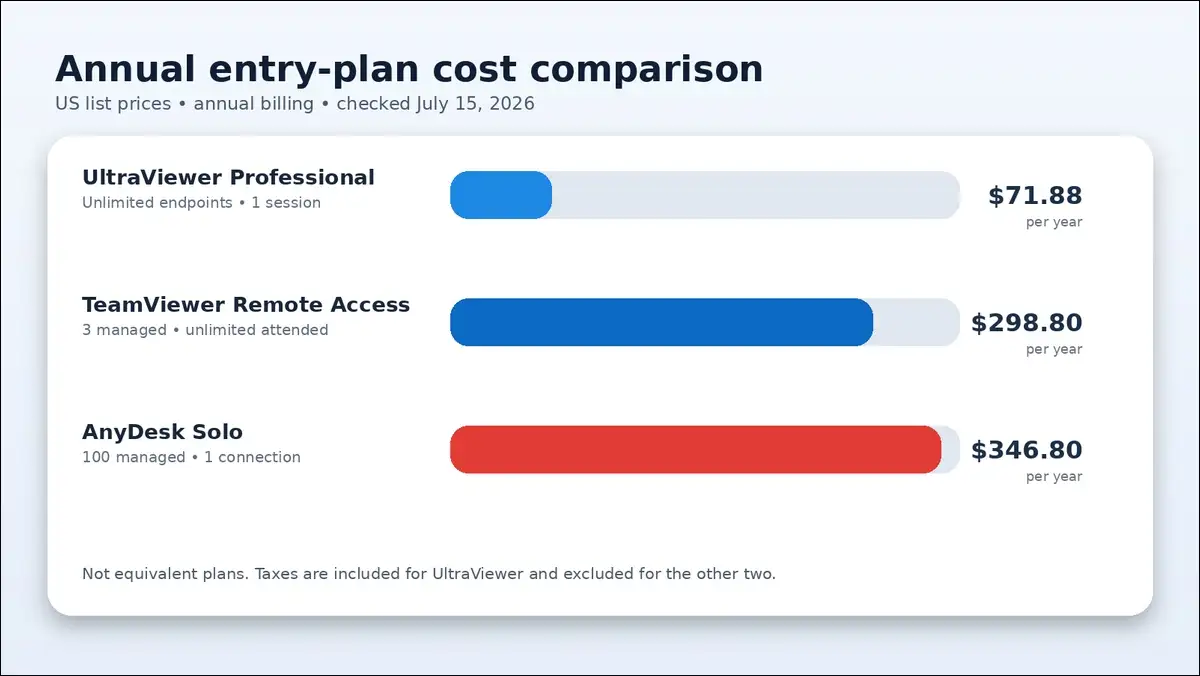
After choosing a plan, competitor pricing adds useful context. UltraViewer Professional remains cheaper than both verified entry plans.
| Entry plan | Annual price | Tax treatment | Notable limit |
|---|---|---|---|
| UltraViewer Professional | $71.88 | Included | One session, Windows-focused |
| TeamViewer Remote Access | $298.80 | Excluded | Three managed devices |
| AnyDesk Solo | $346.80 | Excluded | One connection, 100 managed devices |
Sources: UltraViewer pricing, TeamViewer pricing, and AnyDesk pricing.
Professional costs 75.9 percent less than TeamViewer Remote Access
The calculated yearly difference is $226.92 before TeamViewer tax. That saving matters for simple Windows-only support workflows.
TeamViewer can provide broader platforms and deeper business controls. Those features may justify its higher price for some organizations.
Professional costs 79.3 percent less than AnyDesk Solo
The calculated yearly difference is $274.92 before AnyDesk tax. AnyDesk includes cross-platform access and 100 managed devices.
Still, the plans aren’t equivalent across platforms or features. Your price decision should follow security and device requirements.
Also read: UltraViewer vs TeamViewer vs AnyDesk Full Comparision
Several pricing questions still lack clear official answers
Even with those savings, several questions remain unresolved. Some limits still need clearer documentation directly from UltraViewer.
Free’s file-transfer ceiling isn’t clearly stated
The official pricing table assigns 2 GB files to Lite. It doesn’t publish a matching Free ceiling on the pricing page.
Therefore, you shouldn’t assume Free supports 2 GB transfers. You can ask support when large files matter.
Free commercial use doesn’t include guaranteed capacity
The English page permits commercial use without a time limit. The Vietnamese disclosure says peak restrictions may still apply.
Both statements can be true simultaneously under different service conditions. Free may be allowed commercially without guaranteed service capacity.
Premium’s unlimited sessions lack a performance guarantee
The license permits unlimited concurrent sessions for one user. However, the vendor doesn’t publish a tested capacity benchmark.
Your hardware, internet route, and screen activity will matter. You may want to test workloads before depending on many sessions.
Enterprise identity controls aren’t detailed in pricing
The reviewed pricing page doesn’t document customer-facing MFA or SSO. It also doesn’t describe centralized, tamper-resistant audit retention.
Businesses needing those controls can request written documentation. A low price shouldn’t replace your security review.
The signer and legal publisher use different company names
I inspected UltraViewer’s official stable installer without executing it. Its valid signature identified DUC FABULOUS CO.,LTD as signer.
The Vietnamese product page identifies ULTRALAB as legal publisher. That may reflect corporate arrangements, but buyers can confirm contracting details.
Buy through the official site and save every license record
Once you’ve chosen a plan, use ultraviewer.net for checkout. Search results may include unverified lookalike download domains.
Confirm plan limits before completing payment
You can review annual billing, endpoints, sessions, and file ceilings. Save a dated screenshot before submitting payment through checkout.
Keep your receipt and activation email
Those records may help with renewals, refunds, and device changes. They also document the plan originally purchased for later review.
Check the activated plan inside UltraViewer
After activation, you can confirm the plan name and expiry. You also have the option to verify paid features.
I haven’t completed a paid activation during this review. Therefore, I won’t claim firsthand checkout or refund results.
UltraViewer Pricing FAQs
Quick answers about Free, Lite, Professional, Premium, billing, endpoints, platforms, and refunds.
How much does UltraViewer cost in 2026?
UltraViewer Free costs $0, while paid plans start at $47.88 yearly. Lite costs $47.88, Professional costs $71.88, and Premium costs $95.88. Paid prices include tax and use annual billing.
Is UltraViewer completely free?
UltraViewer offers Free alongside three paid plans. Free can support basic sessions, but capacity may change during heavy demand.
Can businesses use UltraViewer Free?
The English vendor page says Free can support commercial use. However, another official page says Free capacity isn’t guaranteed. Businesses should confirm current terms before depending on it.
Is UltraViewer billed monthly or annually?
UltraViewer currently bills every paid plan annually in advance. The monthly amounts only show equivalent monthly costs, not monthly billing.
Which UltraViewer plan is best for most users?
Professional fits most frequent solo Windows support workflows. It costs $71.88 yearly, removes endpoint limits, and adds Address Book and PC sound.
What counts as an UltraViewer endpoint?
A newly contacted UltraViewer ID counts as one endpoint. The counting window lasts roughly one month, or 30 days. Reconnecting to the same ID doesn’t create another endpoint.
Does Premium support multiple technicians?
Premium allows unlimited sessions for one active licensed user. It doesn’t automatically license several technicians at once. Teams may need additional paid licenses for simultaneous staff.
Does UltraViewer work on Mac or Linux?
No current native Mac or Linux application is documented. UltraViewer’s official FAQ describes the product as Windows-only. Buyers needing other platforms may need another product.
Can I request an UltraViewer refund?
UltraViewer’s official terms provide a 15-day money-back period. You’ll need to submit a refund request through the contact page. Processing times aren’t documented in the pricing terms.
Final thoughts: Professional offers the strongest overall value
Taken together, Professional may fit most solo Windows workflows. It removes Lite’s endpoint limit while costing $71.88 yearly.
Lite saves only $24 yearly and suits fewer users. Meanwhile, Premium costs another $24 and can add advanced features.
Free may work for occasional support without guaranteed capacity. Premium may fit one user handling multiple active sessions.
Before buying, count users, installations, endpoints, and simultaneous sessions. Then you can choose the lowest-cost qualifying plan.