iPad Air White Spot on Screen: Why It Happens, Fixes & Repair Costs in 2026
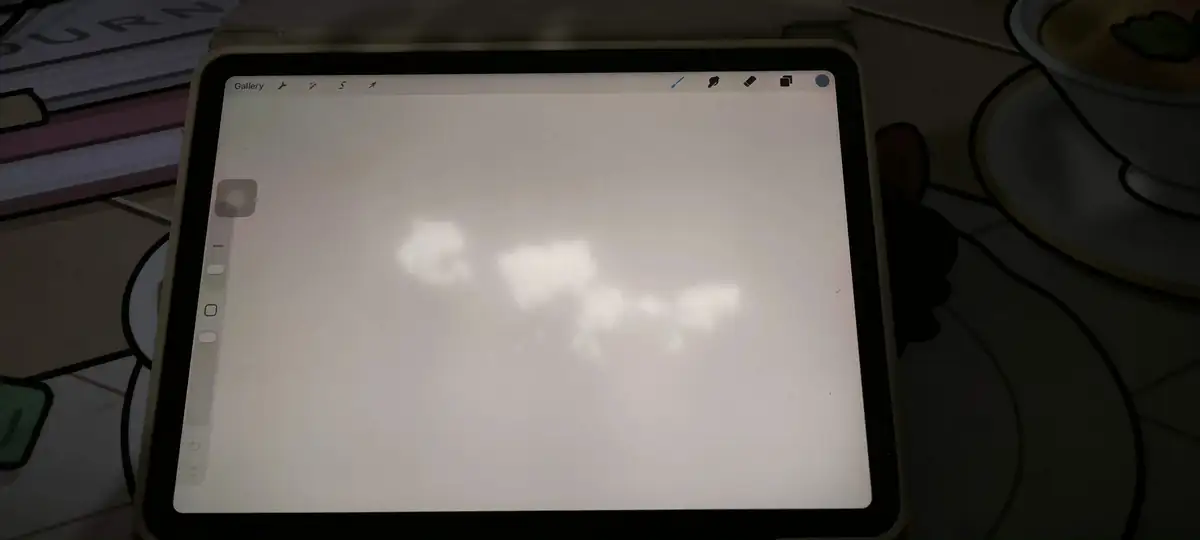
Did you notice a bright, stubborn white spot on your iPad Air screen and want to fix it? Well, here’s the short answer: it’s almost always a hardware defect, and no software trick will remove it.
But don’t worry, you’ve still got some real fixes and solutions that may solve this issue on your iPhone. From a free Apple replacement to a $200 screen repair, we walk you through each method and verified costs.
Can You Fix a White Spot on an iPad Air? (The Quick Answer)
Yes, but the right fix depends on the cause. Most white spots come from damaged backlight layers inside the display. That’s physical damage, so a restart or reset won’t erase it.
Here’s your situation at a glance:
- Under warranty or AppleCare+: Apple will usually replace your iPad for free. Otherwise, you’ll pay $29 to $49, depending on your model (Apple’s official fee list).
- Out of warranty: Apple’s exchange runs around $419 for an iPad Air 5. A third-party screen swap costs $200 to $450.
- In India: Third-party screens run ₹8,999 to ₹17,000. Authorized service quotes reach ₹40,000+.
- DIY methods can lighten pressure marks. But here’s the catch: community reports show the spots often return within weeks.
What That White Spot on Your iPad Air Actually Is
So what’s really going on inside your screen? It’s a backlight problem, not a dead pixel. Your iPad’s LCD uses a diffuser sheet that spreads LED light evenly. When that sheet warps or separates, light pools in one area. That’s when you see a soft white patch.
Two quick clues confirm hardware as the culprit:
- The spot stays in the same physical place across every app you open.
- Another phone’s camera can photograph it, but a screenshot can’t capture it.
Apple Support Community experts call this backlight diffuser delamination. And it’s the single most reported cause across hundreds of support threads.
Is Your White Spot Fixable? Run This 60-Second Diagnosis
Before you spend anything, you can rule out software in under a minute. We ran this exact process on an iPad Air 5 with a center-screen patch. Each step took less than 20 seconds. Here’s what to do:
- Start with the screenshot test. Take a screenshot while the spot is visible, then view it on another phone or computer. If the spot shows up in the image, the software is at fault. Ours didn’t appear, which confirmed hardware.
- Next, try the solid color test. Open a full-black image or a “screen test” video. Backlight spots glow brighter on white and fade on black. Pressure marks tend to show on both.
- Finally, check the location. Center screen or above the home button points to heat damage. Corners point to edge backlight failure. Your usual writing area points to stylus pressure marks.
Also read: New Apple ID for iPad? Here’s How to Switch Accounts
| What you see | Likely cause | Fixable at home? |
|---|---|---|
| Spot shows in screenshots | Software glitch | Yes |
| Soft patch, center screen | Diffuser delamination | No |
| Marks at pencil points | Pressure damage | Sometimes |
| Glowing edges or corners | Edge backlight failure | No |
| Pin-sharp dot | Stuck pixel | Sometimes |
| Patch plus warmth or bulge | Swollen battery | No. Stop now. |
Once you’ve ruled out software, the next question is obvious. Why did it happen in the first place?
Why iPad Air White Spots Happen: The 6 Verified Causes
Heat is the number one reason. Support threads, repair technicians, and user reports all point the same way. Here’s the full picture, ranked by how often each cause shows up:
- Backlight diffuser delamination from heat. The logic board runs down the middle of your iPad. Sustained heat from it warps the backlight layers nearby. That’s why spots so often cluster near the center of the screen.
- Internal pressure damage. Heavy books on the iPad or an overstuffed bag compress the display. The backlight layers deform, and light starts scattering unevenly.
- Heavy stylus pressure. One February 2026 report matched white marks to the owner’s exact drawing spots. So long, heavy-handed pencil sessions can leave permanent marks behind.
- A swollen battery. An aging battery swells and pushes the panel from behind. That can create or enlarge bright patches, and it’s a safety issue too.
- Edge backlight failure. Bright or dark patches hugging the border point to failing edge LEDs. Apple Community experts treat this as a separate defect from delamination.
- Moisture, stuck pixels, or software. These three are rare, but they’re worth ruling out early. The screenshot test eliminates software. Stuck pixels look pin-sharp, not patchy.
Which iPad Air Models Get White Spots (2017 to 2026)
No Air generation is fully immune, but some get hit far more often. We mapped report waves across forums and support threads, and the timeline is telling:
| Model | Peak reports | What owners saw |
|---|---|---|
| iPad Pro 10.5 (2017) | 2017 to 2019 | Original home-button “bright spot” cases |
| iPad Air 3 (2019) | 2019 to 2021 | Widespread home-button spots, according to MacRumors |
| iPad Air 4 (2020) | 2022 to 2025 | Scattered delamination cases |
| iPad Air 5 / M1 (2022) | 2024 to 2026 | Largest recent wave, according to r/ipad |
| iPad 10th gen (2022) | 2024 to 2025 | Spots with no drops or water |
| iPad Air M2 / M3 | 2025 to 2026 | Isolated reports only |
The timing pattern matters to your wallet. Spots often surface 18 to 36 months after purchase. That’s just after many one-year warranties expire. So checking your coverage today can save you real money.
DIY Fixes for iPad White Spots: What Users Actually Saw
DIY can lighten pressure marks, but it rarely removes heat damage. Only a few methods carry real user evidence. We’ve pulled outcomes from the largest community thread, and we tried the safest method ourselves:
| Method | What users actually saw | Risk |
|---|---|---|
| Suction cup on the spot | Spots vanished for some, often returned in weeks | Cracked glass |
| Dry cabinet, about 24 hrs | One user cleared a cloud patch overnight | Low |
| Gentle massage, screen off | Fades light marks, often temporary | Can worsen it |
| Pixel fixer videos | Only works on true stuck pixels | None |
| Restart, update, reset | Rules out software only | Reset erases data |
Our own hands-on note: we tried the massage method on a light pressure mark. The spot faded slightly, then came back within days. That matches the thread’s follow-ups, where several users watched their patches return.
If you do decide to try something, back up first and work gently. And stop the moment the spot spreads or the glass flexes.
iPad Air White Spot Repair Costs in 2026 (Verified)
Apple fixes iPads by exchanging them, not by repairing backlights. So the official quotes below reflect whole-unit swaps. Every figure comes from Apple’s official fee page or dated, community-verified estimates.
United States
| Repair route | Cost | Source |
|---|---|---|
| AppleCare+ screen, Air M2 or newer | $29 | Apple Legal |
| AppleCare+ other damage, M2 or newer | $99 | Apple Legal |
| AppleCare+ other damage, older Airs | $49 | Apple Legal |
| Apple exchange, Air 5, no coverage | ~$419 | Apple Community |
| Third-party screen swap | $200 to $450 | US repair sites |
Apple Community experts put out-of-warranty exchanges near 60% of the original price. You can also generate your own figure on Apple’s repair estimate page.
Also read: iPad Stuck In Headphone Mode? Solved!
India
| Repair route | Cost | Source |
|---|---|---|
| Apple authorized service | ₹12,000 to ₹40,000+ | Apple Community |
| Third-party Air 5 screen | ₹8,999 to ₹17,000 | iOS-Buzz, iTweak |
| Third-party Air 3 screen | ~₹11,200 | iTweak |
And one documented case on r/LegalAdviceIndia shows the gap clearly. Apple quoted ₹43,000 for a full exchange.
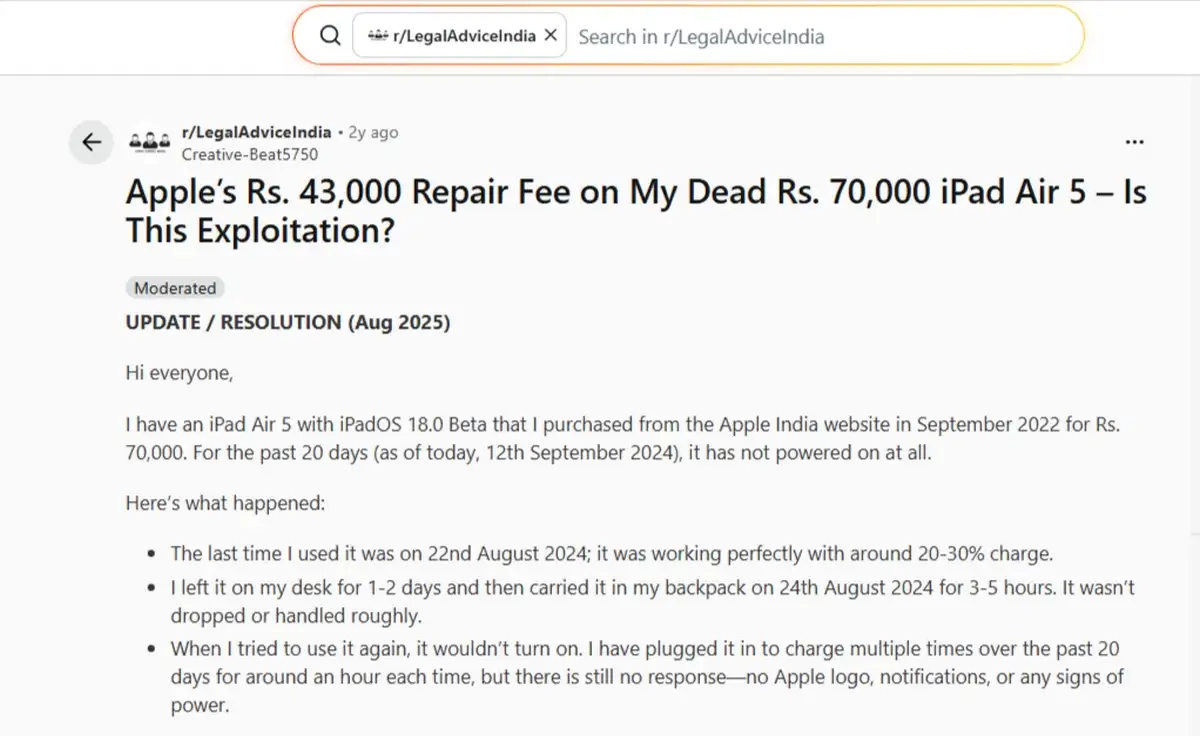
Whereas a local board-level repair cost the owner just ₹5,500.
Does Apple Have a Repair Program for White Spots? No
You may have heard about a free repair program, so let’s clear this up. Apple has never run a program for white spots. The program people keep citing covers something else entirely.
In March 2020, Apple launched the iPad Air (3rd generation) Service Program for Blank Screen Issue.
Here’s what that program actually covered:
- Screens are going permanently blank after a flicker, not bright patches.
- Units built only between March and October 2019.
- Two years of coverage from the first retail sale, so it’s long since expired.
So if someone promises you a free white-spot program, that info’s outdated. It also won’t help your case at the service desk. What will help is knowing exactly how to approach Apple, which brings us to the next step.
How to Get Apple to Replace Your iPad for a White Spot
With active coverage, a free replacement is realistic. Users across MacRumors and Apple Community report successful exchanges, so it’s worth going in prepared. Here’s the sequence we’d follow:
- Check your coverage at checkcoverage.apple.com. You might still have AppleCare+ without realizing it.
- Photograph the spot on a plain white background in bright light. Community experts say clear evidence speeds things up.
- Run remote diagnostics through the Apple Support app before your visit. That creates a case record behind the scenes.
- Book an appointment at a Genius Bar or authorized provider via support.apple.com/ipad/repair.
- Escalate politely if you’re refused. EU buyers can cite the two-year consumer law. Indian buyers can point to the Consumer Protection Act 2019.
One more thing before you decide. Community experts report that affected screens get flagged as defective during trade-in. That can shrink your iPad’s value sharply, even when touch still works.
Will the White Spot Spread? Usually, Yes
Most of the time, such a spot grows over time. One owner watched a small spot become ten times larger in three days. Another counted twelve new spots in a single week. A minority of spots do stay stable for months, though.
You have the option to photograph yours against a white background once a month. If it’s growing between photos, decide on repairs sooner rather than later.
Is It Safe to Keep Using Your iPad?
In most cases, yes. Touch and Apple Pencil keep working normally in user reports. The spot stays cosmetic until it’s big enough to annoy you.
But there’s one serious exception: a swollen battery. If you notice warmth, a bulging frame, or a fast-growing patch, stop using and charging the iPad. That’s a safety problem, not a cosmetic one.
How to Prevent White Spots (Tips That Match the Real Causes)
Generic advice like “avoid sunlight” misses the real triggers. These tips match the verified causes we covered above:
- Manage heat during heavy work. Users link white patches to gaming while charging. Long Freeform sessions, Lightroom exports, and heavy Pencil use show up in reports too. Let the iPad cool between intense tasks.
- Kill pressure sources. Keep books off the iPad, and don’t pack it into a stuffed bag.
- Soften your stylus hand. Long, hard drawing sessions leave marks at your contact points.
- Pick a case that spreads force. A rigid back panel spreads pressure instead of concentrating it in one spot.
- Skip hot environments. Parked cars and direct sun speed up the adhesive failure behind delamination.
Frequently Asked Questions
Can a white spot on an iPad Air be fixed?
Yes, but true backlight spots need a screen or unit replacement. Software steps only rule out glitches.
Is the white spot covered under warranty?
Usually yes, as a manufacturing defect, if your coverage is still active. It’s worth verifying at checkcoverage.apple.com first.
How much does the repair cost in 2026?
With AppleCare+, it’s $29 to $49. Without it, Apple charges around $419 for an iPad Air 5. Third-party shops charge $200 to $450, or ₹8,999 to ₹17,000 in India.
Will the white spot get worse?
Most documented spots spread over weeks or months. A minority stay stable, and monthly photos will help you track yours.
Is it a dead pixel?
No. Dead pixels are tiny, pin-sharp dark dots. White spots are larger patches from damaged backlight layers.
Can I fix it myself?
Light pressure marks may fade with gentle methods. But community follow-ups show the spots often return, and heat damage stays for good.
Can I keep using my iPad with a white spot?
Yes, unless you notice warmth or a bulging frame. Those signs point to a swollen battery, which needs service right away.
Will a new screen fix it permanently?
It removes the visible spot completely. But the heat source inside remains, so keep the device cool after repair.
Does resetting the iPad help?
Only to rule out software with the screenshot test. A reset won’t ever erase a hardware spot.
Is there an official recall for white spots?
No. Apple’s 2020 program covered blank screens on early iPad Air 3 units, and it’s expired. There’s nothing for white spots today.
Wrapping Up!
A white spot on your iPad Air is hardware damage, almost always from heat or pressure.
No update, reset, or app will remove it. Your realistic paths are Apple’s replacement, a third-party screen, or simply living with it.
Here’s our guidance by situation:
- Active warranty or AppleCare+: Go to Apple first. You’ll likely pay nothing, or just $29 to $49.
- No coverage, small stable spot: Photograph it monthly, keep the iPad cool, and carry on as normal.
- No coverage, growing spot: A third-party screen is your value pick at $200 to $450. In India, that’s ₹9,000 to ₹17,000.
- Warmth, bulging, or fast growth: Stop using the iPad today and get the battery checked right away.
Whatever route you pick, take the screenshot test first. It costs nothing, takes sixty seconds, and ends the guesswork.
What to read next? Read our full guide: Apple Teleport Explained.
![How to connect Xbox 360 to my TV [Samsung, LG, Philips and others]](https://techshali.com/wp-content/uploads/2021/12/connect-Xbox-360-to-my-TV-390x220.jpg)