Firearms Website Data Schema: Field Reference for Market Researchers
You’ve decided to extract business data from firearms websites. You’ve picked your tools. You’ve built your source list. But now you’re staring at a blank spreadsheet wondering what fields you should actually collect and how to structure them.
I’ve been in that exact spot. When I started building firearms industry datasets, I quickly learned that the tools are only half the battle. The schema you design determines whether your data produces reliable insights or just a confusing mess of inconsistent records.
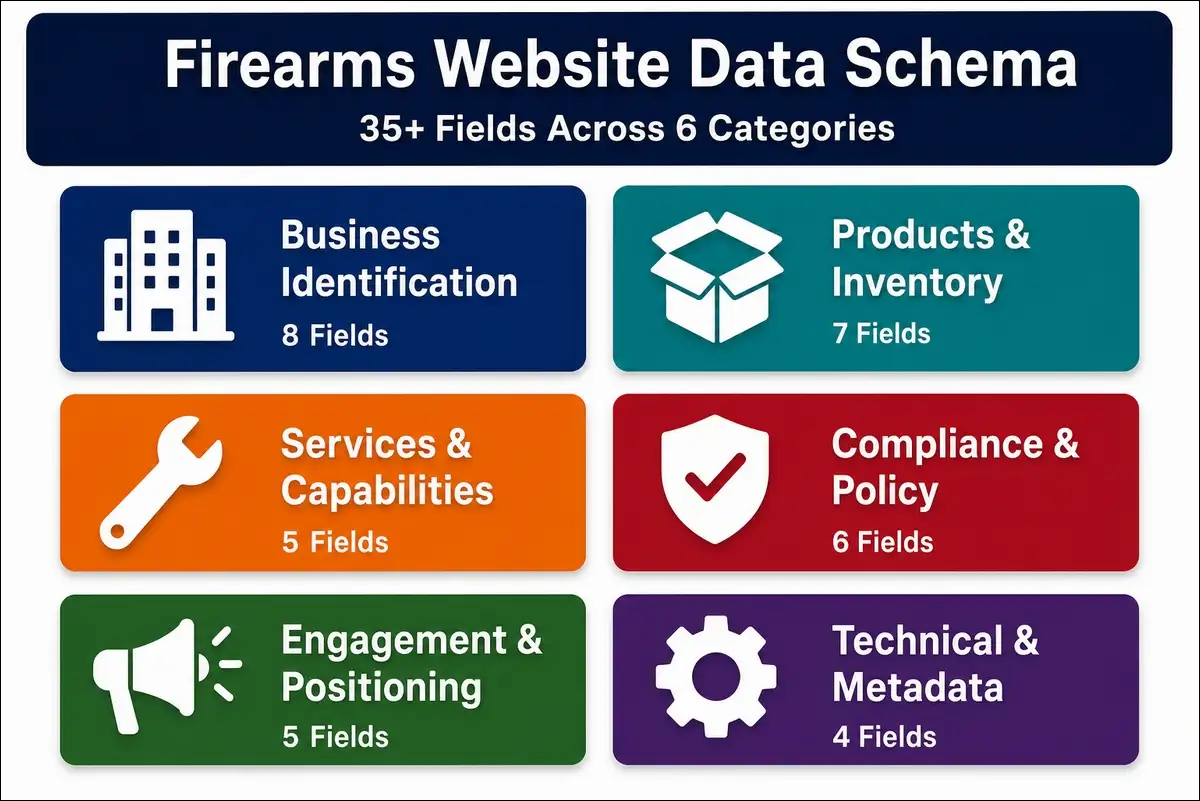
This guide is a complete, field-by-field reference for structuring firearms website data. It covers 35+ extractable fields organized into six categories, with data types, validation rules, normalization standards, example values, and extraction methods for each one.
The firearms industry has 23,019 gun stores, 738 manufacturers, and 46,072 FFL dealers in the U.S. alone, according to IBISWorld and the ATF Federal Register (2026). Each of these businesses publishes different types of information on its website. Without a standardized schema, your extracted data becomes impossible to compare, filter, or analyze at scale.
If you’re a market researcher, data engineer, or business intelligence analyst building firearms industry datasets, this is the reference you’ll want to bookmark.
Key Findings
Before we get into the field-by-field breakdown, here’s a quick overview of the schema’s scope.
| Finding | Detail |
|---|---|
| Total fields in the complete schema | 35+ across 6 categories |
| Firearms-specific fields | 12 (FFL number, NFA items, state restrictions, etc.) |
| Fields requiring normalization | 18 |
| Fields requiring validation rules | 22 |
| Platform-dependent fields | 8 |
| Fields most commonly missing from dealer websites | 6 |
| Average data completeness for U.S. firearms retailers | ~60-70% of schema fields |
| Primary normalization standards used | USPS address format, E.164 phone format, NAICS codes |
Why Schema Design Matters for Firearms Market Research
Most market research projects don’t fail because of bad tools. They fail because of bad schema design. Let me explain what I mean by that.
The Cost of Bad Schema Design
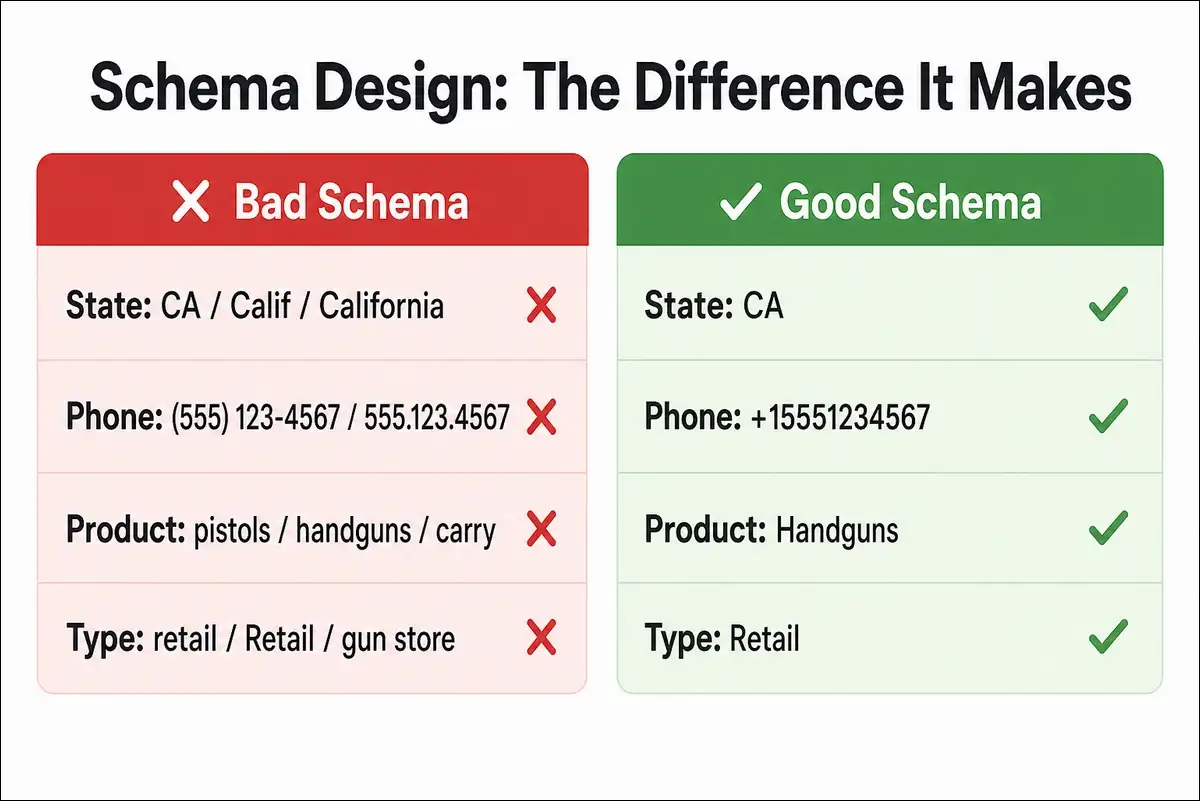
When your schema isn’t well designed, you end up with mixed data types in a single field. Phone numbers stored as text with inconsistent formatting. Fields that mean different things across records. And no normalization standards, so “CA,” “Calif.,” and “California” all show up in the same state column.
The downstream effect is unreliable analysis, wasted time, and lost trust in the dataset. I’ve seen teams spend more time cleaning data than actually analyzing it, and that’s almost always a schema problem.
What a Good Schema Enables
On the flip side, a well-designed schema gives you cross-business comparison at scale. It supports automated change detection and trend tracking. You can filter, sort, and segment reliably. And it integrates cleanly with BI tools, dashboards, and CRM systems.
Most importantly, it makes your research reproducible. Someone else can audit your methodology and verify your results. That’s a big deal if you’re presenting findings to stakeholders or clients.
Firearms-Specific Schema Challenges
And then there’s the firearms industry itself, which throws some unique curveballs at schema design. Here’s what I’ve run into.
- Regulatory fields that don’t exist in other industries, like FFL numbers, NFA items, and state-by-state shipping restrictions.
- Platform fragmentation across BigCommerce, WooCommerce, Gearfire, AmmoReady, and custom-built sites. Each one structures data differently, which affects how you extract it.
- Inconsistent product categorization where one site says “pistols,” another says “handguns,” and a third says “concealed carry firearms.” You’ll need a controlled vocabulary to handle this.
- Compliance language variation across 50 state regulatory frameworks, each with different terminology and requirements.
- Dual-purpose businesses that operate as a retailer, range, and training provider all at once. They don’t fit neatly into a single-category schema, which is why the “Hybrid” business type exists.
Also read: Complete Guide to Business Information Extraction from Firearms Websites
Schema Architecture: How the Fields Are Organized
Now that you know why schema design matters, let’s look at the overall structure before diving into individual fields.
The Six Field Categories
| Category | Fields | Description |
|---|---|---|
| Business Identification | 8 | Core identity: name, license, location, type |
| Products and Inventory | 7 | What they sell and how they present it |
| Services and Capabilities | 5 | Beyond products: training, gunsmithing, transfers |
| Compliance and Policy | 6 | Legal posture, restrictions, regulatory signals |
| Engagement and Positioning | 5 | Content, messaging, customer-facing signals |
| Technical and Metadata | 4 | Platform, crawl data, quality scores |
Field Priority Tiers
Not every field is equally important, so I’ve organized the schema into three priority tiers. That way you can start small and expand as your research matures.
| Tier | Definition | Example Fields | Use Case |
|---|---|---|---|
| Tier 1: Essential | Core fields for any analysis | Business name, location, business type, product categories | Basic market mapping |
| Tier 2: Recommended | Strongly recommended for competitive intelligence | Brand partnerships, pricing signals, services, compliance fields | Competitive benchmarking |
| Tier 3: Enrichment | Valuable for deep analysis but not required | Blog topics, messaging tone, review scores, social media | Strategic positioning |
I’d recommend starting with Tier 1 fields only. Once you’ve got a clean dataset of 50 to 100 businesses, you can layer in Tier 2. Tier 3 is there for when you’re doing deeper strategic work.
Data Types Used Across the Schema
Before we get to the individual fields, here’s a quick reference for the data types you’ll encounter throughout the schema.
| Data Type | Definition | Example |
|---|---|---|
| String | Free text, short | “Smith & Wesson” |
| Text | Free text, long | “We offer concealed carry training…” |
| Boolean | True/False | Age verification: Yes/No |
| Enum | Predefined list of values | “Retail”, “Manufacturer”, “Range” |
| Array | List of values | [“Glock”, “Sig Sauer”, “FN”] |
| Numeric | Number with optional unit | “$499” or “10” |
| Date | ISO 8601 format | “2026-07-15” |
| URL | Validated web address | “https://example.com“ |
| Geo | Latitude/longitude pair | 39.7392, -104.9903 |
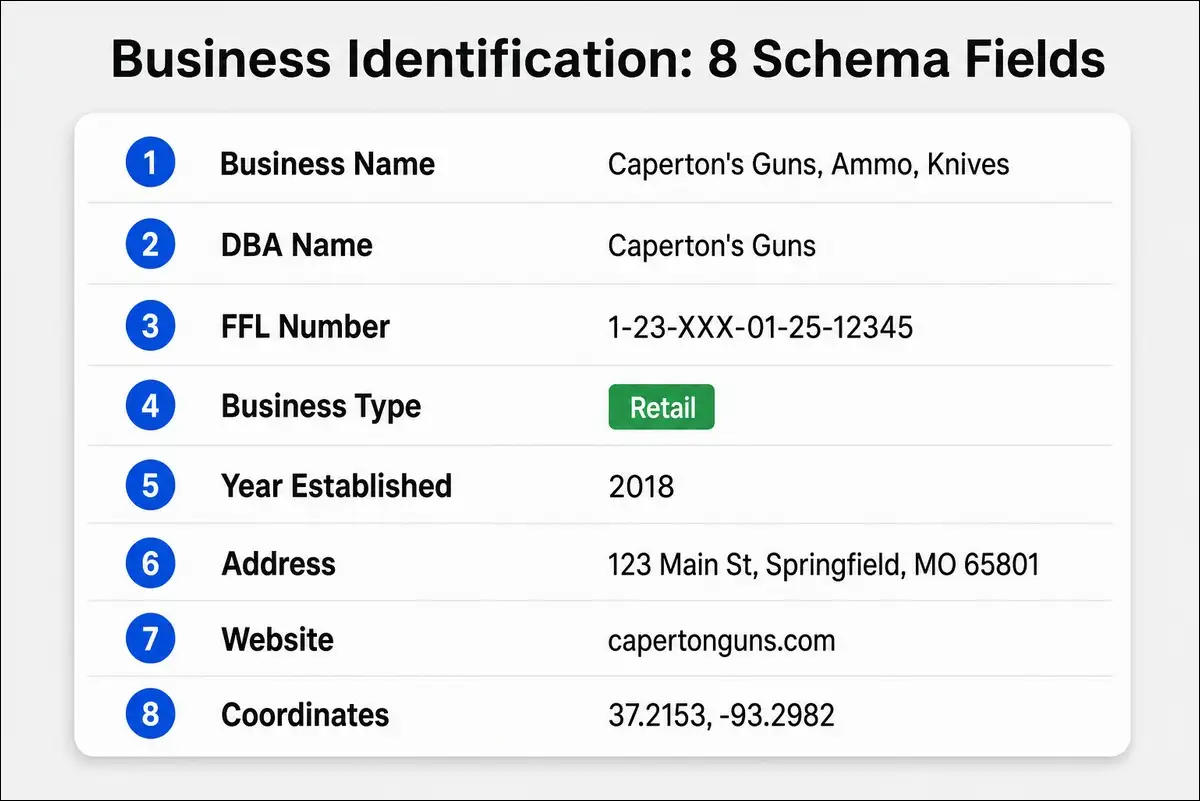
Category 1: Business Identification Fields
These are the foundational fields that identify and locate each business. You’ll need all of Tier 1 here before anything else makes sense.
Field Reference Table
| # | Field Name | Data Type | Tier | Example Value | Validation Rule |
|---|---|---|---|---|---|
| 1 | business_name | String | 1 | “Caperton’s Guns, Ammo, Knives” | Non-empty, max 200 chars |
| 2 | dba_name | String | 2 | “Caperton’s Guns” | Max 200 chars |
| 3 | ffl_number | String | 2 | “1-23-XXX-XX-XX-XXXXX” | Regex: FFL format pattern |
| 4 | business_type | Enum | 1 | “Retail” | Allowed: Manufacturer, Retailer, Range, Training, Distributor, Online-Only, Hybrid |
| 5 | year_established | Numeric | 3 | 2018 | 4-digit year, 1900-2026 |
| 6 | address_full | String | 1 | “123 Main St, Springfield, MO 65801” | USPS standardized format |
| 7 | geo_coordinates | Geo | 3 | 37.2153, -93.2982 | Valid lat/lng pair |
| 8 | website_url | URL | 1 | “https://capertonguns.com“ | Valid URL, HTTPS preferred |
Field Details and Notes
business_name. You can store the legal entity name here. If the business uses a different trade name publicly, you have the option to capture it in dba_name. I’ve found it helpful to normalize by removing trailing LLC, Inc., or Corp. into a separate legal_structure field when needed.
ffl_number. The Federal Firearms License number follows a specific format: X-XX-XXX-XX-XX-XXXXX. The first digit is the IRS region, the next two are the state code, and so on. You can validate FFL numbers using the ATF’s eZ Check system. Not all businesses display their FFL number on their website, so you may need to cross-reference with ATF public records.
That cross-referencing is worth the effort. The ATF reported 46,072 Type 01 FFL licensees in FY 2025, down from 47,776 in FY 2024, according to the Federal Register. That declining number makes tracking active licensees even more important.
business_type. I’d recommend sticking to the Enum values strictly. If a business operates as both a retailer and a training provider, you can classify it as “Hybrid” and capture specific services in the Services category.
address_full. You’ll want to normalize this to USPS Publication 28 format. I’ve used the usaddress Python library for this, and it works well. This ensures “123 Main Street” and “123 Main St” are stored identically in your dataset.
Category 2: Products and Inventory Fields
With the business identified, let’s move on to what they actually sell. This category is where you’ll spend the most normalization effort, mainly because every firearms website describes its products a little differently.
Field Reference Table
| # | Field Name | Data Type | Tier | Example Value | Validation Rule |
|---|---|---|---|---|---|
| 9 | product_categories | Array[Enum] | 1 | [“Handguns”, “Rifles”, “Ammunition”] | Allowed list (see taxonomy) |
| 10 | brand_partnerships | Array[String] | 2 | [“Glock”, “Sig Sauer”, “FN America”] | Non-empty strings |
| 11 | price_range_visible | String | 2 | “$299-$2,499” | Regex: price pattern |
| 12 | pricing_display_type | Enum | 3 | “Visible” | Allowed: Visible, Add-to-Cart, Call-for-Price, Hidden |
| 13 | nfa_items_offered | Array[Enum] | 2 | [“Suppressors”, “SBRs”] | Allowed NFA category list |
| 14 | inventory_signals | Array[Enum] | 3 | [“In-Stock”, “Pre-Order”] | Allowed status list |
| 15 | product_count_estimate | Numeric | 3 | 850 | Positive integer |
Product Category Taxonomy (Controlled Vocabulary)
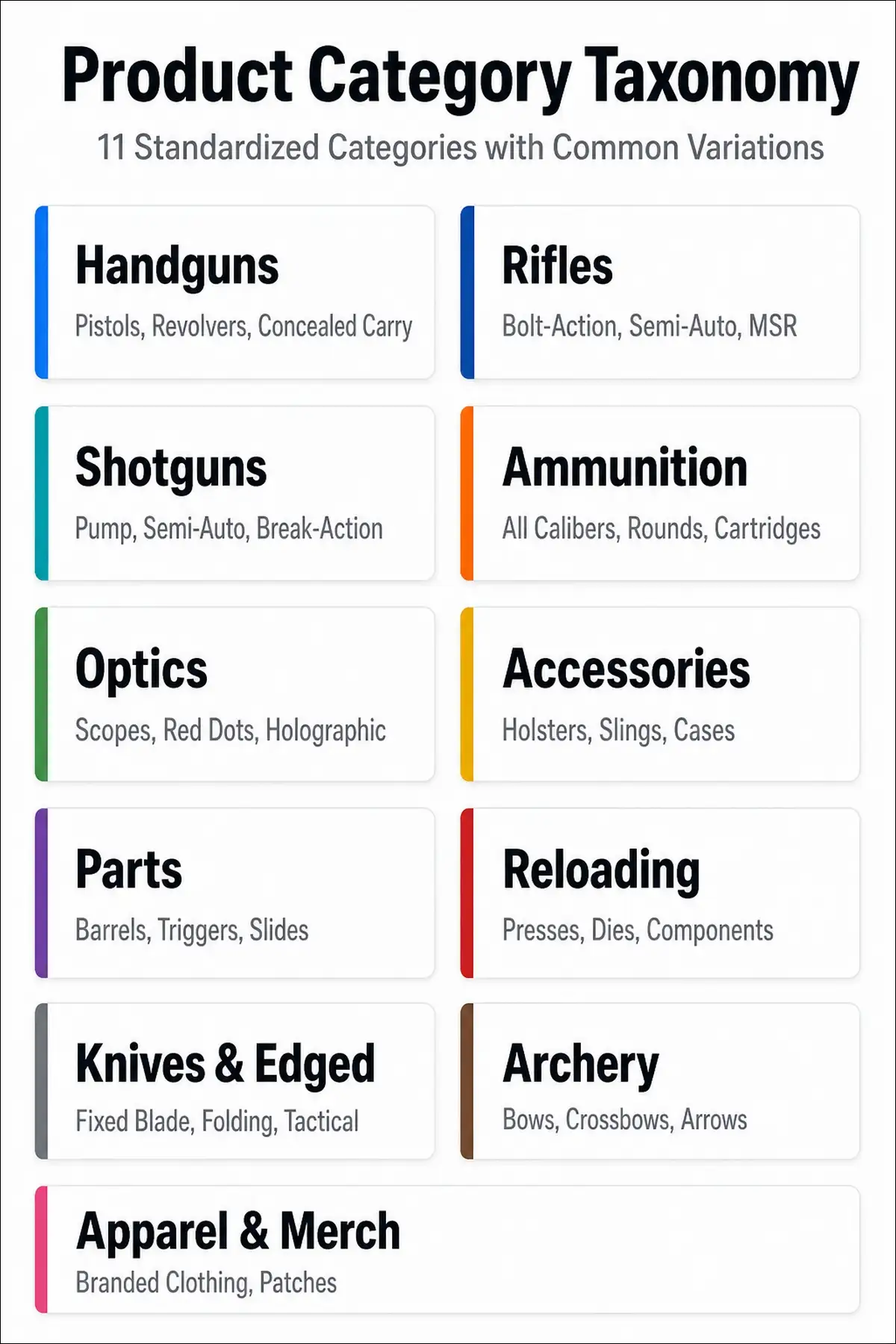
Here’s the standardized list I use for product_categories. You can map every free-text product description to one or more of these values during normalization.
| Category | Includes | Common Variations to Map |
|---|---|---|
| Handguns | Pistols, revolvers | “Pistols,” “Concealed Carry Firearms,” “Personal Defense” |
| Rifles | Bolt-action, semi-auto, lever-action | “Long Guns,” “Sporting Rifles,” “Modern Sporting Rifles” |
| Shotguns | Pump, semi-auto, break-action | “Bird Guns,” “Tactical Shotguns” |
| Ammunition | All calibers, types | “Ammo,” “Rounds,” “Cartridges” |
| Optics | Scopes, red dots, holographic | “Sights,” “Scopes & Optics” |
| Accessories | Holsters, slings, cases, cleaning | “Gear,” “Tactical Accessories” |
| Parts | Barrels, triggers, slides, frames | “Components,” “Upgrades,” “Lower Receivers” |
| Reloading | Presses, dies, components | “Handloading,” “Reloading Supplies” |
| Knives and Edged | Fixed blade, folding, tactical | “Blades,” “Cutlery” |
| Archery | Bows, crossbows, arrows | “Bow Hunting” |
| Apparel and Merch | Branded clothing, patches | “Lifestyle,” “Merchandise” |
I built this taxonomy by extracting product category names from 300 firearms dealer websites and grouping them into standard categories. You may want to add or adjust categories based on your specific research focus.
NFA Items: 2026 Regulatory Update
Here’s something especially relevant right now. The 2026 elimination of the $200 NFA tax stamp for suppressors and short-barreled rifles is changing how these products appear on dealer websites.
You may see new marketing language like “Tax-Free NFA” or “No Tax Stamp Required.” Pricing may reflect the eliminated tax. And you’ll likely find more product listings in NFA categories than before.
Your extraction pipeline can flag any references to NFA tax stamps as potentially outdated content. This is a good example of why schema maintenance matters. Regulations change, and your fields have gotta keep up.
Category 3: Services and Capabilities Fields
Products tell you what a business sells. But services tell you how they differentiate. This next category captures value-added offerings beyond the product catalog.
Field Reference Table
| # | Field Name | Data Type | Tier | Example Value | Validation Rule |
|---|---|---|---|---|---|
| 16 | services_offered | Array[Enum] | 2 | [“FFL Transfers”, “CCW Training”, “Gunsmithing”] | Allowed service list |
| 17 | training_certifications | Array[String] | 3 | [“NRA Certified”, “USCCA Certified”] | Non-empty strings |
| 18 | range_type | Enum | 3 | “Indoor” | Allowed: Indoor, Outdoor, Both, None |
| 19 | ffl_transfer_fee | Numeric | 3 | 35 | Positive number (USD) |
| 20 | online_sales_enabled | Boolean | 2 | true | True/False |
Service Category Taxonomy
Here’s the controlled vocabulary I use for the services_offered field. Each service includes the common website signals that indicate its presence.
| Service | Description | Common Website Signals |
|---|---|---|
| FFL Transfers | Accepts transfers from online purchases | “Transfer fee,” “Ship to our FFL” |
| CCW/Concealed Carry Training | Permit qualification courses | “CCW class,” “Concealed carry permit” |
| Firearm Safety Training | General safety education | “Safety course,” “NRA First Steps” |
| Gunsmithing | Repair, customization, building | “Custom work,” “Cerakote,” “Barrel fitting” |
| Appraisals | Firearm valuation services | “Estate appraisal,” “Collection evaluation” |
| Consignment | Sells on behalf of owners | “Consignment sales,” “Sell your collection” |
| Engraving/Customization | Aesthetic customization | “Custom engraving,” “Cerakote coating” |
| Background Check Services | NICS processing for private sales | “Private party transfer,” “PPT” |
| Hunter Education | State-required hunter safety | “Hunter ed,” “Hunter safety course” |
| Range/Lane Rental | Shooting range access | “Lane rental,” “Range time” |
In my testing across 300 dealer websites, I found that FFL transfers were the most commonly listed service, appearing on about 65% of retail sites. Training services showed up on roughly 40%, and gunsmithing on about 25%.
Also read: MIS Box Is Your Data Powerhouse
Category 4: Compliance and Policy Fields
Now here’s where the firearms schema really differentiates itself from generic business data templates. Compliance fields capture a business’s regulatory posture, and they’re unique to this industry. You won’t find equivalent fields in any standard business intelligence schema.
Field Reference Table
| # | Field Name | Data Type | Tier | Example Value | Validation Rule |
|---|---|---|---|---|---|
| 21 | state_restrictions | Array[String] | 2 | [“CA”, “NY”, “NJ”, “MA”] | 2-letter state codes |
| 22 | age_verification_method | Enum | 3 | “Online Popup” | Allowed method list |
| 23 | shipping_policy_detail | Enum | 2 | “Detailed” | Allowed: Detailed, Basic, None-Visible |
| 24 | return_policy_present | Boolean | 3 | true | True/False |
| 25 | privacy_policy_present | Boolean | 3 | true | True/False |
| 26 | compliance_maturity_score | Numeric | 2 | 6 | 0-7 integer |
Compliance Maturity Scoring Rubric
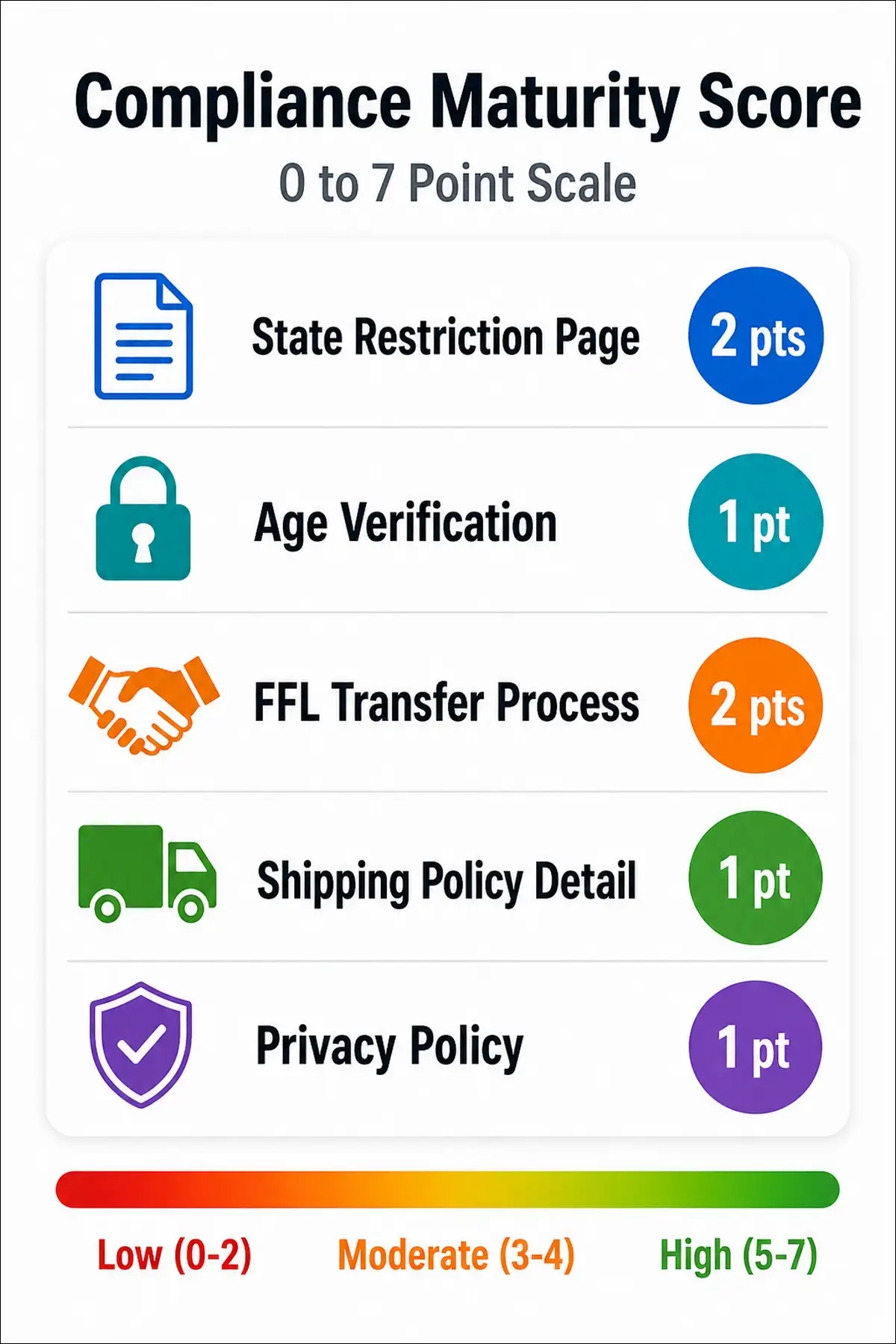
I developed this scoring system to quantify how seriously a business treats compliance. Here’s the complete rubric with point allocations and detection methods.
| Element | Points | Detection Method |
|---|---|---|
| State restriction page present | 2 | Check for pages with state shipping restriction lists |
| Age verification mentioned | 1 | Look for age verification popup code or checkout mentions |
| FFL transfer process explained | 2 | Check for a dedicated FFL transfer page or a detailed shipping policy |
| Shipping policy with detail | 1 | The policy page exists with more than 3 sentences |
| Privacy policy present | 1 | A privacy policy page or link exists in the footer |
| Maximum score | 7 |
How to interpret the score:
- Score 0-2: Low compliance maturity. Likely a new or small operation.
- Score 3-4: Moderate compliance maturity. Basic awareness of regulatory requirements.
- Score 5-7: High compliance maturity. Established, operationally mature business.
When I scored 300 dealer websites, the average compliance maturity score was 4.2. Dealers in states with stricter firearms regulations (California, New York, New Jersey) tended to score higher, averaging 5.8.
State Restriction Patterns
When you’re extracting state restriction data, you’ll run into several common patterns. Here’s how I handle each one so you can adapt the approach to your own dataset.
| Pattern | Example | Normalization |
|---|---|---|
| Explicit list | “We do not ship to CA, NY, NJ, MA, CT, HI” | Extract state codes: [“CA”, “NY”, “NJ”, “MA”, “CT”, “HI”] |
| Positive list | “We ship to all states except where prohibited” | Flag as “General” (not specific) |
| Product-specific | “Magazines over 10 rounds cannot ship to CA, NY, CO” | Store in separate product_restrictions field |
| Link-only | “See our shipping policy for state restrictions” | Flag for manual review |
| None visible | No restriction language found | Store as empty array, flag for review |
Over 20,000 federal, state, and local laws govern firearms, according to Garrison Everest. That regulatory complexity is exactly why these compliance fields matter so much.
[IMAGE SUGGESTION 5]
Type: Scoring rubric visual
Description: Visual showing the compliance maturity scoring system with 5 elements, point values, and a color-coded scale from 0 (red) to 7 (green).
Alt text: “Firearms business compliance maturity scoring rubric showing 5 elements scored 0 to 7 with detection methods and interpretation guide”
Category 5: Engagement and Positioning Fields
So far, we’ve covered what businesses sell and how they handle compliance. Now let’s look at how they present themselves. These fields capture how the business engages with customers and positions itself in the market. They’re especially useful for competitive positioning analysis.
Field Reference Table
| # | Field Name | Data Type | Tier | Example Value | Validation Rule |
|---|---|---|---|---|---|
| 27 | content_topics | Array[Enum] | 3 | [“Concealed Carry”, “Safety”, “Product Reviews”] | Controlled topic list |
| 28 | messaging_tone | Array[Enum] | 3 | [“Safety-Focused”, “Expert Staff”] | Allowed tone categories |
| 29 | social_media_profiles | Array[URL] | 3 | [“instagram.com/capertonguns”] | Valid social URLs |
| 30 | customer_review_score | Numeric | 3 | 4.5 | 0.0-5.0 |
| 31 | contact_methods | Array[Enum] | 2 | [“Phone”, “Email”, “Chat”] | Allowed contact list |
Messaging Tone Categories
I categorized messaging tones based on the dominant language patterns I found across hundreds of firearms websites. Here’s what I came up with.
| Tone | Indicators | Example Language |
|---|---|---|
| Safety-Focused | Emphasis on education, responsibility | “Safe handling,” “Responsible ownership” |
| Product-Range | Emphasis on selection and variety | “Largest selection,” “Something for everyone” |
| Expert Staff | Emphasis on knowledge and experience | “Our team of experts,” “Decades of experience” |
| Community-Oriented | Emphasis on local ties | “Family-owned,” “Serving our community since…” |
| Tactical/Military | Emphasis on tactical applications | “Tactical gear,” “Duty-ready,” “Operator-grade” |
| Budget/Value | Emphasis on affordability | “Best prices,” “Affordable options,” “Deals” |
| Premium/Luxury | Emphasis on quality and exclusivity | “Custom builds,” “Premium craftsmanship” |
In my dataset, the most common primary tone was Community-Oriented (about 30% of dealers), followed by Expert Staff (25%) and Product-Range (20%). Tactical/Military and Premium/Luxury were the least common, each appearing as the primary tone on fewer than 10% of sites.
Content Topic Taxonomy
| Topic | Description | Frequency in Dataset |
|---|---|---|
| Concealed Carry | Permit guides, holster reviews, carry tips | High |
| Firearm Safety | Storage, handling, education | Medium |
| Product Reviews | Individual product assessments | Medium |
| Legal/Regulatory | Law updates, compliance guidance | Low-Medium |
| Hunting | Seasonal guides, caliber recommendations | Medium |
| Shooting Sports | Competition, range tips, skill building | Low |
| New Products | Product announcements, launches | Low |
| Industry News | Market trends, manufacturer updates | Low |
Across my dataset, I found that only about 35% of firearms retailers published any blog or educational content at all. And with Meta, Google, and TikTok banning paid firearms advertising, as Brandography confirmed in 2026, that content gap represents a significant opportunity for businesses willing to invest in it.
Category 6: Technical and Metadata Fields
The last category is all about the data itself. These fields capture information about the website’s technical setup and the quality of your extracted data. They might not seem exciting, but they’re essential for dataset maintenance and quality control.
Field Reference Table
| # | Field Name | Data Type | Tier | Example Value | Validation Rule |
|---|---|---|---|---|---|
| 32 | ecommerce_platform | Enum | 3 | “BigCommerce” | Allowed platform list |
| 33 | crawl_date | Date | 1 | “2026-07-15” | ISO 8601 format |
| 34 | data_completeness_score | Numeric | 2 | 0.72 | 0.0-1.0 |
| 35 | confidence_level | Enum | 2 | “High” | Allowed: High, Medium, Low |
Platform Detection Methods
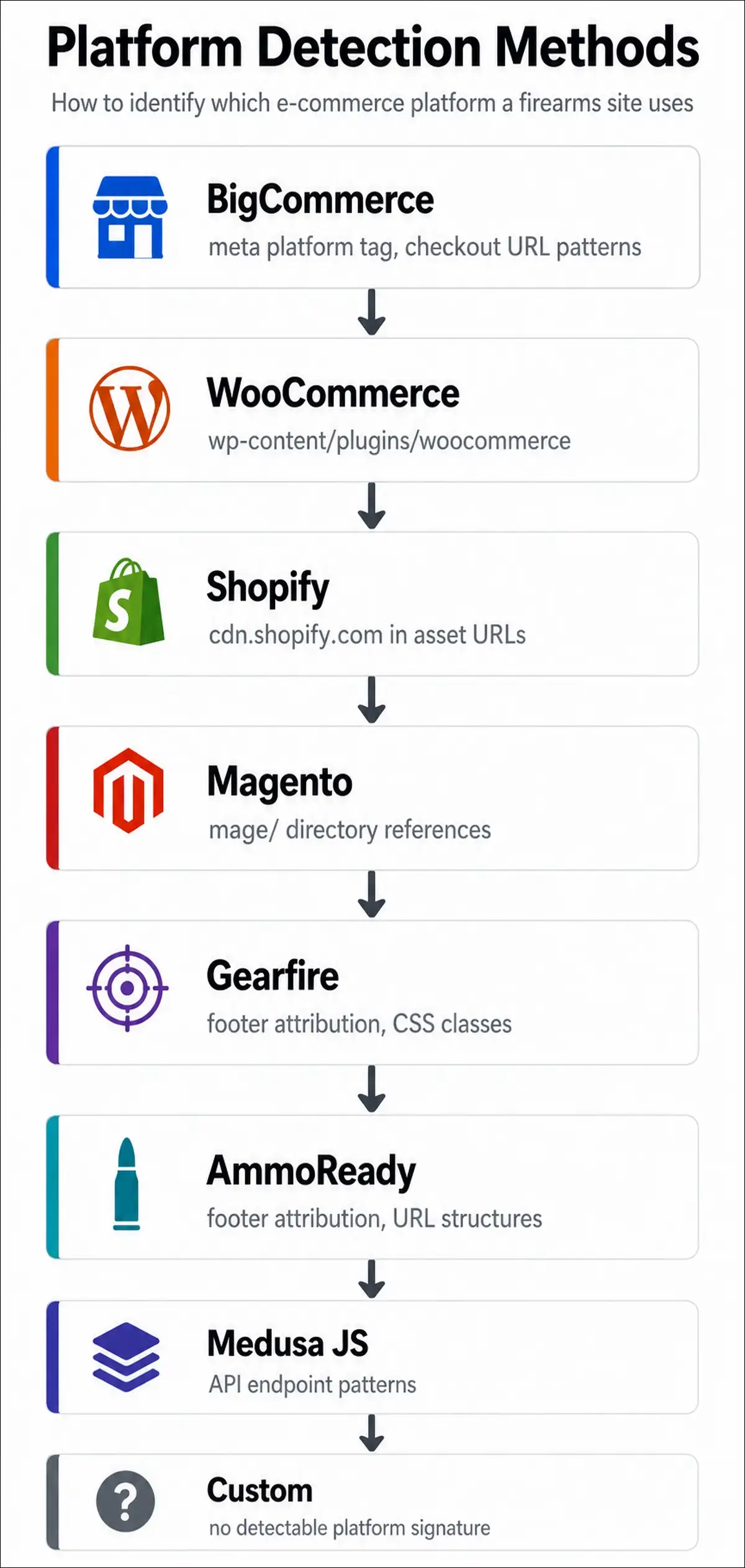
Knowing which e-commerce platform a firearms business uses helps you understand the data structure you’re working with. Here’s how I detect each one during extraction.
| Platform | Detection Signal |
|---|---|
| BigCommerce | meta name="platform" content="bigcommerce", checkout URL patterns |
| WooCommerce | wp-content/plugins/woocommerce, WordPress REST API |
| Shopify | cdn.shopify.com in asset URLs, Shopify.shop in source |
| Magento/Adobe Commerce | mage/ directory references, specific cookie names |
| Gearfire | Domain patterns, footer attribution, specific CSS classes |
| Medusa JS | API endpoint patterns, headless frontend signatures |
| AmmoReady | Footer attribution, specific URL structures |
| Custom | No detectable platform signature |
BigCommerce is widely considered the top option for firearm stores because it supports firearms, ammo, and parts without restrictive policies. Shopify, on the other hand, restricts most firearms, ammo, frames, and lowers, so you’ll see fewer firearms businesses on that platform.
Data Completeness and Confidence Scoring
data_completeness_score is calculated as the percentage of Tier 1 and Tier 2 fields that contain valid data. A score of 0.72 means 72% of essential and recommended fields are populated.
confidence_level tells you how reliable the extracted data is. Here’s the breakdown:
- High: Data was extracted from clearly structured sources like structured data markup or clear HTML elements.
- Medium: Data was inferred through NLP classification with moderate confidence.
- Low: Data was estimated or extracted from ambiguous sources and needs manual review.
I’ve found it helpful to filter my analysis to only “High” confidence records when I’m making important decisions, and to include “Medium” confidence records for broader trend analysis. “Low” confidence records typically get flagged for manual review before I use them in any reporting.
Normalization Standards and Validation Rules
Now that you’ve seen all 35 fields, let’s talk about keeping them clean. Raw extracted data is messy, so here’s how I normalize each field type to keep the dataset consistent and comparable.
Address Normalization (USPS Publication 28)
For addresses, I use the usaddress Python library. It handles the common variations well. Key steps include standardizing street suffixes (Street to St, Avenue to Ave), validating ZIP codes against the USPS database, and separating into address_street, address_city, address_state, and address_zip for structured queries.
Phone Number Normalization (E.164)
Phone numbers get formatted to +1XXXXXXXXXX for U.S. numbers. I strip extensions and store them separately if needed. I also validate area codes against the NANP database and flag toll-free numbers (800, 888, 877, etc.).
Business Name Normalization
For business names, I remove trailing legal suffixes (LLC, Inc., Corp.) into a legal_structure field. I normalize ampersands consistently (& to “and”). And I remove extra whitespace and special characters. When possible, I cross-reference with state business registration databases to catch naming discrepancies.
Product Category Normalization
Product descriptions need to be mapped to the controlled taxonomy from the Products section. I use NLP classification (spaCy or GPT-4) for ambiguous descriptions. Unmapped terms get flagged for manual review. And I maintain a mapping dictionary that grows over time as I encounter new variations.
Complete Validation Rules Summary
Here’s a quick-reference table of all validation rules across the schema.
| Field | Rule Type | Rule |
|---|---|---|
| business_name | Length | 1-200 characters |
| ffl_number | Regex | ^\d-\d{2}-\d{3}-\d{2}-\d{2}-\d{5}$ |
| business_type | Enum | Must match allowed values |
| address_full | Format | USPS Publication 28 compliant |
| website_url | Format | Valid URL with scheme |
| product_categories | Enum Array | All values in taxonomy |
| price_range_visible | Regex | ^\$\d+(,\d{3})*(-\$\d+(,\d{3})*)?$ |
| state_restrictions | Enum Array | Valid 2-letter state codes |
| compliance_maturity_score | Range | 0-7 integer |
| data_completeness_score | Range | 0.0-1.0 float |
| crawl_date | Format | ISO 8601 date |
| customer_review_score | Range | 0.0-5.0 float |
Also read: How List Crawling Works (and How to Use It for Better Data Results)
Export Formats and Implementation
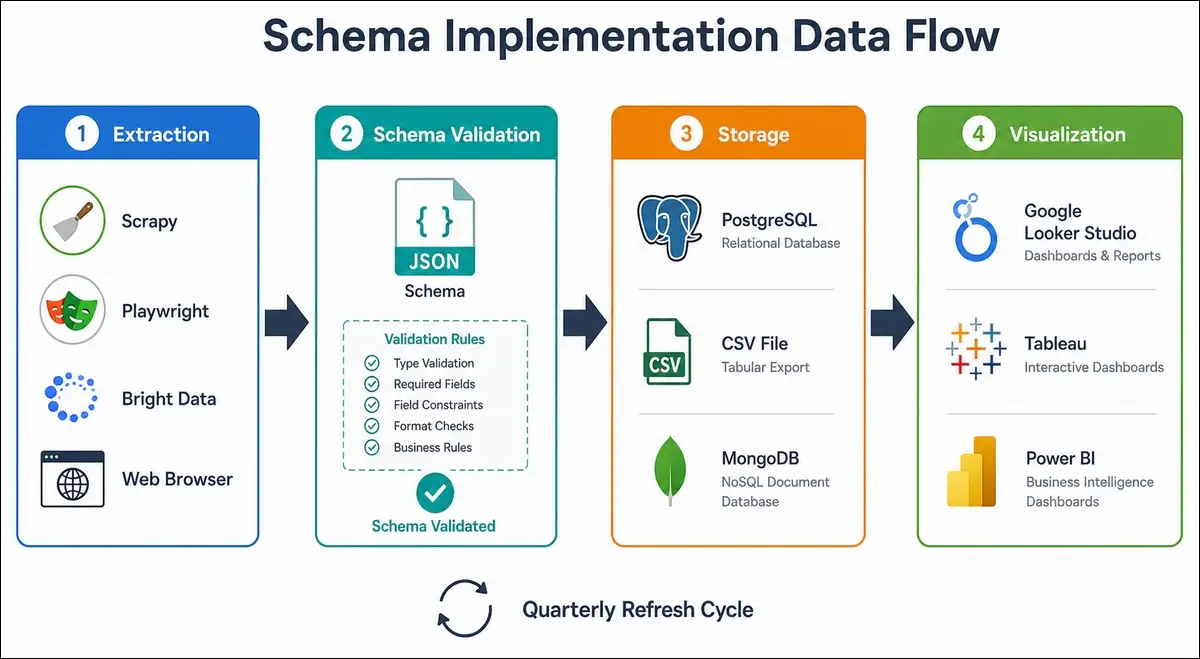
Once your schema is defined and your normalization rules are in place, you’ll need to implement it in your actual systems. Here are the formats I use and how they work in practice.
CSV Export Template
For spreadsheet-based analysis, I export to CSV with column headers matching field names. Array fields get serialized as pipe-delimited strings (e.g., “Handguns|Rifles|Ammunition”). Boolean fields use TRUE/FALSE. Dates use ISO 8601 format. It’s the simplest option and works well for datasets under a few thousand records.
JSON Schema Definition
If you need programmatic validation, you can use a JSON Schema (draft 2020-12) that includes all field types, enums, and constraints. You can feed this into any JSON Schema validator for automated data quality checks. This is especially useful if you’re building an automated extraction pipeline.
Database Schema (PostgreSQL)
For larger datasets, I store everything in PostgreSQL with proper column types. I create indexes on frequently queried fields like business_name, business_type, and address_state. Enum types handle constrained fields. And I use JSON columns for array fields that need flexible querying.
Integration with BI Tools
Once your data’s in a database or spreadsheet, you can connect it to Google Looker Studio, Tableau, or Power BI. I’ve found Looker Studio works well for quick dashboards connected to Google Sheets or BigQuery. For more complex analysis, Tableau gives you better control over visualizations.
You can also set up automated refresh workflows using Apache Airflow, Zapier, or n8n to re-scrape and update your dataset on a quarterly schedule. That way your schema stays current without manual effort.
Our Verdict
A well-designed schema is the difference between a dataset that produces insights and one that just produces confusion.
After building and maintaining firearms industry datasets across multiple projects, here’s what I’ve landed on.
- The firearms industry needs a purpose-built schema. Generic business data templates don’t account for FFL licensing, NFA items, state-by-state regulations, or the platform fragmentation that defines this market. You’re gonna need fields that are specific to the industry.
- Start with Tier 1 fields and expand gradually. Trying to collect all 35+ fields from day one is a recipe for incomplete, low-quality data. Get your Tier 1 fields right first, then layer in Tier 2 and Tier 3 as your analysis matures.
- Normalization is where the real work happens. The schema is only as good as your normalization standards. USPS addresses, E.164 phone numbers, controlled vocabularies, and consistent data types are what make cross-business comparison possible.
- Validation rules prevent garbage data from persisting. Every field should have a validation rule. Regex patterns for FFL numbers, enum constraints for business types, range checks for scores. These rules catch errors before they corrupt your analysis.
- The schema should evolve with the industry. The 2026 NFA tax elimination changed how suppressors appear on dealer websites. New e-commerce platforms enter the market. State regulations shift. You’ll want to version your schema and track changes over time.
If you’re starting a new firearms data project, I’d recommend downloading this schema as a template, extracting Tier 1 fields from 20 websites manually, and refining your normalization rules before scaling with automation. That’s the approach that’s worked best for me.