Edit It Like a Memory: Enhancing Travel Photos to Match Your Nostalgia
You know those vacation photos that are technically fine but don’t feel right? The ones where the sky looks flat, the colors feel wrong, and somehow the emotion you remember is missing from the shot? That’s because cameras capture reality, but memories don’t live in reality. They live in mood, color, and emotion.
With Pippit, you can bridge that gap. Whether you’re editing a sunset from Santorini or a grainy birthday party video from three years ago, it’s possible to turn raw media into heartfelt moments—ones that echo how it actually felt to be there.
And the best part? It works for videos too. All you need is a clean URL to video to bring your travel clips into Pippit and trim, brighten, or polish them to match your memory. But today, we’re focusing on photos—and how to make them feel like magic. Let’s romanticize your camera roll the right way!

When colors lie: the emotional truth behind travel photos
Memory doesn’t see things in full accuracy. It filters moments through feeling. That golden light on your rooftop dinner in Rome? Maybe the sun wasn’t that golden—but your joy made it feel that way. Editing isn’t just about correction—it’s about amplification. It’s your chance to make your photos feel truer than what the lens captured.
Here’s how your memories might reinterpret:
- Cool gray streets → sun-warmed cobblestones
- Flat beach skies → watercolor twilight hues
- A smiling crowd → dreamlike blur with one sharp subject
By leaning into these emotional edits, you don’t just make a photo better. You make it personal.
Focus the feeling: framing edits around memory, not reality
Let’s talk about how to actually choose your edits. You’re not editing for Instagram perfection—you’re editing for memory resonance. That means asking yourself: What emotion do I want this photo to trigger?
Here are a few starting points:
For moments of warmth and wonder:
- Boost highlights and yellows
- Use soft-focus or bloom filters
- Add a slight vignette to center the emotion
For quiet, rainy-day nostalgia:
- Desaturate slightly
- Add cool blues and purples
- Lower contrast for a foggy texture
For wild, joyful chaos
- Add motion blur around the edges
- Increase vibrancy and saturation
- Use grain for a filmic, flashback feel
If you’re working with event clips instead of stills, use Pippit’s video trimmer to isolate the exact moment that holds the most feeling, then freeze or loop that scene.

Use light like memory: let softness tell the story
Sharpness isn’t always honest. Memories are fuzzy around the edges, bright in the middle, and always tinged with emotion. Instead of chasing clarity, try chasing sensation. In the Pippit image editor, look for tools that let you soften backgrounds, blur unimportant details, or add light overlays.
Here’s how:
- Use radial blur to highlight a face in a crowd
- Drop sharpness on everything but the hands in a hug
- Add a glowing light leak in a corner to suggest sun or streetlight
Before the next part, you’ll want Pippit’s image enhancer online that gives you control over exposure, saturation, texture, and effects—without needing Photoshop skills. That’s where Pippit comes in, with a full Image Studio tailored for nostalgic edits and dreamy upscales.
Give your memories the glow they deserve
Here’s how to use Pippit’s Image Studio to turn basic photos into personal time machines.
Step 1: Upload your pictures
To start, register for Pippit’s image resolution enhancer and go to ‘Image Studio‘ from the left-hand menu. Select ‘Upscale Image‘—this will enhance the quality of even aged or grainy images. Click ‘Device‘ to upload your pictures from your laptop, phone, or hard drive.

Step 2: Upscale and edit your pictures
Finally, use ‘Retouch‘ to naturally make facial features more beautiful—it smooths without over-smoothing. Feeling nostalgic for sunsets? Check out ‘Effects‘ and select warm tones, color changes, or film-inspired filters. Need to add depth and color to a flat photo? The ‘Image Enhancer‘ tool can do it in one click.
You can also be creative: layer handwritten text, apply stickers such as vintage stamps or doodles, make dreamy collages, or tweak textures for a soft, vintage look. It’s not realism—it’s resonance.

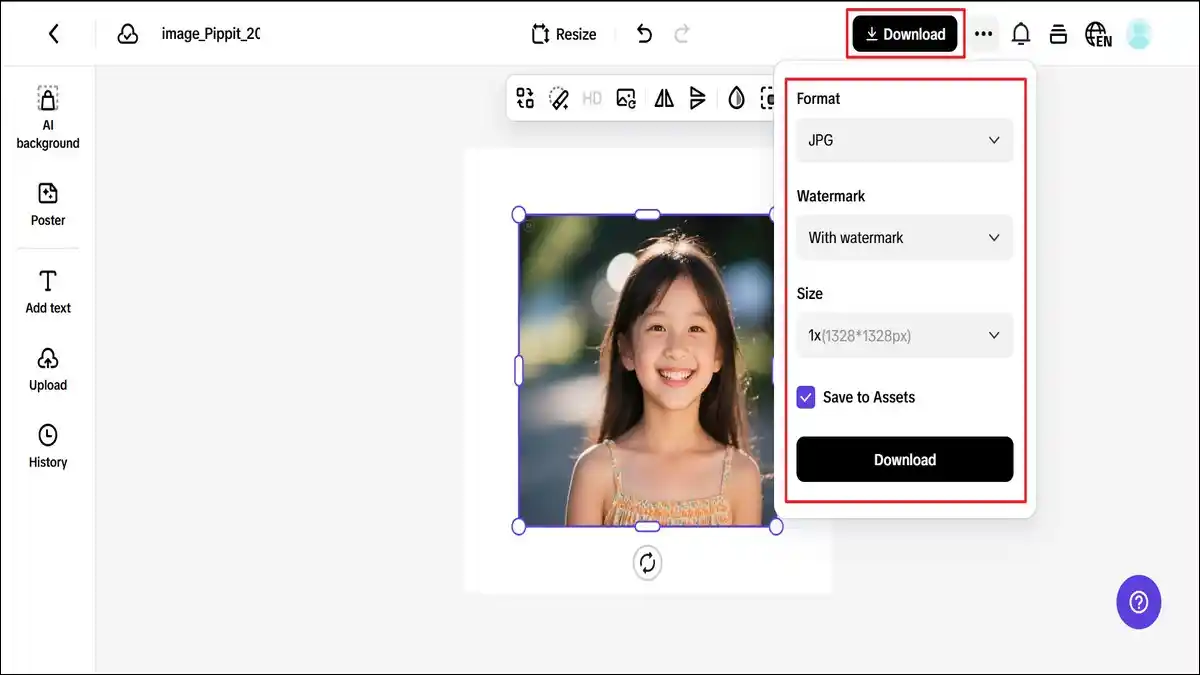
Step 3: Export your images
If your picture comes out just like your recollection feels, press ‘Download‘ at the top-right corner. Select your preferred format and image size. As you press ‘Download‘ once again, it’s good to go to print, post, or store in your virtual scrapbook indefinitely.
Not a filter—an emotion: why edits that feel personal last longer
Trendy filters fade. But emotional edits—the kind that reflect how you experienced a moment—stay timeless. They’re the ones you look back on and feel your heart clench just a little.
Here’s how to keep your edits personal:
- Only enhance what matters—let the clutter stay blurry
- Use light, not just color, to shape emotion
- Leave space for imperfection—it makes the memory feel real
Whether it’s a grainy shot of your mom laughing during a hike or a neon-lit night out with your best friends, let the edit honor the mood, not just the aesthetics.
Make your photos feel like they did back then—with Pippit
You don’t need to be a professional editor to make your photos glow with feeling. With Pippit, anyone can transform a flat image into a heart-shaped memory. Use upscaling to restore old shots, retouching for softness, and dreamy filters to match the colors in your head.
And if you’re bringing video memories to life, just drop your URL to video into Pippit, trim what matters, and enhance with love.
Your memories already matter—let’s make them feel like it. Start editing with Pippit today!