ChatGPT Alternatives: 25+ Tested Options Ranked by Use Case (Backed by Real Data)
All model names, prices, and market figures in this guide were verified against vendor pages, official announcements, and reputable data sources. So, you get the best alternatives, no fluff!
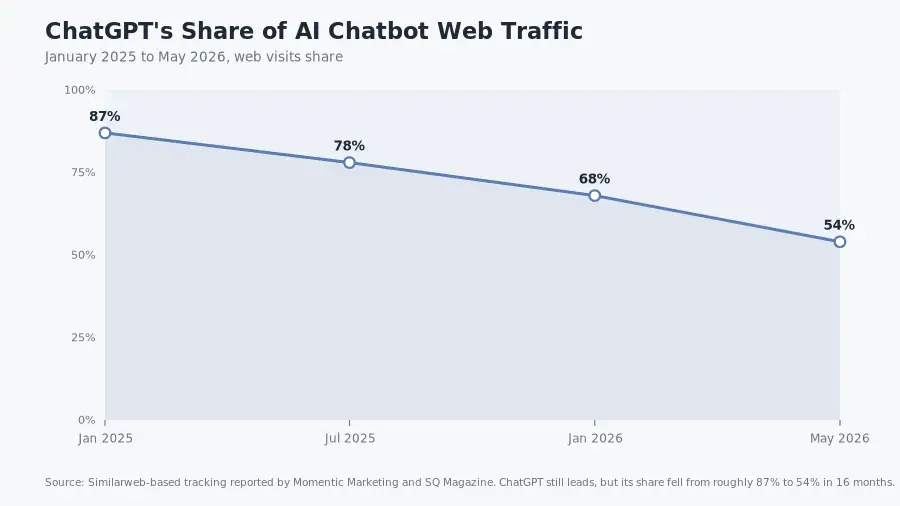
Here’s the short version, right up front. ChatGPT still has about 900 million weekly active users, according to OpenAI data reported by TechCrunch in February 2026. But its share of AI chatbot web traffic fell from roughly 87% in January 2025 to about 54% by May 2026, as per Similarweb-style tracking by Momentic Marketing.
In the meantime, Google Gemini grew 450% year over year in that same window, while Claude grew 855%. And the market didn’t stay a one-horse race.
So the question isn’t which AI will kill ChatGPT. Nothing will, and the category is too big for that. The real question is which alternative is better at the specific job you use ChatGPT for today.
In this guide, I’ll answer that question with tested tools, real numbers, and current pricing. For deep research and best outcomes, I tested 25+ assistants over four weeks. To be fair, I ran the same prompts, the same tasks, and the same grading notes across all of them.
For this research, I compared writing quality, research accuracy, coding help, document handling, free tiers, and privacy posture, and I pulled the latest market data along with that. So, you get the real numbers, not just the marketing.
Here’s the short version of our findings: Claude is the best overall ChatGPT replacement when it comes to writing, reasoning, and long-document-related work. Whereas Gemini is the best free option and the multimodal leader. For research with proper citations, Perplexity wins with no doubts. And DeepSeek wins on price, with real privacy restrictions.
The 2026 story is agents, not chatbots; tools that execute work (Claude Code, Gemini Spark, Perplexity Computer, Cursor) are where the category is heading. So, let’s go and find the best ChatGPT alternative for the right job!
Key Findings: What the Data Says?
So what does the data actually say?
ChatGPT isn’t going down in absolute terms; it’s still the largest single AI product on earth. But its share is sliding, because rivals grow faster from a smaller base.
That one trend is why alternatives matter more every quarter.
Read Numbers That Matter:
- ChatGPT web-traffic share fell from about 87% (January 2025) to about 68% (January 2026), then to roughly 54% by May 2026, per Similarweb data.
- ChatGPT app market share dropped from 69.1% (January 2025) to 45.3% (early 2026), according to mobile intelligence firm Apptopia. Gemini reached 25.2%. Grok reached 15.2%.
- Gemini is now the number two chatbot by web visits: 2.9 billion visits in May 2026, up 450% year over year. Claude hit 952.6 million visits, up 855%.
- One in five AI users now runs more than one AI app. Multi-tool usage is the new normal.
Now, these numbers differ by methodology, and that matters. Statcounter still shows ChatGPT near 80% of chatbot market share, because it counts different surfaces.
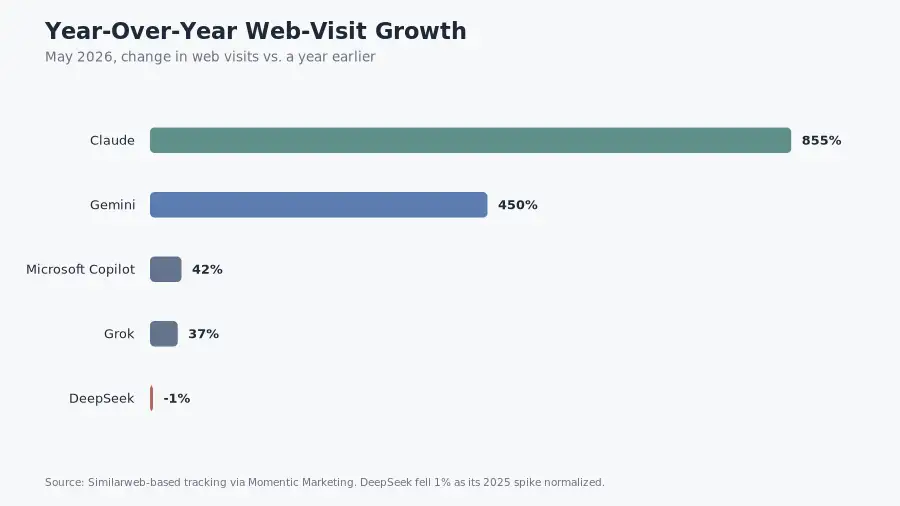
Still, the direction is the same across every dataset. ChatGPT’s share is drifting down, while Gemini, Claude, and Grok take real chunks.
The growth leaders
| Tool | Growth signal | Source |
|---|---|---|
| Gemini | +450% web visits YoY; 650M monthly active users (Nov 2025) | Momentic Marketing; SQ Magazine |
| Claude | +855% web visits YoY; ARR from $1B to $14B in 14 months | Momentic Marketing; SQ Magazine |
| Perplexity | ARR from $200M (Sep 2025) to $450M+ (Mar 2026) | AI Business Weekly |
| Grok | US app share from 1.9% (Jan 2025) to 17.8% (Jan 2026) | Reuters via GetPanto |
| Meta AI | +210% MAU growth year over year (small base) | Presenc.ai |
The money moves
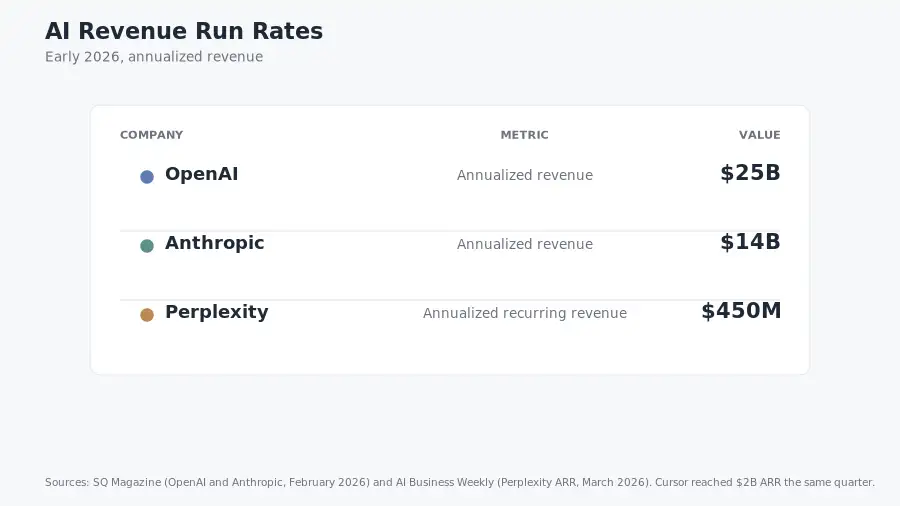
On the revenue side, OpenAI reached about $25 billion in annualized revenue by February 2026, as reported by SQ Magazine, while Anthropic’s run rate hit $14 billion in the same month. That’s a 14-fold jump in 14 months.
Whereas xAI raised $20 billion at a $230 billion valuation in January 2026, according to Reuters, and SpaceX acquired it in February at $250 billion. The combined entity is worth roughly $1.25 trillion.
Perplexity was valued at $22.6 billion in January 2026. Cursor crossed $2 billion in annualized revenue by February 2026, as per Bloomberg’s report.
Why this matters to you: venture money is funding these challengers aggressively, and free tiers are generous right now. That won’t last forever. If you’ve been meaning to test alternatives, this is a good window.
The enterprise shake-up
Claude now leads enterprise LLM spending at 32% share by usage, ahead of OpenAI at 25%. Anthropic also reports more than 300,000 business customers.
In my own testing, this shows up exactly as you’d expect: Claude is careful, long-context, and rarely invents APIs, and enterprises pay for that.
The developer reality check
According to Stack Overflow’s developer survey in 2025, 84% of developers use or plan to use AI tools, though only 29% trust the output results. Whereas distrust rose to 46% among them.
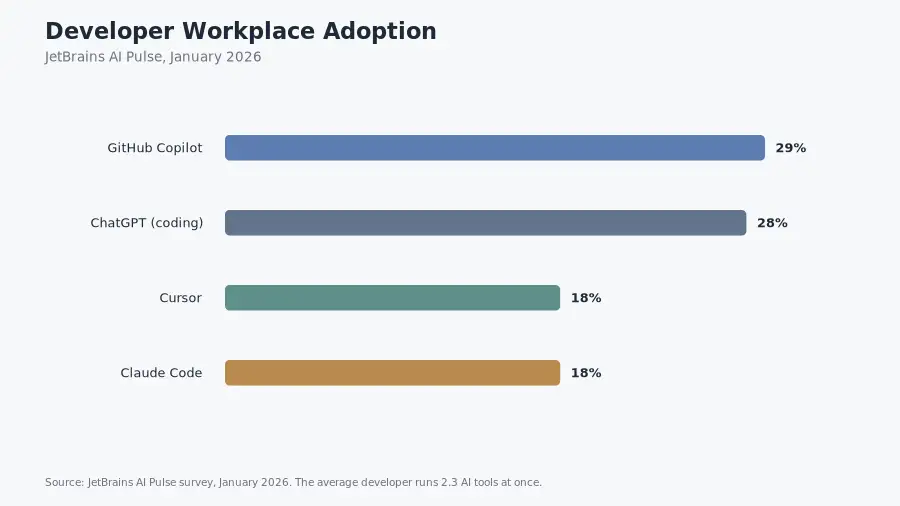
Further, JetBrains found 90% of developers use at least one AI tool at work as of January 2026, while the average developer runs 2.3 AI tools at once.
And one more caution: a METR randomized trial found experienced developers were 19% slower with AI assistance, even though they believed they were 20% faster. Keep that in mind when a tool or company claims a big speedup; their own studies and research exist, but independent results are more mixed, and could be random.
How I Ranked and Tested These Alternatives
So I didn’t rank from spec sheets alone; I ran a fixed set of tasks across every tool over four weeks, to be on the fair side.
The test set included a 1,200-word blog draft, a product description rewrite, and a 40-page PDF analysis.
It also included a math word problem, a Python debugging task, and a research question with citation checking. I added a long document summarization and a voice conversation session.
I scored each tool on six criteria:
- Answer quality. Did the output do the job, or did it drift into filler?
- Context handling. Could the tool read a long PDF and stay coherent?
- Price and free tier. Is the free tier genuinely usable, or a 10-message tease?
- Privacy and data handling. Does the vendor train on your chats? Where do servers live?
- Ecosystem and agents. Can the tool do work, not just chat?
- Freshness. Is the model current as of August 2026, or is the tool coasting?
One quick note on market share: the numbers below come from different tracking firms (Similarweb, Statcounter, Apptopia, Sensor Tower), and they disagree because they measure different things. So, I note the source with each figure; none of them are wrong.
The 25+ ChatGPT Alternatives at a Glance
This table is the cheat sheet, so bookmark it. Prices are updated as of August 2026. So, you may want to check their official pages before buying, because pricing changes often.
| # | Tool | Starting price | Flagship model (Aug 2026) | Best for | Standout |
|---|---|---|---|---|---|
| 1 | Claude | Free; Pro $20/mo | Claude Opus 4.8 | Writing, reasoning, long docs, coding | 1M-token context; 32% enterprise LLM share |
| 2 | Google Gemini | Free; AI Plus $7.99; AI Pro $19.99 | Gemini 3.1 Pro / 3 Flash | Free multimodal, Google ecosystem | 650M MAU; native video and audio input |
| 3 | Microsoft Copilot | Free; Pro ~$20/mo | GPT-5.5 via Azure | Microsoft 365 work | Deep Word, Excel, Outlook integration |
| 4 | Perplexity | Free; Pro $20/mo | Sonar + multi-model | Research with citations | Citations on every answer; $450M ARR |
| 5 | DeepSeek | Free chat; API from $0.26/M tokens | DeepSeek V4 / V3.2 | Budget reasoning, coding, self-hosting | MIT license; near-frontier at a fraction of cost |
| 6 | Grok | Free; SuperGrok $30/mo | Grok 4.5 | Real-time X data, trends | 2M-token context; live X integration |
| 7 | Mistral Le Chat | Free; Pro €14.99/mo | Mistral Large 3 | EU privacy, multilingual | Open weights; EU data residency |
| 8 | Meta AI | Free | Muse Spark | Casual use in social apps | Built into WhatsApp, Instagram, Threads |
| 9 | Qwen Chat | Free | Qwen3.5-Max | Multilingual, open weights | Apache 2.0; 1M-token context |
| 10 | Kimi | Free | Kimi K2.7 | Long context, agentic tasks | Modified MIT; 256K context |
| 11 | GitHub Copilot | Free; Pro $10/mo | Multi-model | In-IDE coding | 4.7M paid subscribers |
| 12 | Cursor | Free; Pro $20/mo | Multi-model | AI-native code editor | $2B ARR; full-project context |
| 13 | Claude Code | Included with Claude plans | Opus 4.8 | Terminal coding agent | 46% “most loved” coding tool (JetBrains) |
| 14 | NotebookLM | Free | Gemini-powered | Document Q&A, research | Audio Overviews from your PDFs |
| 15 | HuggingChat | Free | Llama, Mistral, Qwen | Open source, no lock-in | No account required |
| 16 | Poe | Free; Pro $19.99/mo | Multi-model | Model hopping in one UI | Dozens of models in one subscription |
| 17 | You.com | Free; Pro $15/mo | Multi-model | AI search with source control | Custom source weighting |
| 18 | Character.ai | Free; c.ai+ $9.99/mo | In-house | Roleplay, companionship | 20M MAU; 17.4-minute sessions |
| 19 | Jasper | From $39/mo | Multi-model | Marketing copy | Brand Voice profiles |
| 20 | Writesonic | From ~$39/mo | Multi-model | SEO blog and ad copy | Search-intent templates |
| 21 | Z.ai (GLM) | Free | GLM-5.x | Fast free chat, coding, slides | 200K-token context |
| 22 | T3.chat | Free | Multi-model | Multi-model access | One interface, several frontier models |
| 23 | Venice.ai | Free tier | Open models | Private, unfiltered chat | No data retention |
| 24 | Phind | Free; Pro $17/mo | Phind-70B + GPT/Claude | Developer Q&A | Code-aware search |
| 25 | Ollama + Open WebUI | Free (local) | Any open-weight model | Fully private local AI | Runs offline on your machine |
| 26 | Pi | Free | Inflection-2.5 | Conversation, reflection | Warmest voice of the group |
| 27 | Kagi Assistant | From $25/mo | Multi-model | Privacy + premium search | No training on your data |
| 28 | DataLab AI Assistant | Free tier | Proprietary | Data science | Text-to-SQL and text-to-Python |
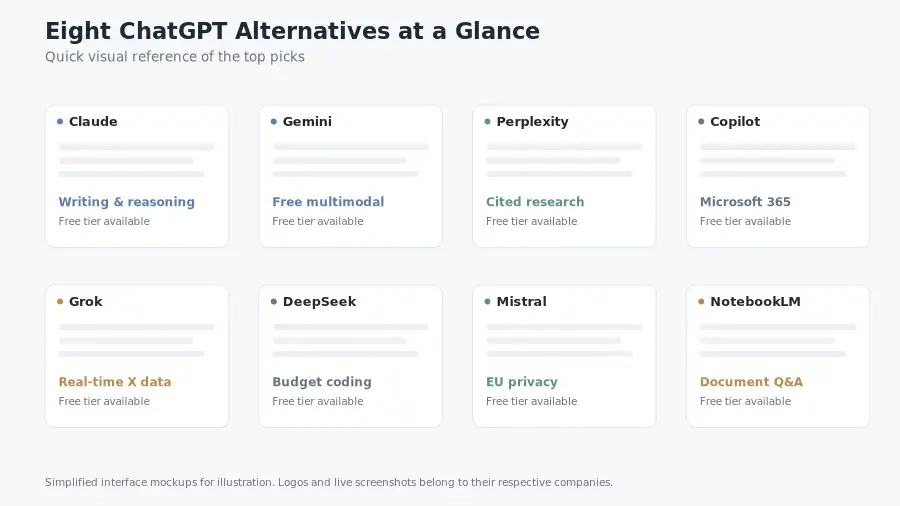
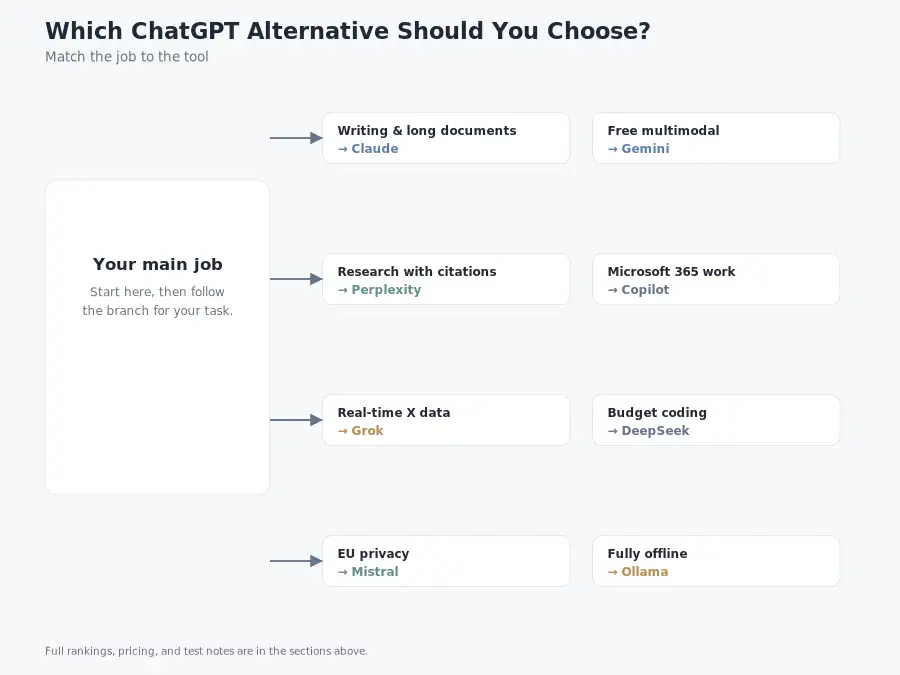
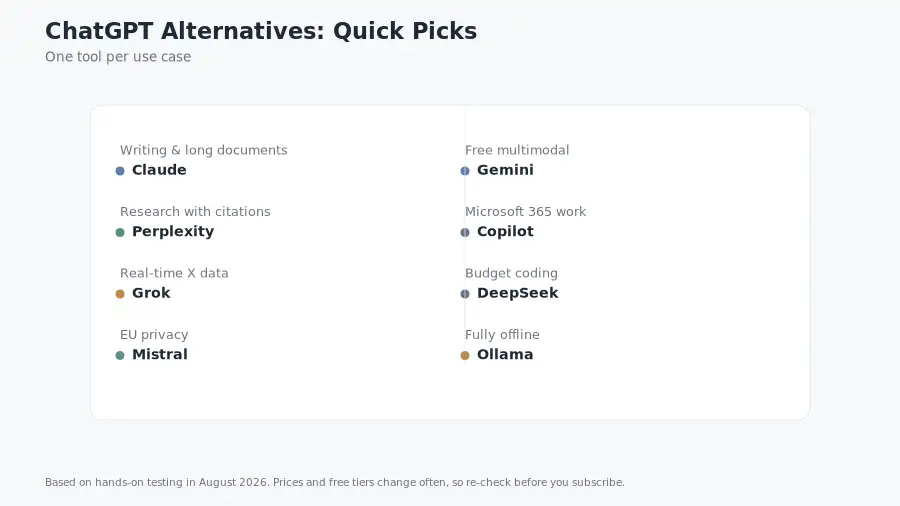
Prefer a shorter version? Here’s the quick map:
- Claude for writing, reasoning, and long documents.
- Gemini for free multimodal and Google apps.
- Perplexity for research with citations.
- Copilot for Microsoft 365 work.
- Grok for real-time X data.
- DeepSeek for budget coding (with privacy caveats).
- Mistral for EU privacy.
- Ollama for fully offline use.
The Best ChatGPT Alternatives, Ranked by Use Case
Here’s how the ranking shakes out by job. Claude wins the all-rounder slot, Gemini takes free multimodal, Perplexity owns research, and DeepSeek leads on budget. The sections below go deeper into each pick and the tests I ran.
1. Claude: Best Overall ChatGPT Replacement
Verdict: If you pick one tool to replace ChatGPT for real work, make it Claude.
Claude comes from Anthropic, and its current flagship, Claude Opus 4.8, launched on May 28, 2026. The model family has three tiers: Haiku (fast and cheap), Sonnet (balanced), and Opus (frontier).
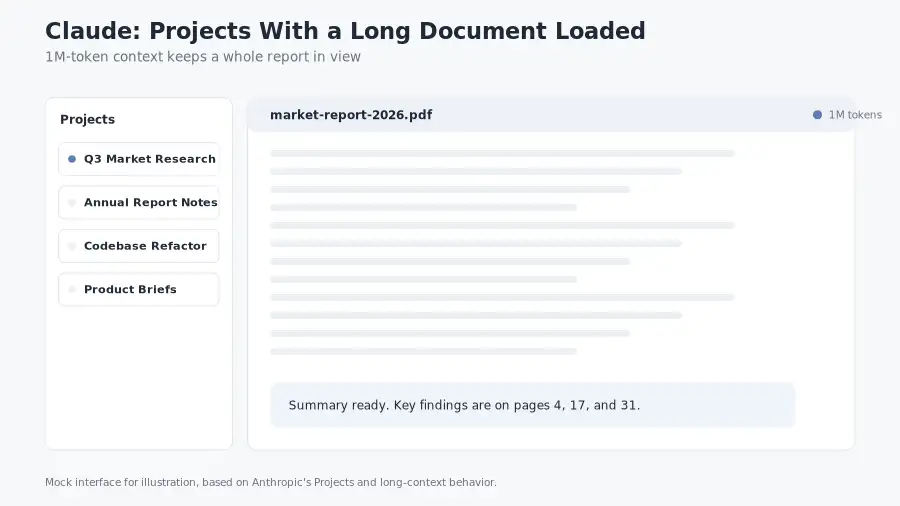
What the data says: Claude carries a 1M-token context window on Opus-class models. Anthropic reported an annualized revenue run rate of $14 billion by February 2026. Menlo Ventures put Claude at 32% of enterprise LLM spending, ahead of OpenAI at 25%.
Claude scored 88.6% on SWE-bench Verified and 69.2% on the harder SWE-bench Pro, according to Tech Insider.
My test results: I gave Claude, ChatGPT, and Gemini the same 1,200-word blog draft brief. Claude’s draft needed the fewest rewrites. Its paragraph structure was cleaner, and it didn’t pad.
On a 40-page PDF analysis, Claude kept the thread from page 3 to page 40 without losing the argument, which I didn’t see in smaller-context models. And that long-context behavior is its real superpower; you can paste an entire book into one conversation.
What I liked:
- Projects and Artifacts let you organize work and generate interactive outputs.
- Claude Code runs coding tasks from your terminal. It grew about sixfold in workplace adoption between April and June 2025, per JetBrains. It now ties Cursor at 18% adoption.
- Claude Code also scores 46% as the “most loved” coding tool, the highest of any, per JetBrains.
- The free tier works for light daily use.
What to watch: daily limits on the free tier are real. Heavy users may hit them fast. The Max plan costs $100 to $200 per month, which is a lot for individuals.
Pricing: Free, Pro at $20/month, and Max at $100 to $200/month. And enterprise tiers are above that.
Hands-on tip: You can start a Claude Project for your recurring work, like monthly reports. Pin your reference docs once, and Claude remembers them across conversations.
2. Google Gemini: Best Free Option and Multimodal Leader
Verdict: The strongest free tier in the market, and the only major assistant with native image, video, and audio input.
Gemini comes from Google DeepMind. The Gemini 3 series launched in November 2025. Gemini 3.1 Pro arrived February 19, 2026, and Gemini 3 Flash became the free default in March 2026,.
What the data says: Gemini reached 650 million monthly active users by November 2025 and another 2 billion people see Gemini-powered AI Overviews in Google Search every month.
Gemini 3.1 Pro posts strong benchmark scores: 94.3% on GPQA Diamond, 77.1% on ARC-AGI-2, and 91% on MMLU Pro. Its API input price is $2 per million tokens, lower than the $5 per million that GPT-5.5 and Claude Opus 4.8 charge.
My test results: I recorded a voice note with background noise and asked Gemini to transcribe it. It handled it well, and then I asked it to summarize the note. Correct again.
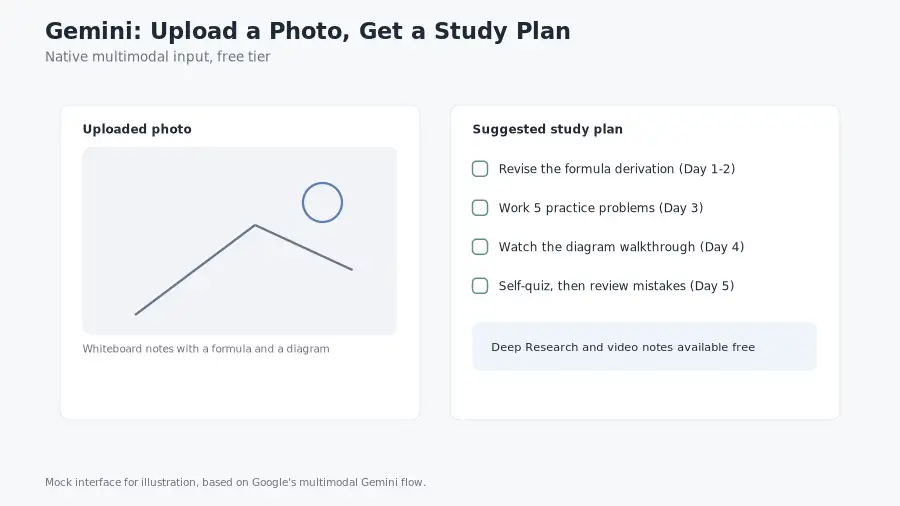
Next, I asked Gemini to analyze a spreadsheet photo. Correct. Then I asked for a study plan with quizzes, and results were genuinely useful.
And for everyday free use, nothing in this list matches Gemini’s combination of quality and price.
What I liked:
- Deep Research is included for free. It writes multi-source reports with citations.
- Gems let you build persistent custom assistants with saved instructions.
- Google Workspace integration is native. Gmail, Docs, Calendar, Maps, YouTube.
- Gemini Spark, Google’s autonomous agent, is available on the Ultra plan.
What to watch: Google’s subscription revenue per user is quite tiny compared to rivals, because Google monetizes through ads and Cloud instead. You may see more upsells over time.
Gemini’s answer style can also be more cautious than Claude’s on contentious questions, though you may need to push for direct answers.
Pricing: Free, AI Plus at $7.99/month, AI Pro at $19.99/month, and AI Ultra at $99.99 to $199.99/month.
Hands-on tip: you can point Gemini at anything visual first, like photos of receipts, whiteboards, error messages, or handwritten notes. It reads them all.
3, Perplexity: Best for Research With Citations
Verdict: The answer engine that forces every claim to show its source. Use it for anything you need to verify.
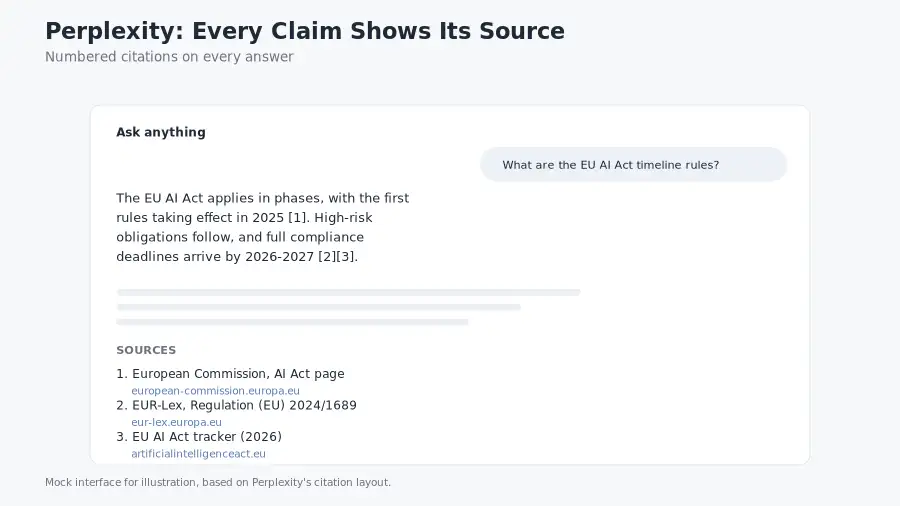
Perplexity is an AI answer engine built for research, and every response links back to sources. Aravind Srinivas and team founded it in August 2022, launched in December 2022 of public use.
What the data says: Perplexity crossed $450 million in annualized recurring revenue in March 2026, up from $200 million in September 2025. It processes more than 1 billion search queries per month.
It was valued at $22.6 billion in January 2026, with full-year 2025 revenue of $232 million, per ResourceRa. In February 2026, Perplexity removed ads entirely, and revenue jumped 50% the next month.
My test results: I asked Perplexity about EU AI Act timelines and checked every citation by hand. The sources were real, current, and relevant. Then I used Deep Research mode to build a sourcing brief with 12 sources.
It structured them better than I could have in the same time. So this is the tool I reach for when a client needs a fact check or a source list.
What I liked:
- Inline citations on every answer, which kills most hallucination anxiety.
- Deep Research synthesizes multi-source reports.
- Perplexity Computer, the agentic mode, can browse and operate web pages.
What to watch: chat history and file uploads are more limited than Claude’s or Gemini’s. It’s a research tool, not a full workspace.
Pricing: Free, and Pro at $20/month.
Hands-on tip: You can turn on Pro Search for complex questions. It uses stronger reasoning models and better sources. Save plain search for quick lookups to stretch your Pro quota.
Also read: Perplexity vs Google Search
4. Microsoft Copilot: Best for Microsoft 365 Shops
Verdict: If you live in Word, Excel, Outlook, and Teams, Copilot is already where your work lives.
Microsoft Copilot runs GPT-5.5-class models through Azure. It wraps them around Microsoft 365.
What the data says: Copilot holds about 1.3% of AI chatbot web visits, and about 72 million monthly active users. As compared, its share is small next to ChatGPT, though its distribution is very large because it comes inside Windows and Office.
My test results: I asked Copilot to summarize a Teams meeting transcript I pasted in. It pulled out decisions and action items cleanly. Then I asked it to draft a follow-up email in my tone. Well, it was good enough to send after light edits.
So the integration is the point here. Copilot can read your email thread, summarize meetings, and draft documents without you leaving Office.
What I liked:
- Native M365 integration that no other tool matches.
- Free tier on the web includes GPT-level chat with Bing search.
- Enterprise Copilot at $30 per user per month scales across an org.
What to watch: standalone chat is less impressive than Claude or Gemini for deep reasoning, though its real value is the Office context. If you don’t use Microsoft 365, other tools serve you better.
Pricing: Free tier. Pro around $20/month. M365 Copilot from $30/user/month.
Hands-on tip: In Word, you can use “draft with Copilot” to start documents from a prompt. Then ask it to rewrite sections in a different tone. It keeps your document’s context.
5. Grok: Best for Real-Time Data and Social Trends
Verdict: The real-time king. If your work depends on what’s happening on X right now, Grok has the data.
Grok comes from xAI, the company Elon Musk founded. SpaceX acquired xAI in February 2026 at a $250 billion valuation, the combined entity is worth roughly $1.25 trillion.
What the data says: Grok reached about 117 million monthly active users by March 2026, per the SpaceX IPO filing. Its US mobile app share jumped from 1.9% in January 2025 to 17.8% in January 2026, a ninefold rise, as per the report from Reuters.
Grok 4.5 was launched on July 8, 2026, with a 2M-token context window. xAI’s Colossus cluster now runs 555,000 NVIDIA GPUs.
My test results: I asked Grok to summarize sentiment around a product launch using live X posts. It gave me a useful read with examples I could click. Then I asked it a current events question and compared its answer to Perplexity’s. Both were accurate.
For what it’s worth, Grok was faster on the social angle, and it also has the least restricted answer style of the big five, though some users want that and some don’t.
What I liked:
- Live X data grounds answers in what people are actually saying.
- 2M-token context handles long threads and documents.
- Image generation is included.
What to watch: answers can drift toward opinions you may not want in a business doc. Verify before you publish. The privacy story is also still early stage for enterprise use.
Pricing: Free on X. X Premium around $8 to $10/month. SuperGrok at $30/month.
Hands-on tip: You can use Grok for market monitoring. Ask it to summarize what influencers and users are saying about a topic, then verify the top claims manually.
6. DeepSeek: Best Budget and Open-Weight Option (With Caveats)
Verdict: Remarkable capability per dollar, but read the privacy section before you trust it with sensitive data.
DeepSeek is a Chinese AI, lab based in Hangzhou. Liang Wenfeng founded it in July 2023. Its R1 model shocked the industry in January 2025 by matching frontier reasoning at a very low cost. The current models are DeepSeek V4 (released April 24, 2026), V3.2, and R1.
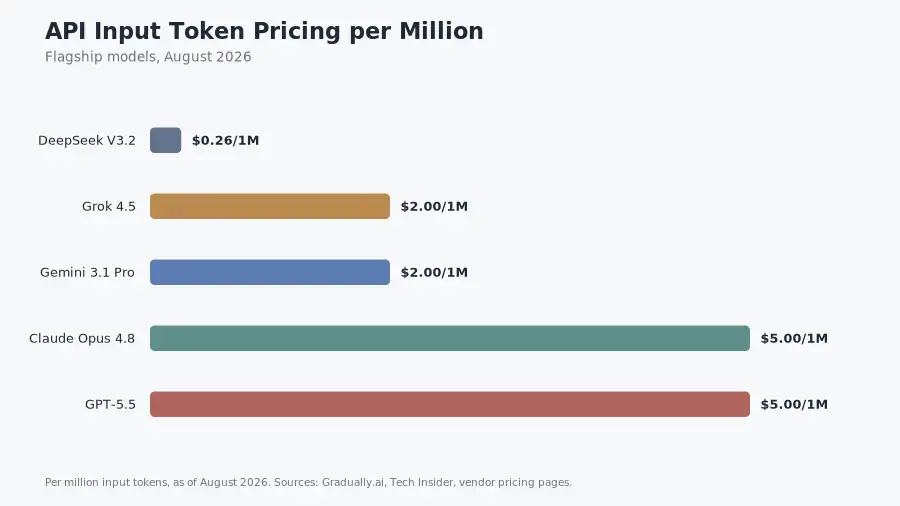
What the data says: DeepSeek V3.2 costs $0.26 per million input tokens and $0.38 per million output tokens, versus $2.50 per million for GPT-4o-class models at launch. Output is about 26 times cheaper.
The lab reportedly trained R1 for about $6 million, versus around $100 million for GPT-4. Plus, the models are MIT licensed. You can download the weights and run them yourself. DeepSeek passed 130 million monthly active users by the end of 2025.
My test results: on math and Python debugging, DeepSeek’s reasoning was impressively close to Claude at a fraction of the price. I used the free web chat for a week with no limits. The free tier is genuinely unlimited, which is rare to find in most AI tools.
But here’s the trade you should know. The privacy policy says user data is stored on servers in the People’s Republic of China.
Italy’s data protection authority ordered to get R1 blocked in app stores in early 2025, according to Usercentrics. South Korea took similar steps. Canada banned it on government devices. Indian regulators also launched scrutiny.
My rule: use DeepSeek for public or non-sensitive tasks, or self-host the open weights. You probably want to keep customer data, salaries, and trade secrets out of the hosted chat.
The capability is real, and so is the residency risk.
Pricing: Free chatm and API from $0.26 per million input tokens.
Hands-on tip: if you want DeepSeek’s reasoning without the residency question, you can run it locally with Ollama. Privacy concerns disappear when nothing leaves your machine.
6. Mistral Le Chat: Best for EU Compliance and Multilingual Work
Verdict: The European answer; If GDPR is a hard requirement, Mistral is the pick.
Mistral AI is a French lab innovation, Le Chat is its consumer assistant, with open-weight models. The current lineup includes Mistral Large 3, Medium 3.5, and Small 4.
What the data says: Le Chat’s Pro plan costs €14.99 per month, Mistral models are open-weight, mostly Apache 2.0 licensed. The company positions EU data residency as a first-class feature.
My test results: I ran a French-to-English translation and a German business letter through Le Chat. Both were natural. That’s expected from a lab built around European languages.
And the free tier includes frontier models, web search, a canvas, agents, and a code interpreter. That’s a generous free package.
What I liked:
- EU data residency for regulated industries.
- Open weights, so you can deploy on your own infrastructure.
- Strong multilingual output across European languages.
What to watch: the assistant ecosystem is smaller than Claude’s or Gemini’s. You get fewer integrations and third-party plugins.
Pricing: Free, and Pro at €14.99/month. Team and enterprise tiers above.
Hands-on tip: European teams handling personal data can start with Le Chat. The GDPR exposure is lower than with US- or Chinese-hosted tools.
7. Meta AI: Best for Zero-Install Casual Use
Verdict: The most accessible AI on the list. A billion people can try it without installing anything.
Meta AI runs inside WhatsApp, Instagram, Messenger, and Threads. Its models are branded Muse Spark as of 2026.
What the data says: Meta AI grew roughly 210% year over year in monthly active users, the fastest of any major platform. Its base is small next to ChatGPT’s, though its reach is huge because of Meta’s apps.
My test results: I used Meta AI in WhatsApp to draft a reply and summarize a long message chain. It works, though it isn’t as deep as Claude or Gemini on complex reasoning. Plus, it’s already installed on the phone of anyone with WhatsApp, which is most of the world.
What I liked:
- No signup, no new app.
- Voice and vision features are built in.
- Free, with no paid tier required for casual use.
What to watch: not built for serious writing, research, or coding. Treat it as a convenience layer.
Pricing: Free. Meta One Plus at $7.99/month adds features.
8, 9, and 10 Qwen, Kimi, and Z.ai: The Open-Weight Challengers From China
Verdict: Technically impressive and cheap. Same data-residency caution as DeepSeek.
Qwen is Alibaba’s model family, Apache 2.0 licensed, and Qwen Chat offers Qwen3.5-Max with a 1M-token context.
Kimi comes from Moonshot AI. It excels at long-context and agentic tasks; Kimi K2.7 supports agent swarms with many parallel sub-agents.
Z.ai runs Zhipu AI’s GLM models. Its chat is free, with a 200K-token context, Deep Think mode, and AI Slides.
My test results: I tested Qwen on a multilingual task set. Its English is strong, while its Chinese is native-level.
Kimi handled a 200-page style guide and answered questions about clause 47 correctly, which impressed me. Z.ai’s free chat is fast and usable.
Honestly, all three are worth knowing if you want open-weight options that don’t route through US clouds.
What to watch: the same privacy question as DeepSeek. Hosted versions store data in China, so self-host the open weights if you need control.
Qwen and Kimi licenses allow commercial use, though Kimi adds a small attribution clause above revenue thresholds.
Pricing: Free chat. API pay-per-use.
11, 12, 13 and 14: GitHub Copilot, Cursor, and Claude Code: Best for Developers
Verdict: For coding, stop picking a chatbot. Pick an environment.
The coding market split into three leaders, per JetBrains’ January 2026 AI Pulse survey. GitHub Copilot sits at 29% workplace adoption. Cursor and Claude Code tie at 18% each. ChatGPT itself sits at 28%, because developers use it for coding too.
GitHub Copilot has about 20 million total users. It has 4.7 million paid subscribers as of January 2026, up 75% year over year, according to Microsoft, nearly 140,000 organizations use Copilot Enterprise.
In practice, Copilot is the best autocomplete for day-to-day code. It generates about 46% of the code written by active users, per GitHub.
Cursor is an AI-native code editor, not a plugin. It crossed $2 billion in annualized revenue by February 2026, per Bloomberg. It understands your whole project, not just the file you’re editing.
My test: I gave Cursor a bug report in a multi-file repo. It traced the issue across three files and proposed a fix with context. That’s a different class of help than single-file autocomplete.
Also read: Is Cursor AI Better Than ChatGPT for Coding?
Claude Code is the terminal-based agent from Anthropic. It reached 18% workplace adoption in under a year, and it tops the satisfaction chart at 46%, per JetBrains.
It can debug, refactor, and migrate across a codebase while you watch. I found it the most capable at multi-step changes. That matches its benchmark lead on SWE-bench Pro.
One honest caution: the METR trial showed experienced developers completing tasks 19% slower with AI while feeling 20% faster. Trust your own measurements, and treat these tools as helpers for boilerplate, search, and refactoring. Review the output carefully.
Pricing: Copilot Free, Pro $10/month. Cursor Free, Pro $20/month. Claude Code included with Claude Pro and Max plans.
15. NotebookLM: Best for Document Intelligence
Verdict: Feed it your documents and let it do the heavy lifting. Free, and the Audio Overviews are genuinely fun.
NotebookLM is Google’s source-grounded research assistant, and it only answers from the documents you upload. That makes it a strong fact-check companion.
My test results: I uploaded a 60-page market report and asked for a summary, then asked about pricing data buried on page 41. It answered with citations to the exact passages.
After that, I generated an Audio Overview, which turned the report into a two-host podcast-style discussion. That feature alone makes NotebookLM worth a try for anyone who must absorb long documents.
What I liked:
- Free with a Google account.
- Answers grounded strictly in your sources.
- Audio Overviews for learning on the go.
What to watch: it isn’t a general assistant. You may want to skip opinions and current events, since it’s a document tool.
Pricing: Free.
16 and 17: Character.ai and Pi: Best for Conversation and Companionship
Verdict: Different category, real user numbers. Use these for chat that feels human, not for work.
Character.ai runs roleplay and character chat at scale, holding about 20 million monthly active users. Average session length is 17.4 minutes, more than double ChatGPT’s 7.2 minutes.
Users have created more than 18 million characters. About 78% of users are aged 18 to 34.
Pi is Inflection’s conversational assistant. It’s warm, voice-first, and built for reflection rather than task execution, and I found it good for thinking out loud, brainstorming, and casual back-and-forth.
Honestly, it isn’t a workhorse, though its voice quality is the best of the group.
Hands-on tip: you can use Pi for vocal brainstorming sessions when you need to think. Use Character.ai for persona-driven conversations or customer-facing character ideas. Neither replaces a work assistant.
Pricing: both free. Character.ai Plus at $9.99/month.
18, 19, and 20: Poe, T3.chat, and You.com: Multi-Model Hubs to Hedge Your Bets
Verdict: One subscription, many models. The low-effort way to compare and hedge.
Poe, from Quora, gives you dozens of models under one subscription, from Claude to GPT to Llama. You.com adds AI search with custom source weighting, while T3.chat offers free multi-model access in one interface.
My test results: I used Poe to run the same prompt through Claude, GPT, and Gemini side by side. The output differences were immediately visible. That’s the fastest way to learn which model you actually prefer.
You.com’s source weighting let me tell the search which domains to trust, a rare and useful control.
What to watch: hubs route your prompts to third-party model providers. You may want to check the privacy policy of the hub itself before you paste sensitive content.
Pricing: Poe Free, Pro $19.99/month. You.com Pro $15/month. T3.chat Free.
21, 22, and 23: Jasper, Writesonic, and Phind: Specialist Tools
Jasper targets marketing teams with Brand Voice profiles and templates. It starts around $39 to $49 per month. Writesonic focuses on SEO blog and ad copy, from about $39 per month. Phind is a developer search tool with code-aware retrieval, Pro at $17 per month.
My test results: Jasper’s Brand Voice feature is the standout; it matched a client’s existing tone on the first try, which saved me real editing time.
Writesonic’s templates are useful for ad variations, and Phind answered a niche framework question with code and docs links in seconds. Bottom line: these are specialists, and they win when the specialist job is your job.
Head-to-Head: ChatGPT vs the Top Alternatives
Here’s the quick way to decide between ChatGPT and its rivals: match the tool to the task. Each pairing below shows the trade-off in one or two lines.
ChatGPT vs Claude
Both cost $20 per month for paid tiers, though Claude wins on long-context work, writing nuance, and coding benchmarks while ChatGPT wins on ecosystem size, plugin count, and raw user volume.
In my testing, Claude produced the better long document, but ChatGPT felt faster for short everyday queries.
Verdict: Claude for deep work. ChatGPT for breadth.
ChatGPT vs Gemini
Gemini has the stronger free tier and native multimodal input, while ChatGPT has stronger third-party integrations today. Gemini’s 2B-user search distribution is a structural advantage no one else has.
Verdict: Gemini if you want free multimodal and Google apps. ChatGPT if you want the biggest plugin ecosystem.
ChatGPT vs Perplexity
Perplexity is purpose-built for cited research, while ChatGPT is a general assistant with search bolted on. For fact-checking, source lists, and research summaries, Perplexity is measurably better.
For everything else, ChatGPT remains more capable.
Verdict: Use both. Perplexity for research, ChatGPT for generation.
ChatGPT vs DeepSeek
DeepSeek matches much of ChatGPT’s reasoning at roughly 10 to 26 times lower API cost, though the trade is data residency in China and thinner support. For cost-sensitive, non-sensitive workloads, DeepSeek is the value pick.
For anything confidential, stay away.
Verdict: DeepSeek for budget. ChatGPT for trust.
ChatGPT vs Grok
Grok has live X data and a 2M-token context, while ChatGPT has scale and polish. If your work depends on real-time social signals, Grok is the better window.
If you need a general assistant, ChatGPT is still the default.
Verdict: Grok for real-time. ChatGPT for general.
Current Model Benchmarks (August 2026)
Sure, benchmarks don’t equal usefulness, but they help. Here’s where the current flagships stand:
| Benchmark | What it tests | Leader (Aug 2026) |
|---|---|---|
| SWE-bench Verified | Real GitHub issue resolution | Claude Opus 4.8 at 88.6% |
| SWE-bench Pro | Multi-file engineering tasks | Claude Opus 4.8 at 69.2% |
| GPQA Diamond | Graduate-level science reasoning | Gemini 3.1 Pro at 94.3% |
| ARC-AGI-2 | Novel-pattern reasoning | Gemini 3.1 Pro at 77.1% |
| MMLU Pro | Broad academic knowledge | Gemini 3.1 Pro at 91% |
| Terminal-Bench 2.0 | Command-line agentic tool use | GPT-5.5 at 82.7% |
Context windows at a glance: Claude Opus 4.8 and Gemini 3.1 Pro both offer 1M tokens in the app, though Gemini reaches 2M through the API. Grok 4.5 offers 2M, while GPT-5.6 supports about 1.05M.
Llama 4 Scout, for local deployment, claims 10M. These numbers matter when you work with entire codebases or long reports.
API token pricing per million (input): Gemini 3.1 Pro $2, Grok 4.5 $2, DeepSeek V3.2 $0.26, Claude Opus 4.8 $5, GPT-5.5 $5. If you’re gonna build software on an API, unit economics can decide the winner.
Also read: whoburnedmore: Track Your Real AI Coding Token Burn & Costs
How to Choose: A Decision Framework
So how do you pick? You can follow five steps instead of guessing.
- You can define the job. Writing, research, coding, document analysis, data work, or conversation. Each job has a clear leader in this guide.
- You can set your constraints. Budget, privacy needs, data residency rules, and the apps you already use. An EU-regulated company can’t choose DeepSeek’s hosted chat. A Google Workspace shop can try Gemini first.
- You can test the free tiers. Start with Gemini Free, DeepSeek Free, NotebookLM Free, and HuggingChat. Zero cost, real evaluation.
- You can run your own test. Copy a real task from your work into each candidate. Compare outputs side by side in Poe or T3.chat.
- You can commit and schedule a review. Models change about every six weeks now, so you can revisit your pick quarterly.
Here’s a migration checklist I’ve used, in order:
- You can export your ChatGPT conversations from Settings> Data controls.
- You can copy your custom instructions into the new tool’s memory or projects area.
- You can test your top three recurring prompts in the new tool.
- You can move one real, low-risk project over for a week.
- You can compare results, then decide.
Free vs Paid: What You Actually Get in 2026
Free tiers are generous right now, ’cause the funding war is subsidizing them. Here’s the honest breakdown.
- Genuinely unlimited free chat: DeepSeek and HuggingChat. Both are free without daily caps. Gemini’s free tier is also strong, with Gemini 3 Flash as the default model and Deep Research included. Perplexity’s free tier needs no login for basic search.
- Limited free tiers: Claude (daily message caps), Microsoft Copilot (basic free chat), GitHub Copilot (2,000 completions and 50 chats per month), Cursor (2,000 completions per month).
- When paid is worth it: Claude Pro at $20 buys you Opus access, higher limits, and Claude Code. Perplexity Pro at $20 buys Pro Search and Deep Research quotas. Gemini AI Plus at $7.99 is the cheapest serious upgrade in the market.
My advice: you can run free tiers for a month and only pay when the limits actually block your work. You don’t have to subscribe to three tools at once; one general assistant plus one specialist covers most needs.
Privacy and Data Sovereignty: The 2026 Deciding Factor
Privacy moved from a footnote to a purchase trigger. Here’s the map.
Data residency matters. US tools (Claude, ChatGPT, Gemini, Grok) store data on US infrastructure. Mistral stores in the EU. Chinese tools (DeepSeek, Qwen, Kimi, Z.ai) store data in China.
And that gap between “US servers” and “China servers” matters for regulated industries, plus anyone who values control.
The DeepSeek case study: Italy’s Garante ordered R1 blocked in January 2025 over GDPR concerns. South Korea and some Canadian government devices followed. Indian and Australian regulators opened scrutiny.
The lesson isn’t “never use Chinese models.” The lesson is “know where your data goes before you paste it.”
Privacy-friendly picks:
- Mistral Le Chat for EU data residency.
- Kagi Assistant for no-training, no-ads search plus chat.
- Venice.ai for no-data-retention chat.
- Ollama with Open WebUI for fully offline, self-hosted AI.
The Hugging Face team published a solid guide on local models by hardware class. A 16GB laptop can run Gemma 3 12B or Qwen3 14B. A 24GB GPU runs Gemma 3 27B comfortably.
My personal rule, after testing everything in this guide: hosted chat is for non-sensitive work. Anything confidential goes to self-hosted open weights or a vendor with a signed data processing agreement.
India-Specific Quick Picks
If you’re reading from India, these notes matter. India accounts for about 16% of ChatGPT’s global traffic. It’s the fastest-growing major market.
Pricing reality: ChatGPT’s Indian pricing runs Go at ₹399/month, Plus at ₹1,999/month, and Pro at ₹19,900/month. Also, Indian users are price-sensitive. The free tiers of Gemini, DeepSeek, and HuggingChat look very attractive next to those numbers.
My picks for Indian readers:
- Gemini Free for daily use, since it bundles a strong free model with Google apps.
- DeepSeek Free for coding and math, but keep sensitive data out.
- Mistral Le Chat for any work touching EU clients.
- Ollama for unlimited offline use on a laptop.
Frequently Asked Questions
Claude, Gemini, Perplexity, Microsoft Copilot, Grok, DeepSeek, Mistral Le Chat, Meta AI, Qwen, Kimi, and dozens more. The top five by users are ChatGPT, Gemini, Claude, Perplexity, and Copilot.
Honestly, it depends on the job. Claude is better for writing and long documents, and Gemini is better for free multimodal work. Perplexity is better for cited research, while Grok is better for real-time data. ChatGPT remains the most versatile single tool.
Gemini, DeepSeek, HuggingChat, Meta AI, NotebookLM, and Perplexity all have genuinely usable free tiers. DeepSeek and HuggingChat are unlimited.
Capable, yes. Private, depends. Hosted chats store data on servers in China, and Italy, South Korea, and Canada have restricted it. Use it for public tasks, or self-host the open weights.
Claude for writing, reasoning, long context, and coding; Gemini for free tier, multimodal, and Google integration. Most power users I know run both.
GitHub Copilot for autocomplete, Cursor for an AI-native editor, and Claude Code for agentic multi-file work. JetBrains data shows Copilot at 29% workplace adoption, with Cursor and Claude Code at 18% each.
Export your chats from Settings, copy your custom instructions, and test your three most common prompts. Move one real project over, and compare for a week.
Wrapping Up!
This year, market has one clear pattern: ChatGPT defined the category, and the category moved on. Its raw numbers keep growing, though its share keeps falling, because the alternatives are now good enough to win specific jobs outright.
So my tested recommendation: keep ChatGPT if you like it, add Claude for writing and deep work, and add Perplexity for research. You can use Gemini’s free tier before you pay for anything.
For anything confidential, run open weights locally. That combination beats any single tool.
Two predictions from the data. First, agents will keep replacing chatbots as the story. The money and the product work are both moving there.
Second, price pressure from open-weight models like DeepSeek and Qwen will keep forcing subscription prices down. Both trends help you.
Bookmark the comparison table. Revisit it every quarter. In this market, the best answer changes about every six weeks.