SimilarWeb: 10 Best Ways To Use This Tool
Most people only scratch the surface of Similarweb. Here are 10 practical ways to use it for competitor research, keyword gaps, and smarter growth decisions.

If you’ve used Similarweb before, you probably checked a competitor’s traffic number, nodded at it, and closed the tab. Most people do exactly that.
But that’s like buying a Swiss Army knife and only ever using the bottle opener. The tool runs deep. And the marketers, SEOs, and business owners who go deep are making decisions that actually move the needle.
So we put this guide together for one reason — to show you what Similarweb can do when you stop skimming. Every method here is practical. Every one is worth your time. No filler, no fluff. Just ten ways to get more out of the tool.
Let’s go.
First, a Quick Word on What Similarweb Actually Is
Similarweb is a digital intelligence platform. It tracks website traffic, keyword data, referral sources, audience behaviour, and competitive performance across more than one billion websites and 200 million mobile apps around the world.
Marketers use it. SEO teams use it. Media buyers, investors, and growth teams use it too. Some run quick competitive checks. Others build full content and ad strategies around what it shows them.
The free version gives you a limited look at any site. Paid plans unlock deeper history, more keywords, and sharper breakdowns. Most methods below work with a free account to start — but the paid tier is where it really opens up.

1. Understand Exactly How Your Competitors Are Growing
This is where most people start — and where most stop too early.
Similarweb breaks any site’s traffic into six clear channels: direct, referral, search, social, email, and display advertising. Each one tells you something specific about how that site grows.
As Similarweb’s own channel analysis guide explains, direct traffic signals strong brand awareness — people already know the site and go there on purpose. High email traffic points to a loyal, returning audience. Strong referral numbers usually mean an active affiliate program or solid press coverage.
So when you look at a competitor’s full channel breakdown, you’re not just reading numbers. You’re reading their growth strategy. Use it like a map.
Start with your top three competitors. Line up their channel mixes side by side. You’ll quickly see which channels own your niche — and which ones nobody’s really using yet.
Also read: 10 Best GMB (Google My Business) Optimizations

2. Find the Keyword Gaps Your Competitors Are Quietly Exploiting
Here’s a question worth sitting with. Which keywords are sending your competitors thousands of visits every month — while you haven’t written a single sentence about them yet?
Similarweb’s Keyword Gap tool answers that directly. Enter up to four competing domains, and the tool pulls up every keyword they rank for that you don’t.
Through, Similarweb’s Keyword Gap feature, each result comes with traffic share data, keyword difficulty, and search intent — so instead of a raw list, you get a clear action plan.
What sets this apart from other keyword tools is the data source. Similarweb draws from real browsing behaviour, not just search engine estimates. So the numbers are closer to what’s actually happening.
Use this to map out your next three months of content. Focus on keywords trending upward, sitting at moderate difficulty, with clear informational or commercial intent. That mix gives you the best shot at ranking without a long wait.

3. Benchmark Against the Market — Not Just Your Own Last Month
Most site owners track their own metrics constantly. Page views, sessions, bounce rate — all compared to the month before. That’s useful, sure. But it’s a bit like only judging your fitness by how you felt yesterday.
Similarweb lets you benchmark against the actual market. You can pull engagement metrics from competing sites — bounce rate, pages per visit, average session duration — and stack them against your own. Backlinko’s breakdown of Similarweb’s features flags benchmarking as one of the platform’s most practical uses for competitive research.
Say your bounce rate sits at 78% and a close competitor holds 51%. That’s not just a gap — it’s a signal that their content or user experience is solving something yours isn’t yet.
Run this check once a month. Don’t react to single data points. Look for patterns across three to six months. Steady gaps in engagement are your clearest, most honest signal of where to focus next.

4. Build a Referral and Affiliate Outreach List in Minutes
This might be the most underused feature in the whole tool. And once you see how it works, you’ll wonder why you skipped it.
Go to any competitor’s profile. Open the Referring Websites section. Filter for Competitive Traffic and hit Referral Opportunities. What you get is a list of every site already sending traffic to your competitors — but not to you.
These are warm leads. They’re already in your niche, linking to content like yours, and they’re already open to partnerships. You don’t have to guess who to contact. Similarweb just built the list for you.
You can sort by traffic volume, relevance, or domain strength — then save the best ones to a tracked list and watch them over time. A process that used to take hours of digging now takes minutes.
Also read: Live Marketing: What It Is and How to Apply It In Your Digital Strategy

5. Reverse-Engineer Competitor Paid Ad Strategies Before You Spend a Penny
Jumping into paid ads without checking what’s already working in your niche is one of the most expensive habits in digital marketing. Similarweb gives you a way out of that trap.
The paid search section shows which keywords competitors are bidding on, how much traffic those ads pull in, and which ad networks and display publishers they’re using. Similarweb’s paid search analysis documentation walks through how you can build a clear picture of where competitor budgets are going — and what’s actually paying off.
Here’s a simple read. If a competitor has been running the same paid keywords for six months straight, those keywords are almost certainly converting. Nobody keeps paying for traffic that doesn’t work.
Check this before any new PPC campaign. Even 30 minutes of competitor paid research can save real money and steer you toward keywords that are already proven.
| Data Point | What It Tells You |
|---|---|
| Paid keywords | Which terms competitors are bidding on |
| Paid traffic volume | How much traffic those ads are generating |
| Ad networks used | Where display ads are being placed |
| Traffic trends over time | Whether a paid strategy is working long-term |
| Landing page destinations | Which pages they’re driving paid traffic to |

6. Spot Trending Keywords Before Everyone Else Does
Most keyword research is reactive. You find out a topic is popular after a dozen competitors have already published on it. By then, ranking is slower, harder, and more costly.
Similarweb’s Demand Analysis tool flips that. Enter a seed keyword and it shows you total demand size plus trend direction for related terms. As Similarweb’s keyword trends guide explains, sorting by the “change” column surfaces keywords climbing fast — before they get crowded.
The move here is filtering for non-branded queries with rising momentum. These are topics people are searching for more and more, but where strong competitors haven’t locked up the top spots yet.
When you spot one, act fast. Publish a solid, thorough piece while competition is still thin. A keyword trending up at moderate difficulty is one of the best content bets available right now.
We’ve seen this play out time and again. Early content on rising keywords tends to earn top rankings that hold for months — sometimes longer — before the niche catches up.

7. Go Page-Level to See What Content Is Actually Winning
Looking at competitor keywords in bulk gives you direction. But going page-level is where the real clarity is.
Similarweb’s Organic Pages tool shows a competitor’s top-performing individual pages — not just their overall domain. As outlined in Similarweb’s organic research documentation, you can see which specific articles, product pages, or landing pages drive the most traffic, which keywords send visitors to each page, and whether a page is gaining or losing ground over time.
This changes how you think about content. Instead of guessing which angle or format to use on a topic, you can see exactly which version is already winning — then build your own with more depth and a fresh perspective.
Pay close attention to competitor pages gaining traffic month on month. That’s growing demand with a format search users are responding to. And watch the pages losing ground too.
When a competitor’s content starts sliding, a gap opens. A fresher, more useful piece on the same topic is your way in.
Also read: What Is Scamalytics and How Does It Protect Online Users?

8. Validate a New Market Before You Commit Any Resources
Starting a new blog, entering a new niche, expanding to a new country, or launching a product — every one of those decisions costs real time and real money. Similarweb lets you test the opportunity before you’re locked in.
Use the Market Research section to look at traffic trends across an entire category. According to Similarweb’s market analysis report, you can see total market size, top players, how traffic is spread across the market, and whether demand is growing or shrinking — the kind of read that used to need a research firm.
Traffic share tells you a lot. If three sites control 80% of total market traffic, the space is concentrated and breaking in will be slow going. If traffic is spread across many sites, the market is more open and more worth chasing.
Also look at emerging players — newer sites growing fast. They’re often early signals of where a market is heading. Getting there first is a real edge.
| What to Check | What You’re Looking For |
|---|---|
| Total market traffic | Is the audience large enough to matter? |
| Traffic trend direction | Is the market growing or shrinking? |
| Top site traffic share | Is it too packed to enter competitively? |
| Emerging players | Are newer sites gaining ground fast? |
| Top traffic channels | Which channels drive growth in this niche? |
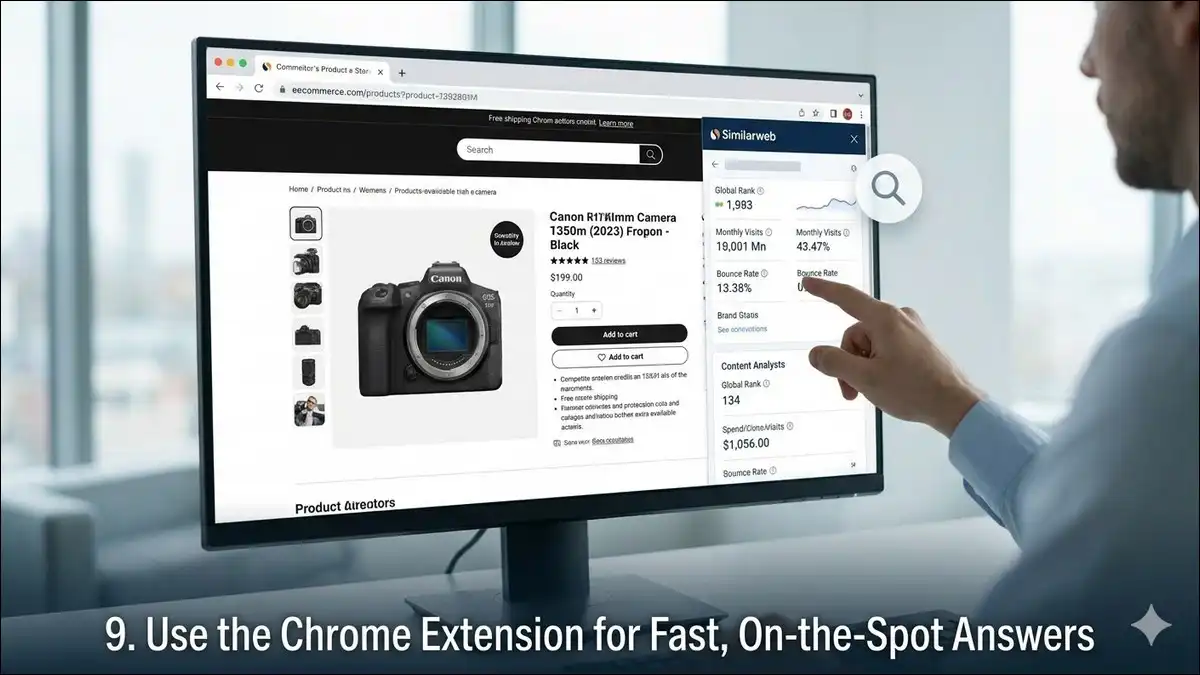
9. Use the Chrome Extension for Fast, On-the-Spot Answers
Not every research session needs a full dashboard. Sometimes you just need a quick answer while you’re mid-task.
Similarweb’s Chrome Extension does that well. Install it once. Then any time you visit a site, one click gives you a full traffic summary right in your browser — monthly visits, source breakdown, bounce rate, and engagement data.
This pays off fast during outreach. Before pitching a guest post or proposing a sponsorship, you can check whether a site has the traffic to justify your time. Three seconds. Done. It’s saved a lot of people from spending hours pitching to sites with a few hundred monthly visitors.
Same goes for competitive research. When you’re scanning search results and want a quick read on how strong a competing site really is, the extension gives you the answer without breaking your flow.
Small tool. High return. If you’re already on Similarweb, there’s no reason to skip this one.
Also read: Types of FAQ templates : Use cases + When to pick each

10. Set Alerts So You’re Never Caught Off Guard
Most people check Similarweb when they remember to. Which, let’s be honest, isn’t often enough.
The smarter play is letting the data come to you. As mentioned in Similarweb’s competitive tracker documentation, you can set automated alerts on any competitor domain — covering traffic spikes, new keyword moves, ad shifts, content launches, and referral source changes.
This matters more than it sounds. A competitor picking up a big media mention, launching a new content line, or changing their paid strategy can start hitting your traffic within weeks. Alerts mean you see it live — not after the damage is done.
Set alerts on your top five competitors. Check them every Monday. Over time you build a live picture of your competitive landscape instead of a snapshot you took three months ago.
One more thing worth knowing. As Similarweb’s AI search tracking covers, the platform now includes an AI Chatbot Traffic tracker. It shows how often your domain versus a competitor’s shows up inside AI-generated search answers. As AI search grows, that visibility is only going to matter more.
Putting It All Together
Here’s a clean summary of all ten methods:
| #No | Method | Best Used By |
|---|---|---|
| 1 | Analyse competitor traffic channels | Marketers, strategists |
| 2 | Find keyword gaps | SEO teams, content writers |
| 3 | Benchmark performance | Business owners, analysts |
| 4 | Build referral outreach lists | Link builders, partnership teams |
| 5 | Reverse-engineer PPC strategies | Paid ads teams |
| 6 | Spot trending keywords early | Content planners, bloggers |
| 7 | Analyse competitor top pages | Content strategists |
| 8 | Validate new markets | Entrepreneurs, product teams |
| 9 | Chrome extension for quick checks | Anyone doing outreach or audits |
| 10 | Automated competitor alerts | Growth teams, agency pros |
Also read: Qureka Banner: Engage Your Audience and Drive Results
One Last Thing Before You Go
Similarweb is a directional tool, not a definitive one. Its estimates come from panel data, web crawls, and modelling — so smaller sites with modest traffic will show less precise numbers than large, well-established domains.
Use it for patterns and comparisons, not pinpoint accuracy. When a competitor’s referral traffic triples in a month, that pattern means something — even if the exact figure is a rough estimate. When a keyword trend is climbing week on week, that’s worth acting on — even if the volume isn’t exact.
The people who get the most from it are the ones who use it often, layer it alongside tools like Google Search Console and Ahrefs, and treat the data as one strong input — not the final word.
Pick two or three methods from this list. Get comfortable with them. Then build from there.
The competitive data is already in the tool. You just have to go use it.