How to Remove Ads on HDMovie2: A Comprehensive Guide
So, you love watching movies on HDMovie2, but those pesky ads keep popping up. There’s no doubt that they can ruin your movie night! In this guide, we’ll show you easy ways to get rid of these annoying ads on HDMovie2.
In this guide, we mention simple steps to help you stream smoothly. That should make your HDMovie2 experience better, with online safety, and everything goes without interruptions.

Why Do Ads Show Up on HDMovie2?
Basically, HDMovie2 is a free streaming site with plenty of movies and shows. This website uses ads to make money, like other most websites. And these ads can be pop-ups, banners, or video breaks, of course they can be annoying, right?
Among these, Some ads come from third-party companies too. While most of them are okay, but some might lead to bad websites or viruses. So, knowing this can help you stay safe while watching movies or TV shows on such websites.
Ads on HDMovie2 can also come from your browser or sneaky software on your device. We’ll show you how to tackle all these sources. So, let’s start with the easiest way: ad blockers.
Using an Ad Blocker
An ad blocker stops ads from showing up, it’s like a shield for your browser. Let’s see how you can use one for HDMovie2.
Pick a Good Ad Blocker
While there are plenty of options available, we recommend uBlock Origin. It is free, easy to use, and works well on HDMovie2, and similar websites. Other options are AdBlock Plus or AdGuard, but uBlock is super light, consumes less memory!
To install uBlock Origin on Chrome:
- Go to the uBlock Origin website here.
- Click “Add to Chrome.”
- Follow the prompts to install it.
If you’re using Firefox browser, it’s the same process. Just go to the Firefox add-ons page and add uBlock. Now you’re ready to block ads on any website that you visit.
Set Up Your Ad Blocker
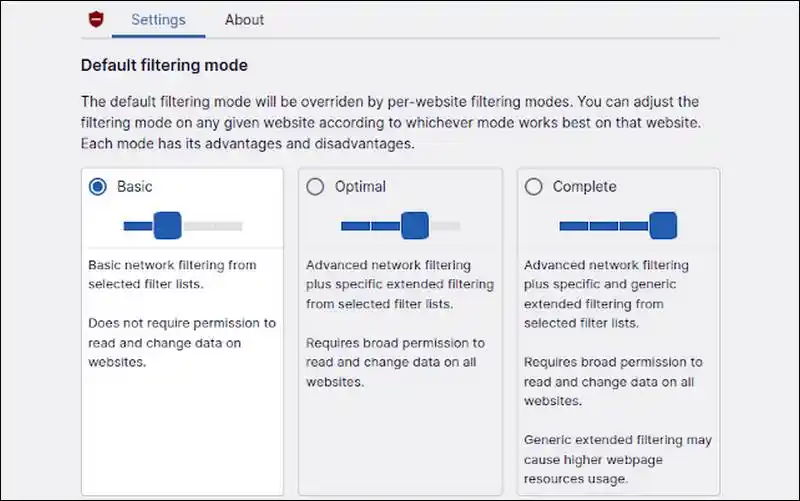
Once installed, uBlock needs a quick setup. Open its settings. Turn on all the default filters. These filters block most HDMovie2 ads.
Sometimes, you might want to let ads show on sites you like. You can whitelist those sites but keep HDMovie2 blocked. Update uBlock regularly to catch new ads.
What If Ads Still Show?
You should know that Ad blockers are not so perfect. Some ads might appear through. This happens if the site uses tricky ad codes. If you find that, we’ll share more tricks later to stop them too!
Tweak Your Browser Settings
Your browser can help block ads too. There are a few changes, that can stop pop-ups and other annoying ads on HDMovie2. Here’s how you can do that:
Stop Pop-Ups
Browsers like Chrome and Firefox have pop-up blockers. To turn this on in Chrome:
- Click the three dots in the top corner.
- Go to “Settings” and then “Privacy and Security.”
- Click “Site Settings” and find “Pop-ups and redirects.”
- Choose “Don’t allow pop-ups.”
Do the same in Firefox or Edge. This stops those sudden pop-up ads.
Turn Off Notifications
HDMovie2 might ask to send you notifications. These can lead to spam. To stop them in Chrome:
- Go to “Settings” > “Privacy and Security.”
- Click “Notifications.”
- Select “Don’t allow sites to send notifications.”
Check that HDMovie2 is blocked from sending alerts too. This keeps your screen clean.
Clear Cookies and Cache
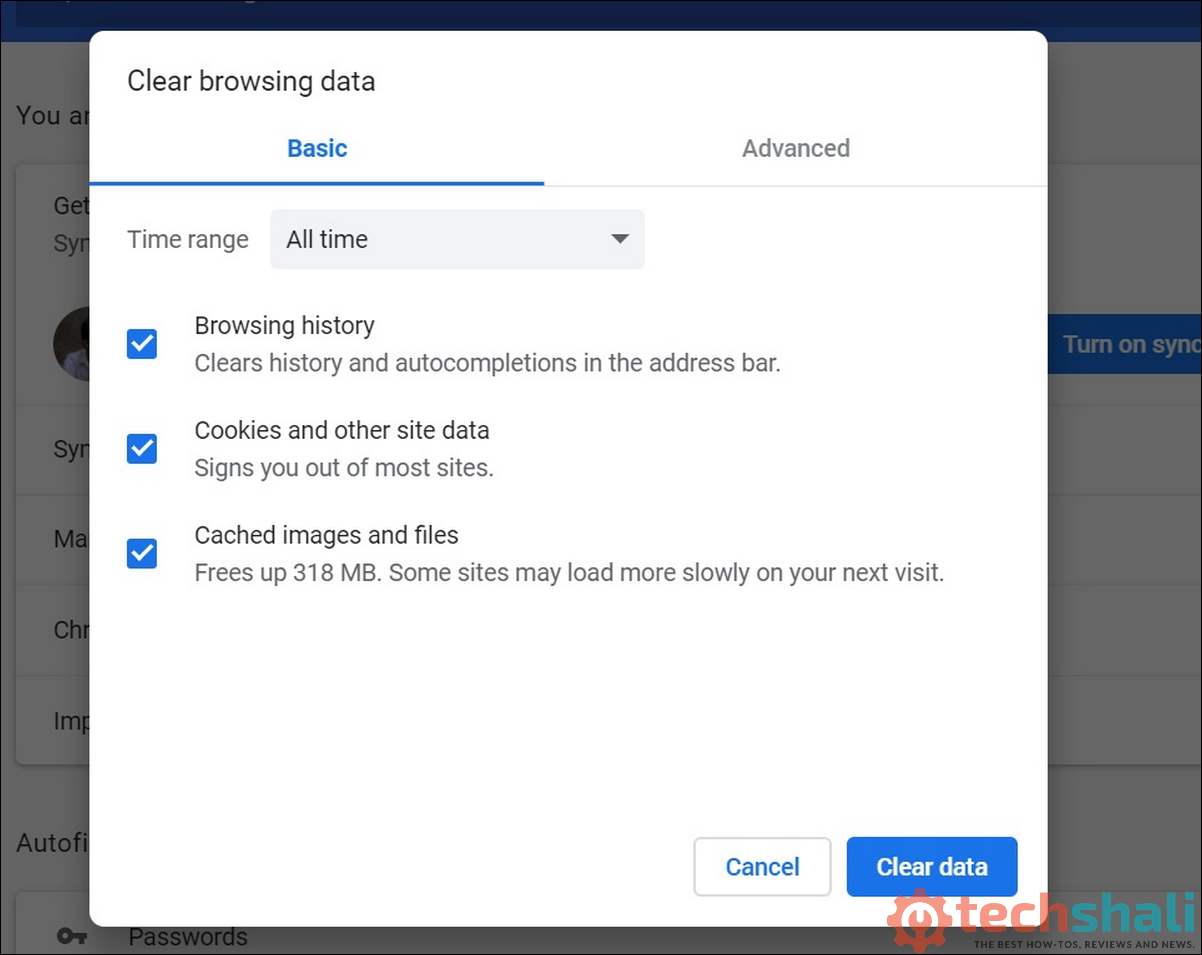
Cookies track what you do online. They can make ads follow you around. Clear them in Chrome:
- Go to “Settings” > “Privacy and Security.”
- Click “Clear browsing data.”
- Choose cookies and cache, then hit “Clear.”
Do this every month. It cuts down on targeted ads.
Try Incognito Mode
Incognito mode stops cookies from sticking around. Open a new incognito window in your browser. It might reduce ads on HDMovie2.
But it’s not enough alone—use it with an ad blocker.
Keeping Your Device Safe
Some ads on HDMovie2 come from adware. That’s sneaky software on your computer. Let’s make sure your device stays clean.
Check for Adware
Adware can make ads worse. Use a tool like Malwarebytes. It’s free and finds bad software. Here’s how:
- Download Malwarebytes from its official site.
- Run a scan.
- Delete any adware it finds.
Run a scan every week to keep ads away.
Download Safely
Don’t click “Download” buttons on HDMovie2. They might install adware on your laptop or computer. When downloading other free software, always choose “custom install.”
Uncheck any extra programs you don’t want.
Update Your Software
Old browsers or systems can let adware in. Keep your browser and computer updated. Turn on automatic updates. This stops ads caused by security holes.
Using Readability Tools
Readability tools clean up websites. They remove ads and clutter, leaving just the main stuff. These work great for HDMovie2’s homepage.
Try a Readability Bookmarklet
A bookmarklet is a tiny tool you save in your browser. Readability has one that makes HDMovie2’s pages simpler. Here’s how:
- Go to the Readability website.
- Drag the bookmarklet to your bookmarks.
- Click it when you’re on HDMovie2.
It strips away banners and side ads. You’ll see a cleaner page.
Use a Text-Only Extension
Instaread is another tool. It’s an extension for Chrome or Firefox. Install it, then click its icon on HDMovie2. You can change the font to make it easier to read.
Limits of Readability Tools
These tools don’t block video ads. They’re best for HDMovie2’s menus or search pages. Use them with an ad blocker for the best results.
Checking for HDMovie2 Premium
Some sites like HDMovie2 have a paid version with no ads. Let’s see if that’s an option for you.
Look for a Premium Plan
Go to HDMovie2’s official site. Check for a “premium” or “ad-free” option. If they offer one, it might cost a little but could be worth it. Look for details on their website.
Is Premium Worth It?
A paid plan might give you no ads and better video quality. If you watch HDMovie2 a lot, it could save you hassle. But make sure the site is real before paying.
Free vs. Paid
Free HDMovie2 has ads. A paid version, if available, is cleaner. Think about how much you use the site. A subscription might be better than fighting ads.
Staying Safe on HDMovie2
HDMovie2 is free, but free sites can have risks. Let’s keep you safe while you stream.
Use the Right Website
HDMovie2 has copycat sites that aren’t safe. Stick to the real one. Check reviews on sites like Scam Detector. Avoid weird domains like “hdmovie2.click.”
Get a VPN
A VPN hides your online activity. It can cut down on targeted ads. Try NordVPN or ExpressVPN. Turn it on before you visit HDMovie2.
Skip Suspicious Links
Some ads on HDMovie2 have fake “Play” buttons. Don’t click them! They might download viruses. Stick to the main video player. Close any weird tabs right away.
Keep Your Browser Clean
Clear your cache and cookies monthly. Update your browser often. This stops ads from sneaky sources.
Table: Ways to Block Ads on HDMovie2
| Method | How Well It Works | How Easy It Is | Cost | Best For |
|---|---|---|---|---|
| Ad Blocker (uBlock) | Great | Very Easy | Free | Blocking most ads |
| Browser Settings | Okay | Easy | Free | Stopping pop-ups |
| Readability Tools | Okay (not for videos) | Medium | Free | Cleaning up the homepage |
| Premium Plan | Great (if available) | Easy | Paid | No ads at all |
| VPN | Okay | Medium | Paid | Privacy and fewer ads |
This table shows your options. Pick what fits your needs.
What If Ads Keep Showing?
Sometimes, ads on HDMovie2 won’t go away. Here’s how to fix that.
Double-Check Your Ad Blocker
Make sure uBlock is on and updated. Open its settings. Check that all filters are active. Add extra filters for HDMovie2 if needed.
Look for Malware
If pop-ups keep coming, you might have malware. Scan with Malwarebytes. Remove any threats. Restart your browser.
Switch Browsers
Chrome might struggle with some ads. Try Firefox with uBlock. Or use Brave—it blocks ads automatically.
Ask HDMovie2 for Help
If HDMovie2 has support, contact them. They might tell you about ad-free plans or fix ad problems.
Is HDMovie2 Legal and Safe?
HDMovie2 can be tricky. Let’s talk about staying safe and ethical.
Know the Legal Stuff
HDMovie2 might show movies without permission. This could be illegal where you live. Check your country’s laws. Ad blockers or VPNs don’t make it legal.
Support Creators
Ads help HDMovie2 stay free. Blocking them might hurt the site. If you can, use legal sites like Netflix to support movie makers.
Be Ethical
Don’t share your info on HDMovie2. Avoid downloads from the site. If you pay for premium, use the official site to stay safe.
Making HDMovie2 Even Better
Want to enjoy HDMovie2 more? Here are some tips beyond ad removal.
Get Better Video Quality
Check HDMovie2’s settings. Pick a higher resolution if your internet is fast. This might reduce buffering, but watch for new ads.
Find Great Content
HDMovie2 has lots of movies. Use the search bar or browse categories. A cleaner site (with ad blockers) makes this easier.
Set Up a Profile
If HDMovie2 lets you make a profile, do it. It helps you find shows you like. It saves time searching through ads.
Watch Offline
Some paid plans let you download videos. If HDMovie2 offers this, you can watch without ads or internet. Make sure the site is legit first.
Safe Streaming Checklist
| Task | Why It Helps | How Often |
|---|---|---|
| Update Ad Blocker | Stops new ads | Weekly |
| Clear Cookies/Cache | Cuts down on tracking ads | Monthly |
| Scan for Malware | Removes ad-causing software | Weekly |
| Use a VPN | Keeps you private | Always |
| Check Site Safety | Avoids fake HDMovie2 sites | Every Visit |
Follow this checklist to stay safe and ad-free.
Using Multiple Tricks Together
One method might not stop all ads. Mix a few for the best results. Try this:
- Use uBlock Origin to block most ads.
- Turn on pop-up blockers in your browser.
- Add a VPN for extra privacy.
- Scan for malware regularly.
This combo keeps HDMovie2 clean and safe. Test what works for you.
Keep Up with HDMovie2 Changes
HDMovie2 might change how it shows ads. Your ad blocker could stop working. Check tech blogs or forums for new tips. Update your tools often.
If HDMovie2 has official news, follow it. You might learn about new ad-free plans. Staying on top of changes keeps your streaming smooth.