Linkrify Review: Smarter Link Management (Updated)
No doubt that these days, we spend an incredible amount of time creating content. We obsess over the perfect images, rewrite headlines until they catch the eye, and polish our captions until they shine. But in all that hustle, we often forget the most critical part of the puzzle: the bridge.
The link is bridge that connects your audience to the content you worked so hard to create. It is the very first thing a user has to trust before they can see what you have built.
Think about the last time you saw a messy, unoptimized link. You know the type—it’s long, filled with random numbers, and looks like a string of computer code. Did you click it? Probably not. You likely hesitated, wondering if it was safe or relevant.
That split-second hesitation is where you lose clicks. And when you lose clicks, you lose potential customers.
This is where “link management” steps in. It is not just about making a URL shorter to save space; it is about transforming that link into a professional, trustworthy asset. Recently, a tool called Linkrify has been making waves in this space, promising a smarter and simpler way to handle your digital traffic.
But is it actually any good? Does it live up to the hype of being a “smarter” solution?
In this updated review, we are going to walk through everything you need to know. We will explore the features, test the workflow, and see if it truly helps you grow. If you are tired of messy links and confusing data, stick around—this might be the solution you have been looking for.
How I Tested Linkrify
To ensure this review is based on real-world performance rather than just a promotional feature sheet, I signed up for Linkrify and ran it as my primary link-management tool for two weeks.
During this hands-on testing period, I evaluated the platform by:
- Migrating Data: I imported 50 existing affiliate links from a legacy shortener to test the transition process.
- Infrastructure Setup: I connected a custom branded domain (e.g., links.techshali.com) to test the SSL provisioning and DNS routing speeds.
- Campaign Tracking: I deployed 15 dynamic QR codes and geo-targeted short links across our social media channels to measure the accuracy of Linkrify’s click-through analytics.
- Support Stress-Test: I reached out to their support team with a technical query regarding Facebook Pixel retargeting to gauge their actual response time and expertise.
Here is a breakdown of what I found, including where the tool excels and where it falls short.
What is Linkrify?
Before we know the specific features, let’s learn what Linkrify actually is.
Put simply, Linkrify is a command center for your links. While it certainly functions as a URL shortener, calling it just a shortener would be selling it short. It is a comprehensive dashboard designed to help creators, marketers, and business owners take full control of their traffic.
Here is the core concept: You take a long, unattractive link that looks like yoursite.com/products/item=2837?ref=social, and you feed it into Linkrify. In return, the tool transforms it into something clean and concise, like links.yourbrand.com/sale.
Why does this transformation matter? It creates a sense of professionalism and safety.
But Linkrify goes beyond just aesthetics. It is built to be a central hub. If you have links scattered everywhere—in your email signature, on Twitter, in Facebook ads—managing them can be a nightmare. Linkrify consolidates all those touchpoints into one easy-to-use platform.
So, is it just a copy of the older tools we have used for years? Not quite. As we will see in the next few sections, it feels like a tool built specifically for the modern internet, focusing heavily on simplicity and actionable data rather than just utility.

The Branded Short Link: Building Trust
Now that we know what the tool is, let’s look at its flagship feature: the “branded short link.”
If you take only one thing away from this review, let it be this: generic links are out, and branded links are in. This feature is the main reason you should consider moving away from free, public shorteners.
A branded link uses your own custom domain name. Instead of sharing a link that starts with a random company’s name (like bit.ly), you share a link that starts with your name.
Why is this so important? It comes down to trust.
The internet is unfortunately full of spam and phishing scams. When users see a generic link, they often don’t know where it leads, which creates friction. However, when they see your brand name right at the start of the URL, that fear disappears. They know exactly who is sending them the content.
Linkrify makes setting this up surprisingly easy. You connect your domain once, and from then on, every link you create carries your brand’s authority. We found their setup process to be much smoother than legacy platforms, which often require complicated technical settings.
Mini-Summary: By using branded links, you aren’t just shortening a URL; you are putting your stamp of approval on it.
Furthermore, search engines and social media algorithms tend to favor clear, transparent links. This concept, often called “Link Trust,” can actually help your content reach more people. Plus, branded links are memorable. You can easily say “Visit mybrand.com/offer” on a podcast, whereas reading out a random string of characters is impossible.
Analytics: Seeing the Full Picture
Creating a beautiful link is a great start, but it is only half the battle. Once you share that link, you need to know if it is actually working.
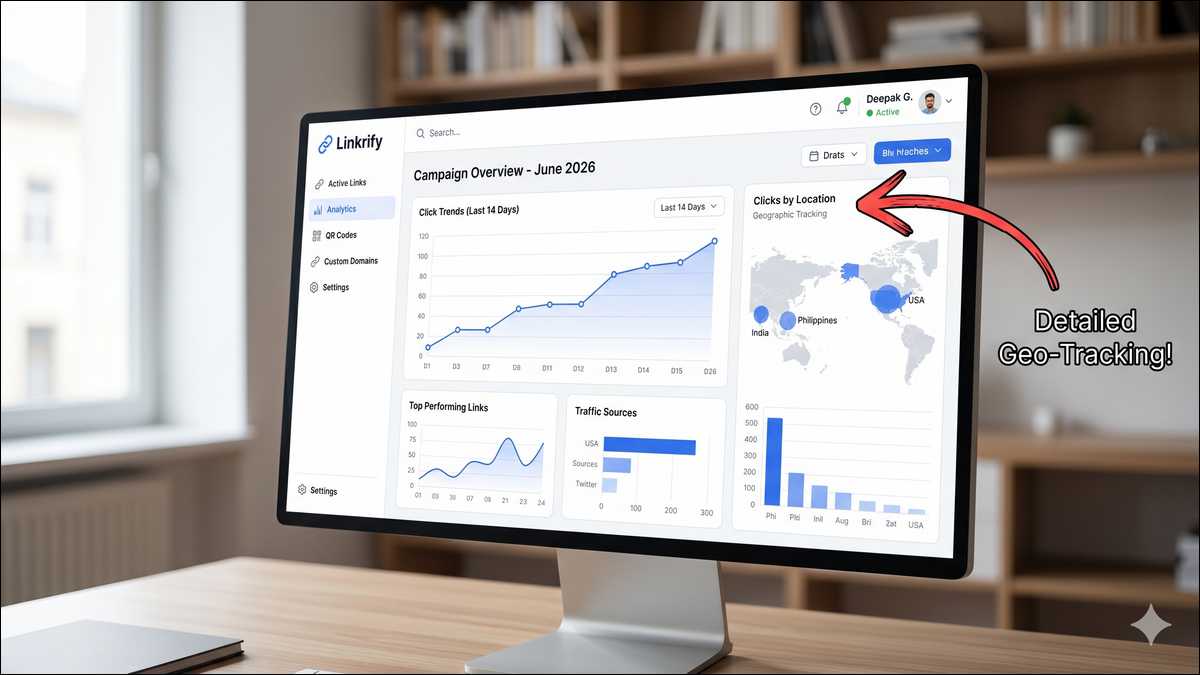
We have all used analytics dashboards that look like the cockpit of a fighter jet—too many buttons, confusing graphs, and data that doesn’t seem to mean anything. Linkrify takes a refreshing approach here by keeping things simple and focused on the metrics that actually move the needle.
When you log in, you don’t just see a total click count. You see the story behind those clicks.
For example, you can see exactly where your visitors are located. Are they clicking from New York, London, or Tokyo? This insight allows you to tailor your marketing. If you notice a spike in traffic from a specific city, you might decide to run a targeted ad just for that region.
Ask yourself: Do you know if your audience prefers mobile or desktop?
Linkrify answers this instantly. If the data shows that 80% of your clicks are coming from mobile phones, but your website is hard to use on a small screen, you have just identified a major problem to fix. This single insight could save you thousands in lost sales.
Another powerful piece of data is the “Referrer.” This tells you where the click originated. Did they find you on Facebook, Twitter, or through an email campaign? Knowing this helps you double down on what works and stop wasting time on platforms that don’t deliver results.
The best part? The charts are clean and easy to read. You can download reports to show clients or team members without needing to explain complex math. It turns raw data into clear decisions.

The “Link-in-Bio” Solution
So, we have covered how to manage individual links. But what about social media platforms like Instagram and TikTok that restrict you to just one link in your bio?
This is a common frustration. You have a website, a YouTube channel, a new blog post, and a store—but you can only share one.
Linkrify solves this with its “Bio Page” feature. Think of this as a mini-landing page that lives in your social profile. You put one Linkrify link in your bio, and when people click it, they are taken to a beautiful menu containing all your important content.
What makes this special is the ease of use. You don’t need to be a web designer to build one. Linkrify provides a builder where you can add buttons, images, and videos in minutes. You can customize the colors to match your brand perfectly, ensuring a seamless visual experience.
We were particularly impressed by the mobile performance. Since these pages are viewed almost exclusively on phones, speed is everything. Linkrify’s bio pages load instantly, ensuring your followers don’t get bored and leave before the page opens.
Beyond just looking good, these pages are smart. You can track analytics for the bio page specifically. You might discover that while nobody clicks your “Newsletter” button, everyone is clicking “My Shop.”
What does this tell you? It tells you to move the Shop button to the very top. Linkrify gives you the data to make these small tweaks that lead to big results. It eliminates the need for a separate “link-in-bio” subscription, keeping everything under one roof.
QR Codes: Bridging the Physical and Digital
We have talked a lot about the digital world, but marketing happens in the physical world, too. This is where QR codes come in.
You see them everywhere now—on restaurant menus, business cards, and product packaging. Linkrify includes a robust QR code generator that is fully integrated with your link management system.
Imagine you are printing flyers for an upcoming event. You can generate a Linkrify QR code for that flyer. When people scan it, they are taken directly to your registration page. Because it is connected to the Linkrify dashboard, you can track exactly how many people scanned that specific flyer versus how many clicked a link online.
But Linkrify takes it a step further with “dynamic” QR codes.
Here is a common scenario: You print 1,000 business cards with a QR code linking to your portfolio. A month later, you change your portfolio website. With a standard QR code, your business cards are now useless. But with a dynamic code from Linkrify, you simply log in and update the destination URL. The printed code on the card stays the same, but it now points to the new site.
This flexibility saves you money on re-printing and reduces waste. Plus, you can customize the design of the codes. You aren’t stuck with a boring black-and-white square; you can add your logo, change the colors, and make it feel like a real part of your brand design.
Targeting: Sending People to the Right Place
Up until now, we have discussed passive features—shortening, tracking, and displaying. Now, let’s look at the active “smart” features.
A standard link is static; it sends everyone to the same place. A smart link from Linkrify can make decisions on your behalf.
One of the most powerful examples of this is Device Targeting. This feature allows you to route traffic based on the user’s device.
- If a user clicks on an iPhone, Linkrify sends them to the Apple App Store.
- If they click on an Android, it sends them to the Google Play Store.
- If they are on a laptop, it sends them to your website.
All of this happens from a single link. You don’t need to clutter your captions with “Click here for iOS” and “Click here for Android.” You just share one link, and the system handles the rest. This removes friction for the user, and less friction means higher conversion rates.
You can also target by Location. If you have different online stores for the US and the UK, Linkrify acts as a traffic cop, directing visitors to the correct regional site automatically. The customer never knows they are being redirected; they just land where they are supposed to be.
For the advanced marketers reading this, Linkrify also supports Retargeting. You can “tag” people who click your links (even links to third-party content) so you can show them ads later on platforms like Facebook or Google.
It is a highly effective way to re-engage people who have already shown interest in your niche.
Working with a Team
Marketing is rarely a solo sport. As your business grows, you will likely have copywriters, designers, and social media managers working together.
Linkrify understands this and offers built-in collaboration tools. This is a huge security upgrade because it means you don’t have to share a single login password among five different people.
Instead, you can invite team members to your account and assign them specific roles.
- Need an intern to create links but not delete them? You can do that.
- Need a client to view their stats but not touch the settings? You can do that, too.
This keeps everyone on the same page while keeping your data safe.
For agencies managing multiple brands, the “Workspaces” feature is a lifesaver. You can create a separate workspace for each client. Client A’s data never touches Client B’s data. This organization keeps your reporting accurate and your clients happy.
We also appreciate the bulk creation tools. Sometimes, you might need to generate 100 unique links for a massive email campaign. Doing that one by one would take hours. Linkrify lets you upload a spreadsheet and generates all the branded, tracked links in seconds.
Mini-Summary: Whether you are a solo freelancer or a full agency, the workflow features are designed to save you time. And in this business, time saved is money earned.

Why Simple “Link Management” Matters
Let’s zoom out for a moment. We call this category “Link Management,” but that sounds a bit dry, doesn’t it?
A better way to think about it is Customer Journey Control.
Every digital interaction—from a tweet to an email to a purchase—usually involves a link. If that link is broken, slow, or looks suspicious, the journey ends abruptly. Linkrify acts as the guardian of that journey, ensuring the transition from social media to your website is smooth and branded.
Moreover, using a tool like this gives you ownership. When you use a generic, public shortener, you are building their brand and giving them your data. When you use Linkrify with your custom domain, you are building your brand and collecting your data.
This ownership is crucial for long-term stability. You are building on your own land rather than renting someone else’s. It is a simple tool, but the implications for your business strategy are significant.
Pricing: Is it Worth the Money?
Of course, all these features beg the question: Is it worth the cost? You are likely already paying for email tools, hosting, and various other subscriptions. Does it make sense to add one more?
To answer this, we need to look at value.
Most tools in this space, including Linkrify, offer a free version. This is excellent for testing the waters without any risk. You can set up a bio page and create a few links to see if it fits your workflow.
However, the paid plans are where the real power lies, unlocking custom domains and detailed history. Compared to enterprise-level competitors, Linkrify is priced very competitively, making professional features accessible to small businesses.
Consider the cost of not using it.
If you send an email campaign to 10,000 people using a messy, spammy-looking link, and 100 people hesitate to click it, you have lost potential revenue. If your product costs $50, that is $5,000 left on the table—far more than the cost of a monthly subscription.
Additionally, consider the savings from consolidation. If you are currently paying $10/month for a bio-link tool, $15 for a QR generator, and another fee for analytics, you are spending quite a bit. Linkrify combines all these functions. You could actually save money by switching to this all-in-one solution.
Where Linkrify Falls Short (The Drawbacks)
While Linkrify consolidates multiple tools into one dashboard, my testing revealed a few areas where it lags behind enterprise-level dedicated platforms:
- Limited Native Integrations: If your tech stack relies heavily on direct integrations, Linkrify requires workarounds. While platforms like Bitly plug natively into almost every major CRM (like HubSpot or Salesforce) and social scheduling tool, Linkrify currently relies heavily on webhooks and third-party automation tools to pass data along.
- Analytics Gating on Lower Tiers: The real power of Linkrify is in its geographic and device-level targeting. However, on the entry-level plans, the historical data retention is somewhat limited. If you are running long-term, year-over-year marketing campaigns, you will be forced to upgrade to a higher tier just to keep your historical click data accessible.
- Clunky Pixel Retargeting Setup: Linkrify allows you to fire retargeting pixels (Facebook, Google Ads) when a user clicks a short link—a fantastic feature for affiliate marketers. However, the UI for setting up and managing multiple pixels across different workspaces can feel unintuitive compared to dedicated retargeting software. It requires a bit of a learning curve to ensure your tags are firing correctly without slowing down the redirect speed.
The Verdict on these limitations:
If you are a solo creator, blogger, or managing a small portfolio of affiliate sites, these drawbacks won’t impact your day-to-day operations. However, enterprise teams needing deep CRM syncs might find the ecosystem a bit restrictive.
User Experience: Is it Actually Simple?
Features and price are important, but they don’t matter if the tool is a nightmare to use. The title of this review includes the word “Simple,” so we wanted to put that to the test.
Many software tools suffer from feature bloat—they become so cluttered with buttons and menus that you get lost. Linkrify, thankfully, feels different.
The interface is clean, with plenty of white space and clearly labelled buttons. You don’t need a user manual to figure out how to create your first link. The “Create” button is obvious, and the dashboard is intuitive.
We tested the platform across various devices, including laptops, tablets, and phones. It felt snappy and responsive on all of them. When you are working on a tight deadline, a slow interface is the last thing you need, so this speed is a big plus.
The onboarding process also deserves a mention. When you first sign up, the system guides you through the essentials: connecting your domain, creating a link, and setting up a bio page. It holds your hand just enough to get you comfortable, then steps back to let you work.
They also use plain English. Instead of confusing technical jargon like “Modify DNS CNAME Records,” they use phrases like “Connect your web address.” This small shift in language makes the tool accessible to everyone, not just IT experts.

Comparison: Linkrify vs. Other Link Management Tools
You might be thinking, “How is this different from the big names I already know, like Bitly or Linktree?“
Well, it is a fair question. Here is how they stack up:
- Bitly is the industry standard. It has been around forever and is incredibly reliable. However, it can be very expensive if you want advanced features like custom domains, often pricing out small businesses.
- Linktree is the king of bio pages. It is fantastic at what it does, but that is all it does. It doesn’t manage your email links, QR codes, or short URLs for other campaigns.
- Linkrify sits comfortably in the middle. It combines the shortening power of Bitly with the bio page aesthetics of Linktree.
For most users, this hybrid approach is superior. You don’t want to manage two different logins and two different subscriptions. You want a unified experience.
Quick Feature Check
| Feature | Linkrify | Standard Shorteners | Bio-Link Tools |
| Shortening | Advanced | Advanced | No |
| Custom Domain | Easy Setup | Yes (Often pricey) | Limited |
| Bio Pages | Fully Custom | No | Yes |
| QR Codes | Custom & Dynamic | Basic | Basic |
| Value | High | Low (Expensive) | Moderate |
Linkrify covers all the bases, bringing everything together in a modern, affordable package.
Who Should Use This?
We have covered a lot of ground, but who is the ideal user for Linkrify? Based on our testing, three distinct groups stand to benefit the most.
- Creators and Influencers: You need a bio page that looks professional, and you need to share affiliate links without them looking scary or “spammy.” Linkrify consolidates your entire business into one dashboard.
- Small Business Owners: You want to look as professional as the big corporations, but you don’t have their budget. Linkrify gives you branded links and powerful data at a price point that makes sense for a growing company.
- Marketing Agencies: You manage campaigns for multiple clients and need to prove your value. The ability to organize clients into Workspaces and generate clean reports makes this tool a perfect fit for agency life.
Even if you are just a hobbyist blogger, the free plan offers a significant upgrade over using raw, messy links.
Pros and Cons
Of course, no tool is perfect, and in the interest of full transparency, let’s weigh the good against the bad.
👍 Pros
- Excellent geographic and device-level link routing.
- Very competitive pricing for custom domains compared to Bitly.
- Built-in dynamic QR code generator without extra costs.
👎 Cons
- Native integrations with major CRMs are currently limited.
- Pixel retargeting setup has a steep learning curve for beginners.
- Historical analytics data is restricted on lower pricing tiers.
For 95% of users, the positives far outweigh the negatives.
How to Get Started
If you have decided to give Linkrify a try, here is a simple roadmap to get you up and running without getting overwhelmed.
Step 1: Audit your links.
Take a moment to look at where your links live right now. Are they in your Instagram bio? Your email signature? Your Twitter profile? Make a quick list.
Step 2: Secure your domain.
This is the most important step for branding. Connect a custom domain (like links.yourname.com) to Linkrify. It instantly elevates the look of every link you create.
Step 3: Build your Bio Page.
Spend about 20 minutes designing your page. Upload a nice photo, choose your brand colors, and add your most important links.
Step 4: Swap them out.
Go back to the list you made in Step 1. Replace those old, messy links with your new, clean Linkrify links.
Step 5: Watch the data.
Let it run for a week, then check your analytics. You might be surprised by what you find. You might discover that your email signature is driving more traffic than you realized.
Final Thoughts
Marketing is rarely about one giant explosion of success. More often, it is about doing a hundred small things right. Optimizing your links is one of those small things that can have a compound effect.
A branded link looks better. A better-looking link gets more clicks. More clicks mean more customers, and more customers mean more revenue. It is a simple chain reaction that starts with how you manage your URLs.
Linkrify offers a compelling package. It is powerful enough for the pros yet simple enough for beginners. It strips away the clutter and focuses on what truly matters: Branding, Tracking, and Results.
If you are still using messy, generic links, you are likely leaving opportunities on the table. It is time to clean up your digital act and take control of your traffic. We believe Linkrify is a top contender for 2026. Give it a spin, set up your domain, and start seeing the internet through a smarter lens.