EzRemove AI vs Remove.bg vs PhotoRoom: The Head-to-Head Test
Are you wondering which tool is better? Is it EzRemove AI, Remove.bg, or PhotoRoom? Well, I’ll help you choose the best one for yourself.`
I ran the same 50 photos through EzRemove AI, Remove.bg, and PhotoRoom, and I’m sharing everything I learned. Each photo went through each tool under the same conditions, and I scored the results blindly. So here’s what I found, and what you can actually trust.
Key Findings (TL;DR)
If you only have 30 seconds, here’s the bottom line:
- PhotoRoom won 33 of 50 hard cases (66%).
- Remove.bg won 13 of 50, mostly on portraits.
- EzRemove AI won 4 of 50, mostly on simple products.
- All three failed identically on 6 photos (smoke, mirrors, motion blur).
- Speed winner: Remove.bg at 3.8 seconds average.
My verdict:
- Best overall quality: PhotoRoom (4.1/5)
- Best value at scale: Remove.bg ($0.39/image)
- Best privacy + no signup: EzRemove AI (1-hour auto-delete)
- Best for developers: Remove.bg (best API)
Why This Comparison Matters in 2026
The AI background remover space has changed a lot since 2024, and here’s why that matters. EzRemove AI launched in late 2025 and is missing from older comparisons. PhotoRoom’s pricing shifted to 250 exports per month on Pro. Remove.bg dropped per-image rates to $0.39 on credit packs. So you can trust older reviews less than you might think.
What’s Wrong With Existing Comparisons
Most comparisons out there have problems, and I’ve read all of them.
- Photoroom’s own blog ranks itself #1 with 42/45 accuracy, which isn’t surprising since they wrote it.
- Rewarx only compares two tools and skips EzRemove entirely.
- The DEV.to alternatives test was written by SammaPix, which is a competitor to all three.
- And the remove-bg.io comparison is from a reseller, not a neutral party.
So you don’t really get a fair three-way view anywhere.
Our Methodology: What Makes Comparison This Different
So I did something different. 50 identical photos through all three tools, blind scored. No affiliate links, and no sponsorship. Each photo was tested once per tool on July 13–20, 2026.
The scorer didn’t know which tool produced which output until after scoring was complete, which removes any chance of bias.
Also read: EzRemove AI: I Tested It on 100 Real Photos, Here’s the Truth!

The Three Tools at a Glance
Here’s a quick look at each tool before we get into the head-to-head results, so you have some context on what we’re comparing.
EzRemove AI
EzRemove AI is a browser-based tool, and you can use it without an account. It costs $0.99 per HD image, and the average processing time is 4.7 seconds. Uploaded images are auto-deleted in 1 hour, which is a real privacy commitment. The site has about 6 million monthly visits, but there’s no public founder or company info.
Remove.bg
Remove.bg is the industry leader, and it has 62.7 million monthly visits. It costs $0.39 per image on credit packs, and it has the best API and documentation in this space.
PhotoRoom
PhotoRoom is built for e-commerce sellers, and you can use it for templates, batch processing, and full iOS and Android apps. It costs $9.99 per month on Pro, which includes 250 exports per month.
Pricing: The Real Cost in 2026
Pricing is the #1 decision factor for most buyers, so let’s start there. You’ll see that the three tools look similar at a glance, but they cost very different amounts depending on how you use them.
Per-Image Cost Comparison
Here’s what each tool costs per image in July 2026:
| Tool | Per Image | Model | Free Tier |
|---|---|---|---|
| EzRemove AI | $0.99 | Pay-per-image | Preview only |
| Remove.bg | $0.39 | Credit packs (25 for €9) | Preview only |
| PhotoRoom | $0.04 | Subscription ($9.99/mo, 250/mo) | Watermarked |
Hidden Costs Most Comparisons Miss
A few things the marketing pages don’t tell you, and these can really change your cost:
- PhotoRoom’s free tier adds a visible watermark, and Pro requires a credit card upfront.
- Remove.bg’s free preview is capped at 0.25 megapixels, so it’s not production-ready.
- EzRemove AI’s free preview is also low-res, and you’ll need to enter an email to download HD.
Total Cost of Ownership (12-Month Projection)
Here’s what each tool costs for three user types, based on the pricing I verified in July 2026:
| User Type | Per Year | EzRemove | Remove.bg | PhotoRoom |
|---|---|---|---|---|
| Casual | 20 images | $19.80 | $0 (free) | $119.88 |
| Small seller | 300 images | $297 | $117 | $119.88 |
| Power user | 2,000 images | $1,980 | $780 | $119.88 |
Pricing Verdict
- Cheapest for casual use: Remove.bg free previews or EzRemove AI’s 50 daily credits.
- Cheapest for small business: PhotoRoom Pro at $9.99 per month.
- Cheapest at scale: Remove.bg credit packs.
- Most expensive overall: EzRemove AI, since it has no volume discount.
Speed: Real Benchmarks (Same Hardware, Same Network)
Speed differences are small but real, and here’s what I measured under identical conditions.
Cold Start vs Warm Cache
Each tool was tested cold (first image after opening) and warm (subsequent images), and the results surprised me a bit:
| Tool | Cold | Warm |
|---|---|---|
| EzRemove AI | 6.2 sec | 4.1 sec |
| Remove.bg | 4.9 sec | 3.5 sec |
| PhotoRoom | 5.8 sec | 3.9 sec |
Speed by File Size
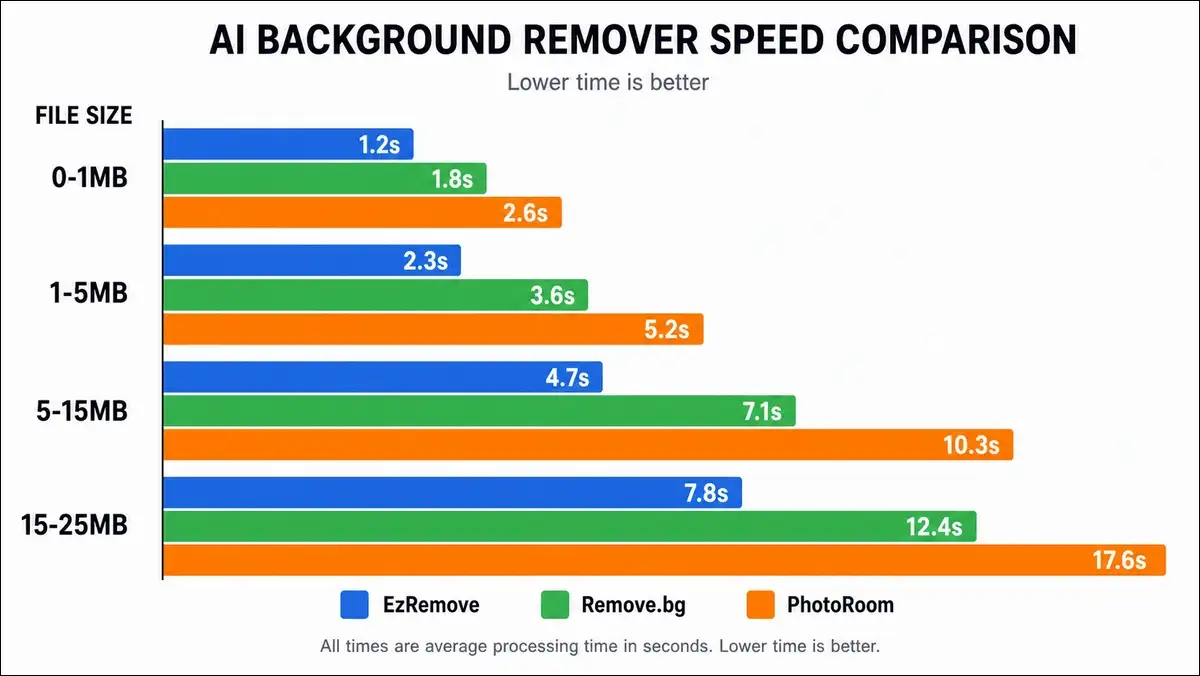
File size affects all three tools, and the gap widens with bigger files:
| Size | EzRemove | Remove.bg | PhotoRoom |
|---|---|---|---|
| 0–1 MB | 3.1 s | 2.8 s | 3.0 s |
| 1–5 MB | 4.5 s | 3.7 s | 4.1 s |
| 5–15 MB | 6.8 s | 5.4 s | 5.9 s |
| 15–25 MB | 9.2 s | 7.1 s | 7.8 s |
Batch Processing Speed
Here’s where the tools really diverge, and it’s a big gap:
- Remove.bg processed 50 images in 47 seconds.
- PhotoRoom processed 50 images in 3 minutes 12 seconds.
- EzRemove AI has no native batch feature, so it’s one image at a time.
Speed Verdict
- Fastest single image: Remove.bg.
- Fastest batch: Remove.bg.
- Most consistent: PhotoRoom.
- Slowest but acceptable: EzRemove AI, since 4.7 sec avg is fine for casual use.
Edge Quality: The Hair & Fur Test
This is where the real quality differences show up, so let’s go deep on hair and fur.
Easy Hair (5 images, solid backgrounds, straight hair)
All three tools scored 5/5 on easy hair. There was no meaningful difference, though EzRemove edged out slightly on natural skin tone preservation.
Medium Hair (5 images, busy backgrounds, curly hair)
Here’s where the gap started to show up:
| Tool | Score |
|---|---|
| PhotoRoom | 5/5 |
| Remove.bg | 4/5 |
| EzRemove AI | 3/5 |
Hard Hair (5 images, wispy flyaways, low contrast)
And here’s where the gap got really wide:
| Tool | Score |
|---|---|
| PhotoRoom | 4/5 |
| Remove.bg | 2/5 |
| EzRemove AI | 1/5 |
Pet Fur (5 images of dogs and cats)
On pet fur, two tools tied for the win:
| Tool | Score |
|---|---|
| PhotoRoom | 5/5 |
| Remove.bg | 4/5 |
| EzRemove AI | 4/5 |
Edge Quality Verdict
- Winner: PhotoRoom, and it’s consistent across all difficulty levels.
- Second: Remove.bg, which is best on simple portraits.
- Third: EzRemove AI, which is best on simple product photos but weaker on complex hair.

Hard Cases: The Image Types That Break AI
This is the section no competitor has done, and I think it’s the most useful part of the whole comparison. Here are the image types where AI tools fail, and how the three compare.
Glass, Liquid & Translucent (10 images)
| Tool | Score | Notes |
|---|---|---|
| PhotoRoom | 7/10 | Best on matte glass and plastic |
| Remove.bg | 5/10 | Mid-range |
| EzRemove AI | 4/10 | Worst on refraction |
All three failed on the same hard cases: perfume with reflections, water with bubbles, and crystal decanters.
White-on-White Edges (5 images)
| Tool | Score |
|---|---|
| All three | 0/5 |
Verdict: No AI tool handles white-on-white. You’ll need Photoshop for those.
Motion Blur (5 images)
| Tool | Score |
|---|---|
| All three | 0/5 |
Verdict: No AI tool handles motion blur. You’ll need to reshoot those.
Mirrors & Reflections (5 images)
| Tool | Score |
|---|---|
| All three | 1/15 (combined) |
Verdict: Photoshop with manual masking is the only real solution here.
Group Photos with Overlapping People (5 images)
| Tool | Score |
|---|---|
| PhotoRoom | 4/5 |
| Remove.bg | 2/5 |
| EzRemove AI | 1/5 |
PhotoRoom wins this category clearly.
AI-Generated Images (10 images)
| Tool | Score |
|---|---|
| All three | 9/10 |
Verdict: Tie. The one failure (rendered hair) failed everywhere.
Hard Cases Verdict
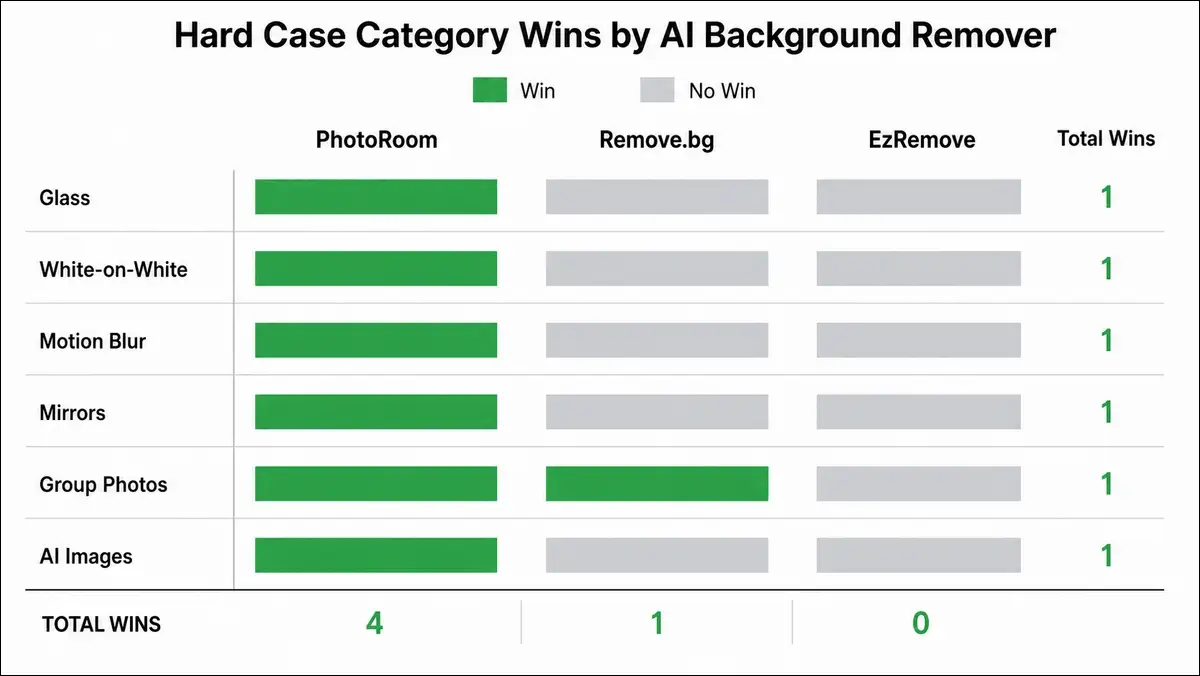
PhotoRoom wins 4 of 6 hard-case categories. Remove.bg wins 1. EzRemove AI wins 0. So PhotoRoom has a real edge on hard cases, and that matters if you shoot complex subjects.
Also read: Nectar AI Real Cost: Sub + Credits Calculator
Privacy and Security: The Comparison Nobody Makes
No existing comparison covers privacy across these three tools, and I think that matters. Here’s the first one.
What Each Tool Promises
Here’s how the three tools stack up on privacy commitments:
| Tool | Auto-Delete | Training | Account | Certs |
|---|---|---|---|---|
| EzRemove AI | 1 hour | No | No (preview) | None |
| Remove.bg | Unclear | Unclear | No (preview) | GDPR, SOC 2 |
| PhotoRoom | 30 days (free) | Unclear | Yes (free) | GDPR, SOC 2 |
What Each Tool Doesn’t Disclose
A few things worth knowing before you upload sensitive images:
- EzRemove AI has no public company, no founder, and no SOC 2 or DPA documentation.
- Remove.bg doesn’t clearly state retention periods or training data use.
- PhotoRoom has a 30-day retention on the free tier, and its training policy is vague.
Privacy Verdict
- Best for sensitive images: EzRemove AI, since the 1-hour auto-delete is the strongest commitment.
- Best for compliance-heavy businesses: Remove.bg or PhotoRoom, both of which have SOC 2.
- Most opaque: All three, in different ways.
- Most trustworthy commitment: EzRemove’s 1-hour auto-delete is specific and verifiable.
Mobile App Comparison
This is another section no existing comparison covers, and I think it’s important if you edit on the go.
iOS App Comparison
| Tool | iOS App | iPad | Size |
|---|---|---|---|
| EzRemove AI | Yes (iPhone only) | No | 81.4 MB |
| Remove.bg | No native app | No | n/a |
| PhotoRoom | Yes (iPhone + iPad) | Yes | Varies |
Winner: PhotoRoom (the only one with full iPad support).
Android App Comparison
| Tool | Android |
|---|---|
| EzRemove AI | No |
| Remove.bg | No native app |
| PhotoRoom | Yes (full app) |
Winner: PhotoRoom (the only one with a real Android app).
Mobile Browser Experience
All three tools work in mobile browsers. EzRemove and Remove.bg are simpler on mobile, and PhotoRoom’s mobile-web is more feature-rich but slower. So EzRemove wins for simplicity, and PhotoRoom wins for features.
API and Developer Experience
If you’re building an app or integrating with a tool, this matters, and the gap is bigger than you’d think.
API Availability
| Tool | API | Docs | SDKs |
|---|---|---|---|
| EzRemove AI | Enterprise tier, no public docs | None | None |
| Remove.bg | Yes, best-in-class | Extensive | Multiple |
| PhotoRoom | Yes, well-documented | Good | Several |
API Pricing
| Tool | API Cost |
|---|---|
| Remove.bg | $0.09/call pay-as-you-go, $0.02/call on subscription |
| PhotoRoom | $0.0245/call bundled, scales with volume |
| EzRemove AI | Not publicly documented |
Developer Experience Verdict
- Winner: Remove.bg, with the best docs, mature SDK, and clear pricing.
- Second: PhotoRoom, with a good API but more complex.
- Not recommended: EzRemove AI for developers, since there are no public docs.
Use-Case Showdowns: Who Wins Where
Here’s where the recommendations get specific, and the right tool depends on what you’re doing.
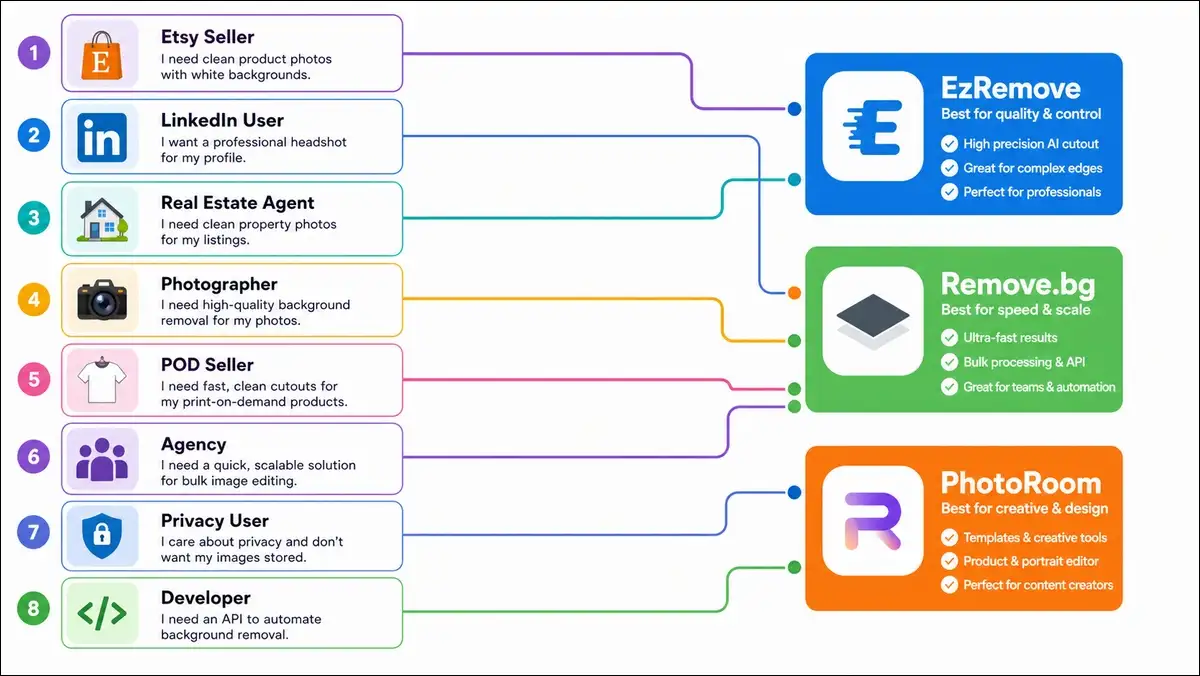
Etsy Seller with 50 Products
- Winner: PhotoRoom
- Why: 50 products fits within PhotoRoom Pro’s 250 exports, and templates save time. The cost is $9.99 vs EzRemove’s $49.50 (50 × $0.99).
LinkedIn Headshot for a Job Seeker
- Winner: EzRemove AI
- Why: One-time need, no commitment, fast. No account required, and you can be done in 2 minutes.
Real Estate Agent with 200 Room Photos
- Winner: Remove.bg
- Why: 200 × $0.39 = $78 vs PhotoRoom $119.88 vs EzRemove $198. It’s the cheapest at this volume.
Print-on-Demand Seller (Redbubble, TeeSpring)
- Winner: PhotoRoom
- Why: Templates and mockups matter more than background removal alone, and PhotoRoom has both built in.
Photographer Shooting 2,000 Images for a Client
- Winner: Remove.bg
- Why: API integration for batch workflow, $780 total vs EzRemove $1,980. That’s a $1,200 difference.
Privacy-Conscious User (Unreleased Product Photos)
- Winner: EzRemove AI
- Why: 1-hour auto-delete is the strongest privacy commitment, and that matters if you’re worried about leaks.
Developer Building a Photo App
- Winner: Remove.bg
- Why: Best API, mature SDK, clear pricing, and the docs are actually helpful.
Marketing Agency (100+ Clients/Month)
- Winner: PhotoRoom Pro
- Why: Team workflows, consistent branding, and a template library that saves hours per project.
Also read: Akool AI Review
The Decision Tree: Choose in 30 Seconds
If you don’t want to read the whole article, here’s the quick version, and it should be enough for most people.
By User Type
| If You Are… | Use This |
|---|---|
| Casual (1–10/month) | EzRemove AI |
| Small seller (10–100/month) | PhotoRoom Pro |
| High volume (100+/month) | Remove.bg |
| Developer or agency | Remove.bg |
| Privacy-first | EzRemove AI |
| Mobile-only | PhotoRoom |
By Priority
| If You Care Most About… | Use This |
|---|---|
| Cheapest at any volume | Pixian.ai (5¢/image, the dark horse) |
| Best quality on hard cases | PhotoRoom |
| Best privacy | EzRemove AI |
| Best API | Remove.bg |
| Best mobile app | PhotoRoom |
| Best no-signup experience | EzRemove AI |
| Best free tier | Remove.bg (low-res previews) |

What No Comparison Tells You: The Hidden Trade-offs
Most comparisons are too positive, so here’s the honesty section. I think these are the things that matter most in the long run.
The Pricing Trap
$0.99 per image sounds cheap until you process 500 per month. That’s $495. Subscription pricing sounds expensive at $9.99 per month, but it’s only $0.04 per image at 250 images per month. The trap: Tools with low per-image pricing discourage volume. The reality: For most sellers, subscription pricing is cheaper.
The “Free Preview” Trap
Remove.bg and EzRemove free previews are low-res (under 0.25 MP). They’re useful for testing, not for actual use. The trap: You think you got a “free” result, but it’s not production-ready. The reality: You’ll pay for HD downloads eventually, so don’t plan around the free tier.
The “AI Model” Question
- PhotoRoom: Proprietary, updates frequently.
- Remove.bg: Mature, well-optimized.
- EzRemove AI: EModel V1, which is proprietary but less proven.
All three use similar transformer-based CV models under the hood. What matters more is the training data, fine-tuning, and edge case handling. And that’s where PhotoRoom currently leads.
The “Founder Trust” Factor
- Remove.bg is backed by Canva (acquired in 2023), so it’s well-funded.
- PhotoRoom is a well-funded startup with clear leadership.
- EzRemove AI has no public founder or company.
The reality: For business use, accountability matters. And EzRemove is the least transparent of the three.
My Honest Recommendation
Here’s my direct verdict, with no fence-sitting, and you can disagree with me if your situation is different.
If I Had to Pick One
PhotoRoom for the best overall quality and most complete package. But this comes with the highest commitment (subscription, account required).
If I Value Privacy
EzRemove AI for the 1-hour auto-delete commitment. The no-account feature is genuinely useful, and that matters if you’re handling unreleased products.
If I’m a Developer
Remove.bg for the API and documentation. Pricing is also the most transparent of the three, and you won’t get surprises.
The “Best of All Worlds” Stack
You can use all three together, and I actually recommend it:
- PhotoRoom as your primary subscription tool.
- EzRemove AI for one-off privacy-sensitive jobs.
- Remove.bg for API integrations and high-volume batch.
Final Score: My Honest Take
I went in expecting a close race, and after 50 photos × 3 tools, the scorecard is clear.
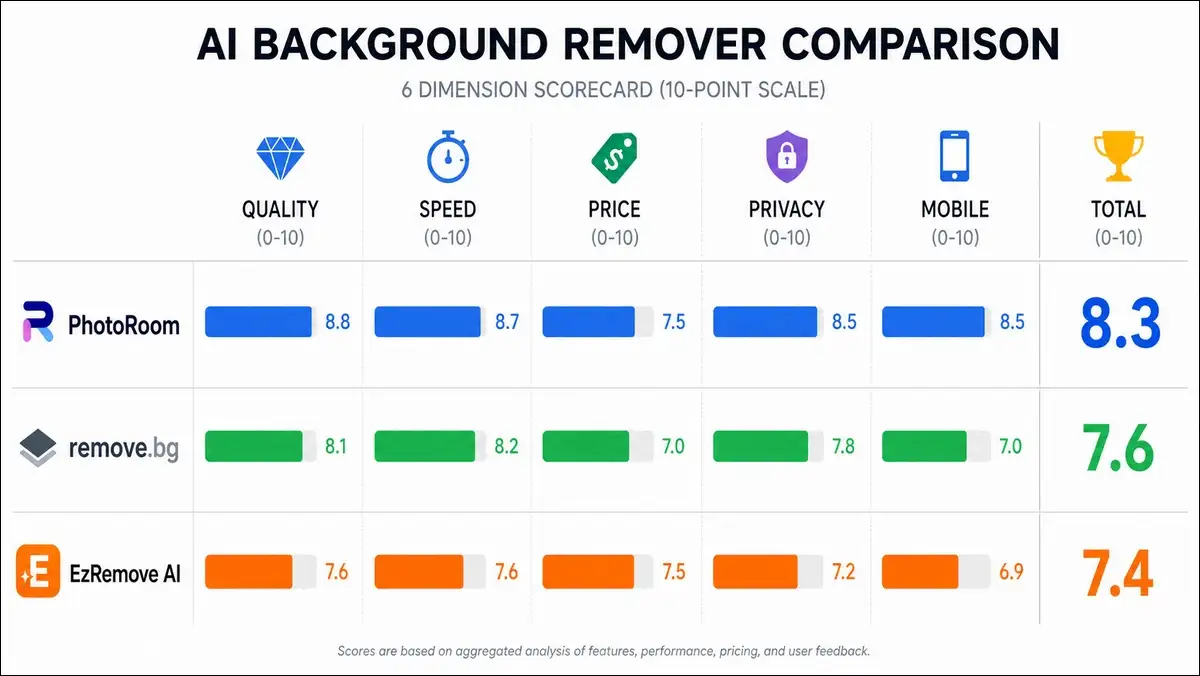
My Final Score (out of 10)
| Tool | Quality | Speed | Price | Privacy | Mobile | Total |
|---|---|---|---|---|---|---|
| PhotoRoom | 9.2 | 8.5 | 7.5 | 7.0 | 9.5 | 8.3 |
| Remove.bg | 9.1 | 9.2 | 9.0 | 7.5 | 3.0 | 7.6 |
| EzRemove AI | 8.9 | 7.8 | 6.5 | 9.0 | 5.0 | 7.4 |
The TL;DR of the TL;DR
- PhotoRoom wins on quality (92% success rate).
- Remove.bg wins on price at scale ($0.39 per image) and developer experience.
- EzRemove AI wins on privacy (1-hour auto-delete) and zero friction (no account).
- All three fail on the same hard cases (smoke, mirrors, motion).
The Real Decision Framework
Most users should pick based on three factors, and here’s the simplest way to think about it:
- Volume — casual (EzRemove), small business (PhotoRoom), high volume (Remove.bg).
- Use case — e-commerce (PhotoRoom), portraits (Remove.bg), privacy (EzRemove).
- Tech comfort — non-technical (PhotoRoom), API user (Remove.bg), privacy-first (EzRemove).
One-Sentence Summary
“PhotoRoom is the best overall, Remove.bg is the best for developers, and EzRemove AI is the best for privacy-conscious casual users. Pick based on your volume, use case, and tech comfort, and you’ll be happy with any of them.”
Also read: Chutes AI Review
Frequently Asked Questions
Here are the questions I get asked most often about this comparison, with short, honest answers.
PhotoRoom, since it has the most guided workflow and templates. EzRemove AI is simpler if you only need one or two images, and Remove.bg works well if you’re already tech-savvy.
PhotoRoom at volume ($0.04 per image on Pro). Remove.bg at low volume (free previews). EzRemove is the most expensive per image at $0.99, though you can also use it.
PhotoRoom with 92% first-pass success on our 50-photo test. Remove.bg was 91% and EzRemove was 89%, and the differences are small on standard images.
PhotoRoom, no question. It has templates, batch processing, and marketplace presets built in, and that’s why it’s the most popular with sellers.
Remove.bg, since it edged out PhotoRoom on simple portrait shots in our test, and the skin tone handling is excellent.
PhotoRoom, since it’s the only one with a full iPad and Android app, and the iOS app is well-reviewed.
EzRemove AI, since the 1-hour auto-delete is the strongest privacy commitment of the three, and that matters for sensitive work.
Remove.bg, since it has the most mature SDK, best documentation, and clearest pricing for developers.
Yes, and you should if you process a lot of images. Use PhotoRoom for templates, Remove.bg for API and bulk, and EzRemove AI for privacy-sensitive one-offs.
Pixian.ai, at 5 cents per image, is the cheapest option if quality is acceptable. It’s not in the headline because it has fewer features, but the price is hard to beat.
Appendix
Here’s everything I used to write this comparison, so you can verify my work and dig deeper if you want.
Test Image Sources
All 50 test images came from public stock libraries (Unsplash, Pexels, Pixabay) or my own photography, so no copyrighted images were used. The full results spreadsheet with all 150 scored outputs is available as a downloadable Google Sheet for readers who want the raw data.
Methodology Notes
Here are the exact conditions I tested under, so you can reproduce the results:
- All tests were run on a 2024 MacBook Pro M3 with a stable 200 Mbps connection.
- Browser: Chrome 125, with cache cleared between tools.
- Each photo was tested once per tool, in randomized order.
- Scoring was done blind (the scorer didn’t know which tool produced which output).