What is Nut Simulator and How to Use It?
Learn what Nut Simulator is and how to use it! Learn the basics, master strategies, explore helpers and upgrades, in this fun browser-based clicker game.

Nut Simulator is a quirky, browser-based clicker game where you collect nuts by clicking and invest in upgrades to boost your nut-gathering efficiency. It’s part of a genre called idle or incremental games, where small actions lead to exponential growth over time. You start as a simple nut collector, clicking to gather nuts, and gradually build a “nut empire” by purchasing helpers and enhancements.
The game, is found on nutsimulator.github.io, has a simple premise but hides surprising depth. You’ll find yourself strategizing to maximize nuts per second, balancing manual clicks with automated systems. It’s free to play, accessible on any modern browser, and requires no downloads or installations. This makes it easy for you to jump in and start collecting nuts right away.
Beyond the basic clicking, Nut Simulator introduces elements like prestige systems, where you reset progress for long-term bonuses, and a variety of upgrades that change how you approach the game. Let’s explore these mechanics in detail, but first, let’s get a handle on why this game has caught the attention of so many players.
Also read: What is PlayStream.gg?
The Appeal of Nut Simulator
Why would you want to play a game about collecting nuts? The charm lies in its simplicity and humor. The absurdity of being a nut in a nut-filled world—or just gathering them relentlessly—taps into a lighthearted, stress-free experience. You can play for a few minutes or get lost for hours, making it a flexible option for casual gamers.
Additionally, the game’s progression system keeps you engaged. Early on, you click manually to gather nuts, but soon you’re buying “Nut Kids” or “Nut Factories” to automate the process. Each upgrade feels rewarding, as your nut count climbs faster.
The gradual unlock of new features, like “Nuclear Clicks” or “Galactic Nut Reign,” adds a layer of strategy to what seems like a silly concept.
For some, it’s a relaxing break. For others, it’s a challenge to optimize and dominate the leaderboard. Whatever your style, Nut Simulator offers a mix of passive and active gameplay that adapts to how you want to play.
Getting Started: How to Play Nut Simulator
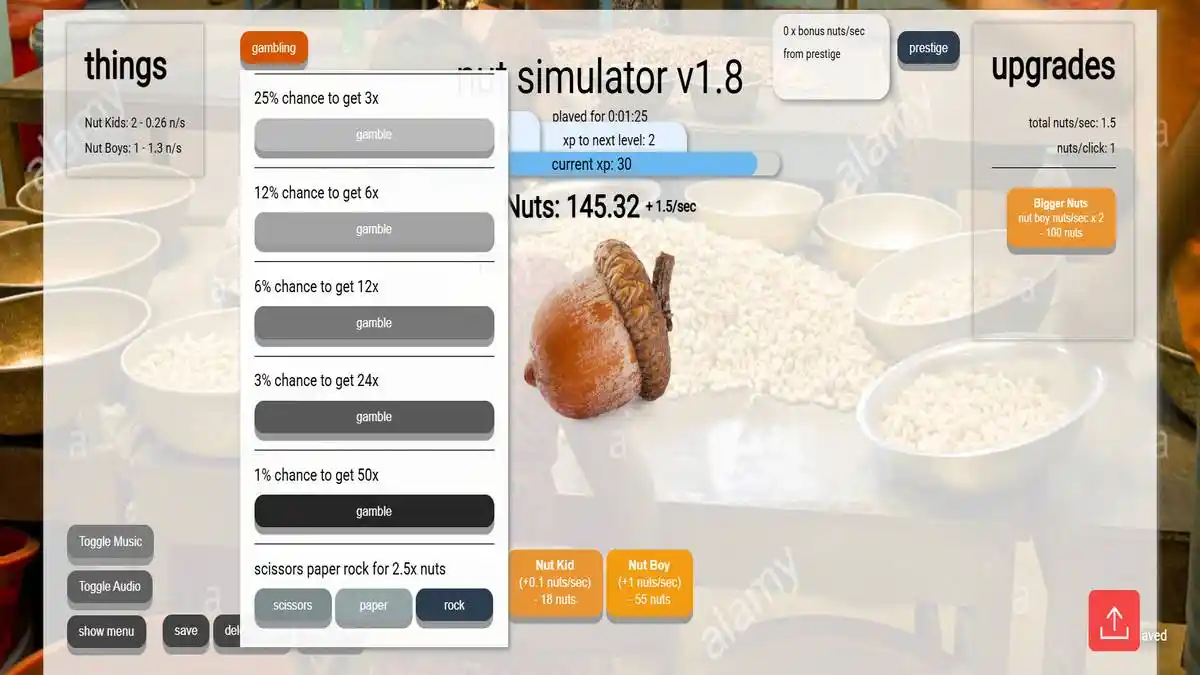
Ready to dive in? Here’s how to get started with Nut Simulator. First, navigate to a site hosting the game, such as nutsimulator.github.io. You’ll see a simple interface: a big nut to click, a counter for your total nuts, and a menu of upgrades or helpers to purchase.
Step-by-Step Guide
- Click to Collect: Start by clicking the nut on the screen. Each click adds a small number of nuts to your total, often 0.1 or 1 nut per click initially.
- Buy Helpers: Once you have enough nuts—say, 15—you can buy your first helper, like a “Nut Kid,” which generates 0.1 nuts per second automatically.
- Upgrade Your Clicks: Save up for upgrades like “Powerful Clicking” (e.g., 300 nuts) to boost how many nuts each click earns.
- Scale Up: As your nut count grows, invest in bigger helpers like “Nut Farms” or “Nut Banks” for higher nuts-per-second rates.
- Monitor Progress: Keep an eye on your nuts per second and total nuts. The goal is to balance manual clicking with automated gains.
The interface is intuitive, often with a “save” and “load” feature to keep your progress. You might also see options to toggle music or audio for a quieter experience.
Don’t worry if progress feels slow at first—things speed up as you unlock more powerful options.
Tips for Beginners
Patience is key. Early on, focus on buying the cheapest helpers to build a steady stream of nuts. Avoid spending all your nuts on click upgrades until your automated income is solid.
Also, check for any in-game menus or tooltips—some versions offer hints or stats to guide your decisions.
Key Mechanics and Features
Nut Simulator isn’t just about clicking. Several mechanics shape your experience and strategy. Let’s break them down so you can make the most of your nut-collecting journey.
Helpers and Upgrades
Helpers are automated tools that generate nuts per second. Examples include:
- Nut Kid: Costs 15 nuts, adds 0.1 nuts/sec.
- Nut Boy: Costs 50 nuts, adds 1 nut/sec.
- Nut Factory: Costs 150,000 nuts, adds a hefty nuts/sec boost.
Upgrades, on the other hand, enhance your clicks or multiply helper output. For instance, “Bigger Nuts” might double your nuts per second for 100 nuts, while “Nuclear Clicks” boosts click value dramatically for 300,000 nuts. You’ll need to decide whether to boost clicking power or automate more.
Also read: How to Play and Win 55 Ace Game
Prestige System
Once you’ve built a solid nut empire, consider the prestige system. This lets you reset your progress—nuts, helpers, and upgrades—in exchange for a permanent bonus, like a multiplier to all nut gains. It’s a long-term strategy, ideal when progress slows and costs for new upgrades skyrocket (e.g., “Nut God” at 170,000,000,000,000 nuts).
Before prestiging, check how much bonus you’ll earn. It’s often based on your total nuts or nuts per second. This reset can feel daunting, but it’s a game-changer for reaching higher tiers faster in later runs.
Game Interface
The layout varies by version, but you’ll typically see:
- A central nut or button to click.
- A counter for total nuts and nuts per second.
- A shop or menu for helpers and upgrades.
- Options to save, load, or toggle settings.
Some versions, like those on GitHub, let developers tweak the game, so you might encounter custom features or mods. Always ensure you’re playing on a trusted site to avoid issues.
Strategies for Success
To excel in Nut Simulator, you need a plan. Here are proven strategies to help you grow your nut empire efficiently.
Early Game Focus
In the beginning, prioritize cheap helpers like “Nut Kid” and “Nut Boy.” These build a passive income stream, freeing you from constant clicking. Aim to gather 50-100 nuts before buying your first upgrade. This balance ensures you’re not stuck clicking forever.
Also, watch your nuts-per-second rate. Once it’s steady—say, 5 nuts/sec—consider a click upgrade like “Powerful Clicking” to speed things up. Don’t overspend early; costs escalate quickly.
Mid-Game Growth
As you hit thousands of nuts, invest in mid-tier helpers like “Nut Farm” (13,000 nuts) or “Nut Factory” (150,000 nuts). These offer bigger returns. Combine them with upgrades like “Nut Mastery,” which doubles all non-click production for 100,000 nuts.
At this stage, decide if you’ll lean on automation or keep clicking. If you enjoy active play, boost click bonuses. If you prefer a hands-off approach, stack helpers and multipliers.
Late-Game and Prestige
When costs climb into the millions or billions, progress slows. This is where prestige shines. Resetting might seem like a step back, but a 2x or 5x multiplier to all gains transforms your next run. Before prestiging, max out affordable helpers and upgrades to boost your bonus.
Track your nuts per second—aim for a high rate, like 1,000 or more, to make the reset worthwhile. From there, you’ll tackle goals like “Galactic Nut Reign” or “Universal Nut Domination” much faster.
Here’s a handy table to summarize key helpers and upgrades you’ll encounter:
| Feature | Cost (Nuts) | Effect | Best For |
|---|---|---|---|
| Nut Kid | 15 | +0.1 nuts/sec | Early game automation |
| Nut Boy | 50 | +1 nut/sec | Early to mid-game boost |
| Nut Factory | 150,000 | +significant nuts/sec | Mid to late-game growth |
| Powerful Clicking | 300 | +15 nuts per click | Active players |
| Nut Mastery | 100,000 | Doubles non-click production | Mid-game scaling |
| Nuclear Clicks | 300,000 | Doubles click bonus | Late-game clicking |
Variations and Platforms
Nut Simulator isn’t one-size-fits-all. You’ll find different versions across the web, each with unique twists. The most common is hosted at nutsimulator.github.io, a project by developers on GitHub. This version focuses on the classic clicker experience, with a progression from “Nut Kid” to “Nut Afterlife.”
Other takes, like “Nut Simulator Unblocked” on sites like zohoho.org or us-class.net, cater to players in restricted settings, such as schools or offices, by bypassing network blocks. Some versions add mini-games, puzzles, or even nut-themed characters, like a walnut navigating obstacles.
Be cautious, though. Stick to reputable sites to avoid malware or broken versions. If you’re a tinkerer, check GitHub repositories (e.g., nutsimulator/nutsimulator.github.io) for open-source code you can explore or modify.
Also read: Retro Bowl 3kh0
Challenges and Limitations
Nut Simulator is fun, but it’s not perfect. For one, the grind can feel repetitive—clicking or waiting for nuts to pile up takes time, especially in the late game. Some players find the lack of a deep storyline or end goal limiting if you’re not into idle games.
Technical issues pop up too. Older versions might not save progress reliably, so use the save feature often.
Also, transfer speeds or performance can lag on slower devices or networks, as noted in some Reddit discussions about similar tools. If you’re frustrated, take a break or try a prestige reset to shake things up.

Advanced Tips and Community Insights
Ready to go deeper? Join communities like Reddit’s r/SwitchPirates or GitHub discussions to learn from others. Players often share hacks or strategies, like optimizing click-to-helper ratios or timing prestige for maximum gain.
For advanced play, experiment with timing. Click furiously during a “Nuclear Clicks” boost to rack up nuts, then invest in high-yield helpers. Some tinkerers even modify the game’s code—check GitHub for scripts, but be careful, as untested changes can break your save.
Ultimately, Nut Simulator is what you make it. Whether you play casually or chase “Nut God” status, the key is balancing clicks, helpers, and resets to suit your pace.
Comparing Nut Simulator to Other Games
How does Nut Simulator stack up? Compared to clicker games like Cookie Clicker, it’s simpler, with fewer layers but a unique nut theme.
Unlike complex simulators (e.g., NUTS, a surveillance mystery game on Steam), it’s light and accessible.
Here’s a quick comparison:
| Game | Core Mechanic | Complexity | Platform |
|---|---|---|---|
| Nut Simulator | Click and automate nuts | Low to medium | Browser |
| Cookie Clicker | Click and upgrade cookies | Medium to high | Browser, mobile |
| NUTS (Steam) | Surveillance, puzzles | High | PC, consoles |
This table shows where Nut Simulator fits—perfect if you want a straightforward, humorous experience.
Final Thoughts on Usage
To use Nut Simulator effectively, start small, build your automated income, and don’t shy away from prestiging when ready. Play on a trusted site, save often, and adjust your strategy based on whether you prefer active or passive play.
We hope this guide helps you navigate the nutty world of Nut Simulator with confidence. Enjoy collecting nuts!
Also read: LyncConf Game Mods