iGradePlus Review: Features, Pros, Cons & Alternatives
Here’s a detailed review of iGradePlus, learn about it’s features, pros, cons, pricing, and top alternatives to decide if it’s the right grading tool for your school.
When it comes to find an affordable way to manage grades, attendance, and classroom communication, platforms like iGradePlus come into our mind. Many teachers, tutors, and small schools choose it because it reduces manual work and offers a simple system that is quick to learn.
So, before you get this to this platform, it is good to know about this tool thoroughly. Therefore, we take a detailed look at iGradePlus, and help you decide whether it can meet your classroom or school needs.
What Is iGradePlus and Who Should Use It?
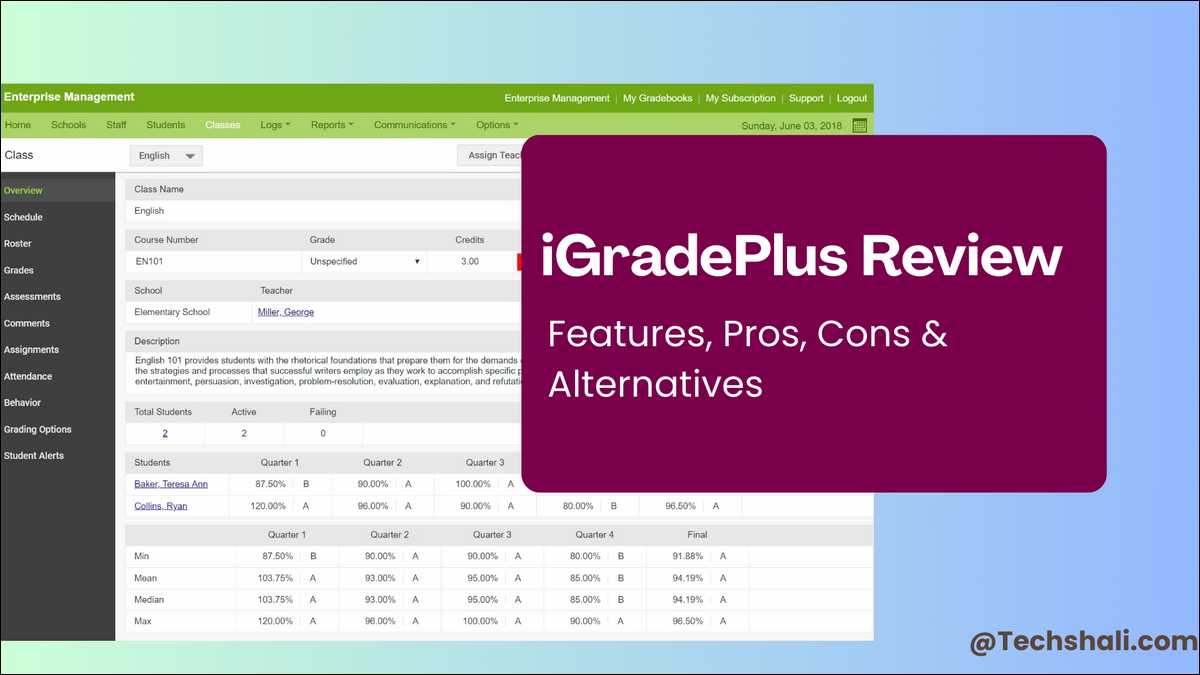
iGradePlus is a cloud-based grading and classroom management platform designed for teachers, tutors, independent educators, and smaller educational organizations.
People can use it to track student performance, organize class data, generate reports, and communicate with families.
Many schools prefer it because it requires no technical setup, or skills!
They only need a browser, making it useful for anyone who wants a lightweight alternative to large and complex learning management systems.
Also read:
- The Flippity Advantage: Simple Tools, Powerful Learning
- Classroom 15x: Master Education With Personalized Technology
Key Features of iGradePlus
For better management, iGradePlus includes tools for grading, reporting, communication, and school-wide oversight. These are the features most educators use on a daily basis.
1. Simple and Reliable Gradebook Tools
The gradebook is clean, intuitive, and straightforward.
You can create assignments, enter scores, and apply weighted calculations without dealing with complicated menus.
Teachers appreciate the automated math and flexible categories for tests, homework, and participation. We can also export grades or share them directly with parents through the portal, reducing confusion and saving time.
2. Built-In Attendance Tracking
iGradePlus offers attendance tools that work well for daily or class-based records. You can track absences, tardies, or early dismissals with preset or custom codes.
Clear attendance reports help you identify patterns and prepare for meetings with families or administrators.
The system also creates automatic summaries for each student, which makes documentation easier.
3. Behavior and Discipline Logging
In education, accurate behavior tracking is valuable for both teachers and administrators.
Thus, iGradePlus offers structured behavior logs where you can record incidents, add notes, and document follow-up actions.
You can include consequences, parent communication details, or any steps taken. These logs help maintain consistent documentation and support transparency during conferences.
4. Communication and Messaging Tools
Also, this platform supports simple messaging between teachers, parents, and students. You can share announcements or send private messages directly from your dashboard.
Even though the messaging feature is basic, it works well for reminders, updates, and short notices. This keeps communication clear and organized across all parties.
5. Customizable Reporting Options
iGradePlus offers a wide range of report types, including grade summaries, attendance reports, progress updates, and performance charts.
Reports are clean, easy to understand, and simple to export or print. Schools that rely on flexible reporting often find this feature especially helpful.
6. Administrative Functions for Schools
Schools can use iGradePlus as a light student information system. Administrators can manage teacher accounts, monitor all classes, and review student data in one place.
You can also organize enrollment records, track student information, and manage documentation. These tools extend iGradePlus beyond a basic gradebook.
iGradePlus Pricing Details:
iGradePlus is known for its budget-friendly pricing. It offers plans for individual teachers and for entire schools.
There are no setup fees, which helps keep costs low for smaller programs.
Here’s a quick snapshot of sample fees structure:
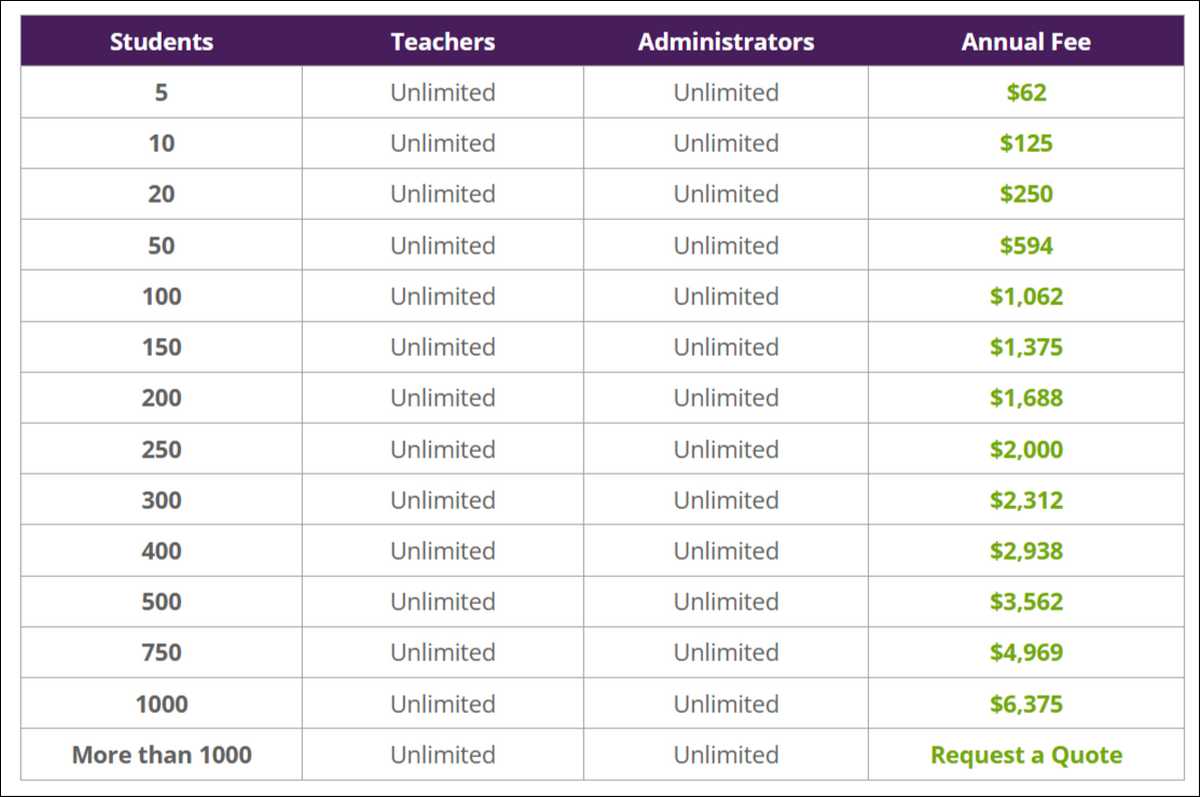
You can learn more about the price details on their official page → here.
Also read:
- How StateKaidz.com Makes Learning Fun for Kids
- EducationBeing com Brings A Modern Approach to Learning
- Securly Pass — Easy and Safe Online Learning
How iGradePlus Fits Teachers’ Daily Work
Most teachers choose iGradePlus because of its simplicity. The dashboard is clean, and your classes appear immediately when you log in.
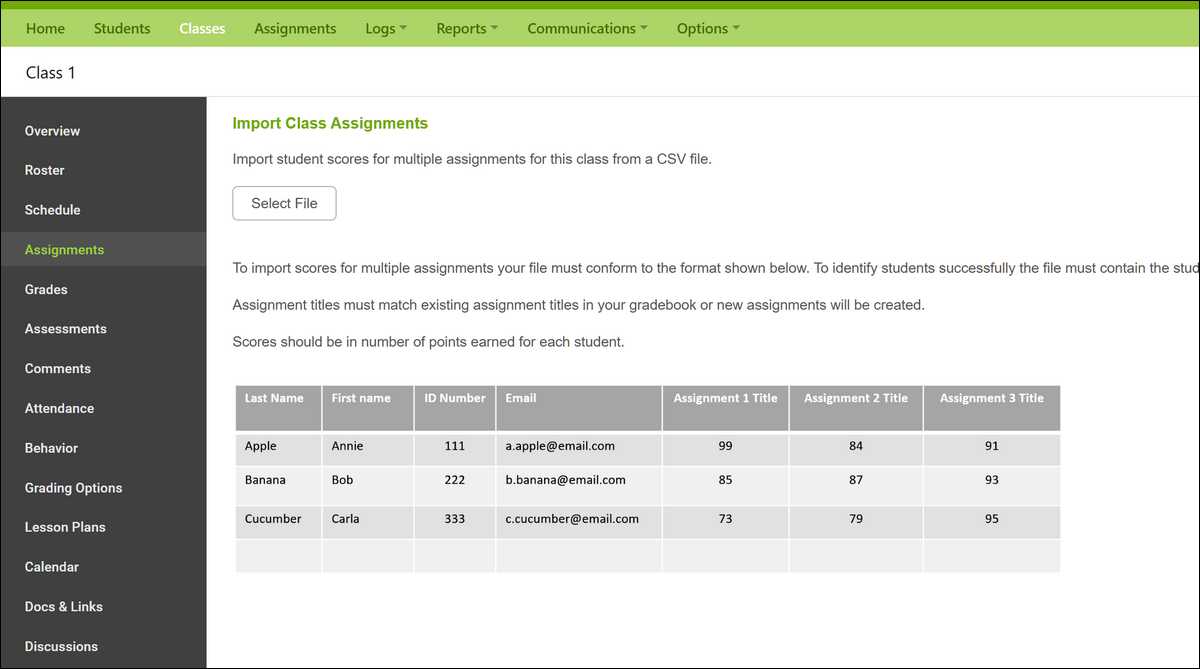
Entering assignments takes only a few steps. You add the title, category, due date, and points, and the system handles calculations automatically.
Attendance is also quick and efficient. Reports update in real time, which reduces the time you spend on administrative tasks.
Teachers can manage unlimited classes without performance issues, giving them room to organize all coursework in one place.
How iGradePlus Supports Schools
For schools, iGradePlus provides a light but effective student information structure. Admins can oversee all classes, check gradebooks, and view school-wide data.
You also get tools for enrollment, communication, discipline tracking, and central data management.
These features make iGradePlus suitable for schools that want organization without the complexity of large SIS platforms.
Pros and Cons of iGradePlus
Below is a clear look at what iGradePlus does well and where it may fall short.
Pros
- Easy interface suited for all tech skill levels
- Affordable pricing for teachers and schools
- Customizable gradebook and detailed reporting tools
- Parent and student portals included
- Support resources and documentation available
- Built-in behavior logging
- Browser-based—no installation required
Cons
- Not as advanced as full-featured LMS platforms
- Mobile use is functional but not highly optimized
- Messaging system is basic
- Few integrations with other tools
- Interface design feels a bit outdated
Ease of Use: One of Its Strongest Qualities
Since ease of use is a major advantage of iGradePlus, most teachers understand the system within an hour.
The interface uses clear wording, and processes require few steps. This is especially helpful for teams that want a simple system without long training sessions.
Because everything is browser-based, you can access it from any device, which makes day-to-day management smoother.
Performance and Reliability
Teacher feedback on forums and review sites shows that iGradePlus performs well under daily loads. Pages respond quickly, and the system remains stable during busy grading periods.
You never have to install updates because everything runs in the cloud. This reliability is a commonly mentioned positive in reviews from platforms such as Capterra and G2.
Privacy and Data Security
Data security is essential in education, and iGradePlus uses encrypted connections and protected cloud storage to safeguard student information.
While it does not publicly highlight advanced compliance frameworks like FERPA certification, its policies generally align with common education privacy standards.
You can find more details on their official privacy policy page.
Who Gets The Most Benefits from iGradePlus?
iGradePlus is a strong choice if:
- You want a clean, easy-to-learn gradebook
- You run a tutoring center or small school with limited technical resources
- You need flexible reporting without complex dashboards
- You prefer a simple tool that requires minimal setup
- You do not need advanced LMS features like digital assignments or online content delivery
It works well when your priority is organization and clarity rather than broad instructional features.
Where iGradePlus Has Limitations
Like many tools, it has some limitations too. Like this platform does not offer tools for digital assignments or lesson planning. If you want a platform where students submit work and teachers grade online, you’ll need to rely on another LMS.
And the lack of third-party integrations may also be a drawback for schools that rely on systems like Google Classroom or Microsoft Teams.
The mobile experience works, but it is not as smooth as dedicated apps, which may matter if your school uses mobile-based workflows too much.
So, before you invest in this platform, you must consider these limitations very carefully!
Top iGradePlus Alternatives You Can Consider
If you feel you need different features, here are some reliable alternatives that you can consider:
1. Google Classroom
Google Classroom is free and widely adopted in schools using Google Workspace. It supports assignments, communication, and collaboration but has a simpler gradebook than iGradePlus.
2. Canvas LMS
Canvas is a robust LMS used in many colleges and districts. This includes modules, quizzes, integrations, and analytics.
However, it is more expensive and requires more training.
3. PowerSchool SIS
PowerSchool is a full student information system, more complex and feature-rich as compared to iGradePlus. It includes enrollment, discipline tracking, attendance, and parent portals.
It delivers strong administrative control but comes with higher costs and setup needs.
4. ThinkWave
Next in our list, ThinkWave is quite similar to iGradePlus but with a more modern interface. It includes gradebooks, attendance tools, communication features, and reporting.
Its pricing is also competitive for small schools.
Also read: Gimkit: Game-Based Learning, Simplified
How iGradePlus Stacks Up Against Full LMS Platforms
iGradePlus is primarily a gradebook and classroom management tool.
Platforms like Canvas or Schoology serve as complete learning environments with built-in lesson delivery, submissions, and assessments.
If you need a streamlined system that handles core classroom data, iGradePlus is much easier to maintain. But if you want a full digital classroom, an LMS is a better fit.
User Feedback: What Teachers Say
Reviews on G2, Capterra, and education forums consistently highlight:
- High satisfaction with ease of use
- Low learning curve
- Helpful customer support
- Affordable pricing
- Requests for a more modern interface
- Desire for additional integrations
This feedback reflects how the platform aligns well with small educational programs that prioritize simplicity.
Final Thoughts
iGradePlus stands out as a simple, affordable tool for managing grades, attendance, behavior tracking, and classroom communication.
It is best for teachers and smaller schools that prefer a clean and straightforward system.
If your environment requires digital assignments, extensive integrations, or advanced analytics, alternatives such as Canvas or Google Classroom may meet your needs better.
But if your main goal is to streamline administrative tasks with minimal setup, iGradePlus remains a strong contender.
Important FAQs
iGradePlus is a cloud-based tool for tracking grades, attendance, behavior, and communication. Teachers and schools use it to organize student information in one place.
Yes. The system is simple and beginner-friendly. Most teachers can understand the basics within an hour.
Yes. Parents and students can log in to see grades, attendance, and messages from teachers.
No. It is mainly a gradebook and classroom management tool. It does not include online assignments or content delivery.
Only limited integrations are available. It does not fully sync with popular tools like Google Classroom or Microsoft Teams.
It offers a flat-fee teacher plan and a per-student school plan. Pricing is considered budget-friendly.
Common alternatives include Google Classroom, Canvas, PowerSchool, and ThinkWave.
Yes. The system uses encryption and secure cloud storage to protect data.