Why 9xmovies.biz Is Not Working? Top Fixes
Do you find 9xmovies.biz keeps going offline very oftent, you are not alone. One day, the site opens fine, the next day, it refuses to load, and sometimes you see a error message on your browser.
In this guide, we break the situation down. Learn why this site goes offline, from ISP blocks and domain takedowns to DNS and browser issues. And xlear, practical fixes explained in simple terms.

What Kind of Site 9xmovies.biz Is
To make sense of the issue, we need to start with what this site actually is.
9xmovies.biz shares movies without permission from copyright owners. That single fact drives almost everything else. Because the site breaks copyright law, it faces constant pressure from many sides.
Courts issue blocking orders. Internet providers act on those orders. Domain companies suspend addresses or hosting providers pull the plug.
Each action cuts off access for users like you and me. The site does not aim for stability. Instead, it tries to stay online for as long as it can. That choice explains the frequent disruptions.
ISP Blocking Stops Access
Most of the time, the problem begins with the internet provider.
Courts often tell ISPs to block piracy websites. When that happens, the internet provider stops the connection before it reaches the site. You type the address, press enter, and the request ends early.
Because of this, you may see a message saying the site cannot be reached. You may see a warning page. Or the browser may just keep loading. From your side, it looks broken.
Whereas, from the network’s side, it is doing exactly what it was told to do.
Reference:
- Internet Society – DNS and ISP blocking basics
Domain Takedowns Remove the Address
If your ISP is not blocking the site, the domain itself may be gone or changed to something else.
Companies that manage domain names, such as “.biz,” can suspend addresses after copyright complaints. When that happens, the web address simply stops working.
The site might still exist on a server somewhere. You just cannot reach it without a valid domain. This is why search results can mislead you.
While old links stay visible, even though the address no longer works, the result feels sudden, but the cause is direct.
Server Failures Break the Site
Even when the domain is active, the servers can still fail.
Piracy sites usually rely on cheap hosting. They expect trouble, so they avoid long-term investments. When traffic spikes—often after new movie releases—servers struggle.
Pages may load slowly, may freeze halfway, or they may time out completely. These issues do not have anything to do with you device. They suggest weak infrastructure and limited resources on the site’s end.
DNS Errors Prevent Resolution
Sometimes, the browser cannot even find the site.
DNS acts like an address book for the internet. And it connects names to server numbers. If that connection breaks, the browser has nowhere to go.
ISPs often block piracy sites by changing DNS responses. In other cases, DNS records disappear after domain disputes. Either way, your browser asks for directions and gets none back.
Browser Cache Causes Local Errors
Not every problem caused by the network alone. Some start on your own device too!
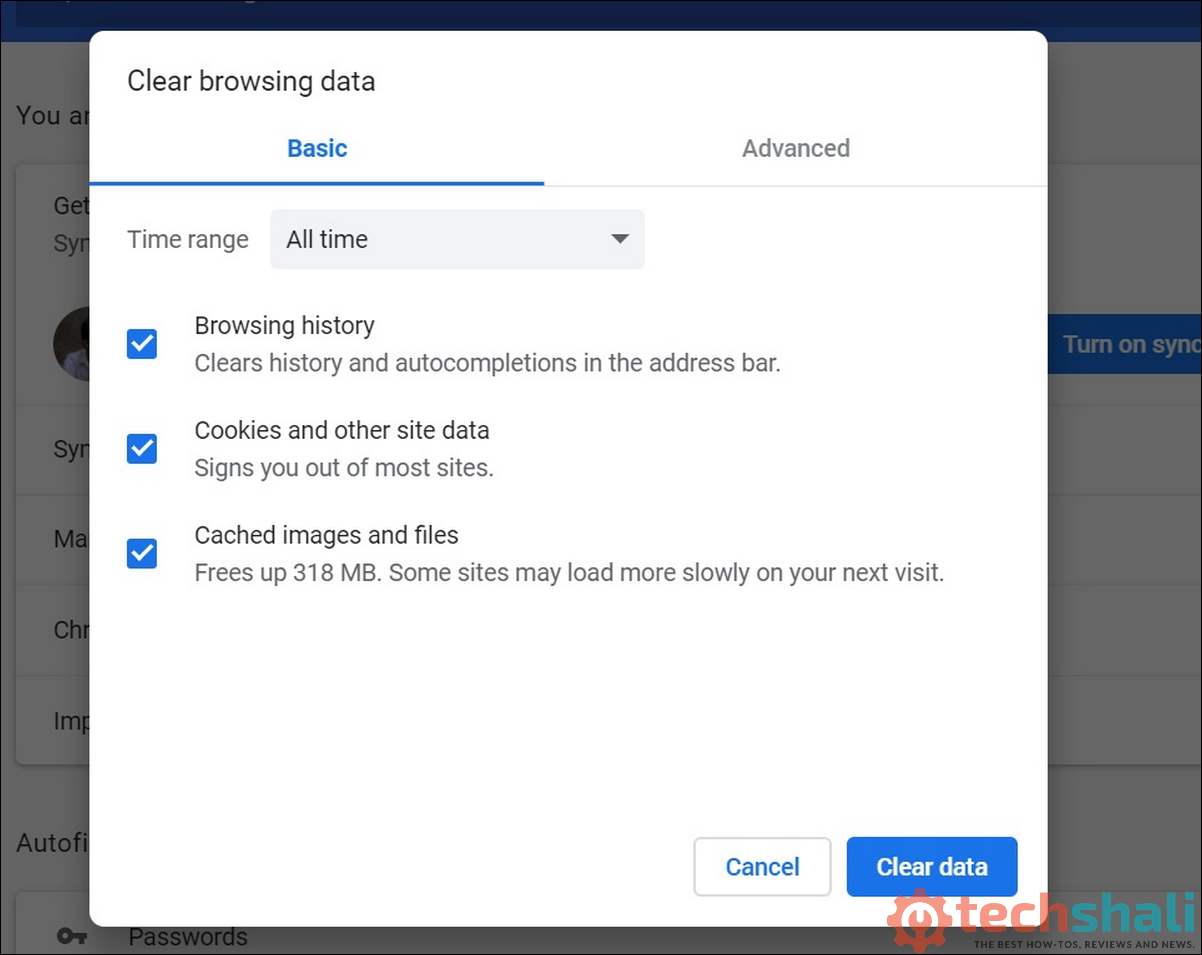
Browsers save files to speed things up. Over time, those files become outdated. Piracy sites change often, so old files stop matching new pages.
When that happens, you may see blank screens, broken layouts, or buttons that do nothing. So, clearing your browser’s cache removes the old files and forces a fresh load.
In many cases, that alone fixes the issue.
Network Differences Change Results
Have you noticed the site working on one network but not another?
It might fail on mobile data but load on Wi-Fi. It might fail at home but work elsewhere. This feels confusing, but there is a reason.
Each internet provider blocks sites in its own way. While, one may block DNS, and another may block IP addresses. Whereas, a third may use both. Because of this, access changes when the network changes, even though the site itself stays the same.
Country-Based Blocking Applies
Location also plays a role in such restrictions too!
Courts issue blocking orders within specific countries. ISPs enforce them only inside those borders. As a result, the site may work in one country and fail in another.
If you travel, you may notice sudden changes. Nothing magical happened. You just crossed into a different legal zone.
VPN Use Has Limits
When blocks appear, many of us think about using a VPN.
A VPN routes your connection through another country, which can bypass local blocks. Although, that works fine most of the time.
However, VPNs are not a cure-all. Many VPN IP addresses already sit on blocklists. Free VPNs often struggle with reliability, and DNS leaks can also reveal your real location.
That is why VPN access may work first and then fail again.
Browser Extensions Break Scripts
Even when the network allows access, your browser setup can get in the way.
Ad blockers and privacy tools often stop scripts from running. Piracy sites depend on scripts to load pages and links. When those scripts fail, the site falls apart.
You may see missing links, inactive buttons, or empty pages. Turning extensions off for a moment helps confirm whether they are the cause.
Security Software Blocks Access
Security tools add another layer.
Piracy sites rely on aggressive ads. Some ads carry harmful code. Browsers and antivirus programs detect that risk and block the connection.
You may see warning screens. Downloads may stop. Tabs may close on their own. These tools act to protect your device, even if the site itself still exists somewhere.
Top Fixes To Make 9xmovies.biz Work Again
When the site stops working, most of us do not think about court orders or DNS tables. We try simple fixes first. These steps do not guarantee success, but they often explain what is going wrong.
1. Clear browser cache and cookies
This is usually the first step. Cached files can conflict with the site’s current structure. By clearing them, you force the browser to load everything again from scratch. If the issue is local, this often solves it.
2. Switch to another browsers
If the site fails in one browser, users often try another. Different browsers handle scripts, security rules, and cached data differently. If the site opens elsewhere, the problem likely sits in the original browser.
3. Change networks
Many users switch from mobile data to Wi-Fi, or the other way around. This test helps reveal ISP-level blocking. If the site works on one network but not another, the issue is almost always provider-related.
4. Use public DNS services
Some users change DNS settings to public resolvers. This can bypass basic DNS blocking by ISPs. It does not work in all cases, but it helps when the block sits only at the DNS level.

5. Disable extensions
Ad blockers and script blockers often break piracy sites. Users disable extensions one by one to see which one causes the issue. When the site loads after disabling an extension, the cause becomes clear.
6. Search for updated domains
Because domains change often, users search for newer addresses. Sometimes, the site still operates under a different name. This does not fix the system problem, but it explains why old links stop working.
Each fix targets a different layer: device, browser, network, or domain. None of them remove the core instability, they only help diagnose where the break occurs.
Why the Problem Keeps Returning
Basically, such piracy sites operate in constant conflict with law and policy. Every workaround triggers a response. Every response breaks access. The site adapts, and users adapt with it. The cycle repeats.
Whereas, licensed platforms work differently. They hold legal rights, and invest in stable servers. They aim for steady access. So, this contrast explains the difference in experience.
Legal Context Matters
We also need to be clear about the legal side.
Accessing pirated content may break local laws. Enforcement varies, but the risk exists. Industry groups and courts continue to push for stronger controls, and ISPs follow those rules.
Reference:
- Motion Picture Association – Anti-piracy enforcement
Final Words
When 9xmovies.biz stops working, the cause is rarely difficult to find. Like, ISP blocks, domain suspensions, weak servers, DNS issues, and security filters explain most cases.
Once you understand these factors, the screen makes more sense. A broken page usually means a system working somewhere else. For piracy sites, instability is not a glitch. It is the price of how they choose to operate.