How to Remove Yourself from NumLookup (Opt Out Guide)
You search your own phone number on NumLookup. You find your full name, your address, your age, your family members, and your carrier all sitting there for anyone to see.
That’s very unsettling, and I’ve been there myself, trust me!
NumLookup is one of the most popular online reverse phone lookup services. It’s got more than 5 million monthly users, and indexes over 600 million phone records. And if your phone number’s in their database, anyone can find you and get your details.
The good news? You can opt out. It’s free, takes about 5 minutes, and this guide walks you through every step.
Here’s what we cover in this comprehensive guide:
- Why does NumLookup have your data in the first place
- A step-by-step manual opt-out process with exact instructions
- What to do if the manual method doesn’t work
- How automated removal services compare
- How to remove your data from other data broker sites
- Prevention tips to stay off their radar
- Answers to the most common questions
Quick Stats About NumLookup and Data Brokers
| Key Statistic | Detail |
|---|---|
| Monthly users | More than 5 million |
| Phone records indexed | More than 600 million |
| Trustpilot rating | 4.1 out of 5 stars (430 reviews) |
| Data removal window | Up to 45 days |
| Data broker sites in the US | More than 750 |
| Americans who lost money to phone scams | 68.4 million |
| Average loss per robocall victim | $3,690 |
| Scam calls in 2025 total | 29.6 billion (six year high) |
| Contact email | hello@numlookup.com |
| Headquarters | Atlanta, GA (founded 2019) |
Sources used to gather these stats: Trustpilot, FTC, PIRG Education Fund, Pew Research Center, Proton report.
Why Is My Information on NumLookup?
Let me start with the short answer. Basically, NumLookup is a data broker; it collects information from public and private sources and makes it searchable. Your data isn’t there because you signed up for something. It’s there because that’s what data brokers do. They follow the data.
What Is a Data Broker?
A data broker is a company that collects personal information and sells access to it to different companies. There are more than 750 data brokers in the US, according to a report from Proton, and NumLookup is among them.
Basically, these companies pull data from many places. They combine it, organize it, and then they let people or companies search it. The service might look free to you, but the real currency here is your information, which is very, very important these days.
Where Does NumLookup Get Your Data?
I spent some time tracing the actual sources, and here’s what I found:
- Public records. Birth certificates, property deeds, marriage licenses, voter registration files, case files, and incident reports. These are legal documents that are open to the public by law.
- Social media profiles. Facebook, LinkedIn, Instagram, and Twitter accounts that are linked to your phone number. If your phone number shows up on any of these platforms, data brokers can connect the dots.
- Third-party data partners. Commercial data vendors buy and sell consumer information. Data brokers trade with each other too. So your data moves through this ecosystem without you even knowing it.
- Telecommunications databases. Carrier subscriber information is sometimes accessible through industry channels.
- Data breaches. When a service you use gets breached, your phone number can end up in data broker databases. It’s a domino effect.
What Information Does NumLookup Show About You?
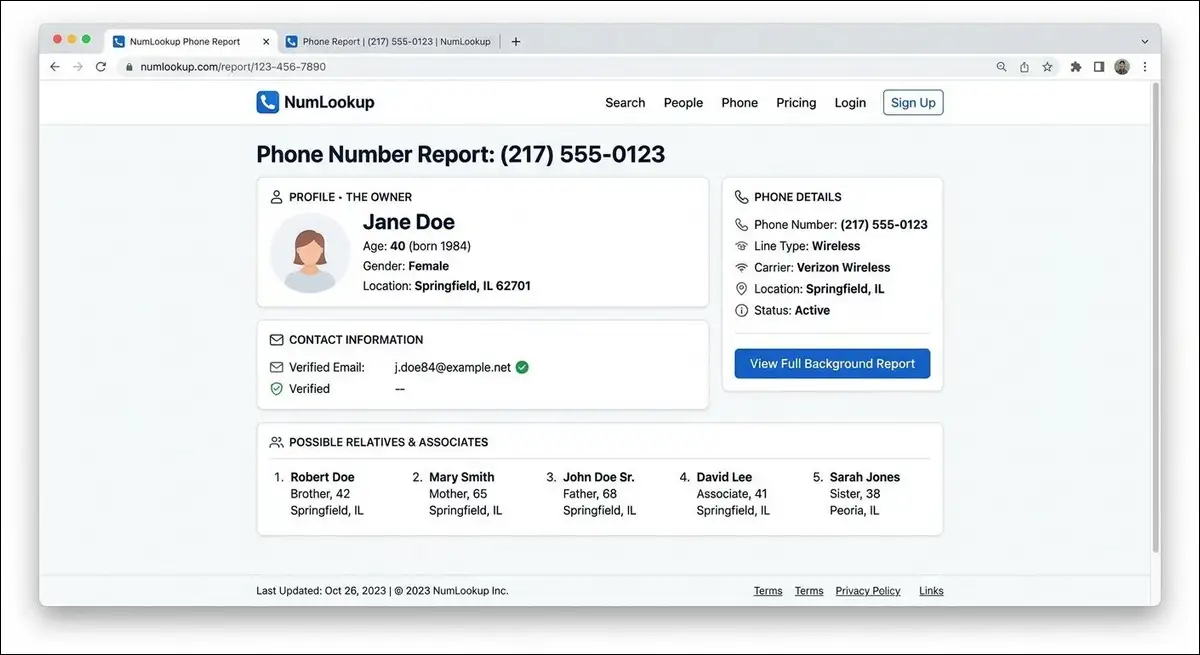
I tested this by searching several numbers on the platform. Here’s what I found available.
Free results (appeared within 5 seconds):
- Full name
- Age and date of birth
- Gender
- General location (city and state)
- Wireless carrier
- Line type (mobile, landline, or VoIP)
- Spam risk score
Premium results (behind a subscription):
- Full street address
- Address history
- Email addresses (sometimes)
- Social media profile links
- Relatives and associates (up to 12 people)
- Income estimate
- Estimated credit rating
- Home value and net worth
- Education and occupation (sometimes)
The free results showed up within 5 seconds, but the premium stuff required clicking through to a subscription page.
Why You Should Care About Being Listed
You might think being on a data broker site is harmless. I thought the same thing until I had a reason to worry. Here’s why it matters.
- Stalking and harassment. Your address and relatives are exposed. That’s a serious safety concern for a lot of people.
- Identity theft. Your full name, date of birth, and address together make identity theft much easier. It’s like handing a thief half the puzzle.
- Social engineering scams. Scammers who’ve got your information can sound like they know you. They can reference your address, your carrier, or your family members to sound legitimate. The FTC says total consumer losses to scams exceeded $12.5 billion in 2024.
- Unwanted calls. Telemarketers, debt collectors, and people from your past can find you.
The numbers back this up. Americans received 29.6 billion scam robocalls in 2025, according to the PIRG Education Fund. That was a six-year high.
What You Should Know Before You Opt Out
Before I walk you through the steps, there are a few things you should know. Trust me, knowing these upfront will save you some frustration, and of course, time too!
The 45 Day Removal Window
NumLookup says removal can take up to 45 days. That’s not new to them alone, as most data brokers have similar timelines, and limitations.
The delay is there because the company needs to verify your identity and push the removal across the cached systems.
A user named Jesse G. posted a review on SmartCustomer about this.
He said: “I submitted a request for removal of my information from this site as I am in a situation where my safety and privacy could be at risk. However, they said it could take up to 45 days for removal, and there is no way to call them or speak to an agent directly.”
From what I’ve seen, most removals process within 2 to 4 weeks. But you should plan for the full 45 days just in case.
Is the Opt Out Process Really Free?
Yes. The manual opt-out process costs nothing. You don’t need a credit card or need their subscription plan.
However, there are some services that will charge you to do this for you. Those are convenience services, not requirements. You can get the same result by following this guide.
What You’ll Need to Start
- The phone number you want to remove
- A valid email address for confirmation
- Your full name
- Your state of residence
- About 5 to 10 minutes of time
- Patience (there’s no phone support for removal requests)
Can You Call Someone About This?
You can call +1 (844) 405-2145 (the only number given on their website). But this number’s for billing inquiries, not for opt-out requests. The removal process is handled entirely through the web form and email.
Email support is at hello@numlookup.com. Response times vary based on user reports.
Step by Step: How to Opt Out of NumLookup Manually
I walked through this process myself to verify each step. Here’s exactly what you need to do.
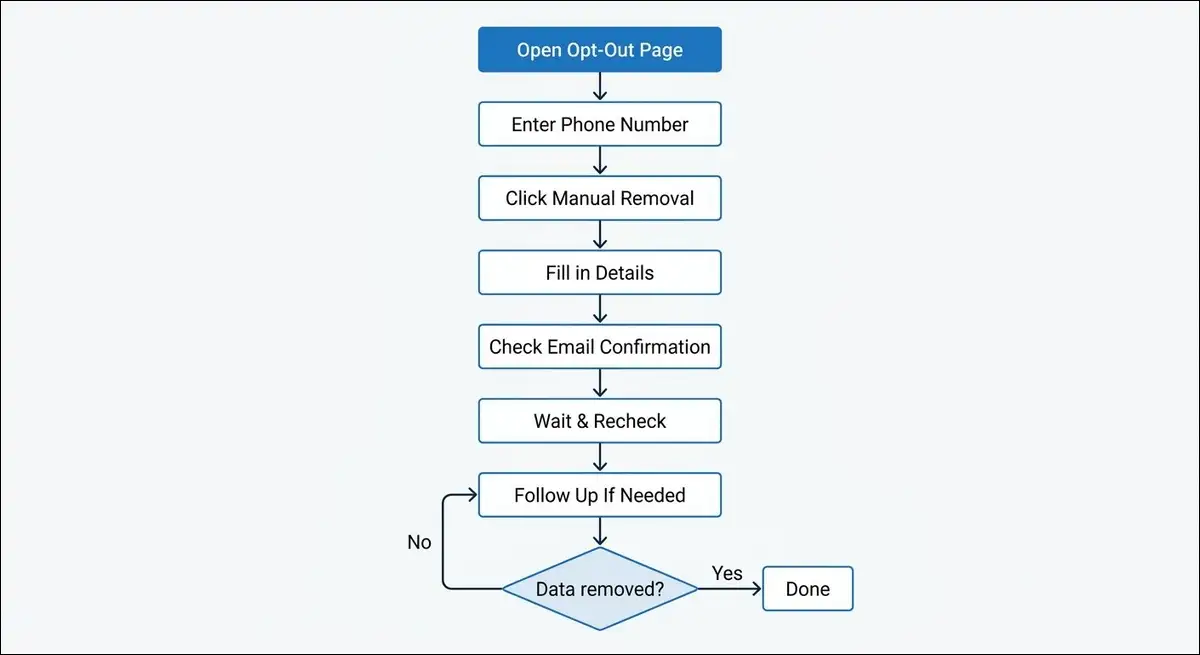
Step 1: Open the NumLookup Opt Out Page
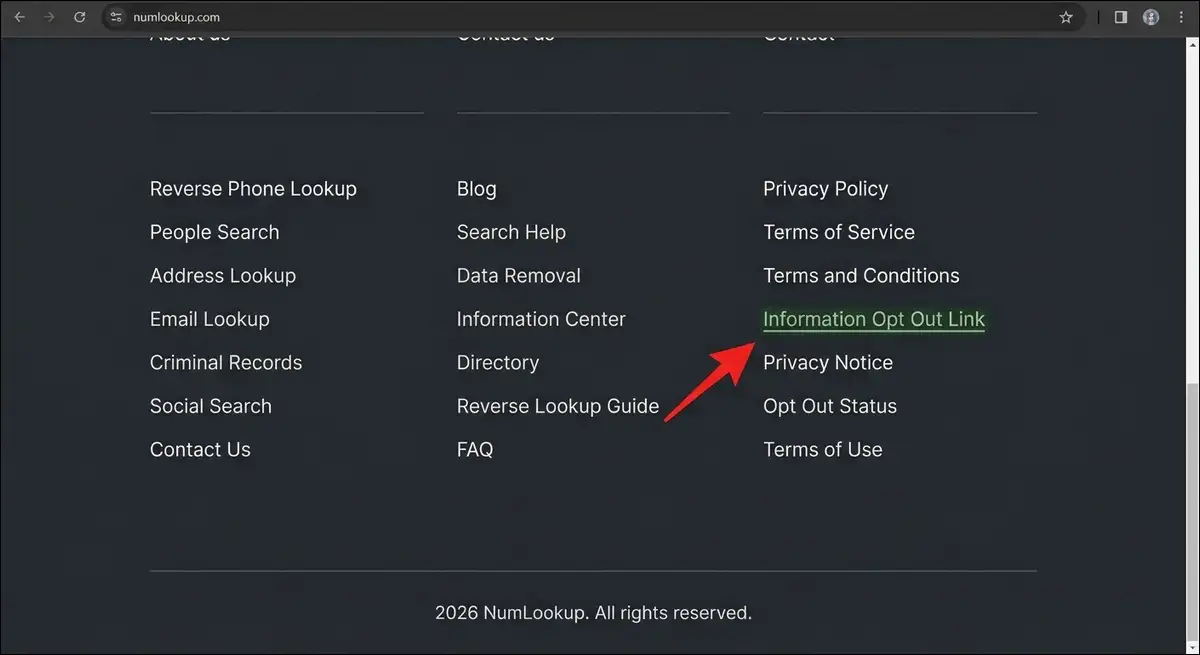
Go to numlookup.com. Scroll down to the very bottom of the page. Look for the link labeled “Information Opt Out Link” in the footer. Click it.
You’ll land on the opt-out form.
Step 2: Enter Your Phone Number
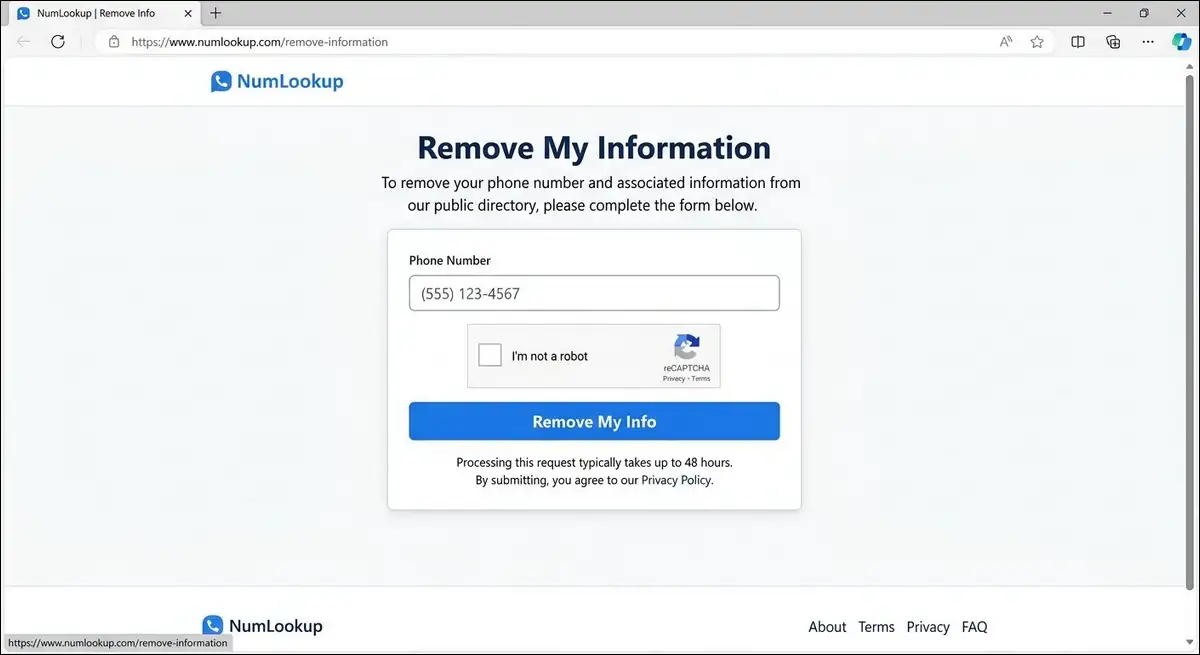
Type your 10-digit phone number with the area code into the input field. Complete the reCAPTCHA verification. Click the “Remove My Info” button.
You should see a confirmation message on the screen.
Step 3: Click the Manual Removal Button
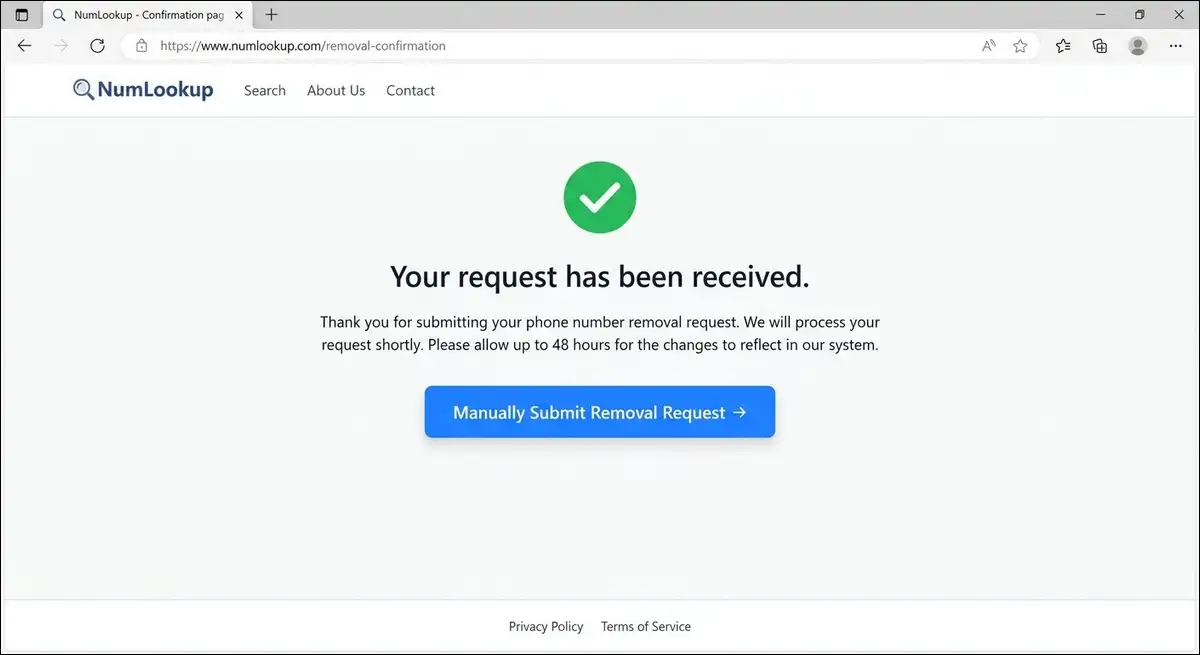
After you click “Remove My Info,” a new button appears. It says “Manually Submit Removal Request.” Click it.
This takes you to the detailed submission form.
Step 4: Fill in Your Details
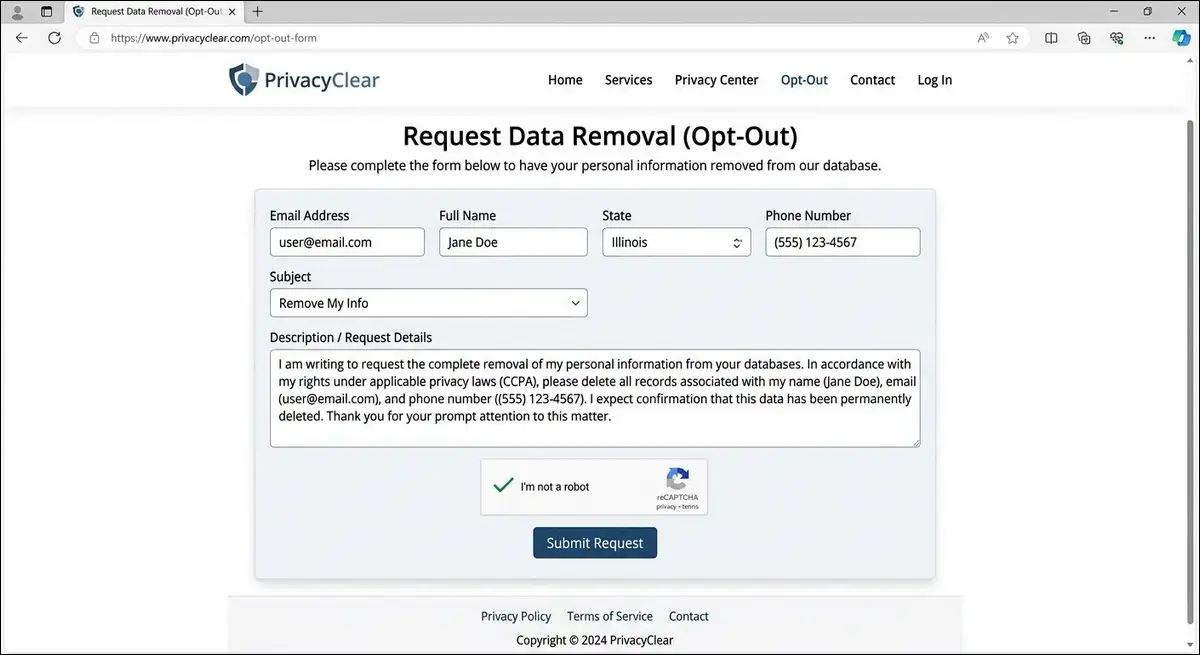
You’ll see a form asking for several pieces of information. Fill in each field carefully.
- Email address. Use an email you check regularly. This is where the confirmation lands.
- Full name. Use the name that appears on the listing.
- State. Your state of residence.
- Phone number. Confirm the number you want removed.
- Subject. Select or type “Remove My Info.”
- Description. Write a brief request for removal.
Here’s a template you can copy and paste into the description box.
“I request the immediate removal of my personal information from NumLookup’s database. I do not consent to having my phone number, name, address, or any other personal data displayed on your platform. Please confirm once my data has been removed.”
Complete the CAPTCHA again. Click “Submit.”
Step 5: Check Your Email for Confirmation
Watch for an email from hello@numlookup.com. If it doesn’t arrive in 10 minutes, check your spam folder. If it still doesn’t show up, check your promotions folder if you use Gmail.
Save this email. It’s your proof that you submitted the request. You might need it if you have to follow up later.
Step 6: Wait and Recheck
Set a calendar reminder for 14 days from now. After 14 days, go back to NumLookup. Search your phone number. See if your information’s still visible.
If it’s gone, you’re done.
If it’s still there, wait until day 30 and check again.
Step 7: Follow Up If Needed
If your data’s still visible after 30 days, send an email to hello@numlookup.com. Use this subject line: “URGENT: Opt Out Follow Up [Your Phone Number].”
Include your original confirmation email or the date you submitted the request. Ask for escalation to a supervisor.
Some users report that follow-up emails aren’t answered quickly. If you don’t hear back in a week, you may want to consider using a paid removal service or invoking your rights under state privacy laws.
What If the Manual Method Doesn’t Work?
Sometimes the process doesn’t go smoothly. Here are the most common problems I found from testing and from user reports.
| Problem | Likely Cause | What You Can Try |
|---|---|---|
| Form doesn’t load | Browser issue | Try Chrome or Firefox. Clear your cache and cookies. |
| CAPTCHA keeps failing | IP address flagged | Try a different network, like your mobile hotspot. |
| No confirmation email | Typo or spam filter | Double check your email. Check all inbox folders. |
| “Number not found” message | Number may not be in database | Search the number first to confirm it’s listed. |
| Form redirects to homepage | Session timed out | Start again from the opt out link in the footer. |
| Data reappears after removal | Reindexing from public records | Submit the opt out again. This is a known issue. |
Escalation Options
If the standard process doesn’t work, you’ve got a few options.
- Email support. Send a detailed message to hello@numlookup.com. Include “Escalation” in the subject line. Describe what happened and what you’ve tried.
- Billing phone line. Call +1 (844) 405-2145. This is primarily for billing, but you can try asking for help with a removal request.
- State privacy laws. If you live in California, the CCPA gives you the right to request deletion of your personal information. Virginia, Colorado, Connecticut, and Utah have similar laws. The company must respond within 45 days.
- Attorney General complaint. If NumLookup doesn’t respond to your request, you can file a complaint with your state attorney general’s office. In July 2026, 49 state attorneys general signed a letter to the FCC about phone-related privacy issues. So regulators are definitely paying attention.
Also read: GhostTrack Explained
Automated Removal Services Compared
You can do this yourself for free. I showed you how above. But you might not want to spend hours doing the same process on 50 different websites.
That’s where automated services come in. They scan data broker sites, find your information, and submit opt-out requests on your behalf. They also monitor continuously and resubmit if your data reappears.
Manual vs Automated: Which Should You Choose?
| Factor | Manual Opt Out | Automated Service |
|---|---|---|
| Cost | Free | $6.49 to $15 per month |
| Time required | 5 to 10 minutes per site | 2 minutes to set up |
| Sites covered | 1 at a time | 150 to 316 at once |
| Ongoing monitoring | You recheck manually | Automatic scanning and re removal |
| Best for | One time or a few sites | Full privacy cleanup |
Top Data Removal Services Compared
I looked at the four most popular services. Here’s how they stack up.<div class=”responsive-table”>
| Service | Monthly Cost | Sites Covered | NumLookup Covered | Monitoring |
|---|---|---|---|---|
| Incogni | $6.49 (annual) | 190 plus | Yes | Continuous |
| Onerep | $8.99 to $15 | 316 | Yes | Continuous |
| DeleteMe | $10.75 (annual) | 150 plus | Yes | Quarterly reports |
| PrivacyBee | $8.99 | Around 100 | Yes | Continuous |
How Automated Removal Works
I tested Onerep to understand the experience. Here’s how it works.
- You provide your name, phone number, email, and address.
- The service scans data broker databases for your information.
- It submits opt out requests to each site, including NumLookup.
- It monitors continuously and resubmits if your data reappears.
- You get periodic reports of what was found and removed.
My Recommendation for Which Approach to Use
If you only care about NumLookup, go with the manual method. It’s free. It takes 5 minutes. You can do it right now.
If you want comprehensive privacy protection, think about an automated service. Here’s the thing: if you’re on NumLookup, you’re almost certainly on other data broker sites too. Manual opt-out from all of them would take hours or days.
For most people, I’d suggest a layered approach. Do the manual NumLookup opt-out now. Then sign up for an automated service to handle the rest.
Beyond NumLookup: Other Data Brokers You Should Know About
More than 750 data brokers are operating in the US. NumLookup is just one of them.
Removing your data from NumLookup alone is a good start. But it’s not enough.
The Top 10 Data Brokers You Should Opt Out From:
| Data Broker | Difficulty | Processing Time |
|---|---|---|
| NumLookup | Easy | Up to 45 days |
| BeenVerified | Easy | 24 to 48 hours |
| Whitepages | Easy | 24 to 72 hours |
| Spokeo | Easy | 48 to 72 hours |
| Intelius | Medium | 7 to 10 days |
| PeopleFinders | Medium | 24 to 48 hours |
| TruthFinder | Easy | 24 to 48 hours |
| ZabaSearch | Easy | 24 to 48 hours |
| TruePeopleSearch | Easy | Instant |
| MyLife | Hard | 7 to 14 days |
The Three Approaches to Bulk Data Removal
- Approach A: Free but slow. Work through each site manually. Do one per day. This takes about 30 to 45 minutes per site. For 10 sites, that’s 5 to 8 hours total. It costs nothing.
- Approach B: Paid but fast. Use an automated service like Incogni or Onerep. Setup takes 2 minutes. The service handles everything. It costs $6.49 to $15 per month.
- Approach C: The layered approach. Do the manual opt-out for NumLookup now. Then sign up for an automated service to handle the rest. This is what I recommend for most people.
How to Prevent Your Data from Reappearing
Here’s a scenario you don’t want: you opt out, your data disappears, then three months later it’s back. Frustrating, right? But it’s pretty common.
Data brokers rescan public records regularly. If your information appears in a new public record, they can reindex it.
So here are seven things you can do to reduce the chances of being relisted.
1. Use a Secondary Number for Online Forms
Services like Google Voice, TextNow, and the Burner app give you a second phone number. Use this number for online shopping, newsletter signups, and account registrations. Keep your real number private.
2. Tighten Your Social Media Privacy
Set your social media profiles to private. Remove your phone number from visibility on Facebook, LinkedIn, and Instagram. Data brokers scrape these platforms regularly. If your number isn’t visible, they can’t connect it to your profile.
3. Opt Out of Carrier Data Sharing
AT&T, Verizon, and T-Mobile all collect and sell anonymized customer data. You can opt out of this in your account settings. Look for something called “manage your data” or “privacy preferences.”
4. Use a Privacy-Focused Search Engine
DuckDuckGo and Startpage don’t track your searches or sell your data. This reduces the amount of data available about you online.
5. Set a Six-Month Calendar Reminder
Data broker databases change over time. Set a recurring calendar reminder to check NumLookup and other sites every six months. Resubmit opt-out requests if your data reappears.
6. Avoid Free Services That Ask for Your Phone Number
A lot of free online services collect phone numbers and sell them to data brokers. Before you enter your phone number, ask yourself whether the service really needs it. A lot of the time, it doesn’t.
7. Consider a Data Removal Service for Ongoing Protection
If privacy is a priority for you, an automated removal service handles the monitoring and re removal work. It costs a few dollars per month and saves you the effort of checking manually.
Important: The Do Not Call List Won’t Help Here
The National Do Not Call Registry stops telemarketers from calling you. It doesn’t stop data brokers from listing your information. You need both protections. The Do Not Call list for calls. The opt-out process for data brokers. They’re separate tools for separate problems.
Frequently Asked Questions
Quick answers to the most common questions about removing your data from NumLookup.
Yes. The manual opt out process requires no payment, no credit card, and no subscription. If someone charges you for the opt out form itself, that is a scam. Paid services like Incogni and Onerep exist for convenience, not for access. You can get the exact same result by following the steps in this guide.
The company says removal can take up to 45 days. From what I have seen, most removals process within 2 to 4 weeks. Some do take the full 45 days. Plan for the worst case and be pleasantly surprised if it is faster. Set a calendar reminder for day 14 and day 30 to recheck.
There is no direct phone support for opt out requests. The number +1 (844) 405-2145 is for billing inquiries. All removal requests go through the web form and email at hello@numlookup.com.
You get an email confirmation when you submit your request. But many users report not receiving a follow up confirmation when the data is actually removed. You will need to search your number yourself on NumLookup to verify the removal went through.
Several users on Trustpilot and SmartCustomer report being charged $10 per month after signing up for a $1 trial. If this happens to you, contact billing support at +1 (844) 405-2145. Send an email to hello@numlookup.com with “REFUND REQUEST” in the subject line. You can also dispute the charge with your bank or credit card company.
No. NumLookup is one data broker out of more than 750 in the US. Removing your data here does not remove it from BeenVerified, Whitepages, Spokeo, or any other site. You need to opt out of each data broker individually or use an automated service like Incogni or Onerep.
Generally yes, because most of the data comes from public records. However, if you have specific privacy concerns like being a victim of stalking or domestic violence, you may have additional legal options. California residents can use CCPA rights for faster, legally enforced removal.
Generally no. You can only request removal of your own personal information. If you are a legal guardian or have power of attorney, you may be able to make requests on behalf of others. NumLookup may ask for documentation to verify your authority.
NumLookup at numlookup.com is the service covered in this guide. NumLooker at numlooker.com is a completely different website with a confusingly similar name. You need to opt out of each one separately if your data appears on both.
No. Opt out requests are private. Searches are anonymous. The removal process is not shared with other users. NumLookup states that the person you searched will never be notified.
Final Thoughts
Your phone number is a key that opens a lot of personal information. With more than 750 data brokers in the US, the odds are good that your data is exposed on multiple platforms.
The opt-out process for NumLookup takes 5 minutes and costs nothing. I’d recommend doing it right now while this guide is open.
But don’t stop at NumLookup. If you’re listed on one data broker, you’re likely listed on several others. The smartest approach is to do the manual NumLookup opt-out today and then think about an automated service for the rest.
Here’s a quick checklist for what to do next.
- Search your number on NumLookup to confirm it’s listed
- Follow the 7-step opt-out guide in this article
- Set a calendar reminder for 14 days to recheck
- Start opt-outs on the other 10 data brokers listed in this guide
- Implement the prevention tips to reduce future exposure
- Set a six-month calendar reminder for ongoing maintenance
Our Verdict
NumLookup’s opt-out process works, but it’s slow, and there’s no phone support.
If you’re patient, the free method is fine. If you want comprehensive protection across many sites at once, an automated service like Incogni or Onerep saves time and provides ongoing monitoring. The choice depends on how much of your time you want to spend on privacy maintenance.
Either way, start today. Your data’s out there. You have the option to pull it back.